

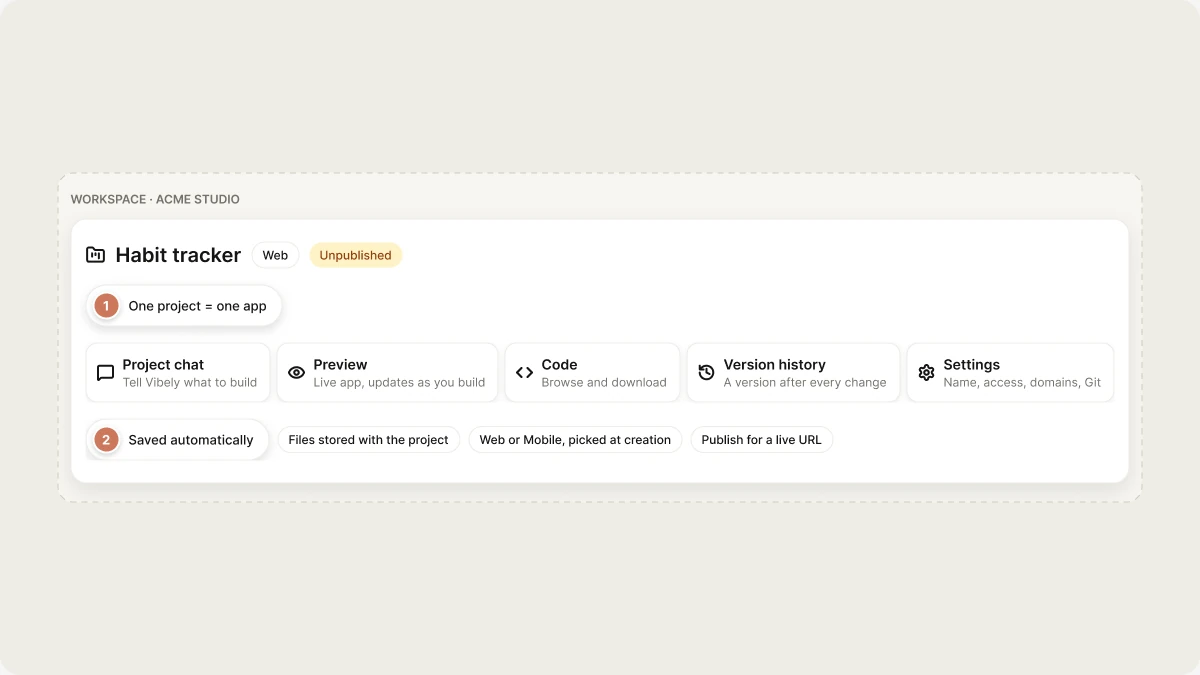
- Project chat: The conversation where you tell Vibely what to build.
- Preview: The live version of your app that updates as you build.
- Code: Your app’s source code, which you can browse and download.
- Version history: A saved version after every change Vibely makes.
- Settings: The project’s name, access, domains, knowledge, Git connection, and more.
Ways to create a project
- From the home screen: Describe what you want to build in the prompt box on the home screen, choose Web or Mobile, and send it. You can attach files or screenshots to your first message. See Quick start.
- From a template: Start from a working app in Templates in the sidebar and prompt from there. See Templates.
- By remixing: Create your own independent copy of an existing project, either one you can already open or one whose owner turned on public remixing. See Remix a project.
- With a build link: Open a link that carries a prompt and Vibely starts a project from it. See Build from a URL.
- From your AI tools: Create and edit projects from Claude, ChatGPT, Cursor, and other assistants through the Vibely MCP server.
Unpublished and published states
A new project is unpublished: only you and the people who can open the project see it, in the editor or through a preview link. When you’re ready, Publish deploys your app to a live URL. Changes you make after publishing stay in the preview until you publish again, so visitors never see half-finished work. See Publish your web app, or Ship to the stores for mobile projects.Your project URL
A published web project gets avibelyagent.com address. The URL subdomain row in project settings shows it, or reads Not published until the first deployment goes out. On paid plans you can also connect a custom domain after you publish.
Who can work in a project
Access to a project comes from two places:- Workspace membership: Workspace members can open projects in the workspace according to their workspace role and the project’s access setting. See People.
- Project collaborators: People you invite to one project from the Invite button in the editor, independent of workspace membership.
The Project access setting decides who in the workspace can open the project: Workspace (every member) or Restricted (only you and people you invite). Restricted requires a Business plan. Who can load the published site is a separate setting. See Collaboration and Sharing.
A project is billed to the workspace that owns it. When a collaborator builds in your project, the credits come from your workspace, and you can see each person’s spend under Usage by member in project settings.
Organize and manage projects
You manage a project from the project card’s ⋯ menu on the dashboard, from the project’s ⋯ menu under Recents in the sidebar, or from project settings.- Rename: From the project card’s ⋯ menu, the sidebar’s ⋯ menu, or Manage → Settings → General → Rename project. Renaming also updates the project’s URL slug.
- Star: From the project card’s ⋯ menu. Starred projects appear under Favorites and sort to the front of your home screen.
- Pin: From the project’s ⋯ menu under Recents in the sidebar, to keep it at the top of the sidebar in this browser.
- Remix: From the project card’s ⋯ menu. See Remix a project.
- Delete: From the project card’s ⋯ menu, the sidebar’s ⋯ menu, or Project settings → Danger Zone → Delete.
FAQ
Is my work saved automatically?
Is my work saved automatically?
Yes. Every change Vibely makes is saved to your project as it happens, and each turn that changes files also saves a version you can restore. There is no save button. See Version history.
Can I switch a project between Web and Mobile?
Can I switch a project between Web and Mobile?
No. The mode is chosen when you create the project. To build the other kind of app, start a new project and pick the other mode on the home screen.
Can I move a project to another workspace or transfer ownership?
Can I move a project to another workspace or transfer ownership?
Not directly. To get a copy into a workspace you belong to, remix the project. The copy is independent of the original.
Can I recover a deleted project?
Can I recover a deleted project?
No. Deleting a project is permanent. Remix it or download its code before deleting it if you want to keep a copy.
Who can see my project?
Who can see my project?
That depends on the project’s access setting and who you have invited. Manage both from the Invite button in the editor. See Collaboration and Sharing.
Related topics
Find your way around the editor
Where every tool in a project lives.
Project settings
Name, access, remixing, and the danger zone.
Remix a project
Make your own independent copy.
Publish your web app
Put your app on a live URL.