

What is npm?npm is the public registry where JavaScript developers share reusable code. You can browse it at npmjs.com.
Ask for a package in the chat
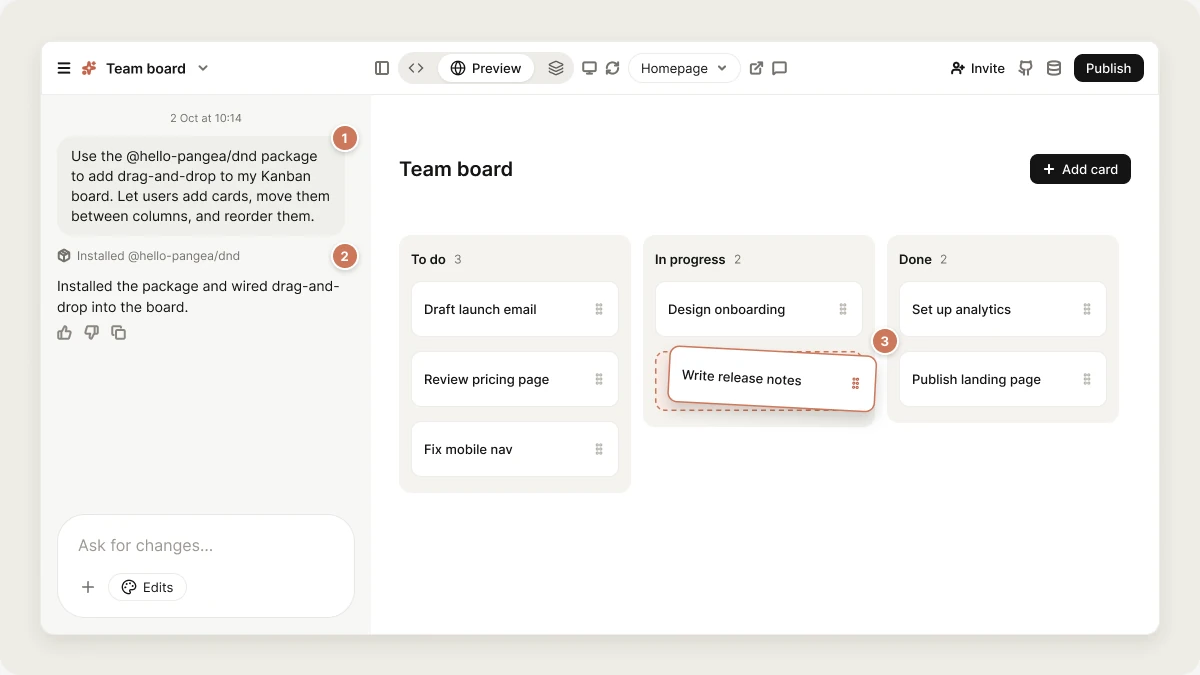
Say you want to rearrange tasks on a Kanban board. You could ask Vibely to build drag-and-drop from scratch, but a dedicated package gets you robust behavior faster:What’s already included
New projects start with a set of packages already installed, so you don’t need to ask for the basics:- Web projects include a UI component library (shadcn/ui) in
src/components/ui. - Mobile projects include a component kit in
src/components/kit, icons fromlucide-react-native, animation withreact-native-reanimated, and navigation withexpo-router.
How installs work
- Web projects install with Bun. The exact version of every package is recorded in
bun.lock. - Mobile projects install with
npx expo install, which picks the version of a native module that matches your Expo SDK.
Packages that don’t work on mobile
Some popular packages are built for the web and don’t work in a React Native app. On mobile projects, Vibely refuses these and uses the built-in replacement instead:Choose packages carefully
Vibely installs any public npm package you ask for, but it can’t vouch for the quality, security, or reliability of third-party code. Test features built on a package before you rely on them. Before adding a package, check:- Downloads. A high weekly download count on the package’s npm page means it’s widely used.
- Maintenance. Recent releases and an active repository are good signs. A package that hasn’t been updated in years is more likely to break with current tooling.
- Community feedback. Read the package’s open issues for reports of problems.
FAQ
Do I need to install packages myself?
Do I need to install packages myself?
No. Ask for the package or the feature in the chat and Vibely adds it to your project’s dependencies. There’s no terminal step or manual
package.json editing.How do I update or remove a package?
How do I update or remove a package?
Ask in the chat. Prompts like “remove the moment package” or “update recharts to the latest version” work the same way as installing.
Can I use private packages?
Can I use private packages?
Yes, on the Enterprise plan. Add your registry token as a build secret and point your package scope at your registry, or publish internal packages to your workspace’s managed registry.
What is the bun.lock file in my project?
What is the bun.lock file in my project?
It belongs to Bun, the tool web projects use to install packages. It records the exact version of every package so your app builds the same way everywhere, including when you sync to GitHub. Leave it in place.
Related
Build secrets
Tokens for installing private packages.
Managed registry
Publish private packages inside your workspace.
Code editor
See
package.json and the rest of your code.Security view
Find packages with known vulnerabilities.