

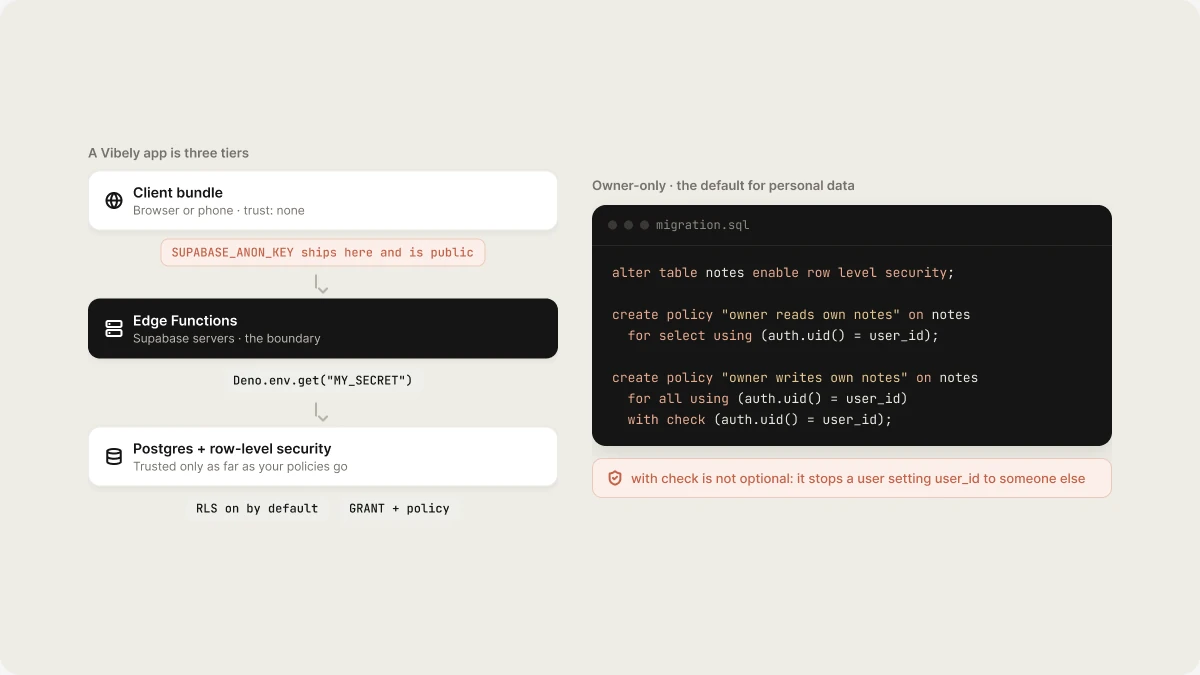
How a Vibely app is structured
The thing to internalise: your
SUPABASE_ANON_KEY ships in the bundle and is
public. It is prefixed VITE_ on web and EXPO_PUBLIC_ on mobile precisely
because it is meant to be there. Anyone can read it out of your JavaScript or
out of your .ipa, point a REST client at your database with it, and start
issuing queries.
Row-level security is the only thing stopping a stranger from reading every row.
Not the fact that your UI never shows that table. Not the fact that your app
never issues that query. RLS.
Never trust the client
Client-side validation is a user experience feature. It tells someone their email is malformed before they wait on a round trip. It is not a security control, because the person you are defending against is not using your UI. Anything a user must not be able to do belongs in one of two places:- An RLS policy — for “can this user read or write this row”
- An Edge Function — for “is this action allowed at all”
if (user.isAdmin) hides
a button. It does not stop the request, because the request does not have to come
from your button.
RLS on by default
New tables get RLS with a deny-all policy, and the agent then adds least-privilege policies for the access patterns your app actually needs. Two rules make that hold up: Vibely re-checks after every table-creating migration and warns the agent about tables left with RLS off or with a policy permissive enough to be no policy at all. Read those warnings. Deny-all first, then least privilege. Start from nothing allowed and add the narrowest policy that makes a screen work. The reverse — open it up and tighten later — leaves a window and usually never gets tightened. GRANTs are separate and required. RLS filters rows;GRANT decides whether
the role may touch the table at all. Without the grant, every query fails
regardless of how correct your policies are. With the grant but no policy, every
query returns nothing. These fail differently and are worth telling apart.
The four policy shapes
Almost everything is one of these. Owner-only — the default for anything personal.with check is not optional. using decides which rows you may act on;
with check decides what a row may look like after you write it. Without it a
user can update their own row and set user_id to someone else’s.
Team or organization — membership lives in its own table, and the policy
asks it.
Edge Functions are the trust boundary
Anything that must be true regardless of who is calling belongs server-side:- Authorization decisions beyond what a row-level policy can express
- Payments and webhooks — verifying a Stripe signature, fulfilling an order
- Third-party API calls that carry a secret key
- Anything that reads across users — aggregates, admin views, exports
Deno.env.get("MY_SECRET") and never appear in a
file. If you see a literal key in a diff, that is a bug — report it.
Where secrets go
One rule: a secret key never goes in your app’s source or its.env file.
Store it as a project secret. Vibely pushes it to your
Supabase Edge Function secrets, and an Edge Function reads it.
VITE_, EXPO_PUBLIC_ and NEXT_PUBLIC_ prefixes mean “this value is
compiled into the bundle and is public”. Some keys are designed for that — a
Supabase anon key, a Stripe publishable pk_…, RevenueCat’s per-store SDK keys.
Secret keys are refused that prefix. If you find yourself wanting to add it to
something called ..._SECRET_KEY, that is the signal you need an Edge Function,
not a prefix.
See Secrets for the full breakdown. If a secret key
ever lands in your code or your chat, treat it as leaked: revoke it at the
provider, issue a new one, and store the new one as a secret.
Workspace and project protection
Project visibility controls who can open the project in the editor. It is a separate thing from who can load your published URL, which you set when you publish.
Set a workspace-wide default in Settings → Privacy & security so new projects
inherit the right value instead of depending on whoever creates them. See
Privacy & security.
Connectors are workspace-scoped, not project-scoped. Connect Notion once and
every project in that workspace can use it — including projects you did not have
in mind when you authorized it. Scope the OAuth grant accordingly, and use
separate workspaces where you want separate blast radii. See
Connectors.
Native app security
Everything above applies to a mobile build too. These do not have a web analogue.The binary is readable
An.ipa or .apk is an archive. Anyone can download it from the store, unzip
it, and read your JavaScript bundle, your assets and your EXPO_PUBLIC_* values.
There is no obfuscation step that changes this and no “it’s compiled” defence.
Nothing secret belongs in an app binary. Not a Stripe secret key, not a
service-role key, not a third-party API key with billing attached, not an
internal endpoint you were hoping nobody would find. Route all of it through an
Edge Function and let the app call that.
Keep cleartext off
Both platforms block plaintext HTTP by default, and both let you turn it off globally. Do not.- iOS — no
NSAllowsArbitraryLoadsin your App Transport Security config - Android — no
android:usesCleartextTraffic="true"
Permissions and usage strings
Request the minimum permission set your app actually uses. A permission you requested “just in case” is one more thing review will ask about and one more thing a user sees at install. Every iOS permission needs an honestNS*UsageDescription — a specific sentence
about what your app does with it, not a placeholder. A vague or missing string is
a common rejection; see Ship to stores.
Do not change what review approved
An over-the-air EAS Update is for JavaScript and assets. It must never be used to add a permission, change native config, or change what the store reviewed. That needs a new build and a new review — see Ship to stores. Shipping a behaviour change over the top of an approved binary is both a guideline violation and a good way to lose a developer account.Before you publish
1
Run a scan and clear the errors
Ask for a security scan in chat, or run a Deep scan from the Security view.
Publishing starts a Basic scan in the background, but it does not block that
publish. See Security view.
2
Confirm every table has RLS and a real policy
Enabled, and not permissive enough to be no policy. Check as a second user,
not through your own UI.
3
Confirm no secret key sits outside Edge Function secrets
Search your code for
sk_, service_role, and anything called SECRET.
See Secrets.4
Confirm auth checks are server-side
Every rule you care about is in a policy or a function, not in a component.
5
Confirm project visibility is what you intended
And that it matches your published URL’s access setting, which is separate.
See Publish.
6
Native only: review permissions and usage strings
Minimum set, honest descriptions, no cleartext exemption. See
Ship to stores.
Related
Security view
Scan a project and fix findings.
Secrets
Where API keys belong.
Authentication
Sign-in, sessions, and redirect URLs.
Supabase
The database and Edge Functions behind your app.