

Talk to our sales team
Tell us about your identity provider, security requirements, and use case, and we’ll put together an Order.
At a glance
Who Enterprise is for
Enterprise workspaces suit organizations that need to:- Control who can invite people, publish externally, share previews, and move projects out of the workspace
- Keep a searchable, exportable record of membership, project, and security changes
- Share private npm packages across every project, with registry credentials that never reach the running app
- Buy on invoice, with terms negotiated on an Order instead of accepted at checkout
What Enterprise adds beyond Business
Business already includes SSO with Require SSO and session duration, SCIM provisioning, groups, the Security center and Workspace Insights, audit logs with CSV export, every control in Privacy & security, restricted projects, the workspace template library, design systems, branded workspace URLs, and workspace connector controls. Enterprise adds:- Build and packages: Build secrets and the Managed registry.
- Commercial terms: the terms listed under Commercial terms.
Identity and access
Centralize how your team signs in and gets access to Vibely.Single sign-on
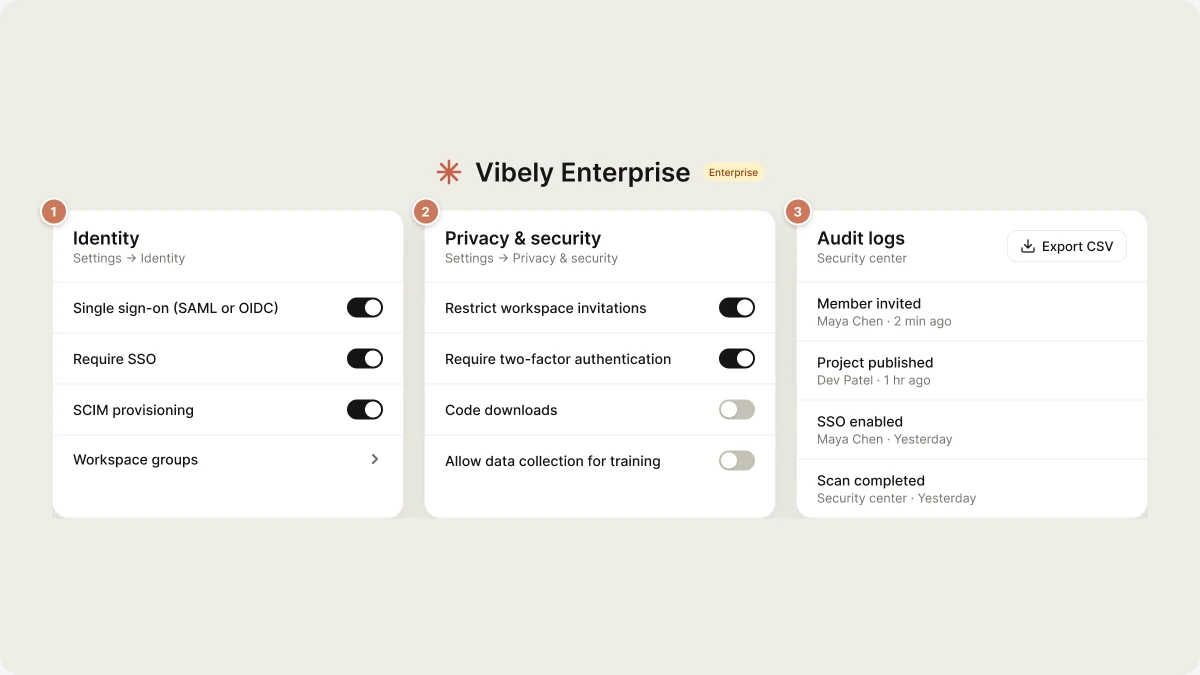
Business and Enterprise. Connect any SAML or OIDC identity provider after verifying your email domain. Make SSO optional or turn on Require SSO, which signs out any member (except the owner) who didn’t sign in through your identity provider, and set a session duration of 24 hours, 48 hours, or 7 days.
SCIM provisioning
Business and Enterprise. Create and deactivate members from your identity provider with a SCIM bearer token you can rotate or revoke, and set the role SCIM users get.
Workspace groups
Business and Enterprise. Group members, let group Admins manage their own group’s Members, and control who can open a published app by group.
Roles and permissions
Owner, Admin, Editor, and Viewer roles, each checked server-side on every request.
Require two-factor authentication
Business and Enterprise. Publishing and changing build secrets ask for a two-factor code. Members set up an authenticator app in Settings → Account.
Restrict workspace invitations
Business and Enterprise. Only admins and owners can invite members, and invitations outside your allowed email domains are blocked.
SSO and SCIM are configured in Settings → Identity. Only workspace owners and admins can change it.
Workspace governance and data protection
Set workspace-wide policies once and apply them to every project. These controls live in Settings → Privacy & security. See Privacy & security.Project transfers
Business and Enterprise. Decide whether members who own a project can transfer or remix it into another workspace, including a personal one.
Require workspace editor role
Business and Enterprise. Members with the viewer role can open projects but never change them, even projects they own.
External project collaborators
Business and Enterprise. Cap the role people outside the workspace can hold on a project, or turn external collaborators off.
Sensitive data scanning
Business and Enterprise. Scan project source for personal data and raise findings in the Security center.
Training data
All plans. Vibely never uses your code, prompts, or project data to train models. Allow data collection for training is off by default.
Abandoned projects
Business and Enterprise. Flag published projects that go a set period without edits, messages, or deploys in Workspace Insights. Nothing is deleted automatically.
Publishing and sharing controls
Govern how projects are shared inside the workspace and how published apps reach the outside world.Default website access
Business and Enterprise. Set whether new publishes are open to anyone, to workspace members, or private by default.
Who can publish externally
Business and Enterprise. Limit public publishing to editors and above, or to owners only.
Preview link sharing
Business and Enterprise. Control whether members can share preview links.
Code downloads
Business and Enterprise. When off, nobody in the workspace can download project source as a zip or a single file.
Publish gates
Block publishing when a scan reports critical issues, and require a basic security scan before a project’s first publish.
Branded workspace URLs
Business and Enterprise. Publish every app under your workspace’s own address pattern.
Audit and monitoring
Keep a record of activity across the workspace, and one place to check security posture.Audit logs
Business and Enterprise. Every membership, project, and security change, with actor, IP address, and user agent. Filter by actor, action, and date, and export to CSV (up to 10,000 rows per export; a larger export tells you it was truncated). Owners and admins only.
Security center
Business and Enterprise. Workspace security posture, SSO and SCIM status, invitation restrictions, recent audit activity, and scheduled scans across all projects or published projects only.
Project security view
All plans. Per-project scan results, with findings you can fix from chat.
Workspace insights
Business and Enterprise. One row per active project, ranked by how urgently it needs a security review.
Open audit logs from Settings → Security → Audit logs.
Code, packages, and hosting
Keep code portable and install private packages safely.Build secrets
Enterprise only. Encrypted workspace values injected only while a project installs and builds, such as an npm token. Values can’t be read back by anyone. Settings → Build secrets.
Managed registry
Enterprise only. Publish scoped npm packages to a private registry inside your workspace and install them in any workspace project. Settings → Managed registry.
GitHub sync
Sync projects to repositories you choose through the Vibely GitHub App.
Host outside Vibely
Deploy the code to infrastructure you operate when policy requires it.
Where your data lives
- Application servers and project sandboxes run in the United States (AWS us-east-1).
- Vibely’s own database, authentication, and file storage run on Supabase in Singapore.
- Your app’s data lives in your own Supabase project, in the region you choose when you connect it. See Supabase.
Compliance
Vibely publishes its position on the Security page and the Trust page:- GDPR: an Article 28 Data Processing Agreement, including the EU SCCs and the UK Addendum, that applies without signature.
- SOC 2 and ISO 27001: Vibely holds neither, and no audit or certification is under way. We answer security questionnaires in writing instead.
- Privacy Policy and Subprocessors.
Commercial terms
An Enterprise Order sets:- Seats and the per-seat price
- Credit volume and the overage rate
- Annual invoicing in USD, net 30, with no card on file
- Named support contacts with target first-response times
- A security questionnaire answered once a year, within 30 days
- A negotiated uptime commitment and liability cap
Get started
Talk to our sales team
Tell us about your identity provider, security requirements, and use case. You can also email sales@vibely.sh.
FAQ
What's the difference between Business and Enterprise?
What's the difference between Business and Enterprise?
Business is the self-serve top tier. It includes SSO, SCIM provisioning, groups, the Security center, audit logs with CSV export, the governance, publishing, and data-protection controls in Privacy & security, restricted projects, the workspace template library, branded workspace URLs, and workspace connector controls.Enterprise is a contract plan. It adds build secrets, the managed registry, and the commercial terms set on your Order.
How do we move from Business to Enterprise?
How do we move from Business to Enterprise?
Contact sales. Once the Order is signed, your existing workspace is moved onto the Enterprise plan. Your members and projects stay where they are.
Does Vibely support our identity provider?
Does Vibely support our identity provider?
Vibely supports any SAML or OIDC identity provider, and SCIM provisioning from any provider that supports SCIM 2.0. Verify your email domain first, then connect your provider from the Identity settings page.
Is our data used to train AI models?
Is our data used to train AI models?
No. Vibely doesn’t use your prompts, code, or project data to train models, on any plan. The optional product-improvement setting, Allow data collection for training, is off by default. The Security page lists how each model provider handles API traffic.
Can editors move projects outside our organization?
Can editors move projects outside our organization?
Not if you turn Project transfers off. On Business and Enterprise, this setting decides whether members who own a project can transfer or remix it into another workspace, including a personal one.
Is Vibely HIPAA-compliant?
Is Vibely HIPAA-compliant?
No. Vibely doesn’t sign Business Associate Agreements. Don’t use Vibely to process protected health information.
How does billing work for Enterprise?
How does billing work for Enterprise?
Seats, credit volume, and the overage rate are set on your Order. Vibely invoices annually in USD, net 30, with no card on file.