

Before you begin
- Your pages are readable by crawlers. New Vibely web apps render on the server, so search engines, social platforms and AI crawlers get fully rendered HTML, not an empty page waiting for JavaScript.
- Only publicly published apps can be indexed. Unpublished projects and sites with restricted website access are invisible to search engines.
- A new app ships with placeholder metadata. Replace it before you share your link anywhere.
- Every fix is a chat message. Vibely edits the page head in
src/routes/__root.tsxand writes files underpublic/. Each fix is a normal build and uses credits.
Quick start
- Replace the placeholder title and description.
- Add a social preview image.
- Give each page its own title and description.
- Publish and, if you have one, connect your domain.
- Add a canonical URL,
sitemap.xmland structured data. - Verify your site in Google Search Console and submit your sitemap.
Review your app in the editor
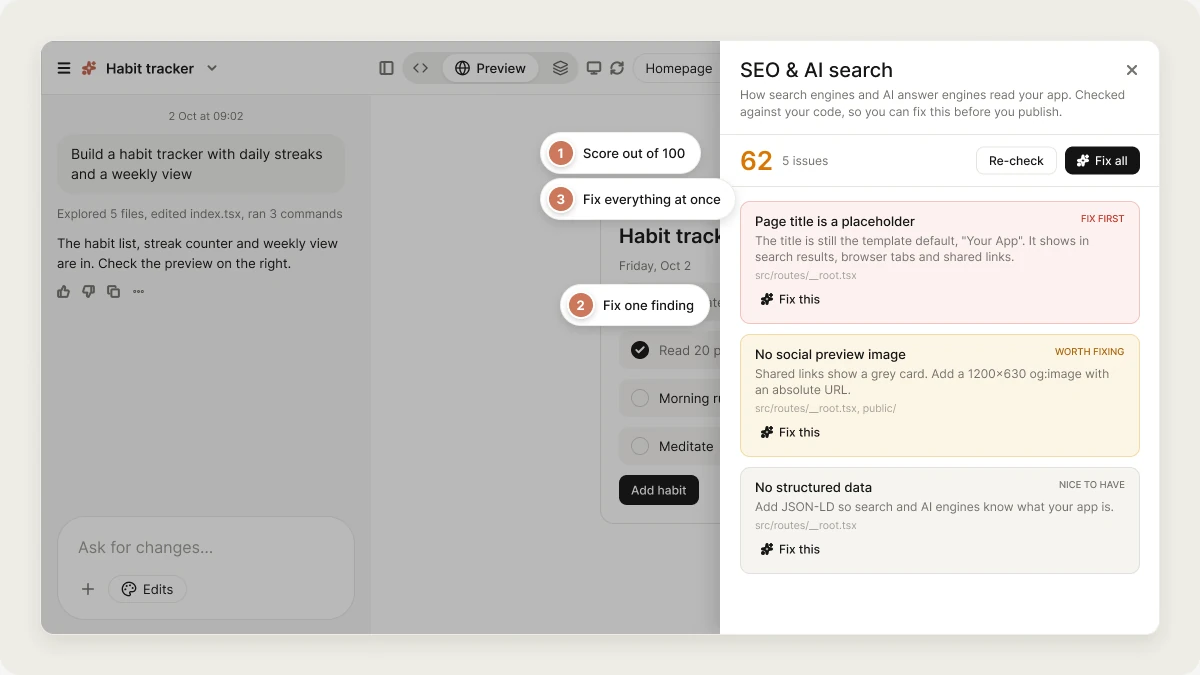
Vibely can check your app for you. In the editor header, with the Preview view open, click SEO & AI search (the magnifying glass). The review reads your project’s code, so it works before you publish, and gives you:- A score from 0 to 100, weighted so a missing title counts for more than a minor nit.
- A list of findings, each marked Fix first, Worth fixing, or Nice to have. It checks the page title and description (including the template placeholders), the canonical URL, the social preview image and Open Graph tags,
robots.txtandsitemap.xml, AI crawlers inrobots.txt, structured data, and page headings. - Fix this on every finding, which sends Vibely the fix as a chat message, and Fix all, which sends every fix in one message.
What a new app ships with
Website info and your app’s own tags
The Website info title and description in the Publish dialog are your site-wide defaults. When you publish, Vibely applies them to your live site, tag by tag (<title>, description, og:title, og:description, twitter:title, twitter:description):
- Your app’s own value wins. If your code sets a real title or description for a page, the live site keeps it.
- Placeholders are replaced. Where a page still has a template placeholder (
Your App,Vibely App,Replace this with…,Vibely Generated Project) or an empty value, Website info is used instead. - Missing tags are added. A page with no
<title>,description,og:titleorog:descriptiongets one from Website info.
Improve your SEO step by step
1
Write a real title and description
Set the page title to “Acme Invoicing — send invoices in 30 seconds” and write a real meta description, 120–155 characters. Update og:title and og:description to match.Keep the title under 60 characters, since Google truncates around there, and the description between 120 and 155. Much shorter, and search engines fill the gap with whatever text they find first on the page.
2
Add a social preview image
Generate a 1200×630 social preview image, save it in public/, reference it as an absolute og:image URL, and switch twitter:card to summary_large_image.
og:image must be an absolute URL; a relative path shows as a grey card on every platform. The template’s twitter:card is summary, which shows even a good image as a small square, so change both.3
Give every page its own metadata
Give every route its own head() with a page-specific title and description.Otherwise every page in a multi-page app has the same title and description, and they compete with each other as the same search result.
4
Set a canonical URL
Add a canonical link pointing at https://app.example.com.The same page can be reachable on your
vibelyagent.com address and your custom domain. A canonical URL tells search engines which one to index. Set it once you know your final domain.5
Add a sitemap
Create public/sitemap.xml listing every route, and add a Sitemap: line to public/robots.txt with its absolute URL.A new app has few inbound links, so a sitemap is how crawlers discover your pages.
6
Add structured data
Add JSON-LD to the root route describing this app — SoftwareApplication with name, description and url.Structured data tells machines what your app is instead of leaving them to guess from the text. See below.
Get cited by AI search
AI answer engines read the same pages crawlers do, but they lift specific claims and attribute them. Two things help most. Structured data. JSON-LD is how a machine learns what your page is about. Pick the schema.org type that matches, such asSoftwareApplication, Organization, Product or FAQPage, and fill in at least name, description and url.
Name AI crawlers in robots.txt. The template’s catch-all rule already allows them, so this doesn’t unblock anything. It makes your intent explicit, since some of these crawlers only read the rules addressed to them by name.
Add explicit Allow rules to public/robots.txt for GPTBot, ClaudeBot, PerplexityBot, Google-Extended and OAI-SearchBot.
Accessibility helps SEO
- One
<h1>per page. It tells search engines and screen readers what the page is about. Styled text isn’t a substitute. alttext on every image. Without it, screen readers read the file name and image search has nothing to index. Usealt=""only for purely decorative images.
Add exactly one h1 to each page and descriptive alt text to every image.
Custom domains
A domain you own is the best long-term home for your search presence. Connect a custom domain, make it your primary domain, then set your canonical URL and sitemap to use it.FAQ
Can my Vibely app rank well in search?
Can my Vibely app rank well in search?
Yes. New web apps render pages on the server, so crawlers see your full content. Ranking then depends on your content, metadata, and the links pointing to your site, like any other website.
Do I need a pre-rendering service?
Do I need a pre-rendering service?
No. New Vibely web apps already send fully rendered pages to every visitor and crawler.
How long does it take Google to index my site?
How long does it take Google to index my site?
Anywhere from a few days to a few weeks. Verifying your domain in Google Search Console and submitting your sitemap speeds up discovery.
Does Vibely do keyword research or rank tracking?
Does Vibely do keyword research or rank tracking?
No. Vibely has no keyword research, competitor analysis, backlink data, rank tracking or Google Search Console integration. Verify your site in Search Console yourself once it’s live.
Does this apply to mobile apps?
Does this apply to mobile apps?
No. App Store and Play Store listings aren’t crawled like websites. The equivalent is App Store optimization. See App Store optimization.
Related
Publish
Your app must be public to be indexed.
Custom domain
Build search presence on your own domain.
Analytics
See which sources bring visitors.
App Store optimization
The mobile equivalent of SEO.