

What is a credit?
A credit is Vibely’s unit of AI spend. What a message costs depends on the work it actually took: how much the agent had to read and write, which AI models it used, and which tools it ran. A short, focused change costs little; a large feature across many files costs more.Where credits come from
On Free, the monthly refresh tops your balance back up to 5 rather than adding 5, so unused free credits don’t pile up.
The order credits are spent in
- Daily credits first. They expire at midnight UTC, so they’re used before anything else.
- Then rollover. It expires at the end of the current period.
- Then your monthly credits.
- Top-ups last. Credits you bought are kept the longest.
What uses credits
Agent messages
Every message the agent works on, in Build, Plan, or chat, is priced when it finishes:- The charge is based on the measured AI model cost of the work, converted to credits at one fixed rate per $1 of model cost, so a message that takes twice the work costs twice the credits.
- Every charged message costs at least 0.5 credits. There’s no upper cap; a genuinely large job costs what it took.
- Some tools add a small fixed amount per use:
Focused requests cost less. The more of your project the agent has to read and change, the more a message costs. Asking for one clear change at a time keeps each message small.
Messages that are free
A chat answer is still charged, even though it runs no tools.
AI features in your published apps
When an app you built uses AI through Vibely AI, each AI request is charged to the same workspace balance, based on that request’s model cost. See per-project AI usage in Settings → Vibely AI.What doesn’t use credits
View your credit balance
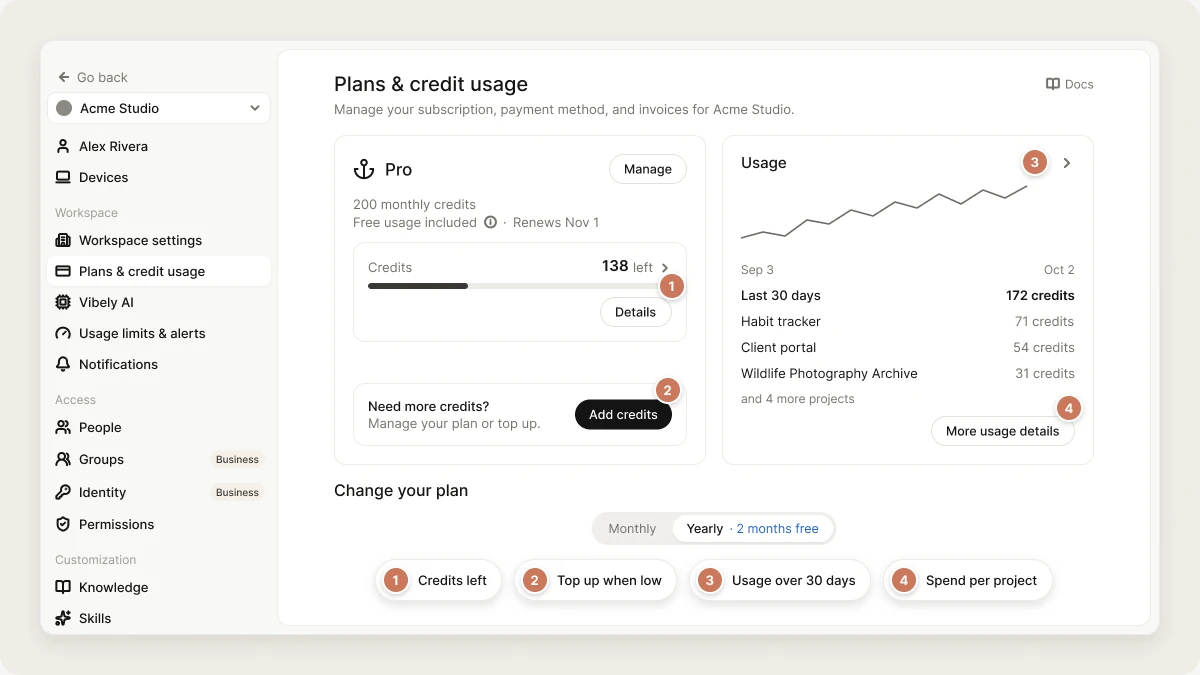
Settings → Plans & credit usage shows your plan, your monthly credits, when they renew, and how many credits you have left. Click Details for the full breakdown, or Add credits to buy more.Check your usage
Settings → Usage shows:- Monthly credits: credits used against your allowance, and when they reset.
- Credits used by project: how much each project used in the current billing cycle.
- Credits used by teammate: how much each member used in the current billing cycle.
- Extra usage: the balance of credits you’ve bought, with Buy more.
Usage limits and alerts
Settings → Usage limits & alerts lets owners and admins cap spending before it surprises anyone. All limits are monthly.Usage limits
Click Create limit, pick what it applies to, set a credit amount, and choose what happens when it’s reached:
You can pause and resume a limit without deleting it. Filter to Only limits that have been reached to see what’s been hit.
Balance alerts
Add a threshold under Balance alerts, and owners and admins are notified when the workspace balance drops to it.Requests
The Requests tab lists the 50 most recent credit-using requests in the workspace, which is the spending your limits are measured against.Credit top-ups
Top-ups are for Pro and Business workspaces, priced at the same rate as your plan’s credits:
Sizes, one-off or automatic: 20, 40, 100, 200, 400, 1,000, or 2,000 credits. The price is set when you buy: a one-off top-up at checkout, an auto top-up when its 24-hour notice is sent, and an automatic charge is never more than that notice said.
An auto top-up you set up before October 2026 keeps its saved amount and is never charged more than it was at the old price ($0.30 a credit, or less where your plan’s rate is lower) until you pick a new amount.
Top-up credits aren’t reset when your plan renews. They’re spent after your daily, rollover and monthly credits, and expire 12 months after your most recent top-up.
One-time top-up
- Go to Settings → Plans & credit usage and click Add credits (or Settings → Usage → Buy more).
- Under One-off top-up, click Buy once.
- Choose an amount and complete payment.
Auto top-up
Auto top-up buys credits automatically when your balance runs low, so long builds don’t stop. Only the workspace owner can turn it on.- Click Add credits, then Set up under Auto top-up.
- Choose the Top-up amount.
- Choose When my balance falls below: 25, 50, or 100 credits.
- Choose a Monthly spend limit, or No limit.
- Enter your Phone number (our payment provider needs it to save a card for automatic charges), then click Enable auto top-up and save your card.
What happens when you run out of credits
- Before a message starts, Vibely checks your balance. Any positive balance lets the message run.
- If you run out mid-build, the work pauses instead of stopping. You’ll see a card with I’ve added credits and Wrap up. Add credits and choose I’ve added credits to continue exactly where it left off, without paying twice for the work already done. Choose Wrap up to keep what was built so far and continue later with a new message.
- At zero, new messages are refused and Vibely opens the upgrade dialog so you can add credits or upgrade.
Mobile builds don’t use credits
Only the agent message that changed your app’s code uses credits. Everything after that is free:FAQ
Why did a short question cost more than I expected?
Why did a short question cost more than I expected?
Cost follows how much the agent had to read. A question about a large project can mean reading a lot of code. Point it at the specific page or file you mean.
Does Plan mode cost credits?
Does Plan mode cost credits?
Yes. Plan and chat messages are priced the same way as Build messages, by the work they took.
Do failed fixes cost credits?
Do failed fixes cost credits?
No. Try to fix on an error card, and fixes the agent makes to its own errors, are free.
Do credits expire?
Do credits expire?
Daily credits expire at 00:00 UTC each day. Rollover lasts until the end of the next billing period. Top-ups expire 12 months after your most recent top-up. On Free, the monthly balance tops back up to 5 each month instead of accumulating.
Can I stop one person from using all the credits?
Can I stop one person from using all the credits?
Yes. Set a default monthly limit per member in Settings → Workspace settings, individual limits in People (Business), or a limit on Every member in Usage limits & alerts.
What currency are top-ups in?
What currency are top-ups in?
US dollars only.
Related
Subscription plans
Compare plans and credit tiers.
Vibely AI
AI features in the apps you build.
Error codes
Every entitlement error, including running out of credits.
People
Per-member usage and credit limits.