

- Chatbots and assistants: conversational helpers inside your app.
- Summaries: condense long text, documents, or transcripts.
- Document Q&A and semantic search: find content by meaning, not keywords.
- Classification and extraction: tag, route, or pull structured data out of text.
- Translation: serve users in more than one language.
- Image generation: create images from a prompt.
- Video generation: create short clips from a prompt.
- Text-to-speech and speech-to-text: read content aloud, transcribe voice notes, add dictation.
Before you start
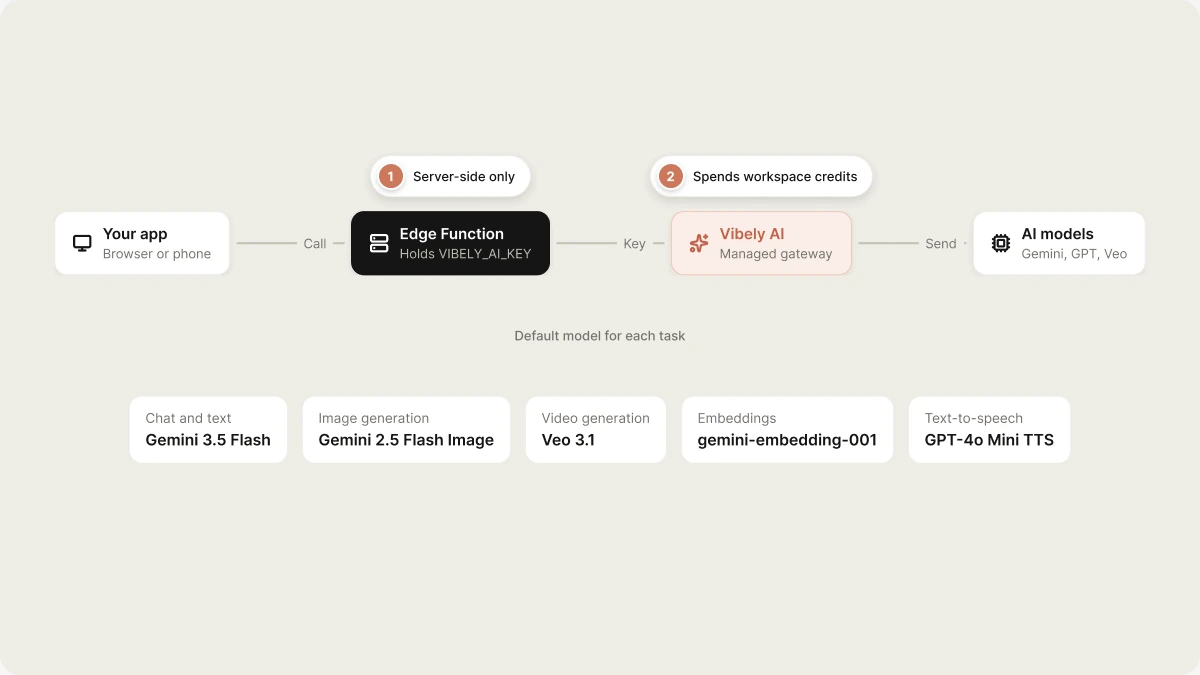
Vibely AI calls are made from a Supabase Edge Function, never from the browser or the phone, so your prompts and credentials stay server-side. That means your project needs a linked Supabase project first. If it isn’t linked, the agent shows the Connect Supabase card instead of writing a function that can’t run.Add an AI feature
Ask for the feature in the project chat. For example:How it works
- API key. Vibely creates and manages a key for each project. It’s injected into your Edge Functions as
VIBELY_AI_KEY, together withVIBELY_AI_URL. You never create or paste it. Both names are reserved secrets. - Server-side calls. Your Edge Function calls the gateway with that key. Nothing in your app’s bundle can reach it directly.
- Streaming. Chat supports streaming responses over server-sent events, so replies appear as they are generated. On mobile, where React Native has no built-in
EventSource, the agent uses the non-streaming chat endpoint.
Supported models
When you ask for an AI feature, you can name a model or describe what you want and let the agent pick. Each kind of task has a default:
To see the current list with descriptions, open Manage → Vibely AI in the editor and select All AI models. The catalog can change, so ask the agent to check it rather than hard-coding a model name you read somewhere else.
Choosing a model
Monitor AI usage and activity
Open Manage → Vibely AI in the editor to see how your app’s AI features are doing. Choose a time range (Last 1 hour, Last 24 hours, Last 7 days, or Last 30 days) and the dashboard shows:- Credits used: what the app’s AI requests cost in the range.
- AI requests: how many calls were made.
- Success rate: the share that completed successfully.
- Avg. time: how long a request took on average.
Usage and pricing
AI features in your deployed app spend from your workspace’s shared credits, the same balance a build turn uses. There is no separate AI balance to fund. Each call is billed after it completes, based on what it actually used, such as tokens, generated images, seconds of video, or audio. Rates follow the underlying provider’s cost for the model you use. Usage is billed to the workspace that owns the project, not to whoever is using the app. See Credits for how credits work and how to add more.Limits and errors
Build your app to handle these responses gracefully. Showing “AI is temporarily unavailable” instead of a crash is the difference between a hiccup and a broken app.
Rate limits are measured in requests per minute and depend on your plan. Other limits: text-to-speech input is capped at 4,096 characters, and speech-to-text accepts up to 25 MB of audio per request, so split long recordings.
Turn Vibely AI on or off
Vibely AI is on by default. Workspace owners and admins manage it in Customize → Connectors → Vibely AI:- Disable for workspace turns it off for every project.
- The permission setting controls what the agent does when a request calls for AI:
FAQ
Is Vibely AI the same as the Vibely agent?
Is Vibely AI the same as the Vibely agent?
No. Vibely AI powers AI features inside the apps you build. The agent is what builds and edits your project.
Do I need my own OpenAI, Google, or Anthropic API key?
Do I need my own OpenAI, Google, or Anthropic API key?
No. Vibely creates and manages the key for each project.
Can I use my own provider key instead?
Can I use my own provider key instead?
Not through Vibely AI, which always bills your workspace credits. If you want usage billed to your own provider account, ask the agent to call the provider directly from an Edge Function, with your key stored as a secret.
Does it work in mobile apps?
Does it work in mobile apps?
Yes. Calls go through an Edge Function on mobile too, never from the app itself, because anything in an app binary can be read. Voice features are especially useful on a phone.
What happens if my workspace runs out of credits?
What happens if my workspace runs out of credits?
AI requests return
402 OUT_OF_CREDITS until you add credits.Related
Supabase
Required first: AI calls run from an Edge Function.
Credits
How the shared credit balance works.
Secrets
Use your own provider key from an Edge Function.
Admin controls
Control which connectors your workspace can use.