

Build secrets are not project secrets
Vibely has two kinds of secrets, and they do different jobs:
If your running app needs the value, use a project secret. If only the package installer needs it, use a build secret.
The Settings → Build secrets page also has a Secrets card at the top. Those are workspace secrets for your running apps, shared by every project, and they’re available on every plan. The Build secrets card below them is the Enterprise feature this page describes.
What you can use build secrets for
- Install private npm packages from npmjs, GitHub Packages, GitLab, Artifactory, or any registry that speaks the npm protocol.
- Install packages from your workspace’s own managed registry.
- Provide any other value that package installs need, shared once across the whole workspace.
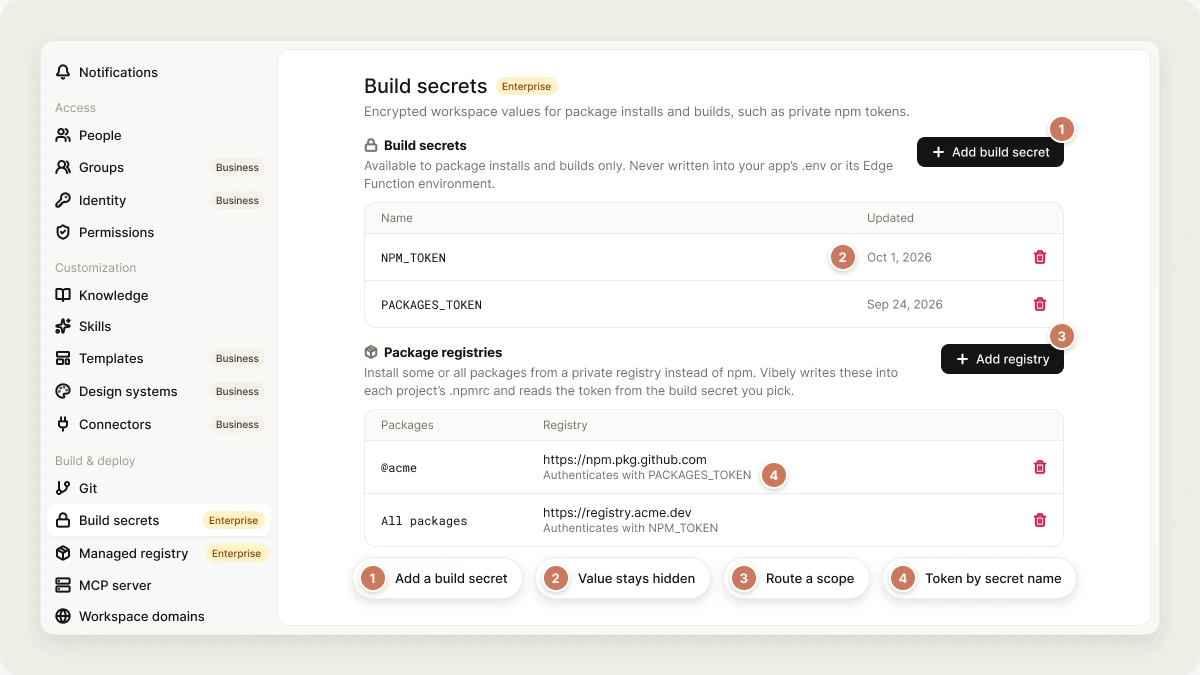
Add a build secret
Only workspace owners and admins can add, change, or delete build secrets.1
Open Build secrets
Go to Settings → Build secrets.
2
Add the secret
In the Build secrets card, select Add build secret. Enter a name, such as
NPM_TOKEN, and the value. Your projects reference the secret by this exact name.3
Save
Select Save. The value is hidden from then on.
Naming rules
The reserved names belong to the build environment itself, and the reserved prefixes to values Vibely manages.
If your workspace requires two-factor authentication, saving or deleting a build secret asks for the 6-digit code from your authenticator app first. After you verify, save or delete again. See Two-factor authentication.
Install private npm packages
A project authenticates to a private registry through its.npmrc file, which references the build secret by name. You can set this up once for the whole workspace, or per project.
- For the whole workspace
- For one project
In Settings → Build secrets, go to the Package registries card and select Add registry. Enter the package scope (for example
@acme), or leave it empty to route every package through the registry. Enter the Registry URL and choose the build secret that holds its Token, or None — this registry is public.Vibely then keeps a matching block in every project’s .npmrc, alongside any settings the project already has.Update or delete a build secret
To rotate a secret, add it again with the same name and a new value. The old value is replaced permanently. To delete one, select the trash icon next to it and confirm. Deleting is permanent, and the next install in any project that references the secret fails to authenticate. Update the projects that use it, or add a replacement with the same name, before you delete.Mobile builds
Build secrets cover the installs that happen inside Vibely, so a private package resolves while you build and preview a mobile app. They are not passed to Expo’s cloud builds (EAS Build), which run on Expo’s own servers. If a native build needs a private-registry token, also set it as an environment variable in your Expo project. Signing credentials don’t go in build secrets either. See Ship to stores.Limitations
- Build secrets apply to the whole workspace. You can’t scope one to a single project.
- Your published app can’t read them. Runtime keys belong in project secrets.
- The agent can’t add, read, or change build secrets.
Troubleshooting
Package install fails with a 401 or 403 error
Package install fails with a 401 or 403 error
The registry rejected the token. Check that the secret’s name exactly matches the name in the project’s
.npmrc or the registry you added, that the token hasn’t expired or been revoked, and that it can read the package.I can't add or change build secrets
I can't add or change build secrets
Only workspace owners and admins can. Editors see the names but can’t change them. Ask an owner or admin.
The Build secrets card shows an upgrade prompt
The Build secrets card shows an upgrade prompt
Build secrets are part of the Enterprise plan. See Plans or Vibely for Enterprise.
FAQ
Can I view a build secret's value after saving it?
Can I view a build secret's value after saving it?
No. Values are encrypted and never shown again. If you lose a token, generate a new one at the registry that issued it.
Can the agent print a build secret?
Can the agent print a build secret?
No. A build secret is loaded only for the install and build commands that need it, not into every command the agent runs.
What's the difference between build secrets and the managed registry?
What's the difference between build secrets and the managed registry?
Build secrets authenticate your projects against registries. The managed registry is a private npm registry hosted inside your Vibely workspace. You use a build secret to install from it too.
Related
Managed registry
Publish private packages inside your workspace.
Secrets
Keys your running app uses.
npm packages
How Vibely installs packages.
Workspace settings
Everything else admins control.