

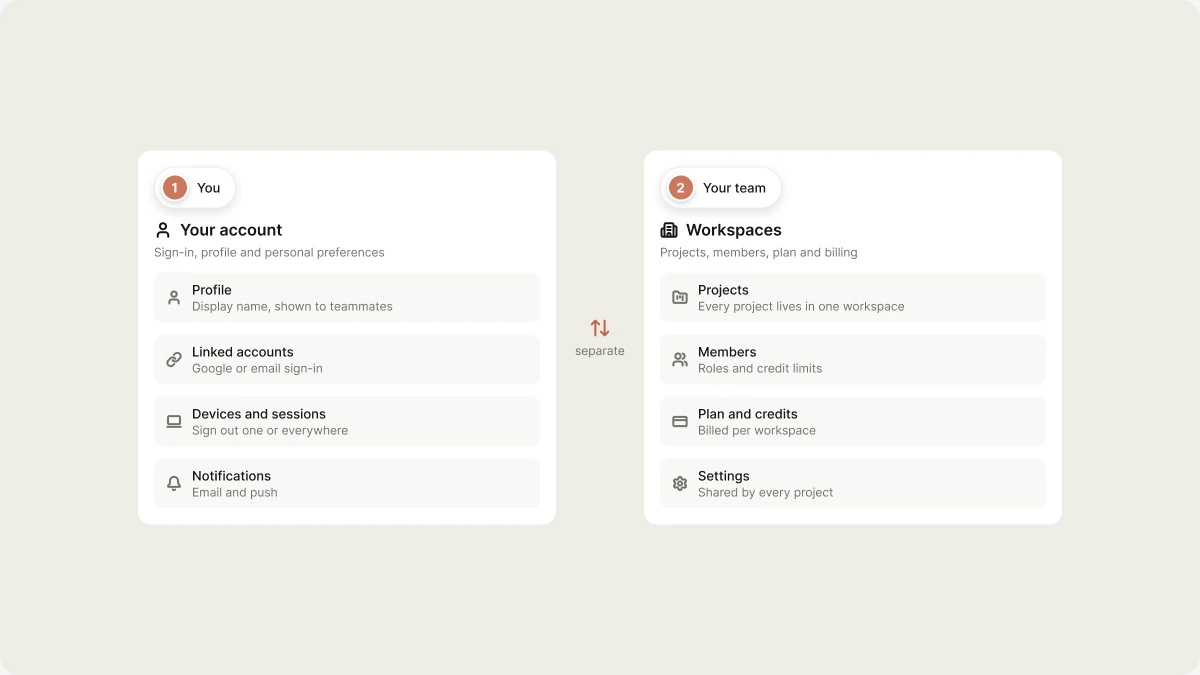
Profile
Control how you appear in Vibely.
Your avatar comes from your sign-in provider.
Linked accounts
The sign-in method on your account, such as Google or email, with its email address. The Primary badge marks the method tied to your account’s email. To reset the password for an email and password sign-in, use Forgot password? on the sign-in page. See Reset your password. If you sign in with Google, manage your password in your Google account.Devices and sessions
Settings → Devices lists everywhere your account is signed in: each session’s browser, operating system, IP address, and when it was last active. Your current session is marked This device, and a session that passed a two-factor check shows MFA.- Sign out of a single session you don’t recognize.
- Sign out everywhere to end every session, including this one. You’ll need to sign in again on each device.
Notifications
Settings → Notifications controls how Vibely reaches you:Two-factor authentication
Two-factor authentication asks for a 6-digit code from an authenticator app, such as Google Authenticator or 1Password, when you sign in. Set it up from the Two-factor authentication card in Settings → Account.1
Start setup
Next to Authenticator app, click Set up.
2
Scan the QR code
Scan the QR code with your authenticator app. If you can’t scan it, type in the key shown under the code instead.
3
Confirm the code
Enter the 6-digit code your app shows and click Verify and turn on. The card shows On once two-factor authentication is active.
AI model training
Whether your data can be used to improve Vibely’s models is a workspace setting, not an account setting, and it’s off by default. See Allow data collection for training.Delete account
Delete account, at the bottom of the page, permanently deletes your account, the workspaces you own, and their projects. It happens immediately and can’t be undone. See Delete your account.Related
Create an account
Sign up, sign in, and reset your password.
Delete your account
What’s removed and what to do first.
Vibely workspace
Create, join, switch, and leave workspaces.
Subscription plans
Plans are per workspace, not per account.