

Deleting your account is different from:
- Canceling a paid plan. To stop paying but keep your account, see Cancel your subscription.
- Leaving a workspace. To step away from a team, see Leave a workspace.
- Deleting one workspace. See Delete a workspace.
Before you delete
- Workspaces you own that have other members. You can’t delete your account while you own a workspace with other people in it. Transfer ownership to one of them (Settings → Workspace settings → Transfer ownership), or remove the other members first.
- Paid plans. You don’t need to cancel first. Deleting your account cancels the subscription of every workspace you own, effective immediately, so you aren’t charged again. The rest of the current billing period isn’t refunded.
- Projects in someone else’s workspace. Projects you created in a workspace you don’t own aren’t deleted if they’re shared with that workspace: they’re transferred to that workspace’s owner, so your team keeps its work. Projects you kept private there are deleted.
- Projects you want to keep. Projects in workspaces you own, and your private projects anywhere, are deleted. Export the code to GitHub first. See GitHub.
- Invoices. Download any you need from Settings → Plans & credit usage. They’re deleted with your workspaces.
- Mobile apps. Apps you shipped live in your own Apple and Google developer accounts and stay on sale. Remove them in App Store Connect and Play Console if you want them gone. See Ship your mobile app.
What gets deleted
What’s not deleted: projects you created in someone else’s workspace and shared with that workspace. They move to that workspace’s owner.
Vibely also asks the services that process your data on its behalf, such as its email provider, to delete what they hold about you.
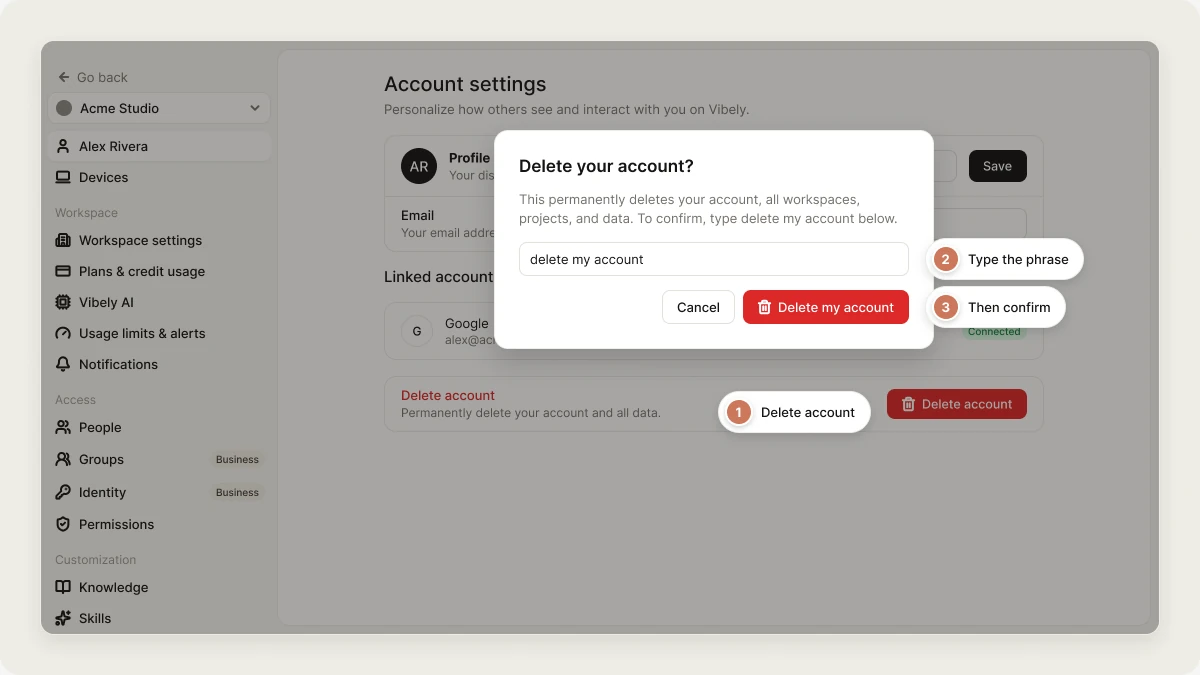
Delete your account
- Open Settings → Account.
- At the bottom of the page, click Delete account.
- Type
delete my accountto confirm. - Click Delete my account.
If deletion fails
Deletion runs in steps: it cancels your paid plans, hands your shared projects to their workspace owners, removes your other projects, and only then deletes your workspaces and your account. If a step fails, Vibely stops there and your account is not deleted. The error tells you which earlier steps had already finished, because those can’t be reversed. For example:One of your projects could not be fully removed, so your account was not deleted. Before it stopped, 1 paid plan was cancelled and 2 projects were permanently deleted; those steps cannot be undone. Everything else is intact. Please retry, or contact privacy@vibely.sh.If nothing had happened yet, the message says “Nothing was erased.” instead. Try again: a retry picks up where it stopped. If it keeps failing, email privacy@vibely.sh. If you see “You own a workspace that has other members”, transfer ownership of that workspace or remove its other members, then try again. Nothing has been changed at that point. If Vibely can’t cancel a paid plan with the payment provider, it stops before removing any project and you’ll see “We could not cancel your paid plan with the payment provider”. Try again, or email hello@vibely.sh and we’ll cancel it for you. A Vibely admin who deletes an account on your behalf goes through exactly the same steps.
Related
Account settings
Your profile, sign-in methods, and sessions.
Delete a workspace
Remove one workspace and keep your account.