

How GitHub sync works
GitHub sync has two parts:- A GitHub connection. You install the Vibely GitHub App on your personal GitHub account or on an organization, and choose which repositories it can access. You can install it on several accounts and organizations.
- A project repository link. Each project links to one repository. When you link a project, Vibely creates a new private repository named after the project, pushes your code, and starts two-way sync.
What the GitHub App can access
When you install the Vibely GitHub App, GitHub asks you to approve these repository permissions:
The App can only reach repositories you grant it. You can change that later on GitHub.
Link a project to GitHub
You need edit access to the project.1
Open the project's Git settings
In the editor, open Manage → Settings → Git, then select GitHub. You can also choose GitHub from the editor’s More menu.
2
Install the GitHub App
If you haven’t connected GitHub yet, click Install GitHub App. GitHub opens in a new window. Choose the account or organization, choose which repositories the App can access, and approve.
3
Connect the project
Under Connect project, pick the account or organization the repository should live under and click Connect. To use an account that isn’t listed, click Add connection and install the App there first.
4
Check the result
Vibely creates a private repository named after your project and pushes your code. When it finishes, you see Project synced with a View on GitHub link.
To install on an organization, you need to be an owner of that organization on GitHub, or have an owner approve the installation.
Manage a project’s repository sync
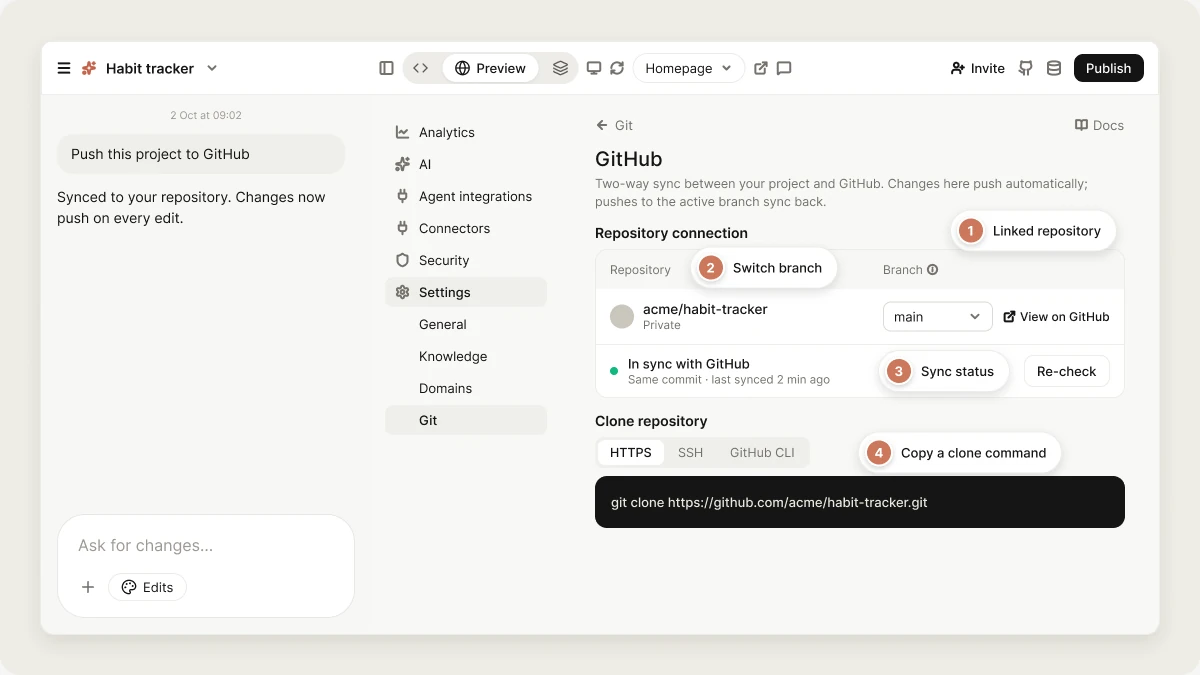
Once a project is linked, Manage → Settings → Git → GitHub shows the Repository connection: the repository, the synced branch, and the sync status.Sync status
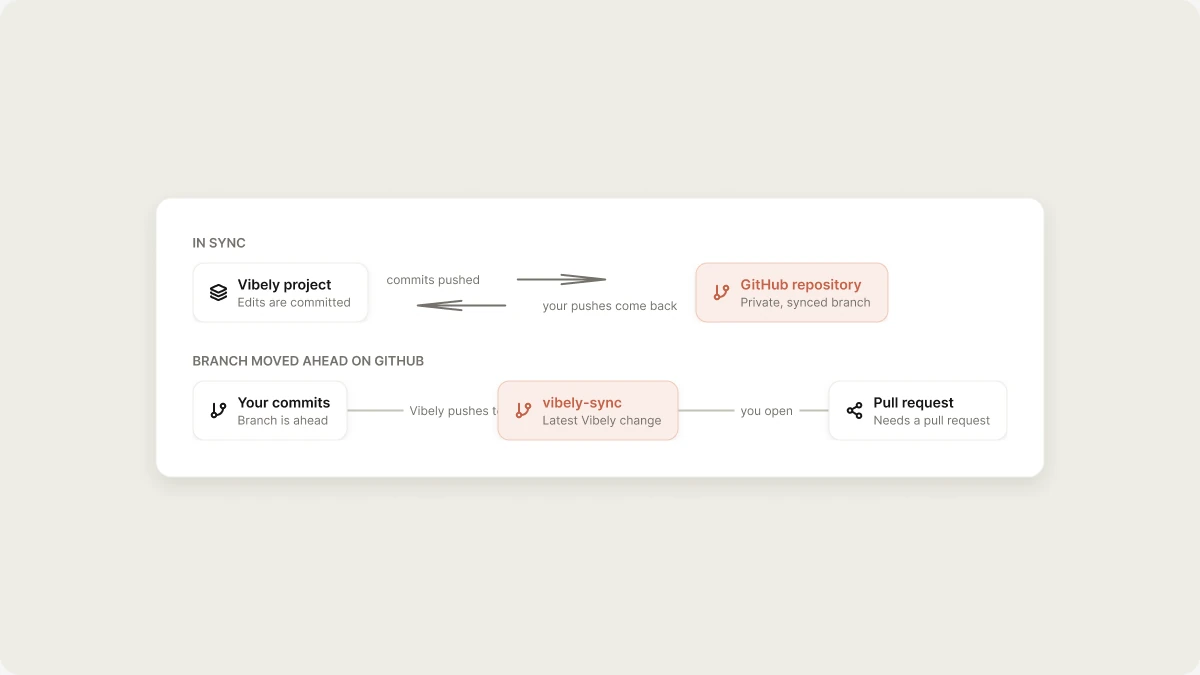
The status shows Connected, Needs a pull request, or Sync broken. Click it to see details:- In sync with GitHub: Vibely and GitHub are on the same commit.
- Needs a pull request: the branch moved ahead on GitHub, so Vibely pushed its latest change to a separate
vibely-syncbranch instead of overwriting your commits. Open a pull request fromvibely-syncinto your synced branch and merge it. - Sync broken: the repository may have been deleted or moved on GitHub.
Switch branches
Use the Branch dropdown to choose which branch Vibely syncs with. From then on, Vibely pushes to that branch, and only pushes to that branch come back into your project.Clone the repository locally
Under Clone repository, copy the command for HTTPS, SSH, or GitHub CLI, then run it in your terminal. Edit and commit locally, push to the synced branch, and the changes appear in Vibely.View the repository on GitHub
Select the repository name, or open the status details and click View on GitHub.Disconnect a project from GitHub
1
Open the repository connection
Go to Manage → Settings → Git → GitHub, open the status details, and click Disconnect.
2
Confirm
Type the repository name to confirm, then click Disconnect.
Manage GitHub connections for your workspace
Go to Settings → Git to see the GitHub accounts and organizations your workspace can sync with.- Connect GitHub installs the Vibely GitHub App on an account. Add account installs it on another one, and Use switches to an installation that already exists.
- Configure on GitHub opens the App’s installation settings on GitHub, where you change which repositories it can access or uninstall it.
- Linked projects lists the projects synced through a connection. Select projects and click Disconnect selected to stop syncing them.
- Delete this connection removes the connection and disconnects every linked project. This can’t be undone.
Limitations
- New repositories only. Linking always creates a new repository. You can’t link a project to an existing repository or import one into Vibely.
- One repository per project, and one synced branch at a time.
- Don’t delete, archive, or transfer the repository. Each breaks the sync, unless you transfer it to an account where the Vibely GitHub App is also installed. Renaming the repository is fine.
- Pushing doesn’t publish. Commits update your project in Vibely; your live site changes only when you publish.
Troubleshooting
My account or organization isn't listed under Connect project
My account or organization isn't listed under Connect project
The Vibely GitHub App isn’t installed there yet. Click Add connection, install the App on that account, and try again.
The status says Needs a pull request
The status says Needs a pull request
Someone pushed to the synced branch at the same time Vibely made a change. On GitHub, open a pull request from
vibely-sync into your synced branch and merge it. Until you do, Vibely keeps pushing to vibely-sync.My pushes aren't showing up in Vibely
My pushes aren't showing up in Vibely
Check that you pushed to the synced branch shown in the Branch dropdown. Commits on other branches don’t sync until you merge them into that branch or switch the synced branch.
The status says Sync broken
The status says Sync broken
The repository was deleted, archived, or moved to an account without the Vibely GitHub App. Restore it, or install the App on the new owner. Otherwise, disconnect the project and connect it again to create a new repository.
Nothing happens when I click Install GitHub App
Nothing happens when I click Install GitHub App
The GitHub window may have been blocked. Allow pop-ups for Vibely and try again.
FAQ
Is the repository Vibely creates public or private?
Is the repository Vibely creates public or private?
Private. You can change its visibility on GitHub.
Do I need GitHub just to download my code?
Do I need GitHub just to download my code?
No. Use Download codebase in Manage → Settings → Git to get a ZIP file.
Can I use multiple GitHub accounts or organizations?
Can I use multiple GitHub accounts or organizations?
Yes. Install the Vibely GitHub App on each one. Each project links to one repository under one of them.
Are commits made by Vibely attributed to me?
Are commits made by Vibely attributed to me?
Commits are pushed by the Vibely GitHub App. When the connection was authorized by a GitHub user, each commit also has a
Co-authored-by line for that account, so it shows up on their GitHub profile.Can I bring files from GitHub into a chat?
Can I bring files from GitHub into a chat?
Yes. Use Add from GitHub in the composer’s + menu to attach files from a repository as context for a message. This doesn’t link the repository to your project.
Related
Git sync
How two-way sync works.
Deploy elsewhere
Host your code outside Vibely.
Code ownership
What you own and can take with you.
Publish
Put your app live.