

app.example.com or example.com, instead of your-app.vibelyagent.com. You buy the domain from any registrar (GoDaddy, Namecheap, Cloudflare, and so on), then connect it to your project in Vibely. Vibely issues and renews the HTTPS certificate for you.
- Custom domains require the Pro plan or above.
- Vibely doesn’t sell or transfer domains. Buy one from a registrar first.
- By default, workspace owners and admins can connect domains. This is the Buy / connect domains row in Settings → Permissions.
- Custom domains are for web apps. Mobile projects don’t have a Domains section.
Before you start
- Publish your project. A domain points at your live app, so the project must be published first. If it isn’t, the Domains section says “Your project is not published yet” with a Publish now button.
- Have access to your domain’s DNS settings at your registrar or DNS provider. You’ll add a few records there.
- Decide on the address. You can connect a root domain (
example.com) or a subdomain (app.example.com,www.example.com).
Connect your domain
1
Open Domains
In your project, open Manage → Settings → Domains.
2
Enter your domain
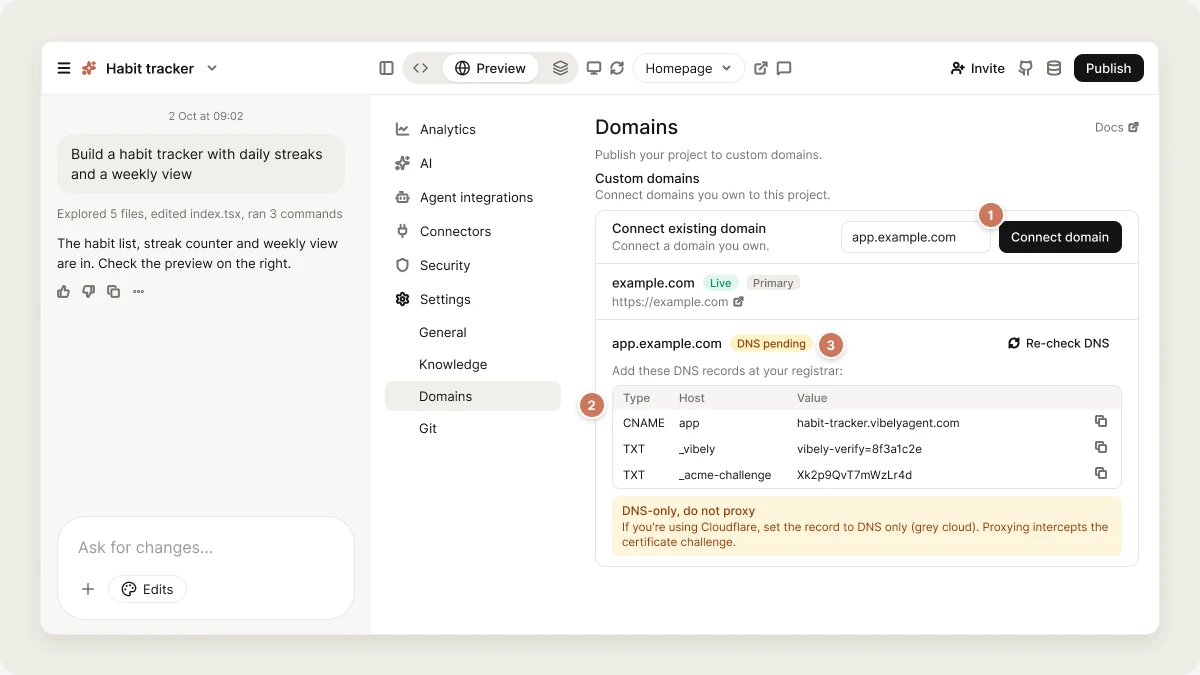
Under Add a domain, type the domain, for example
app.example.com, and click Connect domain.If you enter a root domain like example.com, Vibely also adds www.example.com for you and lists it under the root.3
Add the DNS records
Vibely shows a table: Add these DNS records at your registrar, with the Type, Host and Value of each record and a copy button. Add every record in the table at your DNS provider:
Always copy the exact values from the table. They’re specific to your domain. For a root domain, your registrar may want the host as
@ or left blank.4
Wait for verification
Vibely checks your DNS automatically and updates the status. You can also click Re-check DNS. When the status shows Live, your app is reachable at your domain over HTTPS.DNS changes can take up to 24 hours to spread across the internet, though most finish much sooner. Vibely keeps checking.
Root domains on registrars without ALIAS support
Some root-domain setups need a CNAME-style record at the root. Plain CNAME records aren’t allowed there, so registrars offer alternatives called ALIAS, ANAME or CNAME flattening (Namecheap, DNSimple and Cloudflare support one of them). If your registrar supports none of these (GoDaddy is a common example), you have two options:- Use
wwwas your main address. Whenwww.example.comis live butexample.comisn’t, Vibely offers a Use www.example.com instead button. Then set up domain forwarding at your registrar soexample.comredirects towww.example.com. - Move your DNS to Cloudflare (free), which supports CNAME flattening.
Domain statuses
Primary domain
When you connect more than one domain, one of them is the primary. The first domain you connect becomes primary automatically. Visitors to your other custom domains are redirected (301) to the primary one, so search engines see a single address. To change it, click Make primary on another domain. Only a Live domain can be primary. Yourvibelyagent.com address keeps working alongside your custom domains.
Manage your domains
- In a project: Manage → Settings → Domains lists the project’s domains with their status, DNS records and a link to the live site.
- Across the workspace: Settings → Workspace domains lists every domain attached to any project, with search, and lets you connect a domain to any published project with Add domain.
Disconnect a domain
Click the trash icon (Disconnect) next to the domain and confirm. Visitors stop reaching your app on that domain. If it was a root domain, itswww is removed too, and another live domain becomes primary. Remove the DNS records at your registrar afterwards if you no longer need them.
FAQ
What are DNS, CNAME, A and TXT records?
What are DNS, CNAME, A and TXT records?
DNS is the internet’s address book: it tells browsers where to find your domain. A CNAME record points a name at another name, an A record points a name at an IP address (AAAA is the IPv6 version), and a TXT record holds text that services read to verify things, such as who owns a domain. SSL/TLS is what gives your site the padlock and
https://.Does Vibely provide the SSL certificate?
Does Vibely provide the SSL certificate?
Yes. The certificate is free, issued automatically once your DNS records are in place, and renewed for you.
Can I connect a domain before publishing?
Can I connect a domain before publishing?
No. Publish first, then connect the domain.
Do I need to connect www separately?
Do I need to connect www separately?
Not when you connect a root domain: Vibely adds
www for you. If you connect only a subdomain, only that subdomain is connected.Can I connect several domains or subdomains?
Can I connect several domains or subdomains?
Yes. Connect each one separately. Non-primary domains redirect to the primary.
Can I use the same domain on two projects?
Can I use the same domain on two projects?
No. A domain can only be attached to one project at a time. You’ll see “That domain is already in use.”
My domain shows my old website
My domain shows my old website
An old DNS record still points somewhere else. Remove any
A, AAAA or CNAME records for that name that aren’t in Vibely’s table, then click Re-check DNS.My domain stays on DNS pending
My domain stays on DNS pending
Compare every record with the table, including the host name. Some registrars add your domain to the host automatically, so
app becomes app.example.com and you shouldn’t type the full name. Make sure Cloudflare records are DNS only. Then allow time for DNS to spread.The card says the domain isn't pointing at the live deployment
The card says the domain isn't pointing at the live deployment
Publish the project again. That points the domain at your latest deployment and clears the error.
Will a custom domain help my SEO?
Will a custom domain help my SEO?
A domain you own is a long-term home for your search presence, and redirects keep one canonical address. What ranks is still your content and metadata. See SEO and AI search.
What happens to my domain if I downgrade?
What happens to my domain if I downgrade?
Domains already connected keep working. On a plan below Pro, you can’t connect new ones.
Related
Publish
Put your app live first.
Branded URLs
A workspace-branded address for every app.
How Vibely hosts your app
HTTPS, global delivery and scale.
SEO and AI search
Build search presence on your domain.