

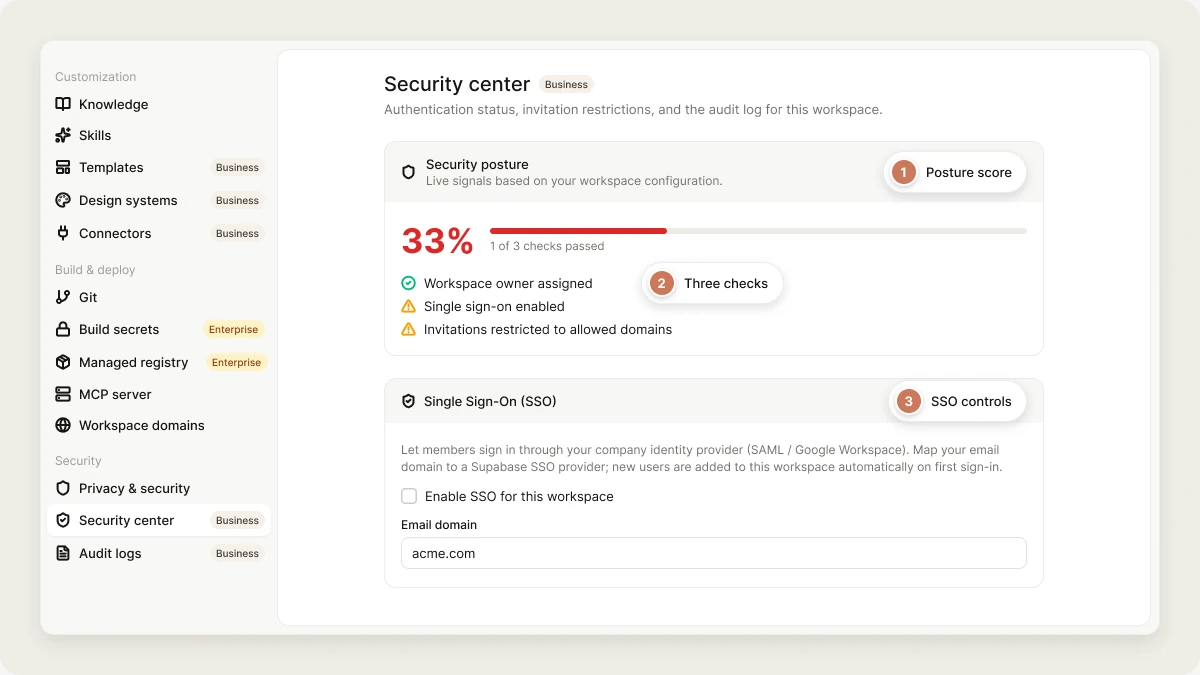
- Settings → Security center: your workspace’s security posture, SSO and SCIM status, scheduled scans, invitation restrictions, and recent activity.
- The security dashboard at
vibely.sh/security-center: findings, dependency vulnerabilities, and secrets across all your projects, plus Workspace Insights.
The security center and audit logs are available on the Business plan, to workspace owners and admins.
Security posture
The top of Settings → Security center shows a score based on three checks:
Below the score you’ll find:
- Single sign-on: the same SSO controls as the Identity page.
- SCIM provisioning: the SCIM base URL, the active token, and the default role for provisioned users. See SCIM.
- Scheduled scans: see Schedule security scans.
- Invitation restrictions: which email domains invitations are limited to, if any.
- Workspace Insights: click Open Workspace Insights to go to the security dashboard. See Workspace Insights.
- Audit log: the 20 most recent significant actions in the workspace. Click an entry to see its details.
The security dashboard
Openvibely.sh/security-center, or click Open Workspace Insights in Settings → Security center, to see scan results for every project in your workspace. The dashboard shows the workspace selected in the workspace switcher. It has four tabs, and Export CSV downloads whichever tab you’re on.
Workspace Insights
Every active project ranked by how urgently it needs a review, based on findings, publish status, ownership, activity, secrets, and credit use. See Workspace Insights.Code Analysis
Open security findings for each active project (up to 200, most recently edited first), from every scanner: database access rules, database, code, dependencies, and sensitive data.- Summary cards: number of projects, and open errors, warnings, and info findings across them.
- Project list: each project with its web or mobile type, when it was last scanned (or Never scanned), and its open findings by severity, sorted with the most severe first.
- Triage: opens that project’s security view to review and fix its findings.
Supply Chain
Known vulnerabilities in the npm packages your projects depend on, with each advisory’s severity and the affected project. The list fills in from deep scans, so run one on a project to populate it.Secrets
Every secret stored in the workspace’s projects, with its name, whether it’s a workspace or project secret, the project it belongs to, and its environment. Secret values are never shown or exported, only names and where they live.Run security scans
Scans run per project. Open a project’s security view to run one, or let the workspace run them on a schedule. See Security view.Schedule security scans
Under Scheduled scans in Settings → Security center:
Scheduled scans are deep scans. Vibely checks for due workspaces every few hours and scans up to 50 projects per workspace each run.
Audit logs
Audit logs require the Business plan. Owners and admins can read them, unless Read audit logs is taken away from admins in Settings → Permissions.
Audit log events
Vibely records events such as:Audit log table
The table shows 50 events per page; use Previous and Next to move through them.
Filter audit logs
Filter by Actor, by Action, and by From date and To date. Clear filters resets them.Export audit logs
Click Export CSV to download the events that match your filters. One export holds up to 10,000 events; if there are more, narrow the date range and export the rest separately. Each export is itself recorded in the audit log.Audit log retention
Vibely keeps audit events for 400 days, and security events for three years.Best practices
- Turn on Block publishing with critical issues and Require basic security scan before first publish in Privacy & security.
- Schedule weekly scans of published projects, so live apps are checked even when nobody’s editing them.
- Review Workspace Insights regularly, starting with High and Not scanned projects.
- Check the Supply Chain tab after major dependency updates.
FAQ
Who can see the security center?
Who can see the security center?
Workspace owners and admins on the Business plan.
Why is a project missing from the dashboard?
Why is a project missing from the dashboard?
Only active projects appear, up to 200 of the most recently edited. Archived and deleted projects aren’t listed.
Can I see secret values?
Can I see secret values?
No. The security center shows only secret names and where they’re used.
Why can't I open audit logs?
Why can't I open audit logs?
They need the Business plan and the owner or admin role. A workspace on a lower plan sees an upgrade screen.
Related
Workspace Insights
Which projects need a security review first.
Security view
Scan one project and fix its findings.
Privacy & security
Publishing gates and data protection.
Build secrets
Credentials that exist only during a build.