

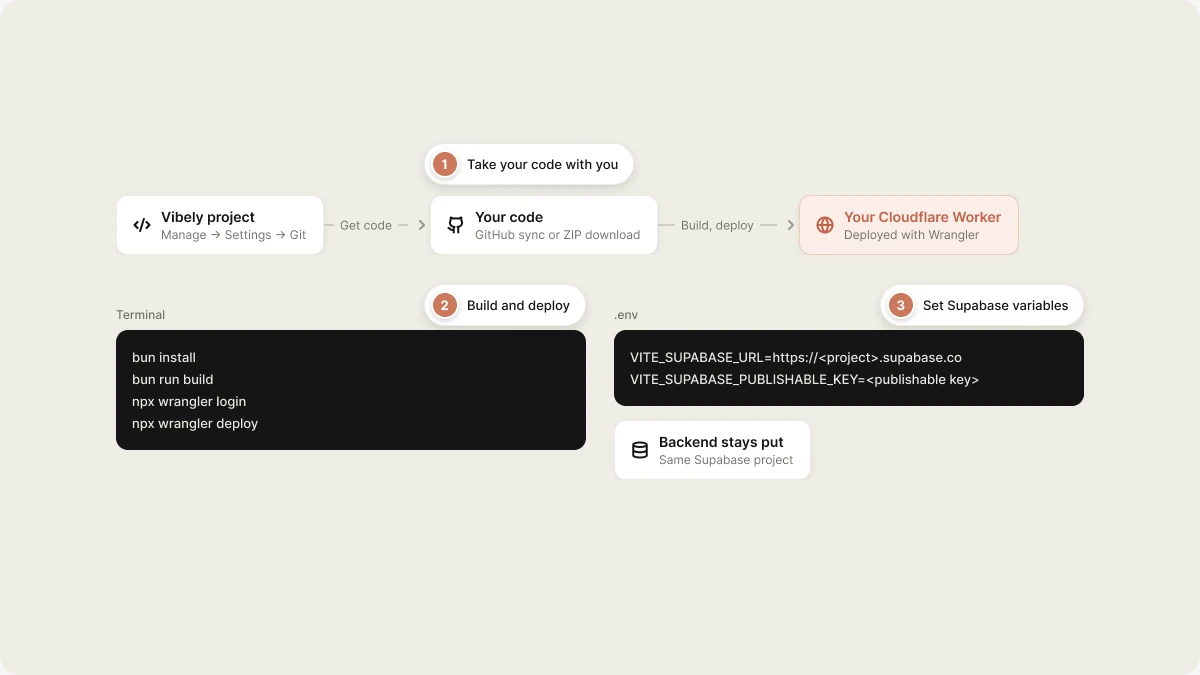
Most apps are best served by Vibely hosting. Move when you have a concrete reason, such as a required provider or deployment pipeline. See Ownership and portability for the trade-offs.
Before you move
- Know your stack. New Vibely web apps use TanStack Start (React, server-side rendering), Vite, TypeScript and Tailwind, managed with
bun. The build produces a Cloudflare Worker (server code plus static assets), not only a folder of static files. The project already includes awrangler.jsoncfor this. - Your backend doesn’t move. Your data is in your own Supabase project. The self-hosted frontend talks to the same project unless you change it.
- You take over operations. Builds, deployments, domains, HTTPS, error monitoring and analytics become your job. Vibely’s analytics and monitoring only cover apps Vibely hosts.
- Mobile apps are different. Expo projects don’t need web hosting. To build and submit them yourself, use your own Expo (EAS) account. See Ship your mobile app.
Get your code
- GitHub sync (recommended)
- Download a ZIP
Connect the project to a GitHub repository in Manage → Settings → Git. Sync runs both ways: Vibely pushes each change as a commit, and pushes to the linked branch flow back into the project. You can keep building in Vibely while your own pipeline deploys from GitHub. See Git sync.
Environment variables
Your app reads its Supabase connection from environment variables at build time:
Add any other
VITE_ variables your app uses, such as VITE_STRIPE_PUBLISHABLE_KEY. VITE_ variables end up in the browser bundle, so only public keys belong there. Secret keys stay in your Supabase Edge Function secrets, where Vibely put them.
Deploy to your own Cloudflare account (recommended)
Because the build is a Cloudflare Worker, Cloudflare Workers is the closest match to Vibely hosting and needs no code changes.1
Install and set up
Clone your repository (or unzip the download), then install dependencies:Create a
.env file with the variables above.2
Build
3
Deploy
Log in to Cloudflare and deploy with Wrangler:Change the
name in wrangler.jsonc first if you want a different Worker name.4
Automate it (optional)
Connect the GitHub repository to Cloudflare Workers Builds, or run the same build and deploy commands in GitHub Actions, so every push to your branch deploys.
5
Add your domain
Attach your custom domain to the Worker in the Cloudflare dashboard. If the domain is currently connected to your project in Vibely, disconnect it there first.
Deploy to another platform
To host on Vercel, Netlify, a Node.js server or a container, the app’s server target has to change from Cloudflare Workers to your platform. TanStack Start supports other targets, but it’s a change to the build configuration (vite.config.ts) and possibly to server code that uses Cloudflare-specific features.
After switching the target, the steps are the same on any platform:
- Connect the repository, or upload the build.
- Set the build command to
bun run build(ornpm run build) and the output directory your target produces. - Add your environment variables.
- Deploy, then attach your domain.
Update sign-in URLs
If your app uses Supabase Auth, add your new domain in Supabase → Authentication → URL Configuration: set the Site URL and add it to the Redirect URLs. Otherwise confirmation emails, password resets and OAuth sign-in send people back to the old address.Each time you publish the project from Vibely, Vibely updates your Supabase Site URL to the Vibely-hosted address. If your self-hosted domain is the real production site, check the Site URL after any Vibely publish, or stop publishing from Vibely.
Moving your backend
Your backend is already yours: it’s a Supabase project in your account. If you need to move it, for example to a different Supabase organization, region or a self-hosted Supabase:- Create the new project and apply your database migrations from the
supabase/migrationsfolder in your code. - Export your data from the old project and import it into the new one (Supabase’s backup and
pg_dumptools work). - Recreate your storage buckets and copy the files.
- Set your Edge Function secrets and deploy your functions.
- Reconfigure authentication providers and URL settings.
- Point the app at the new project with
VITE_SUPABASE_URLandVITE_SUPABASE_PUBLISHABLE_KEY, and reconnect Supabase in Vibely if you keep building there.
Related
Ownership and portability
What you own and your setup options.
Git sync
Two-way sync with GitHub.
GitHub
Connect your GitHub account.
Supabase
Your app’s backend and data.