

Key principles
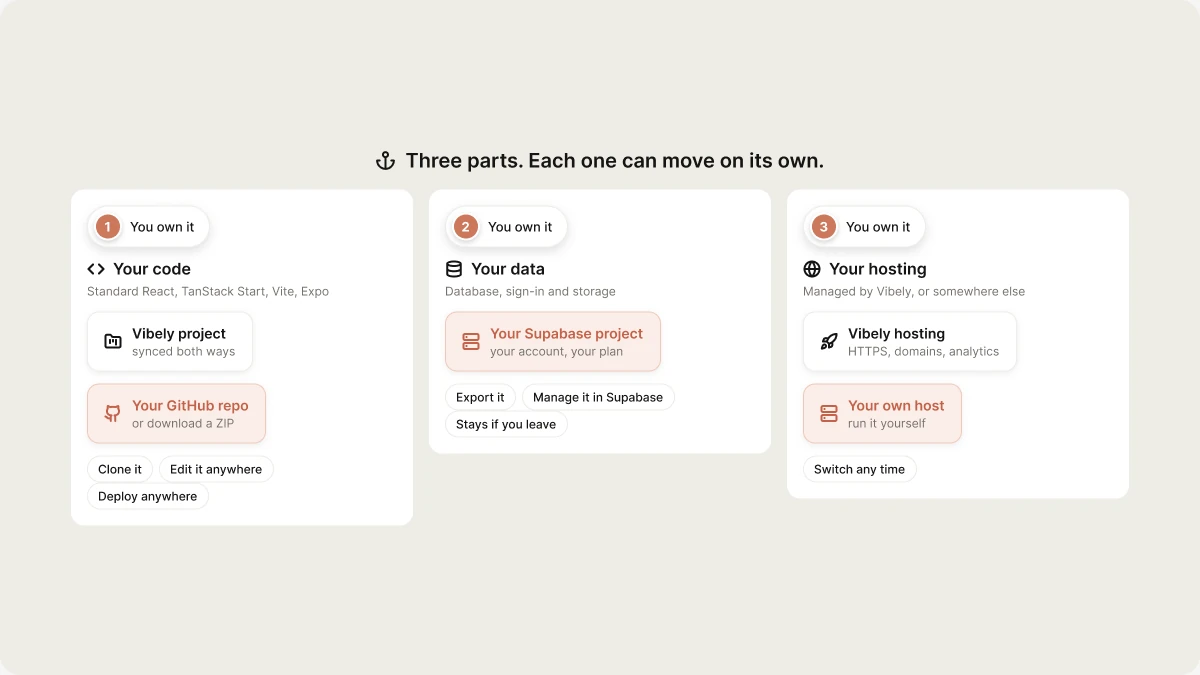
- You own your code. Sync any project to a GitHub repository with two-way Git sync, or download it as a ZIP. You can clone it, change it outside Vibely, and deploy it anywhere.
- You own your data. Your app’s database, sign-in and storage live in your own Supabase project, in your Supabase account, not in a Vibely-owned store. You can manage, export or move it with Supabase’s own tools.
- Standard, open-source technology. Web apps are standard TypeScript projects built with React, TanStack Start, Vite and Tailwind. Mobile apps are standard Expo (React Native) projects. There’s no proprietary runtime to replace.
What you get with Vibely hosting
When you publish with Vibely, development, preview and production work together:- An AI agent and live preview wired directly into your app
- One-click publishing with automatic HTTPS and global delivery
- Custom domains and branded workspace URLs
- Website access control (Business)
- Security scans before you publish
- Built-in analytics and error monitoring
- Mobile builds and store submission from the same project
What changes if you stop using Vibely
If you move off Vibely entirely, you take over the parts Vibely was running for you:- Your development environment and build process
- Deployments, CI/CD and release process
- Hosting, HTTPS certificates, domains and scaling
- Error monitoring and analytics
- Mobile builds and store submissions (with your own Expo/EAS account)
How Vibely fits into your stack
A Vibely app has three parts, and each one can move independently:Common setups
Everything on Vibely (recommended)
- Build, preview and host on Vibely.
- Backend in your own Supabase project.
- Custom domain connected in Vibely.
Vibely + your own hosting (hybrid)
- Build in Vibely, with the code synced to GitHub.
- Deploy the frontend from GitHub to your own hosting.
- Backend stays in your Supabase project.
Fully self-managed (advanced)
- Code lives in your repository, and you develop outside Vibely (or keep using Vibely for some of it).
- Frontend deployed through your own pipeline.
- Backend on self-hosted Supabase or a separate Supabase project you operate.
The Vibely editor and agent are a managed service. They can’t be self-hosted or run inside your own network. The apps you build with them can be hosted anywhere.
Recommended path
- Start on Vibely. It’s the fastest way to production, with nothing to operate.
- Sync your code to GitHub. You always have a copy of your code, and others can work on it with their own tools.
- Move a part only when you hit a real constraint, such as a compliance requirement tied to a specific provider, private networking, or an organization policy that requires self-managed hosting.
Related
Deploy outside Vibely
Step-by-step external hosting.
How Vibely hosts your app
What happens after you publish.
Git sync
Two-way sync with GitHub.
Enterprise
Vibely for larger organizations.