

- A workspace admin can register a custom REST connector that the agent and your projects can call.
- You can connect your own custom MCP server as a chat connector.
- You can ask the agent to integrate the API directly. It writes the code in a Supabase Edge Function and asks you for the key in a secure dialog.
What is an API? An API (Application Programming Interface) is a structured way for services to exchange data. It defines what you can ask for, what you get back, and how to make the request.
Where to find connectors
The full catalog is at Customize → Connectors in the dashboard sidebar. From there you can:- Filter by Enabled, All, or a category, and sort by Popular or A–Z.
- Search the catalog with the search control in the header.
- Click Add to register a custom MCP server.
- Click Request under Missing a connector? to ask the Vibely team for one.
- Manage → Connectors in the editor header shows the same catalog scoped to that project, plus any custom REST connectors your workspace has registered.
- The + menu in the chat composer has a Connectors submenu. It lists your connectors with a switch next to each chat connector, and has Manage connectors and Add connector entries.
Which connection type do I need?
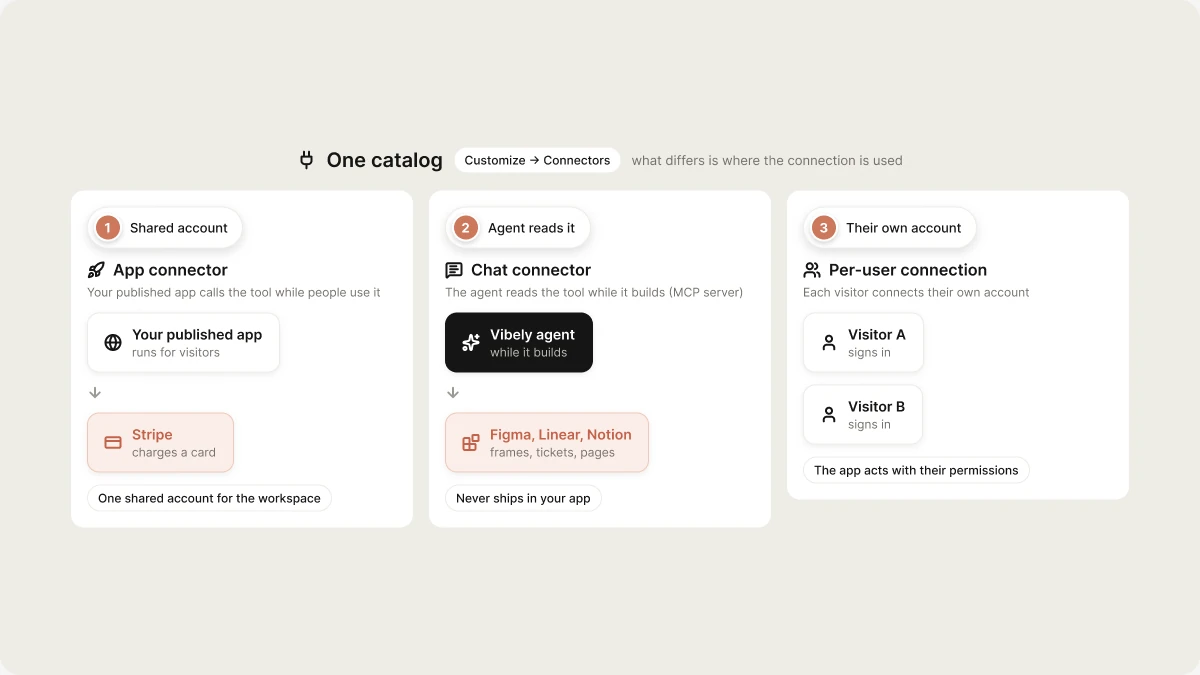
You can combine types. For example, connect Notion as a chat connector so the agent builds from your specs, and as an app connector so the finished app reads and writes your team’s pages.
Backend, payments, and AI
Some integrations are built deeper into Vibely than a regular connector:- Supabase is the backend for every Vibely app: database, auth, storage, and Edge Functions. You connect your own Supabase account. See Backend (Supabase).
- Vibely AI gives your app AI features without API keys. See Vibely AI.
- Stripe and RevenueCat handle payments. See Stripe and RevenueCat.
Managing connectors in your workspace
By default, only workspace owners and admins can connect and disconnect connectors. Owners change this with the Manage connectors row in Settings → Permissions, where admins can also turn off individual chat connectors and block write actions for the whole workspace. See Admin controls. For where credentials are stored and how to rotate them, see Auth and credentials.FAQ
Which connectors does Vibely support?
Which connectors does Vibely support?
The catalog has Vibely AI, GitHub, Notion, Linear, Miro, Figma, Supabase, Stripe, and RevenueCat. Beyond the catalog:
- Custom MCP servers bring any MCP-compatible tool into the chat.
- Custom REST connectors let an admin register any REST API for the workspace.
- The agent can integrate most public APIs directly. Describe the API in a prompt, and it writes an Edge Function and asks for your key.
What's the difference between an app connector and a chat connector?
What's the difference between an app connector and a chat connector?
An app connector is part of your published app and uses one shared workspace account. Every visitor’s request goes through that account, so it can’t be limited to certain workspace members. See Where credentials live.A chat connector is for the agent while it builds. It uses your own account, it’s personal to you, and your published app can’t reach it.
Can Vibely integrate with any API?
Can Vibely integrate with any API?
Yes, for most public and private APIs. APIs without authentication can be called directly. For authenticated APIs, the agent puts the call in a Supabase Edge Function and stores the key as a project secret, so the key never reaches the browser or a mobile app binary. See Secrets.
Related
App and chat connectors
The catalog, and how to connect, use, and remove a connection.
Auth and credentials
Where credentials live, and per-user connections.
Custom MCP servers
Connect a tool that isn’t in the catalog.
Admin controls
Decide who can connect, and what the agent may do.