

What you can build
Before you start
- A Stripe account. Create your products and prices in the Stripe Dashboard first. The generated code refers to price IDs (
price_…), not amounts. - A Supabase project linked to your Vibely project. Stripe’s server code runs as Supabase Edge Functions, so it can’t run without one. If you haven’t linked one, Vibely shows the Connect Supabase card when it needs it. See Supabase.
- Permission to add connectors in your workspace. See Admin controls.
Stripe charges its processing fees to your Stripe account. Vibely takes no cut of what your app collects and doesn’t appear on your customers’ statements.
Connect Stripe
You can connect Stripe in two ways. Both end with your secret key stored server-side, where only your Edge Functions can read it.- Paste your secret key
- Connect with Stripe
This works for every account and is what usually happens.
1
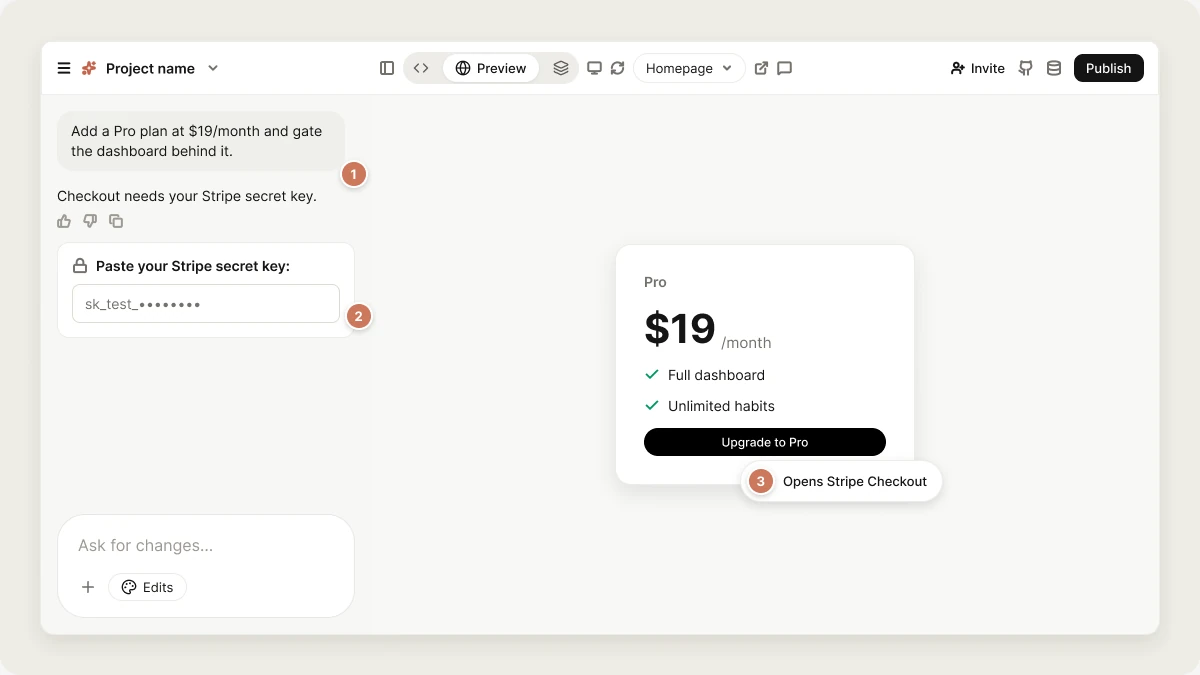
Ask for payments in the project chat
Describe what you want to sell, for example
Add a Pro plan at $19/month.2
Paste your key into the secure prompt
Vibely pauses and asks Paste your Stripe secret key:. Copy it from the Stripe Dashboard under Developers → API keys. Use a test key (
sk_test_…) while you build and a live key (sk_live_…) when you’re ready to charge real cards. Restricted keys (rk_…) also work.The value never appears in the chat. Vibely rejects a publishable key (pk_…) pasted here by mistake.3
Let Vibely finish the build
Vibely saves the key as an encrypted project secret named
STRIPE_SECRET_KEY, syncs it to your Supabase project’s Edge Function secrets, and continues building.What Vibely adds to your project
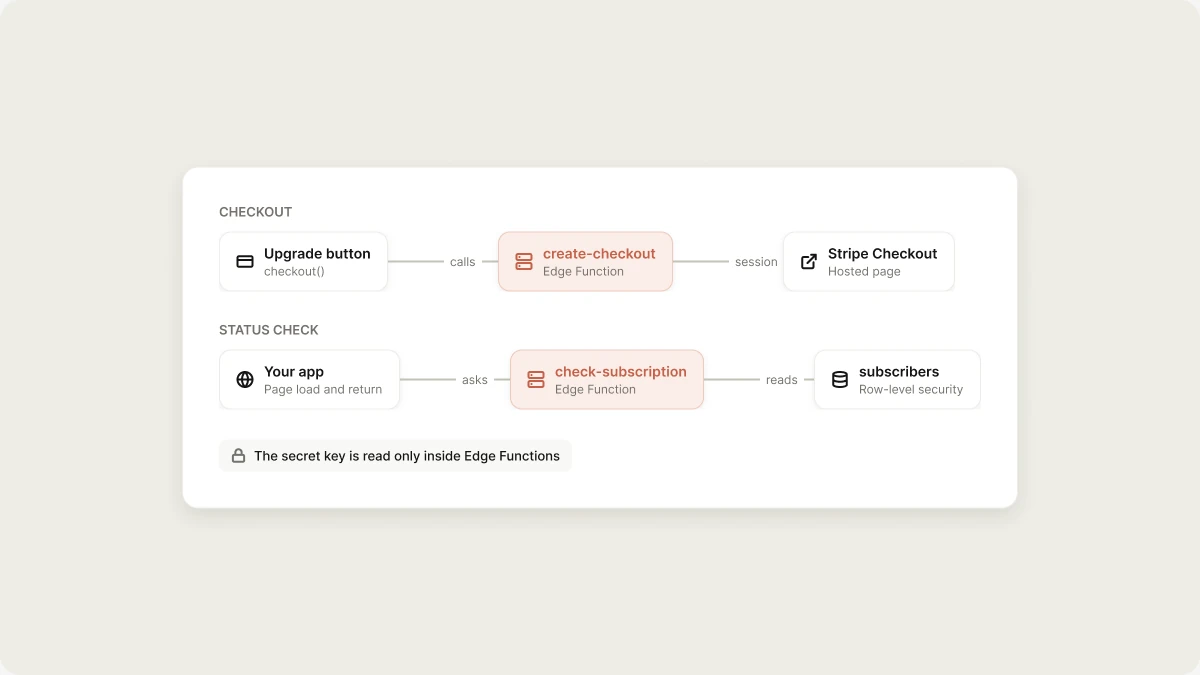
On a web project, Vibely adds:src/lib/payments.ts, withcheckout(),checkSubscription(), andopenCustomerPortal()helpers.- Three Edge Functions:
create-checkout,check-subscription, andcustomer-portal. - A
subscriberstable, readable only by the user it belongs to.
src/lib/payments.ts, a create-payment-intent Edge Function, and wraps the app in Stripe’s StripeProvider.
The secret key is read only inside Edge Functions. The publishable key is public and safe to ship in your app.
Test your checkout
Checkout opens in a new tab and redirects back to a real URL, so it only completes on your published app, not in the editor preview. Publish first, then test with Stripe’s test card:- Card number
4242 4242 4242 4242 - Any future expiry date and any CVC
STRIPE_SECRET_KEY in Secrets.
Limitations
- Requires Supabase. Without a linked Supabase project there are no Edge Functions, so Stripe can’t run.
- Subscription status is checked, not pushed. The app refreshes a customer’s status when a page loads and when they return from Checkout. You don’t need a webhook to launch. If you later need Stripe to notify your app (for failed renewals or async fulfilment), ask for a Stripe webhook. Vibely deploys it as a public function, because Stripe can’t send a signed-in user’s token, so the function itself should verify Stripe’s webhook signature. Any Edge Function can be made public this way by declaring it in its config.
- Mobile is limited to physical goods and services, as described above.
Manage or disconnect Stripe
Open Customize → Connectors → Stripe to see the connection. Disconnecting stops Vibely from using your Stripe account. The Edge Function secrets and the generated code stay in your project until you remove them. Subscriptions your customers already have keep billing in Stripe. Cancel them in the Stripe Dashboard, not in Vibely.FAQ
Where is my Stripe secret key stored?
Where is my Stripe secret key stored?
As an encrypted project secret, and in your Supabase project’s Edge Function secret store once a Supabase project is linked. It’s never written to a file in your project, so it can’t leak through GitHub sync or a code download.
Can I sell subscriptions in my mobile app with Stripe?
Can I sell subscriptions in my mobile app with Stripe?
No. Apple and Google require in-app purchase for digital subscriptions. Use RevenueCat for those, and keep Stripe for physical goods and real-world services.
Why doesn't Checkout work in the preview?
Why doesn't Checkout work in the preview?
Stripe redirects back to your app’s real URL after payment. Publish the app and test there.
Related
RevenueCat
In-app purchases for mobile apps.
Payments
Choose how your app takes money.
Supabase
The backend Stripe runs on.
Secrets
Store and update API keys.