

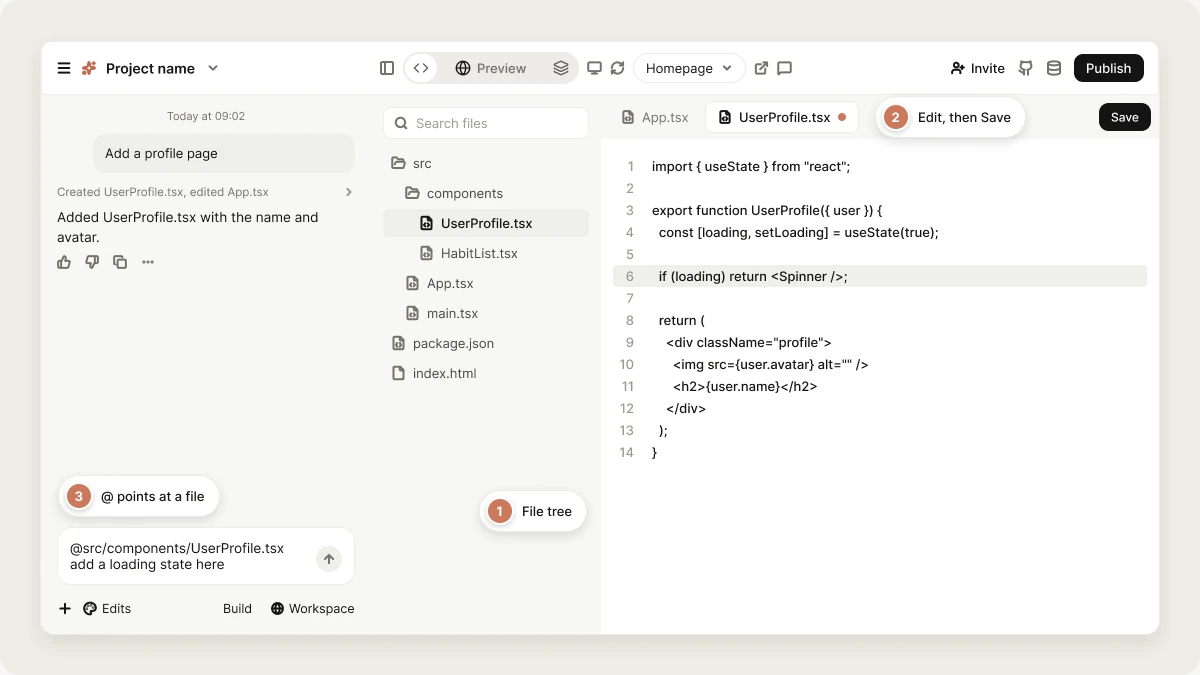
The Code view is available on paid plans. On the Free plan, Code shows an upgrade card instead. Downloading your codebase and GitHub sync work on every plan.
Browse your files
The left panel shows your project’s file tree. Click a folder to expand or collapse it, and use the Search files box at the top to find a file by name. Files you open appear as tabs above the code, so you can keep several open and switch between them. The code opens in a full code editor with syntax highlighting, line numbers, and bracket colors. Images open as a preview, and SVG files have a switch between the rendered image and its source.Watch Vibely write code
While Vibely works, the Code view updates live:- A file Vibely is writing shows a writing label in the tree, and its tab shows a sparkle icon.
- The open file scrolls along as new code arrives.
- The editor is read-only while Vibely is working, so nothing you type can collide with its edits.
Change code
You have three ways to change your app’s code:- Ask Vibely: Describe the change in the project chat. This is the best option for anything beyond a small tweak. Every change Vibely makes is saved as a version you can roll back. See Version history.
- Edit in the Code view: Change a file directly, as described below.
- Edit in your own tools: Connect the project to GitHub. Changes Vibely makes are committed to your repository, and commits you push are pulled back into Vibely. Once the project is connected, the GitHub button in the header also offers Edit in VS Code, which opens the repository in VS Code for the web. See GitHub.
Edit a file
1
Open the file
Click the file in the tree. It opens in the editor.
2
Make your change
Type as you would in any code editor. A dot appears on the file’s tab to show it has unsaved changes.
3
Save
Press Cmd+S (Mac) or Ctrl+S (Windows/Linux), or click Save at the right of the tab bar. The dot clears once the file is saved.
Delete a file
Select the file in the tree, then click the trash icon next to its name and confirm. The file is removed from your project and from the preview. To bring it back, restore an earlier version from Version history.You can’t edit or delete files while Vibely is working. Wait for it to finish, or stop it. Project viewers can read the code but can’t edit or delete files.
Reference code in the project chat
Pointing at the exact file is often faster than describing it. Type@ in the chat input and start typing a file name, then pick the file from the list:
@ list also finds other projects in your workspace. See Cross-project referencing.
Download your project’s codebase
You can download your project’s full source code at any time, on any plan:1
Open the Git settings
In the editor, open Manage → Settings → Git.
2
Download
Under Download codebase, click Download. Vibely saves the project as a
.zip file..env files and build output.
Workspace admins can turn code downloads off for the whole workspace in Privacy & security, in which case the download is refused with a message saying so. See Privacy & security.
For ongoing work outside Vibely, connect a repository with GitHub sync instead of downloading snapshots. Sync keeps the repository and your project in step both ways.
On a phone
On a phone, tap ⋯ next to the chat input and choose Code to browse your files and read any of them. Downloads and GitHub sync are in Project settings → Git.FAQ
Do I need to know how to code to use Vibely?
Do I need to know how to code to use Vibely?
No. Vibely writes and manages the code for you, and most people never open the Code view. It’s optional, for inspection and for working with developers.
Who can open the Code view?
Who can open the Code view?
Anyone who can open the project in the editor, on a workspace with a paid plan. On the Free plan the view shows an upgrade card. Anyone with edit access can edit and delete files; viewers can only read them.
What happens to my hand edits when I ask Vibely for a change?
What happens to my hand edits when I ask Vibely for a change?
Vibely works from your saved files, so it sees your edits and builds on them. Save before you send your next message; unsaved changes stay only in your browser tab.
Does looking at or editing code use credits?
Does looking at or editing code use credits?
No. Credits are only used when Vibely does work for you in the project chat. See Credits.
Can I export all of my code?
Can I export all of my code?
Yes. Use Download codebase in Manage → Settings → Git to get a
.zip, or connect GitHub for a full repository that stays up to date. Both work on every plan. Workspace admins can turn off code downloads in Privacy & security.Is the code mine?
Is the code mine?
Yes. You can download it, host it anywhere, and keep working on it without Vibely. See Ownership and External hosting.
Related topics
Sync with GitHub
Two-way sync with your repository.
Version history
Roll back any change Vibely made.
Project security view
Findings for this project’s code.
Publish your web app
Put your app on a live URL.