

Why remix a project
- Duplicate your own work: Keep a safe copy before a big change, or spin off a variation of an app you already built.
- Start from a public project: Use someone else’s remixable project as a starting point instead of building from scratch.
- Get a copy into another workspace: Remixing is the way to take a copy of a project you can open into the workspace you’re working in.
Control who can remix your project
The Enable public remixing setting in project settings controls whether people outside your project can make their own copy from its link. It’s off by default.- Off: Only people who can already open the project in the editor can remix it: you, members of its workspace who have access, and invited collaborators.
- On: Anyone with the project link can see a preview of the latest version of your app and make their own copy. Nobody gains access to your project itself.
What visitors see
Public remixing doesn’t add people as collaborators and doesn’t give them access to your editor or your project chat. Someone who opens a remixable project’s link sees a preview of your app and a Remix button. If they aren’t signed in, Vibely asks them to sign up or sign in when they click Remix, then finishes the copy for them. Both the preview and every copy are the latest version of your project, including changes you haven’t published. Your project doesn’t need to be published for people to open the link. To let people see your app without letting them copy it, share a preview link instead.How to remix
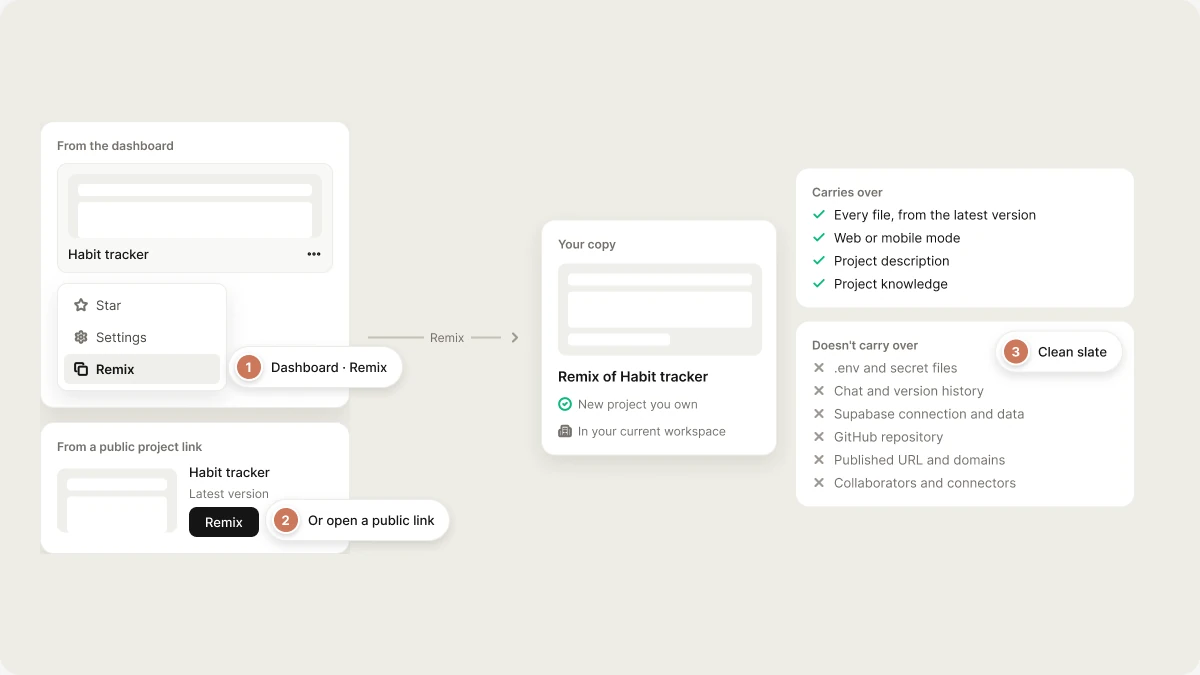
- From the dashboard: Open a project card’s ⋯ menu and choose Remix.
- From a public project link: Open the link and click Remix.
What carries over
A remix copies your app’s code and leaves behind everything tied to the original’s identity, like its live URL, its collaborators, and its connections. Carries over to the copy:- Every file in the project, from the latest version
- Web or mobile mode
- The project description
- Project knowledge, when you can open the original in the editor: you, members of its workspace who have access, and invited collaborators
.envfiles and other secret files (example files like.env.exampleare kept)- Project knowledge, when you remix a public project you can’t open in the editor. Knowledge becomes instructions Vibely follows in the copy, so it only comes along from projects you already have access to.
- The chat history
- Version history: the copy starts fresh
- The Supabase connection and your database data
- The connected GitHub repository
- The published URL, custom domains, and deployment history
- Collaborators, preview links, and access settings
- Connector connections
Because
.env files are left out, a remix of your own project starts with no credentials either. This is on purpose: a copied .env would point the remix at the original project’s database.Remix a mobile project
A remix of a mobile project stays a mobile project, with the same phone preview and store build path. Creating one needs the same plan as creating a new mobile project. Store credentials and the store listing are not copied. The app configuration file is, so the bundle identifier and package name come across unchanged. Change them in the copy before you build, or your build will collide with the original app. See Ship to the stores.FAQ
Does the copy stay in sync with the original?
Does the copy stay in sync with the original?
No. A remix is a snapshot of the project at the moment you remix it. Changes to the original never reach the copy, and changes to the copy never affect the original.
Can I remix a deleted project?
Can I remix a deleted project?
No. Deleting a project is permanent. If you want a backup, remix the project before deleting it.
Do people need a Vibely account to open my remixable project link?
Do people need a Vibely account to open my remixable project link?
No. Anyone with the link can open it and see a preview of the latest version of your app. Making a copy requires signing in or creating an account.
Can people with the link see my project chat?
Can people with the link see my project chat?
No. The link shows a preview of the app and a Remix button. Your chat history is never copied, and your project knowledge isn’t copied for people who reach the project only through its public link. Anyone who makes a copy does get your code, and can read it in their copy.
Why can't I remix a project?
Why can't I remix a project?
The most common reasons are:
- The owner hasn’t turned on Enable public remixing, and you can’t open the project in the editor.
- The project’s workspace has turned off Project transfers in Privacy & security, which stops copies from leaving that workspace. You can still remix it into that same workspace: switch to it, then remix.
- It’s a mobile project and your plan doesn’t include mobile apps.
- You’ve remixed 10 projects in the last hour. Wait a while and try again.
Related topics
Project settings
Turn public remixing on or off.
Sharing
Preview links and published-site access.
Templates
Start from a working app.
Privacy & security
Workspace rules for project transfers.