

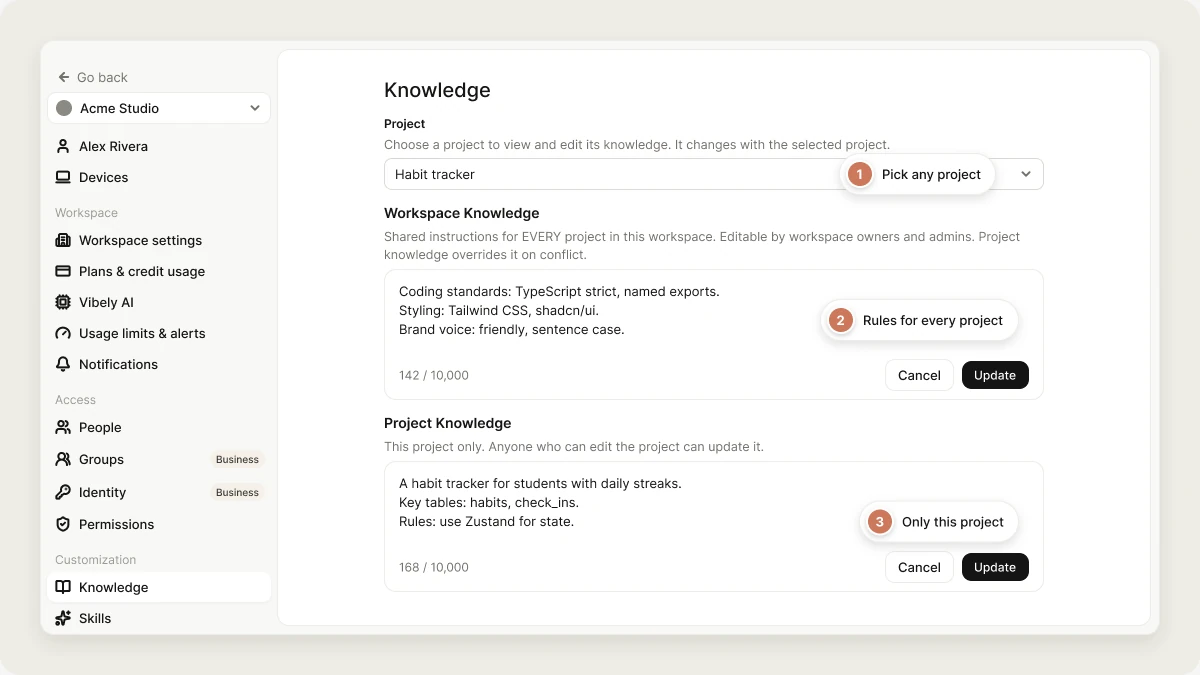
- Workspace knowledge defines shared rules for every project in a workspace, such as coding standards, preferred libraries, or naming conventions.
- Project knowledge adds context for a single project, such as what the app does, key database tables, architecture decisions, or domain terms.
Skills vs. knowledge
Skills and knowledge complement each other.- Knowledge is always included. Use it for rules and conventions that apply to everything Vibely does, such as coding standards, brand guidelines, or your project’s terminology.
- Skills are loaded on demand. Use them for instructions that only matter for specific tasks, such as a launch checklist or a release-notes format.
Workspace knowledge
Workspace knowledge lets you define shared rules once and apply them to every project in your workspace. It’s best for rules and conventions that should be consistent across projects, so you don’t repeat them in each project’s knowledge. It’s especially useful for teams. Workspace owners and admins can set guardrails, such as coding standards or architecture rules, that every project follows automatically. Only workspace owners and admins can edit workspace knowledge. Other members can read it. To manage workspace knowledge, open Settings → Knowledge. The page also has a Project selector, so you can edit any project’s knowledge from the same place without opening the project. Workspace knowledge supports up to 10,000 characters.What to include
Workspace knowledge is best for:- Coding style and naming conventions
- Preferred libraries or frameworks
- Shared architecture patterns
- Testing and code quality rules
- Language, date, and number formatting
- Brand voice, UI copy, or design guidelines
- Things Vibely should avoid doing
Example
Important notes
- Changes apply on the next message. If you update knowledge during a conversation, Vibely uses the new text from your next message on.
- One workspace knowledge per workspace. You can’t define different workspace-level instructions for different groups of projects in the same workspace.
- Long conversations. Knowledge is always included, but in very long conversations with a lot of context, instructions may not be followed perfectly every time.
Project knowledge
Project knowledge stores persistent instructions and context for one project, such as what the app is for, who uses it, and how it’s built. Anyone who can edit the project can update its project knowledge. To manage it, open the project and go to Manage → Settings → Knowledge, or use the Project selector in Settings → Knowledge. Project knowledge supports up to 10,000 characters.What to include
Good project knowledge usually covers:- What the app does and who it’s for
- Key database tables
- Architecture decisions
- Domain terminology
- Project-specific constraints
- Design guidelines, such as colors, fonts, or layout
- Links to important references, such as API documentation
- Security or compliance requirements
Example
A mobile example
The rules that matter for a native app are different from those for a web app. Breakpoints, hover states, and SEO tags mean nothing in React Native. Minimum OS versions, navigation, and touch targets do.Best practices
Be specific
Be specific
Clear rules work better than general advice. “Use TypeScript strict mode. Never use
any.” is more useful than “Write clean code.”Write it like onboarding notes
Write it like onboarding notes
Imagine explaining the project to a new developer. Include the decisions you don’t want changed, so Vibely doesn’t try to change them.
Keep it short
Keep it short
Bullet lists and direct rules work better than long paragraphs. Knowledge is read on every message, so every line you add is read every time.
Review it periodically
Review it periodically
When your stack or architecture changes, update your knowledge so Vibely doesn’t follow outdated rules. A few clear rules and a short project description already make a big difference.
FAQ
What is the character limit for knowledge?
What is the character limit for knowledge?
Workspace knowledge and project knowledge each support up to 10,000 characters. The editor shows a live character count and disables Save above the limit.
Can I have more than one set of workspace knowledge?
Can I have more than one set of workspace knowledge?
No. Each workspace has one workspace knowledge shared by all its projects.
Does Vibely read AGENTS.md or CLAUDE.md files in my project?
Does Vibely read AGENTS.md or CLAUDE.md files in my project?
Not as knowledge. Vibely’s knowledge comes only from the two knowledge fields. Vibely may still open those files if a task calls for reading them, like any other file in your project, but they aren’t included automatically. Put instructions you want applied every time into project or workspace knowledge.
What happens if project and workspace knowledge conflict?
What happens if project and workspace knowledge conflict?
Both are included on every message. When they conflict, Vibely is told to follow project knowledge, because it’s specific to the current project.
Can I edit knowledge from another AI tool?
Can I edit knowledge from another AI tool?
Yes. The Vibely MCP server lets tools such as Claude and ChatGPT read and set project and workspace knowledge on your behalf. Setting knowledge replaces the existing text, so read it first and write back the combined version.
What is the difference between a skill and knowledge?
What is the difference between a skill and knowledge?
Knowledge is always included as background context. Skills are loaded only when a request calls for them. Use knowledge for rules that apply to every message, and skills for instructions that apply to specific tasks.
Related topics
Skills
Reusable instructions Vibely loads on demand.
Project settings
Where project knowledge lives in the editor.
Workspace admin settings
Manage your workspace.
Vibely MCP server
Manage knowledge from other AI tools.