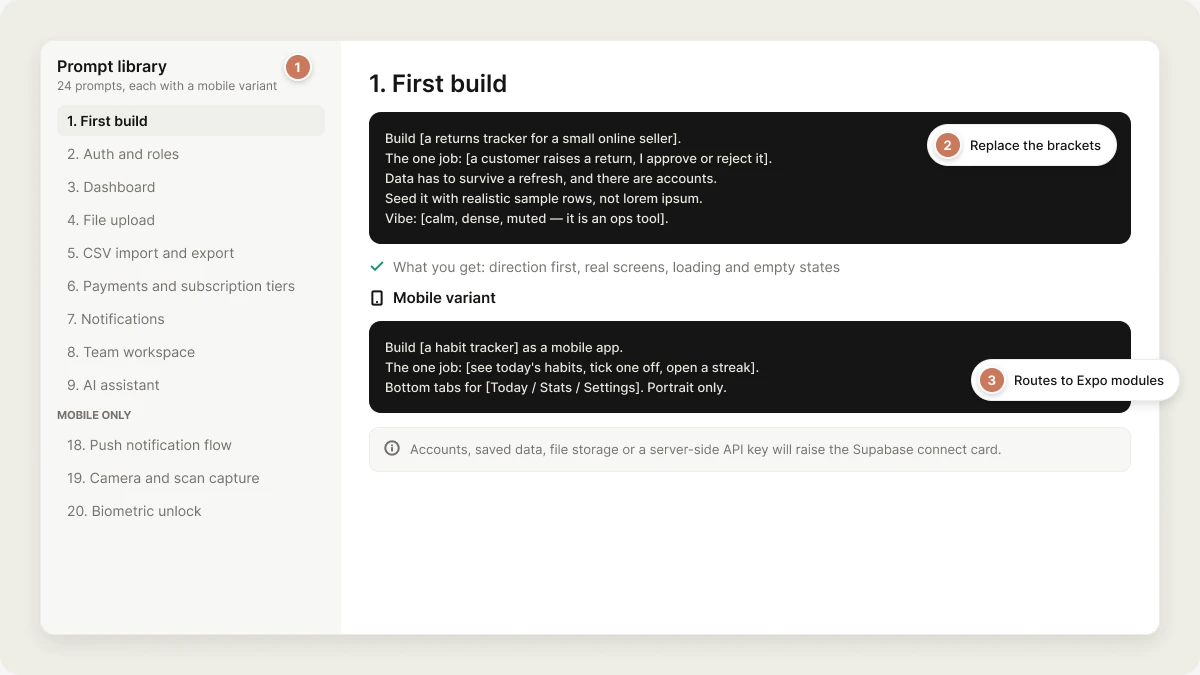
Copy-paste prompts for the features people build most, with a mobile variant for every one
Every prompt here is written for Vibely specifically — it names the things the agent’s own quality bar checks for, so you get the finished version instead of the first draft. Copy one, replace the bracketed parts, send it.How to read an entry. Each has a web prompt, a one-line what you get, and a mobile variant that routes to the right Expo module. The last section is mobile-only: six things a web build cannot have.
These assume a project that already exists. For turn 1, start with First build. Anything touching accounts, saved data, file storage or a server-side API key will raise the Supabase connect card — the agent keeps building in that same turn on sample data and rewires it once you connect. See Connectors → Native.
Build [a returns tracker for a small online seller].The one job: [a customer raises a return with a reason, I approve or reject it,and I can see what's pending pickup versus refunded].Data has to survive a refresh, and there are accounts — this is not a demo.Seed it with realistic sample rows, not lorem ipsum.Vibe: [calm, dense, muted — it's an ops tool, not a marketing site].
What you get: a direction committed before any UI (tokens, type pairing, restyled primitives), the screens that journey needs, every add/edit/delete wired into a dialog with a toast, loading/empty/error states, and a real sign-in route — not a stack of placeholders.Mobile variant
Build [a habit tracker] as a mobile app.The one job: [see today's habits, tick one off, and open a habit to see its streak].Bottom tabs for [Today / Stats / Settings], plus a modal sheet for adding a habit.Portrait only. Data survives an app restart.Vibe: [big tap targets, soft shadows, rounded corners].
Turn 1 on mobile also does branding — a name and scheme in app.json, a generated icon over assets/images/icon.png, splash colours carrying your direction. Say “portrait only” or you may get both.
Add accounts. Email and password sign-in, plus a sign-up flow that handlesemail confirmation. Three roles: admin, editor, viewer.Roles live in their own table, checked in RLS policies — not a column on profiles.Admins can see everything; editors can only edit their own rows; viewers are read-only.The logged-out and logged-in chrome should actually differ.
What you get: a sign-in route plus the email-callback route in the same turn, a user_roles table with an app_role enum and a SECURITY DEFINERhas_role() function, RLS policies keyed on auth.uid(), and a protected layout that redirects logged-out visitors.
A role column on profiles is a privilege-escalation hole and the agent will refuse to build one. If you already have one, ask it to migrate you off it.
Mobile variant
Add accounts to the app. Email and password sign-in and sign-up screens in an(auth) route group, one useSession hook, and an auth gate on the tabs layout.Handle both sign-up outcomes — instant session, and "check your email".Email links have to come back into the app through the deep link scheme.
Routes to expo-linking for the return URL and adds an auth-callback screen that exchanges the code for a session.
Add a dashboard as the landing screen for signed-in users.Four KPI tiles across the top: [total outstanding, collected this month,overdue count, average days to pay]. Below them, [a monthly trend chart] and[a table of the ten oldest unpaid invoices] with the overdue ones first.Every number comes from the real query, not a constant. Empty and loadingstates for each tile.
What you get: tiles wired to real aggregates, a table with at least one of sort/filter/search, skeletons while data loads, and a designed empty state with a primary action rather than a blank panel.Mobile variant
Add a stats screen as a tab. Three summary cards, then a 30-day chart below them.Pull-to-refresh. Render all four states — loading, error, empty, populated.Use the shared formatting helpers for every date and number.
Raw Date and price values are a visual defect on mobile — String(created_at) renders the full timezone string inside a list row. The agent routes through the template’s format helpers.
Let users attach [a bill photo] to each [expense claim].Private storage — a user can only read their own files. Show upload progress,accept images and PDF up to 10 MB, reject anything else with an inline message,and render a thumbnail once the upload finishes.
What you get: a private storage bucket, signed URLs fetched at render time (never persisted to a column, because they expire), conditional rendering so there is no empty src request, and a real failure branch.Mobile variant
Let users attach a photo to each entry — camera or photo library, their choice.Ask for the permission at the moment they tap Attach, not on launch.Upload to private storage, show progress, and render the thumbnail when it lands.
Routes to expo-image-picker (photo library) and expo-camera (capture). Both need their permission config written in the same turn — NSPhotoLibraryUsageDescription / NSCameraUsageDescription and the matching Android permissions.
Add CSV import and export to [the transactions list].Import: file picker, parse in the browser, show me a preview table with thecolumn mapping before anything is written, flag rows that would fail validation,and let me import only the valid ones.Export: current filters applied, real column headers, downloads as a file.
What you get: a preview-before-write flow rather than a blind insert, a per-row validation report, and an export that respects the filters on screen.Mobile variant
Add CSV export to the entries screen — generate the file, then open the systemshare sheet so I can mail it to myself or drop it in Files.Import is out of scope on mobile; keep it on the web app.
Sharing a generated file is the mobile-native equivalent of a download. Say so explicitly or you may get a browser-style download that does nothing on a device.
Add subscriptions. Three tiers — [Free, Pro at $19/mo, Team at $49/mo] — with[the feature matrix below]. Stripe Checkout for the upgrade, a webhook that keepsthe subscription row in sync, and a billing page where someone can see theirplan and open the customer portal.Gate [the export and the API key sections] behind Pro.
What you get: Checkout and webhook as Edge Functions reading STRIPE_SECRET_KEY and STRIPE_WEBHOOK_SECRET server-side, a subscription table the webhook writes, and gating checked on the server, not in the client.Mobile variant
Add a paywall for [unlimited habits]. Present it from the blocked action — themoment they try to add the sixth habit — not on launch. Also add an upgrade rowin Settings and one at the end of onboarding.Monthly and annual cards, annual pre-selected, savings badge computed from thetwo prices. Restore Purchases button, Terms and Privacy links.
Stripe is not an option for digital goods in a mobile app — Apple and Google require in-app purchase, and a Stripe subscription in an iOS build is an automatic rejection under Guideline 3.1.1. Mobile monetization routes to revenuecat. See Connectors → Catalog.
The paywall renders empty in Expo Go and the web preview because there is no StoreKit or Billing there. That is correct, not a bug — do not ask the agent to “fix” it with mock packages.
Add an in-app notification centre. A bell in the header with an unread count,a panel listing recent notifications, mark-one-read and mark-all-read, and arow in the database per notification so it survives a refresh.Also send an email when [an invoice goes 30 days overdue] — from an EdgeFunction, with the provider key kept server-side.
What you get: a notifications table with RLS scoped to the recipient, optimistic mark-as-read, and the email path in an Edge Function with the API key registered as a secret rather than sitting in the bundle.Mobile variant
Add push notifications. Ask permission the first time they turn on reminders inSettings — never on launch. Store the device token against the user row.Local scheduled reminders at a user-chosen time, plus server pushes for[when someone comments on your entry].
Routes to expo-notifications, which also needs POST_NOTIFICATIONS on Android — without it, Android 13+ silently shows nothing. Push does not work in the web preview; test in Expo Go on a real device. Full wiring in Native capabilities.
Make this multi-tenant. Every row belongs to a team, users belong to one or moreteams, and someone only ever sees their own team's data — enforced in RLS, notin the UI.Add an invite flow: an owner invites by email, the invitee accepts and lands inthe team. A team switcher in the header if someone is in more than one.
What you get: a team_id on every tenant table, membership and invite tables, policies that join through membership, and a switcher that actually changes what the queries return.
This is the change worth planning first. Start with “Switch to plan mode and tell me everything multi-tenancy would touch.”
Mobile variant
Add teams. A team switcher in the Settings screen, team-scoped data everywhere,and an accept-invite screen reachable from the invite deep link.
Add an AI assistant to [the notes screen]. It reads the current [note] and can[summarise it, suggest tags, and rewrite it in a chosen tone].Streaming response, a stop button, and a visible error state when the call fails.Use Vibely AI so there's no API key to manage.
What you get: the call behind an Edge Function (no key in the bundle), streamed tokens rather than a spinner that sits for twenty seconds, and a failure branch the user can see.Mobile variant
Add the assistant as a sheet on the entry screen. Stream the response, keep thekeyboard out of the way, and show a retry on failure.
Vibely AI is on by default at the workspace level — no key to bring. See Connectors → Catalog.
Add semantic search over [documents]. Enable pgvector, store an embedding per[document], generate it on insert and update, and add a search box that returnsthe ten closest matches with a relevance score.Embedding generation goes in an Edge Function with the key server-side.Keep the existing keyword filter — I want both.
What you get: a migration enabling vector with an index, a trigger or Edge Function that keeps embeddings current, and a query that ranks by distance. Keep the keyword path — semantic-only search fails badly on exact identifiers like an invoice number.Mobile variant
Add the same search to the mobile app — one search field above the list,debounced, with a loading row and a designed "no matches" state.
Go through every public page and add SEO: a unique title and meta description ineach route's head, one h1 per page, Open Graph and Twitter card tags, JSON-LD on[the product pages], a sitemap, and alt text on every image.Skip the signed-in app routes — those should not be indexed.
What you get: per-route metadata rather than one global title, structured data where it earns a rich result, and the internal pages left out of the sitemap.Mobile variant
A native app has no meta tags — the store listing is its metadata. Write the AppStore and Play listing copy for this app: name (30 chars), subtitle (30),promotional text, full description, and a keyword list. Base it on what the appactually does, not on what it could do.
That copy is what you paste into App Store Connect and Play Console yourself; neither store API accepts it from a build. See Ship to stores.
Add an audit log. Every create, update and delete on [invoices, payments andteam membership] writes a row: who, what, which record, before and after, when.Only admins can read it. Nobody can update or delete a row — inserts only.Add an admin screen with filters for actor, action and date range.
What you get: an append-only table (an insert policy and no update/delete policy), the admin read gated through the role function, and a filterable view rather than a raw dump.Mobile variant
Surface the audit log read-only in the mobile app for admins — a list withfilters in a sheet, paginated, no write actions at all.
Add feature flags. A flags table with a key, a description and an enabled boolean,a hook that reads them once and caches, and per-team overrides so I can turn[the new dashboard] on for one team before everyone.Admin screen to flip them. Default to off for anything unset.
What you get: a default-off lookup (so a missing flag can never accidentally ship a half-built feature), a per-team override table, and one hook instead of scattered checks.Mobile variant
Same flags on mobile, but cache the last fetched values so the app doesn't renderthe wrong UI on a cold start with no network. Fall back to off, never to on.
Add [a due_date and a priority enum] to [tasks].Write it as a new additive migration — don't edit the applied one. Existing rowshave to stay valid, so give me a sensible default or make it nullable. Update thetypes, the list, the create form and the edit form in the same turn.
What you get: an additive, idempotent migration; the GRANTs and RLS in the right order; and the UI updated in the same turn instead of a schema that drifts ahead of the app.Mobile variant
Same migration, and update the entry sheet, the detail screen and the list row.Anything I've already saved on-device has to keep loading — handle the missingfield on old records rather than crashing on undefined.
The [dashboard] feels generic. Make it [denser and more like Linear] —[mono-spaced tabular numbers, tighter row height, one accent hue instead of four,borders doing the separating instead of shadows].Change the tokens, not the individual components. Keep the rest of the appconsistent with whatever you change.
What you get: a token-level change that propagates, rather than fifty one-off class edits that drift apart on the next turn.Mobile variant
Restyle the app to feel [premium and quiet]: [a deeper neutral base, one accent,tighter type, less shadow]. Change the theme constants for BOTH colour schemes,and check the empty, loading and error screens carry the new direction too.
If dark mode looks wrong after a restyle, it is almost always a hex literal left in a screen instead of a theme token. Say “no hex literals in screens” and it gets fixed.
[Clicking Save on the edit form does nothing.]Steps: [open an invoice → change the amount → click Save].Expected: [the dialog closes and the row updates].Actually happens: [the dialog stays open, the row is unchanged, no error appears].Started after: [the turn where we added validation].Investigate first and tell me the cause before you change anything.
What you get: a root-cause turn instead of a guess. “Investigate first” is the load-bearing sentence — without it you often get a plausible patch on the wrong file. Full method in Debugging.Mobile variant
[Tapping a habit row crashes the app.]Steps, expected, actual, and: it happens in Expo Go on my iPhone but NOT in theweb preview. Investigate before fixing.
Always say which surface — web preview or a real device. Half of mobile bugs only exist on one of them, and that fact alone usually names the cause.
Refactor [the invoice fetching] to [go through one shared hook instead of fourcopies]. Behaviour must not change — same data, same states, same URLs.List the files you'll touch first, then do it. Don't rename anything public anddon't reformat files you aren't otherwise changing.
What you get: a scoped refactor with a file list you can veto, instead of a diff that also reformats half the repo.Mobile variant
Refactor [the four screens that each hand-roll useState + useEffect + try/catch]to use the shared async-data hook. Same four states on every screen. No behaviourchange, no new dependencies.
Add reminders. A time picker in Settings, permission requested at the moment theyflip the toggle on, and a daily local notification at that time.Also register the device token against the user row so I can send server pusheslater. Tapping a notification should deep-link into [the habit it's about],not just open the app.
Module:expo-notifications. Needs POST_NOTIFICATIONS on Android — without it, nothing shows and nothing errors. Local reminders need no server; remote pushes go out from an Edge Function. Not testable in the web preview.
Add [barcode scanning] to [the stock screen]. Full-screen camera with a scanframe overlay, a haptic on a successful read, and the matched product shown in asheet with an Add button. Permission asked when they tap Scan.If the camera isn't available (web preview), show a designed fallback with manualentry — don't render a dead black rectangle.
Module:expo-camera. Requires NSCameraUsageDescription and android.permission.CAMERA, written in the same turn as the install. Camera does not work in the browser preview — ask for the fallback or you will think it is broken.
Gate the app behind Face ID. On launch, if a session already exists, require abiometric check before revealing content. Fall back to the device passcode.If the device has no biometrics enrolled, let them in on the existing session —don't lock them out. Add a toggle in Settings to turn it off.
Module:expo-local-authentication, with NSFaceIDUsageDescription. Biometrics gate access to a session token already on the device — they are never primary auth. The no-enrolment branch is the one people forget, and it locks real users out.
Make [the entries list] work offline. Cache the last fetched rows on the device,render them immediately on launch while the network request runs, and reconcilewhen it returns.Writes made offline queue and flush when connectivity comes back. Show a quiet"offline — showing saved data" banner, not an error.
Module:@react-native-async-storage/async-storage (pre-installed). One storage key per collection, loaded on mount and written back on every mutation. Data held only in component state is gone on the next launch — that is a mockup, not an app.
Set up deep links. [habits://habit/123] opens that habit's detail screen,[habits://invite/<token>] opens the accept-invite screen, and anything unknownlands on the home tab instead of a blank screen.Handle both cases: the app already running, and a cold start from the link.
Module:expo-linking plus the scheme in app.json. Cold start is the case that breaks — the link arrives before the router mounts. Universal links (https://…) additionally need apple-app-site-association and assetlinks.json served from your domain; ask the agent for the exact files. See Deep links.
Add [Pro] as an in-app purchase. Real packages from the store, no fake unlock.Paywall at src/app/paywall.tsx, presented from the blocked action. Monthly andannual, annual pre-selected, savings computed from the two prices. RestorePurchases, Terms and Privacy links. Entitlement checked on launch and after apurchase.If the purchase SDK isn't configured yet, say so on the button — don't flip alocal boolean.
Connector:revenuecat (API key tier — two public EXPO_PUBLIC_ SDK keys, one per store). Real purchases need a native build plus products configured in App Store Connect and Play Console. In Expo Go the paywall renders empty, which is correct.
Apple rejected the build. Here's the reviewer note verbatim:"[paste the full rejection text, including the guideline number]"Work out what in our app triggered it, fix it, and tell me what changed. If thefix needs something only I can do in App Store Connect, say exactly what.
What you get: a targeted fix rather than a rewrite. Paste the note verbatim — the guideline number is what pins the cause. The usual culprits are a missing or vague permission usage string, placeholder content still shipping, a login wall with no way to try the app, and web checkout for digital goods. Guideline 4.8 is its own trap: offering Google or Facebook sign-in obliges you to offer an equivalent privacy-preserving option, and plain email/password does not satisfy it.Rejections and resubmissions cost nothing beyond the one turn that triggered the build. See Ship to stores.