

Shape your prompts
Four habits that change the output
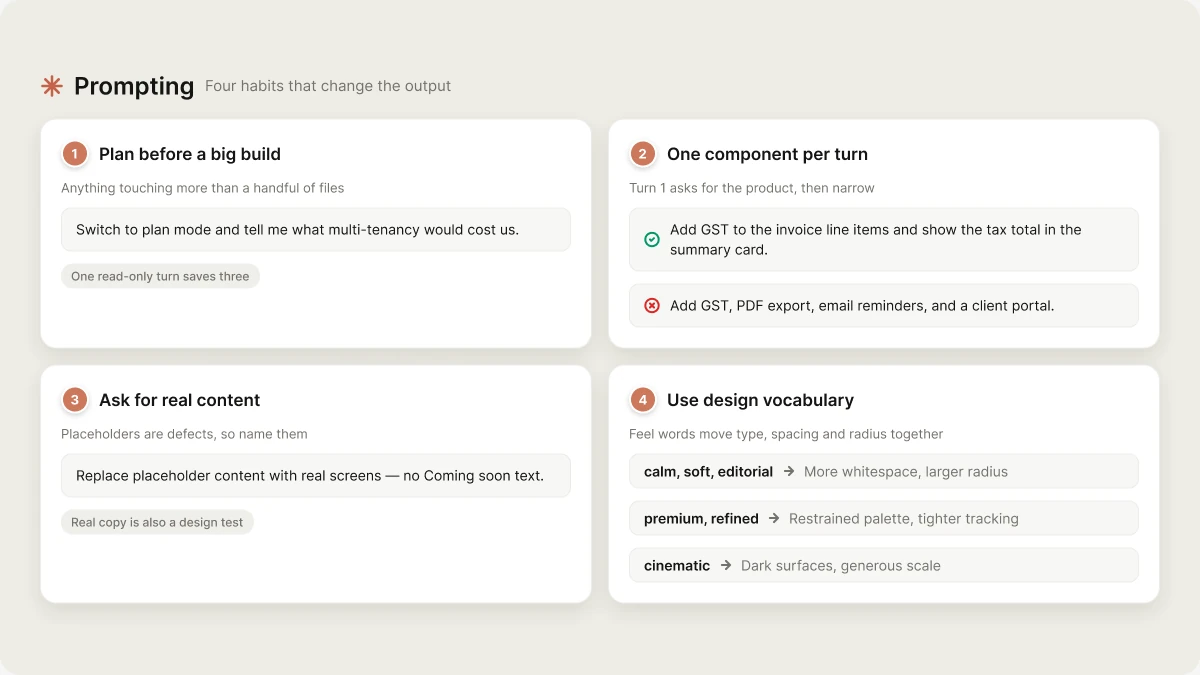
1. Plan before a big build
Anything that touches more than a handful of files — multi-tenancy, a payment flow, swapping a data layer — is worth one read-only turn first. Plan mode costs a turn and saves three. See Plan mode below. Small, obvious changes do not need a plan. “Make the header sticky” does not want a design document.2. One component per turn, after the first one
Turn 1 is the exception: ask for the whole product. The agent’s definition of a finished first build is one user, one key action, one outcome — the screens that journey needs, wired, with realistic seed data. Asking for less produces a skeleton; asking for two products at once produces two half-products. After turn 1, narrow. A turn that names one screen, one component, or one bug lands cleanly. A turn that names four things gets four shallow attempts.3. Ask for real content, not placeholders
The agent already treatslorem ipsum, Item 1, “Coming soon”, empty containers and onPress={() => {}} as defects. If one slips through, name it:
“Replace placeholder content with real screens — no Coming soon text.”
Real copy is also a design test. A layout that only works with three-word headings does not work. Ask for the headlines a real business would write and the broken layouts surface on the same turn.
4. Use design vocabulary the agent acts on
Before writing any UI, the agent commits to a direction: one feel word, a palette reason, a type pairing, one layout motif. Feel words are load-bearing — they change type, spacing, radius and shadow together. These are the ones that route cleanly:
Naming a reference product works too — “more like Linear”, “more like Things” — as does naming a hue for the domain. Both beat “make it look better”, which the agent can only interpret as “redo the tokens and hope”.
Two things you do not have to ask for, because they already run on every turn: generated imagery in every visual slot (the agent creates art rather than pulling stock URLs), and the accessibility floor — labelled inputs, visible focus, WCAG AA contrast,
aria-label on icon-only buttons.
Your first prompt
Web:- Name the one job. Who uses it, what they do, what they get. “A returns tracker: customer raises a return with a reason, I approve or reject, I see what’s pending pickup versus refunded.”
- Say whether data has to survive a refresh. That single sentence is what turns on a database instead of in-memory sample data.
- Say whether there are accounts. If there are, the agent builds the sign-in route and the email-callback route in the same turn.
- Pick a vibe in two or three words. It sets the tokens before a single component is written.
- Name the platform-specific features. “Push reminders”, “biometric login”, “Apple Sign In” — these route the agent to the right Expo SDK module and its permission config in the same turn.
- Pick a navigation pattern. “Bottom tabs for Home / Stats / Settings, plus a modal sheet for adding a habit” is concrete. The tab set is the scope.
- Mention orientation. “Portrait only” or “supports landscape on tablets” prevents a costly rewrite later.
- Pick a vibe in mobile terms. “Big tap targets, soft shadows, rounded corners” sets a different direction than “minimal, tight, high contrast”.
Plan mode
Plan mode is read-only. The agent can read, search, browse and reason; it cannot write a file or run a command. The allowlist isread, list_files, glob, grep, web_search, web_scrape, db_schema, read_runtime_errors, mcp_list, mcp_call, spawn_subagent, use_skill, ask_user and exit_plan_mode.
Use it when you want a recommendation before any change lands:
“We’re about to add multi-tenancy. Read the auth and DB code and tell me what would have to change. Don’t write anything yet.”You get back a structured plan — overview, key decisions, architecture, user journeys, data models, files, steps, dependencies. Read it, push back on it, then approve:
“Good, but keep the existing profiles table. Go ahead and implement that.”
The agent calls exit_plan_mode and the full toolset unlocks. Plan turns are billed like any other turn, so a long plan on a big codebase is not free — but it is cheaper than three wrong builds.
Plan mode is also the escape hatch when the agent keeps making the same wrong edit. See Debugging → When it keeps making the same wrong edit.
Knowledge: the memory that actually persists
Chat context is not durable. It compacts once the conversation crosses 90% of the model’s context window, and a new chat starts empty. Anything the agent must never forget goes in Knowledge, not in a message. Settings → Knowledge has two editors:
Both are injected into every turn as authoritative background context, and project knowledge wins when the two conflict. This is where coding standards, architecture rules and hard product constraints belong:
When to start over
Sometimes the cheapest path forward is a new chat:- The chat is 100+ turns and the agent is making contradictory decisions.
- You’ve changed the brief substantially since turn 1 (a CRM became a CMS).
- You want a fundamentally different stack.
Next
Prompt library
Copy-paste prompts for auth, payments, uploads, dashboards, and the six mobile-only ones.
Debugging
How to report a bug, root-cause in plan mode, and unstick a wedged build.
Iterate
The three iteration modes and visual edits.
From idea to store
One mobile app carried end to end.