

What gets checked automatically, and what does not
The second column is the important one. Verification is on-demand. The agent does not self-review its work and does not drive the browser unless your prompt asks it to — forced self-review is switched off. So if you want proof rather than a claim, type the words:
“Test the login flow in the browser and tell me what you saw.”Without that, “I’ve fixed it” means “the code type-checks and the routes load”, which is a real gate but not the same as “the button works”.
On a broken preview the agent’s first move is to read the console the preview already captured — no browser round-trip, no waiting. It only opens a browser when that log does not explain the failure, or when you asked it to.
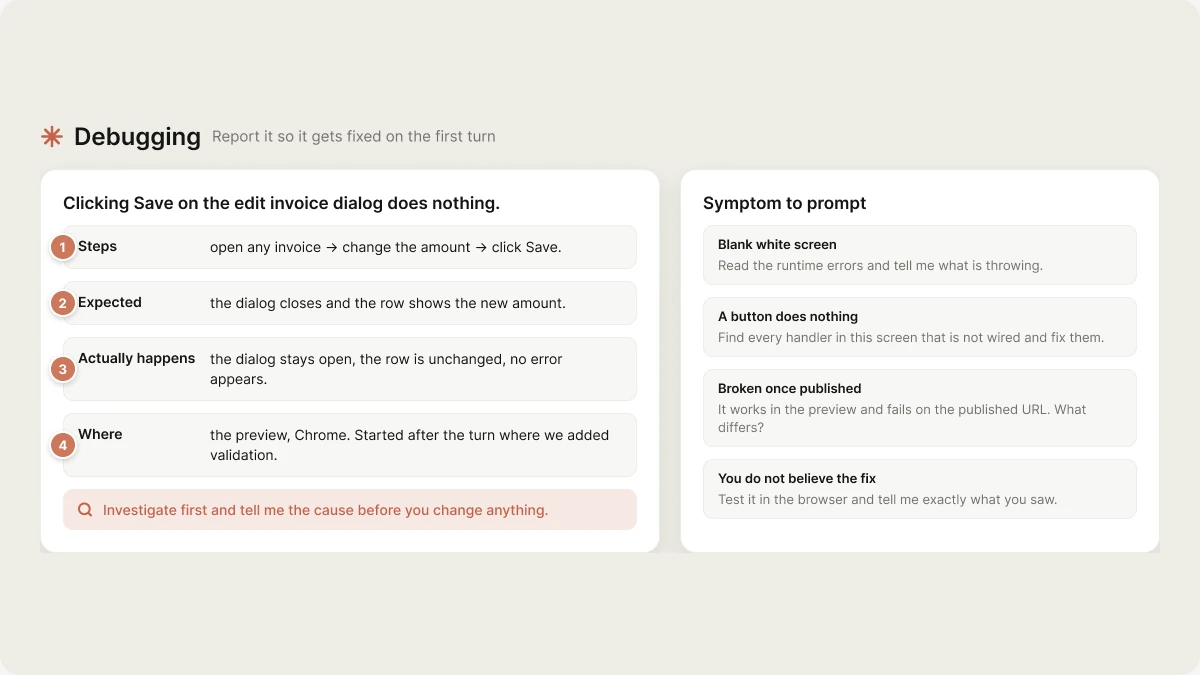
Describe the bug in four lines
Investigate before fixing
The single highest-leverage sentence in a bug report:“Investigate first and tell me the cause before you change anything.”The default is to build, which is right for feature work and wrong for a bug you cannot yet explain. That sentence buys a diagnosis turn. Read it, confirm it matches your symptom, then say “yes, fix that”. For anything that spans several files:
“Trace what happens between clicking Save and the row updating. List every file involved, then tell me where it breaks.”
When it keeps making the same wrong edit
Three attempts on the same bug means the agent is working from a wrong assumption, and a fourth build turn will make the same edit again. Escalate instead of repeating.1
Restate the brief in two lines
Half the time a stuck agent is acting on an outdated assumption from earlier in the chat. A short restatement of what you actually want is the cheapest reset available.
2
Switch to plan mode
3
Rule out your own fix
If it keeps reverting to an approach you rejected, say so explicitly: “We already tried X and it didn’t work — don’t propose it again. Why didn’t it work?”
4
Make it ask instead of guess
5
Start a fresh chat
If the chat is long and the agent is contradicting its own earlier decisions, the context is the problem. Your files are safe in Postgres. Move anything load-bearing into Knowledge first, open a new chat, and restate the bug in the four lines above.
Restart a wedged dev server
Distinguish two failures. A build or type error is code — restarting changes nothing, and asking for a restart to clear one just wastes a turn. A wedged server is the preview being unreachable, stuck on an old bundle, or hung after a dependency change. For a genuinely wedged one:“Restart the dev server.”Edits land in the preview over HMR within about a second, and the platform reloads it for new files, config changes and dependency installs. You should not need a restart to make an edit appear — if you do, that is worth reporting as the bug. If the sandbox itself is unresponsive rather than the dev server, use Restart in the project menu. That rebuilds the sandbox from your current files in the database. The preview URL does not change. On mobile, a stale device build is usually Expo Go holding an old bundle: shake the device, Reload, and re-scan the QR if it does not come back.
Ask for an audit
An audit is a plan-mode question, not a build. Scope it or you get a list too long to act on.Ask for a performance pass
Name the symptom and the surface — “make it faster” is not actionable..map() inside a scroll view instead of a virtualized list, and images loaded without an explicit box. Both are worth naming if you suspect them.
Symptom to prompt
Next
Prompting
Prompt shape, plan mode, and Knowledge.
Prompt library
The bug-report and refactor templates, ready to copy.
Tools
What the agent can and cannot do in plan mode.
Iterate
Build mode, plan mode, visual edits.