

vibely-expo template. Like its web counterpart, the template ships pre-installed and pre-configured so Metro is up and the iframe / Expo Go can mount before the agent writes its first file.
Looking for reusing your own project as a starting point for new projects? That is a different feature — see Workspace templates.
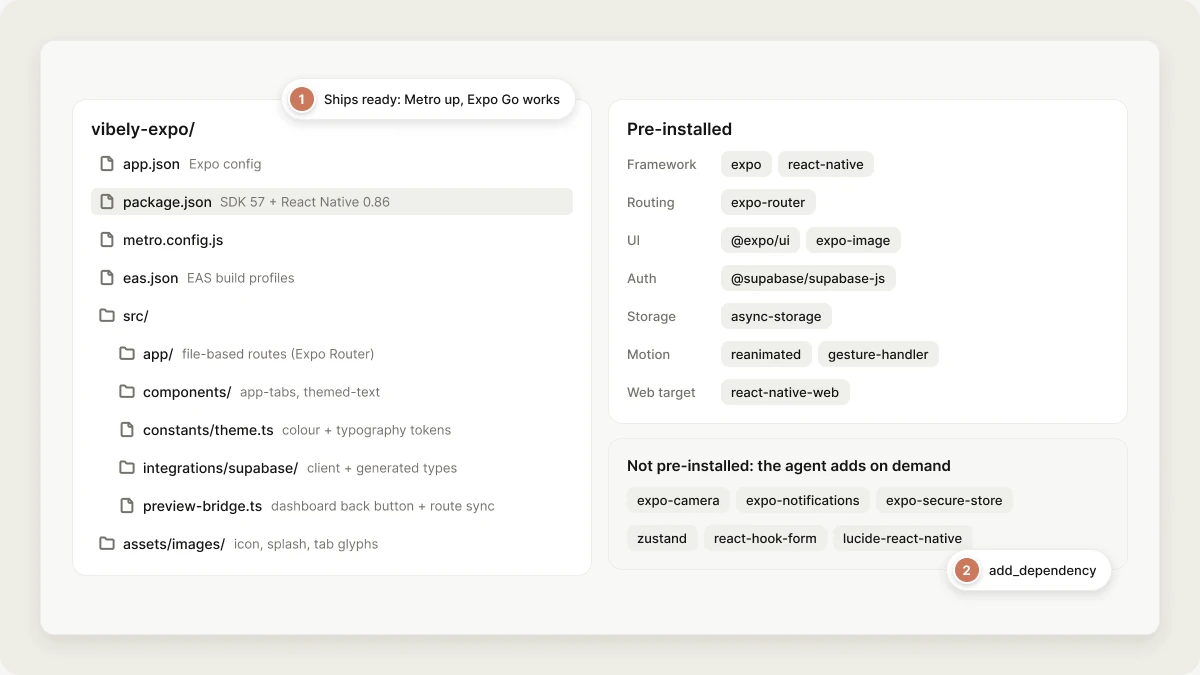
What’s in the box
babel.config.js, no tailwind.config.js and no root global.css:
the template styles with StyleSheet and the tokens in src/constants/theme.ts,
so none of the Tailwind/NativeWind build chain is present.
Default dependencies
State management, forms, icons, charts, camera, push notifications, biometrics
and secure storage are not pre-installed. The agent has
add_dependency
available for those and anything else: common adds are zustand,
@tanstack/react-query, react-hook-form + zod, lucide-react-native,
expo-secure-store, expo-notifications, expo-camera, expo-blur,
expo-linear-gradient, react-native-mmkv.
Why pre-installed
- Metro is up before the first prompt finishes parsing. No
npm installbetween you and a preview. - Expo Go works immediately. The QR code scans into a running app, not a blank build.
- The agent doesn’t waste tokens on RN boilerplate (entry point, navigators, providers). It writes only what varies.
Custom template
To use your own Expo template:- A standard Expo project (
expoin dependencies). startandstart:webscripts that bind to ports detectable byPreviewManager.detectPort().- An
app/directory if you want Expo Router file-based routes (recommended).
Pre-baking the template
In production, templates are baked into the sandbox image:node_modules into the image so a fresh sandbox doesn’t pay for npm install. Re-bake after changing the template’s package.json.