

Creating and attaching design systems requires the Business or Enterprise plan.
Built-in design systems
Vibely includes three design systems that every workspace can use:How design systems are applied
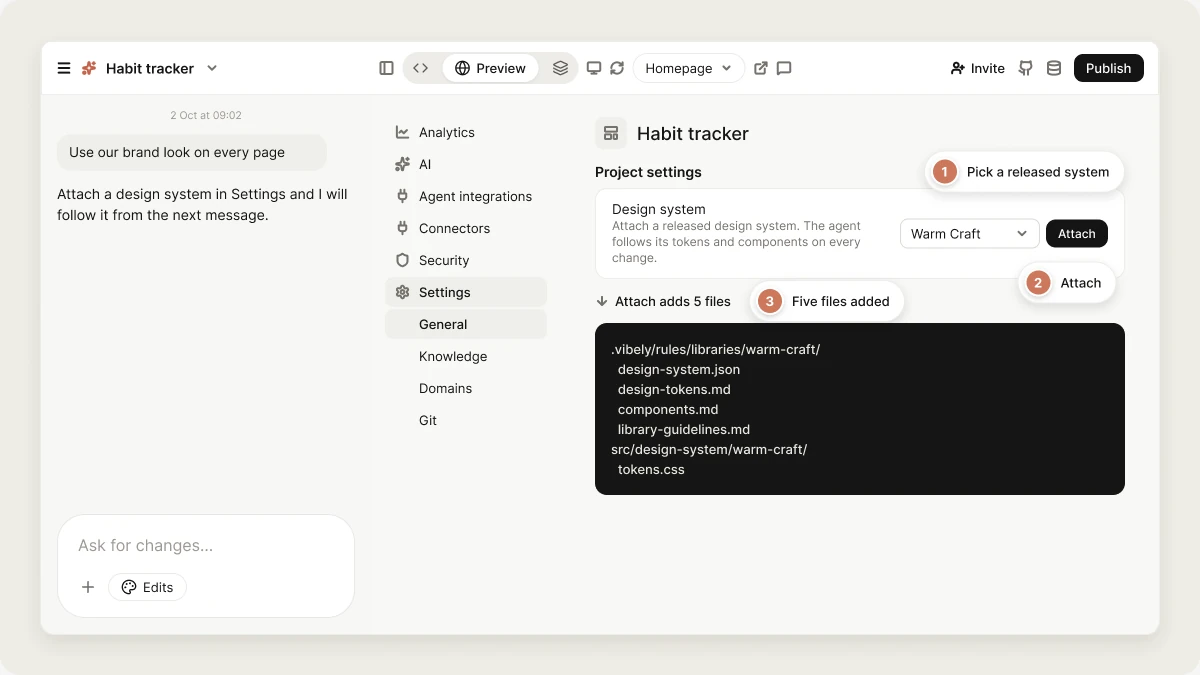
When a design system is attached to a project, Vibely adds these files to it:tokens.css defines the palette and type as CSS variables, and the other files hold the component list and the rules. On every message, Vibely reads the system’s key tokens, component names, and rules, and follows them. It uses the system’s tokens instead of hard-coded colors, builds from the listed components instead of creating one-off versions, and doesn’t bypass the type and spacing scale with inline values.
A project can have one design system at a time. Attaching a different one replaces the first.
Design systems apply to web projects. For mobile projects, set the look with design guidance or with knowledge.
Create a design system from a project
A workspace design system is one of your web projects whoseDESIGN.md describes the system: its palette, fonts, components, and rules.
1
Open Design systems
Go to Settings → Design systems.
2
Pick a project
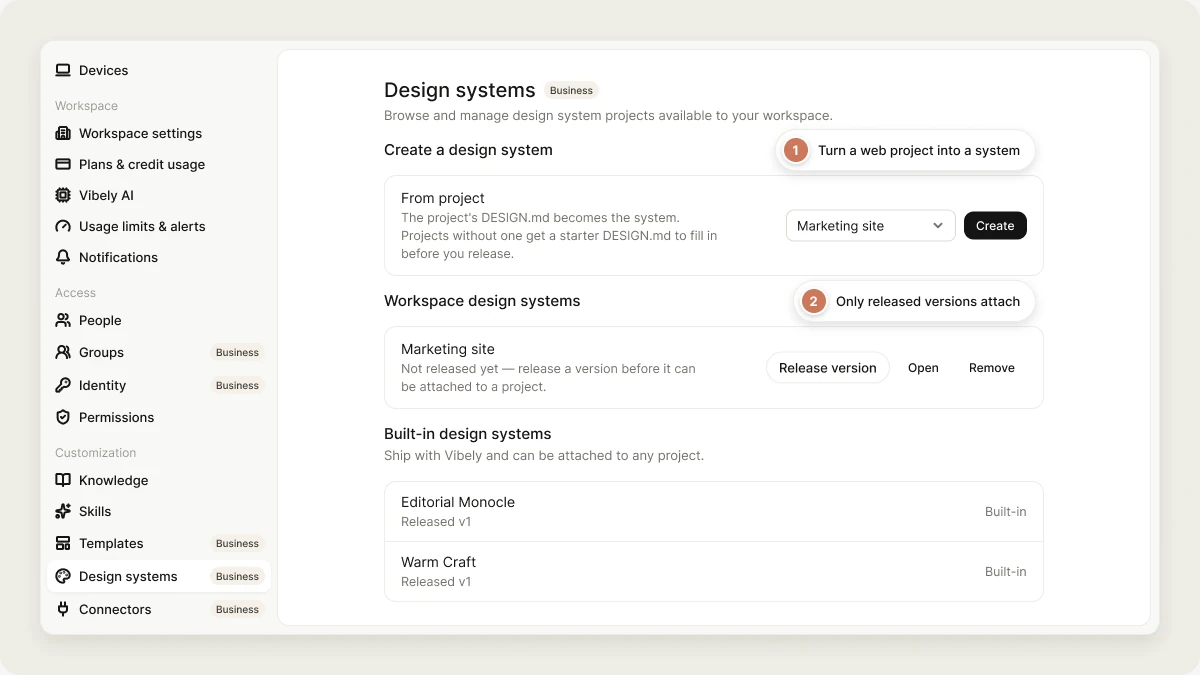
Under Create a design system, choose a web project and click Create. If the project has no
DESIGN.md, Vibely adds a starter one with placeholder colors and fonts.3
Describe the system
Open the project and edit
DESIGN.md so it describes your real design, or ask the agent to write it from the project’s styles.4
Release a version
Back in Settings → Design systems, click Release version. Only released design systems can be attached to projects.
Attach a design system to a project
1
Open the project's settings
In the project, open Settings.
2
Choose a design system
Under Design system, pick a released workspace design system or a built-in one, then click Attach.
list_design_systems), then create a web project with the one you picked (create_project). Vibely attaches it before the first build.
Manage design systems in your workspace
Settings → Design systems has three sections:- Create a design system: turn a web project into a design system.
- Workspace design systems: design systems your workspace owns, with their released version. A workspace design system shows Not released yet until a version is released, and it can’t be attached to a project before then. Click Release version to release the next version, Open to open its project, or Remove to stop using the project as a design system. Removing doesn’t change the project or the projects it’s already attached to.
- Built-in design systems: the three systems that ship with Vibely. They can be attached to any project.
Updates
Releasing a new version of a workspace design system doesn’t change projects it’s already attached to. Re-attaching a system rewrites its five files in the project, and only those files. If you edited any of those files by hand, your edits are replaced.Key notes and limitations
- Business plan. Creating, managing, and attaching design systems need the Business or Enterprise plan.
- Web projects only. Design systems are made from web projects and can’t be attached to mobile projects.
- One per project. Attaching a second system replaces the first. There’s no separate detach option.
- Rules, not components. The component list tells Vibely which components to build and how. It doesn’t ship prebuilt components.
FAQ
What's the difference between a design system and a workspace template?
What's the difference between a design system and a workspace template?
A design system shares design rules: tokens, a component list, and guidelines. A workspace template shares a whole codebase, including real components, pages, and configuration. Use a design system to keep projects visually consistent. Use a template to start projects from the same code.
Can I use a design system with design directions?
Can I use a design system with design directions?
No. When a design system is attached, Vibely builds with it and skips design directions. To explore looks first, create the project without a design system.
Can I bring my own brand colors and fonts without a design system?
Can I bring my own brand colors and fonts without a design system?
Yes. Name them in your prompt, or put them in workspace knowledge so every project uses them.
Related topics
Design guidance
Pick a look before the first build.
Workspace templates
Share a whole codebase across projects.
Vibely MCP server
Create projects from Claude, ChatGPT, and other AI tools.
Knowledge
Rules Vibely follows on every message.