
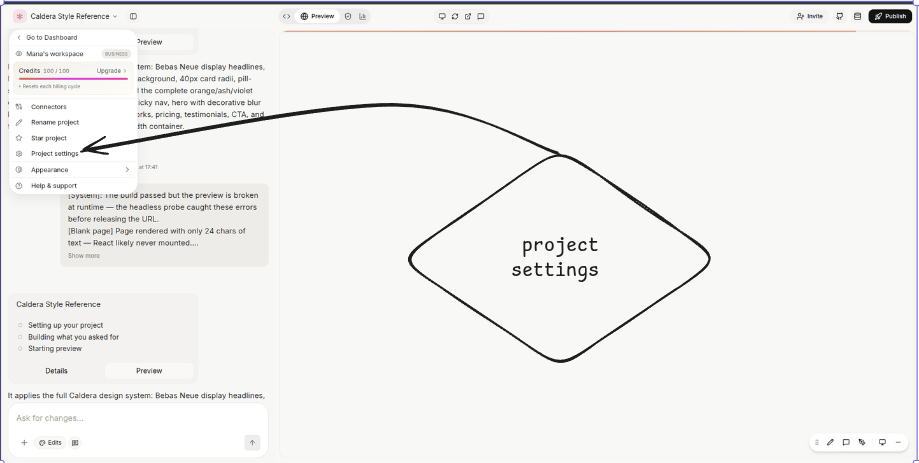
General & Identity
The basics that show up everywhere your project does.- Project name — display name in the dashboard, share links, and emails. Editable by Owner, Admin, and Editor.
- Slug / subdomain (web) — drives the publish URL on
*.vibelyagent.com. 3–63 characters, lowercase letters, digits, and hyphens. A short list of names is reserved —www,api,app,admin,auth,login,dashboard,docs,support,billing,cdn,static,assets,internal, and similar. Changing the slug breaks every existing share URL; Owner only. - Category — optional tag (e-commerce, SaaS, internal tool…) used by AI suggestions and the dashboard’s filters.
Access & Sharing
Who can open, edit, and view the project — independent of workspace membership.Visibility (editor & preview access)
- Restricted — Owner only. (Business)
- Workspace — every member of the workspace.
Collaborators
Invite individuals by email with a role of Admin / Editor / Viewer, scoped to this project only. Invite volume is rate-limited per user to keep accidental loops from spamming people. Effective permission = max(workspace role, project collaborator role, group access). The more-permissive grant wins.Shared link
Generate a single shareable link with a fixed role (Editor / Viewer / disabled). Viewer role on a Shared link is Pro+. Regenerating the link invalidates the old token; people who already accepted stay in.Access requests
When a project is Restricted, others in the workspace can request access at a specific role. The owner approves or denies in the panel, and the requester is emailed when a result is recorded (provided email is configured for the workspace).Team access (Business)
Grant a whole member group Editor, Viewer, or read-only Viewer access in one move. Removing a group grant doesn’t touch individual collaborator grants.Public remixing
Toggle to let anyone with the preview link open the project without signing in. Useful for prototypes, hackathon submissions, and “click to remix” templates. Turning it off purges the edge cache within about a minute.Environment variables & secrets
Per-project key / value store for runtime configuration — API keys, feature flags, third-party tokens that aren’t covered by a workspace connector.- Add / edit / delete keys from Settings → Environment. Editable by Owner, Admin, and Editor.
- Secret masking — mark a value as secret to encrypt it at rest and mask it in the UI. Secret values never round-trip to the browser and are not logged.
- Scope — values are injected at sandbox boot. There’s no separate preview / prod split yet; one value applies everywhere this project runs.
- Reserved keys — Vibely injects a handful of system variables for the gateway, AI access, and the linked Supabase project (URL, anon key, service-role key). These appear in the panel as read-only and can’t be deleted.
- Override rule — when a key exists at both workspace and project level, the project-level value wins.
Connectors
OAuth and API-key connections to external services (Slack, HubSpot, GitHub, Stripe, Supabase, Notion…). Connectors are established at the workspace level and can optionally be pinned to a single project.- Begin OAuth, list connections, disconnect — all from the connector’s row in the panel.
- Bring your own OAuth app — workspace Owner / Admin can register a custom client ID and secret per provider. Changing the credentials forces re-auth for everyone using that connector.
- Per-project scoping — a project-bound connection isn’t visible to other projects in the workspace, even if the same connector is set up workspace-wide.
Domains (web only)
How the live site is reached on the public internet.- Auto subdomain — every project gets a free
*.vibelyagent.comURL on creation. - Custom domain — add a subdomain (CNAME to the Vibely apex) or an apex domain (anycast A record, or CNAME flattening if your DNS host supports it — Cloudflare DNS, Namecheap, DNSimple, and ClouDNS all do).
- Verification flow — status progresses pending → cert pending → active, or failed with the underlying error. Vibely re-checks DNS automatically every few seconds; you can force a recheck from the panel.
- Primary domain — pick one. Non-primary hostnames serve a permanent redirect to the primary. DNS TTL changes can take up to an hour to propagate.
wwwauto-pair — adding an apex domain automatically registerswww.<apex>as a hidden redirect to the primary, so both versions resolve correctly.- Remove a domain — Owner only. The TLS certificate is destroyed and the site becomes unreachable on that hostname immediately; the auto
vibelyagent.comURL keeps working.
Deploy & publish (web)
- Publish — kick off a build and deploy from the project header. Web projects can target Vibely’s default hosting or, when configured, an external host. Mobile projects publish through Mobile settings instead.
- Website access — controls who can visit the published site (separate from editor visibility):
- Public — anyone with the URL (Free and up).
- Restricted / Workspace / Group-only — Business.
- Title & description — Open Graph metadata that appears on the published site and in social previews. Social caches can lag a few minutes after a change.
- Deployment history — every build with its status (queued / building / ready / failed), trigger, and live URL.
- Rollback — activate any prior ready deployment instantly — no rebuild required.
GitHub & source control
Connect a GitHub repo and Vibely keeps it in sync with your project.- Connect / disconnect repo — pick or create a repo. Disconnecting doesn’t delete the repo or the project; they just stop talking.
- Branch selection — choose which branch is live. Defaults to
main. - Push / pull — push commits with a message, or pull edits made directly in the repo. Pulls let you choose ours or theirs when there’s a conflict.
- Auto-deploy on push — a webhook triggers a deploy when commits land on the live branch. These deploys count toward credit usage, same as in-app builds.
Database & backend (Supabase)
Link the Supabase project this Vibely project uses for auth, database, storage, and Edge Functions.- Link Supabase project — provide the project URL, the anon key, and the service-role key. The service-role key is treated as a secret and is server-only.
- Schema browser — read-only view of tables, columns, and row-level security policies, surfaced from the Supabase Management API.
- Auth integration toggle — turn auth on or off. Disabling removes the auth middleware on the next build.
supabase_setup tool reads whatever is configured here.
Mobile settings (mobile only)
Visible when the project is a Mobile App build (Expo / React Native).- Bundle ID / package name — e.g.
com.company.app. Changing this after a store release breaks OTA updates and forces a new listing. - App version (semver) and build number — build number must strictly increase per version.
- Deep-link scheme — your app’s custom URL scheme. Pick something unique to avoid colliding with other installed apps.
- Build target channel:
- Expo Go — dev preview, no native build.
- EAS Internal — ad-hoc QA builds for distribution to a small list of testers.
- EAS Store — production builds for TestFlight and Play Console.
- Code signing — auto (Vibely-managed certificates) or manual (upload your own
.p12or keystore). - Push notifications — toggle on; requires FCM / APNs setup separately.
- Store links — App Store and Play Store URLs, displayed in the dashboard.
- Credentials upload — encrypted iOS
.p12and Android keystore storage; only the Owner can revoke uploaded credentials. - Release notes — per-version text shown in update prompts.
Design settings (design only)
Visible when the project is a Vibely Design build.- Design template — base framework selected at creation.
- Top niche / category — drives the design agent’s suggestions and example library.
- Design system reference — link to or pasted text describing the system you’re matching.
- Typography preference — default font stack used by the agent.
- Color branding — primary brand HEX values; surfaces in tokens, components, and previews.
- Design files / artboards — versioned files for the design canvas; deletes leave a recoverable history.
Security
Project-level security scanning, with results that also feed the workspace-wide Security Center. The same engine drives the inline Security panel covered in Web security and Mobile security.- Run scan — async; covers four scanners: RLS, DB, Code, Dependencies.
- Scan mode — pick Basic (fast, high-signal) for everyday iteration, Deep (exhaustive, follows data flow) before a production release. Both feed the same findings list.
- Findings list — filter by severity (error / warning / info) and by scanner.
- Fix with prompt — each finding has a one-click action that drafts a fix prompt back to the agent.
- State management — each finding moves through open → ignored / fixed → stale (auto-marked when a fresh scan no longer reports it). Ignored findings require a reason for the record.
- Dependencies view — every dependency with its current version and any matched CVEs.
- Export findings — JSON download for offline review or ticket import.
- Auto-verify on build — security scan + typecheck run after every build, sharing a small self-heal attempt budget.
- Pre-deploy gate — when you click Deploy on a web project (or start a publish on mobile), Vibely re-runs the scan and surfaces blockers/warnings in the modal before shipping. See Web security → Pre-deploy scan.
Plan gating on scan depth
The depth of scan available varies by tier. Basic is broadly available; Deep is gated by plan. Open Settings → Security Center for the current matrix under your plan.Restricted sharing & access requests
When a project’s visibility is Restricted or its website access is Workspace-only / Group-only, visitors and workspace members who aren’t on the list see a request-access screen instead of a 404.- Submit a request — the requester adds a short note and the role they want.
- Approve / decline — Owner and Admin see pending requests in the project settings panel. Approving grants the role; declining notifies the requester.
- Audit trail — every decision is recorded against the actor for review.
Per-project credit usage analytics
Workspace billing rolls up to the workspace, but every project surfaces its own credit usage so you can see where spend is going.- Usage breakdown — credits this billing period, grouped by mode, tool, and model.
- Per-turn cost — drill in to see how each agent turn was billed.
- Available on Pro and Business — Free workspaces don’t expose the per-project meter at this granularity.
- Opt out — toggle the Disable analytics switch (covered under Analytics) to stop project-level analytics collection. The usage rollup still happens for billing.
Analytics
- Visit analytics — page views, unique visitors, geography, top referrers. Aggregated hourly, not real-time.
- Build & deploy metrics — counts, frequency, last deployment time and status.
- Credit usage per project — visible on Pro and Business. Free shows an “Unlimited” placeholder since the meter isn’t surfaced per project at that tier.
- Disable analytics — opt out of visit-tracking entirely from the panel.
Templates & Marketplace
Two distinct “share this as a starting point” surfaces.Workspace template (Business)
Mark the project as a template so members can spin up new projects from it. Captures the current files, design tokens, and project type. Owner / Admin can mark, set a default template that’s pre-selected on the New project screen, or unmark — unmarking automatically clears the default. Creating new projects from a template is rate-limited per user.Marketplace listing
Publish the project as a public template anyone on Vibely can install.- Publish — Vibely strips sensitive files automatically:
*.env, common credential files (credentials.json,serviceAccountKey.json,*.pem), and anything whose path containssecret. - Edit listing — name, description, category, tags, thumbnail.
- Unpublish — sets the listing to draft. Existing download and fork counts persist so you can republish later without resetting metrics.
Public messaging flag
Toggles whether the project’s in-app chat / messaging surface is exposed publicly. Off by default — turn on only for projects that intentionally need an anonymous-visitor chat path.Danger zone
Owner-only operations grouped together so you don’t trigger them by accident.- Transfer project to another workspace — moves the project, secrets, deployments, and connectors with it. Workspace-scoped integrations (e.g. Slack) need to be re-bound in the destination workspace. Collaborators who aren’t members of the destination workspace lose access.
- Archive — soft delete. Builds are disabled, but the live site stays up. Unarchive in one click.
- Delete (permanent) — kills the sandbox session, invalidates the preview, deletes screenshots, clears AI memory, removes stored files, and drops the project record. The live site goes offline immediately. No recovery.
- Leave — collaborators can self-remove. Owners must transfer ownership or delete the project instead.