
*.vibelyagent.com URL, your own custom domain, or both.
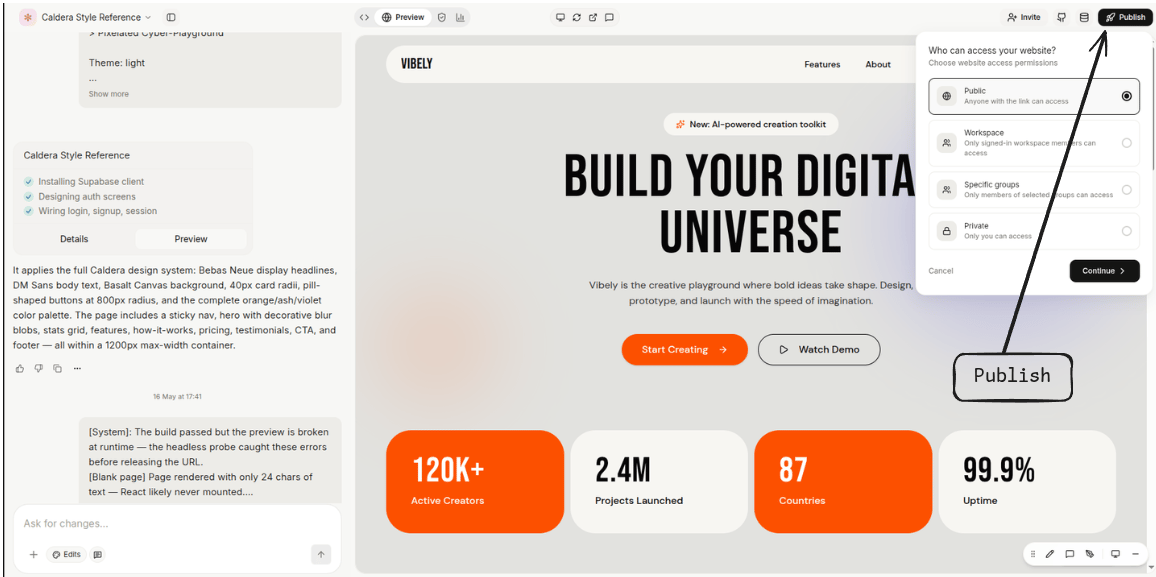
Preview vs published
Two URLs coexist for every project.
The preview URL is for development. For users, always publish.
Publishing
Project menu → Publish. Pick a slug, click Publish. Vibely builds the app, deploys it to the edge, and your URL goes live in under 30 seconds. Re-publish to push changes. Each publish creates a new version; previous versions stay around so you can roll back instantly if something breaks.Features
Branded *.vibelyagent.com URL
Every project gets a free <your-slug>.vibelyagent.com. The slug is global (first-come, first-served) but you can change it any time — the previous slug becomes available to others within 30 days.
Good for: shipping a portfolio piece, sharing a demo, hosting a side project you don’t want to pay for a domain on.
Custom domain
To serve atapp.example.com:
1
Open Domains
Project menu → Domains → Add domain.
2
Add the DNS record
Vibely shows you a
CNAME record to add at your registrar. Pointing app.example.com → cname.vibelyagent.com is the typical setup. For an apex domain (example.com), use ALIAS / ANAME if your provider supports it; otherwise, redirect apex → www.3
Verify
Click Verify. Vibely checks the DNS, provisions a TLS certificate via Let’s Encrypt, and switches your published URL to the custom domain. Provisioning typically completes in <2 minutes.
- DNS hasn’t propagated yet — wait 5 minutes and retry
- An existing
A/AAAArecord at the same name — remove it first - Cloudflare proxying enabled on your registrar — disable the orange cloud (Vibely provisions its own cert at the edge)
Access controls
Restrict who can load your published URL. Enforced at the edge, before traffic reaches your app.
Switch modes any time from Project menu → Publish → Access. Changes take effect immediately.
Access requests
When a project is restricted (workspace-only or group-only), visitors who aren’t on the list see a request-access screen instead of a 404. They submit a short note; project owners and admins see the request in the project’s settings panel and approve or decline from there. This is the path most teams use to onboard a new collaborator onto a published app without inviting them to the whole workspace first.Iframe embedding
Published apps work as iframes anywhere by default — Notion, Webflow, slides, your portfolio. No frame-blocking headers in the way. If you’d rather not be embeddable on a custom domain (common for production apps with sensitive flows), toggle Frame-Options → Same-origin only in domain settings.Version history & rollback
Every publish creates a versioned build. The project’s Versions tab lists them with timestamp, slug, and a one-line note of what changed. Click any previous version → Restore to roll back. The URL points at the older build within seconds; no rebuild needed. Roll forward the same way. Good for: catching a broken release, A/B comparing two designs at the same URL, restoring after an accidental delete.Export to GitHub
Project menu → Export → GitHub. Pick a repo (or let Vibely create one), and the project is committed as a normal Vite + React project.bun install && bun devworks locally without Vibely- Re-import via Connect GitHub to keep the project in sync both ways
- Code is yours — no proprietary runtime, no special build step, nothing that ties the codebase to Vibely once it’s out
Hosting elsewhere
The build output is a staticdist/ directory. Drop it on any static host:
- Vercel / Netlify / Cloudflare Pages — connect the GitHub repo, point at
bun run build, deploy - S3 + CloudFront / Bunny / Fastly — upload
dist/and point your CDN at it - Your own server —
npx serve distor any static file server
Auto-publish from GitHub
Once GitHub is connected, every push tomain (configurable) can auto-publish to a chosen domain. Useful when you’ve graduated from “prompt-driven iteration” to “team of developers editing the codebase directly.”
Toggle in Project menu → Publish → Auto-publish.
Limits
- Free
*.vibelyagent.comURLs are best for demos and side projects; for branded production, custom domains are the way. - Static hosting only on Vibely’s side — for serverless functions, use Supabase Edge Functions or Inngest via Connectors.
- Access control modes are mutually exclusive — pick whichever scope you need. Workspace-only and group-only require Business.