
Connectors
Vibely connectors come in two flavours, and they do different jobs.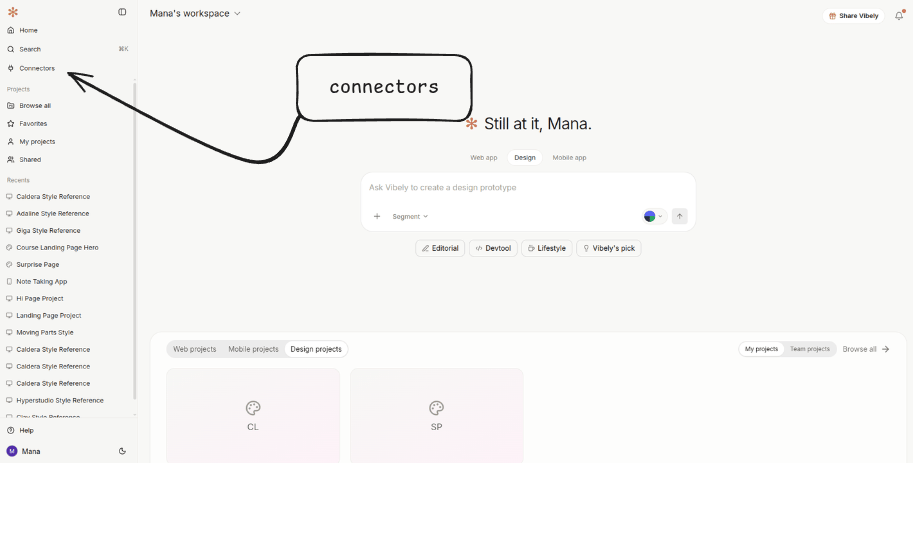
Some services carry both surfaces (Notion, Linear, Stripe, Slack, HubSpot, PostHog, Amplitude, Sentry, Shopify, Sanity, Contentful, Resend, Google Calendar, GitHub — currently ~13). Connect each one once on each side; they’re independent.
Catalog
Every App connector Vibely ships with, plus which ones also carry an MCP surface.
MCP / Chat connectors
The 46+ services the agent can read while building — Figma, Atlassian, Neon, and more.
Native integrations
First-party app-side wiring: Supabase, Stripe, Razorpay, Resend, Tavily, Firecrawl, Google AI.
Auth & secrets
Where each credential lives, scope policy, and what the agent never sees.
Which one do I need?
Use the question, not the brand name.
If you connect Slack as an MCP connector and then ask the agent to “send a Slack message when a user signs up,” the agent will tell you that’s an App-side capability and walk you through adding the App connector. The two surfaces don’t substitute for each other.
How App connectors work
When you ask the agent to wire a third-party service into your project, it picks the right connector, scaffolds typed files into your codebase, and asks you to connect the service in the Connectors panel.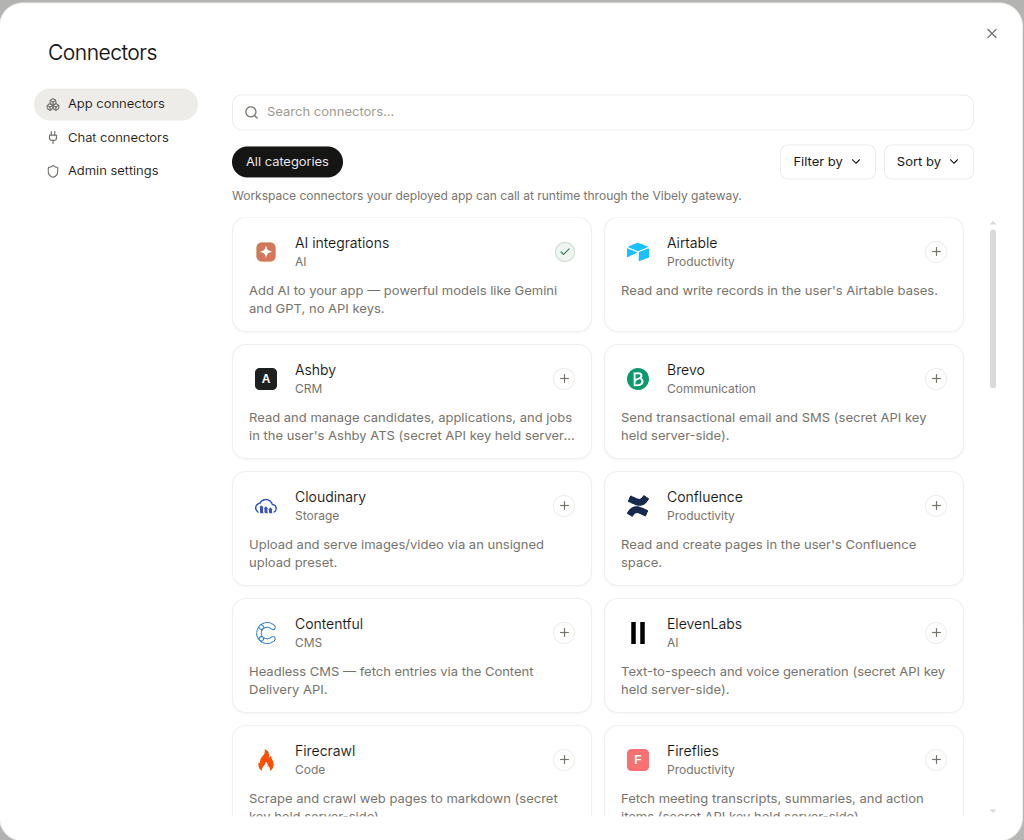
- Direct client. The connector’s key is safe to ship in the browser/mobile bundle (public DSN, Storefront token, dataset id). The agent installs the upstream SDK and reads its key from
VITE_*(web) orEXPO_PUBLIC_*(mobile). Examples: Sanity, Contentful, Shopify Storefront, PostHog, Sentry, Amplitude. - REST client with a key from the bundle (web only). Used for Resend, Perplexity, Firecrawl, ElevenLabs. The mobile variant is intentionally blocked because bundling a server key into an APK leaks it; mobile apps get routed through the Edge-Function pattern instead.
- Supabase Edge Function proxy. A Deno function holds the secret in Supabase Vault and proxies HTTP calls. The client wrapper invokes it via
supabase.functions.invoke(slug, ...). This is what Telegram, Notion, Linear, Jira, BigQuery, Snowflake, etc. ship today. - OAuth via Vibely. Gmail, Slack, and a growing set run on a Vibely-hosted OAuth proxy. Vibely handles the OAuth dance, holds refreshed tokens, and forwards each call.
How MCP / Chat connectors work
MCP (Model Context Protocol) connectors don’t write any code into your project. They expose a set of tools — list issues, get page, search nodes — that the agent can call during the build conversation to pull live data.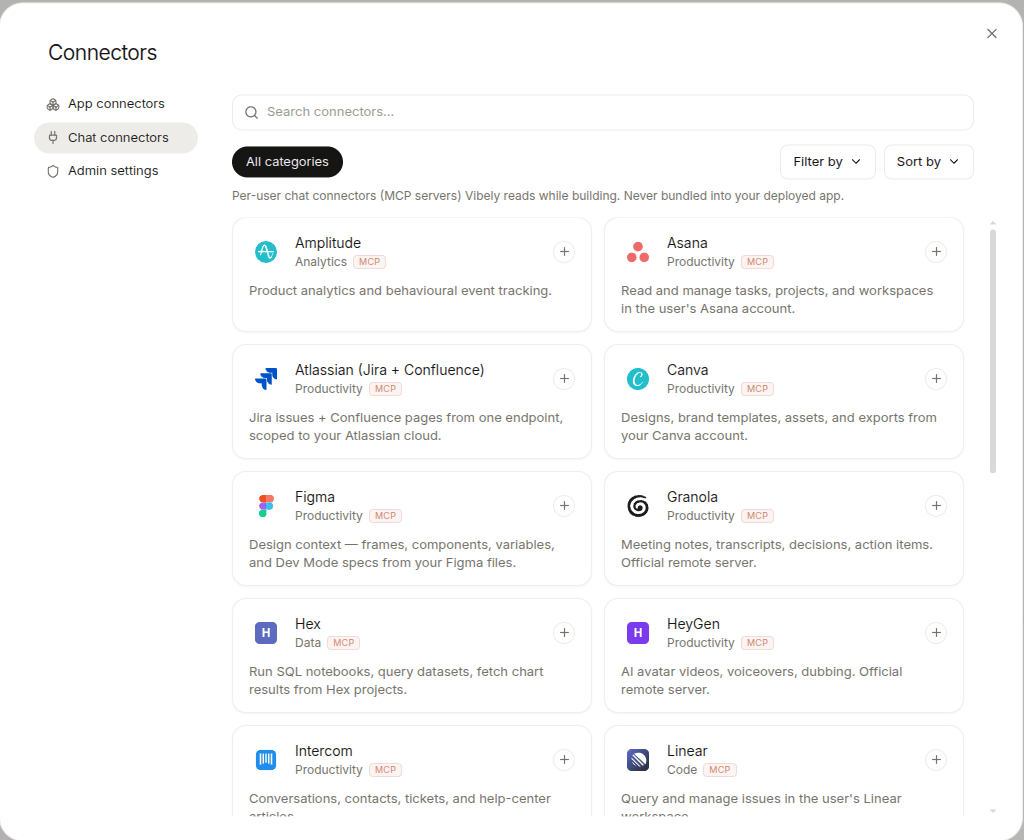
What’s available
- App connectors — see the live Catalog for the current list.
- MCP / Chat connectors — see MCP / Chat connectors for the current list and categories.
- A subset of services carry both surfaces — connect each one once per surface.
- 4 scaffold patterns for App (direct, REST web-only, Edge Function proxy, OAuth via Vibely).
- 6 MCP categories — dev, knowledge, productivity, data, monitoring, generic (incl. bring-your-own).
Native integrations (first-party)
These deliberately stay out of the connectors catalog — the agent’s system prompt, templates, and tools know about them at a deeper level:
First-party integrations are App-side only. For build-time context from the same vendor (e.g. agent-side Figma access), use MCP / Chat connectors.
See Native integrations for setup details.
Asking for a connector
The agent picks the right one from your prompt, but you can name it explicitly:
“Add the Slack App connector. When a user signs up, post their email to #new-signups.”
“Connect Figma as an MCP server so you can read the design tokens while building.”
If a service you want isn’t in either catalog, ask anyway — for many public REST APIs the agent can write a direct fetch wrapper plus an Edge Function in one turn.
Limits
- Rate limits are the third party’s. Vibely doesn’t proxy or buffer — your app talks to Slack / Linear / BigQuery directly (or via the OAuth proxy for Gmail / Slack, which mirrors upstream limits).
- No long-running workers. App connectors run from request handlers and Edge Functions. For scheduled jobs, use Supabase pg_cron or roll your own background queue.
- Mobile-incompatible web App connectors. Resend, Perplexity, ElevenLabs, Firecrawl scaffold for web only — using them from an Expo project requires an Edge Function instead.
- MCP / Chat connectors don’t ship with your app. They’re build-time only. If you need the same data at runtime, add the matching App connector too.