> ## Documentation Index
> Fetch the complete documentation index at: https://docs.vibely.sh/llms.txt
> Use this file to discover all available pages before exploring further.
# MCP Tools
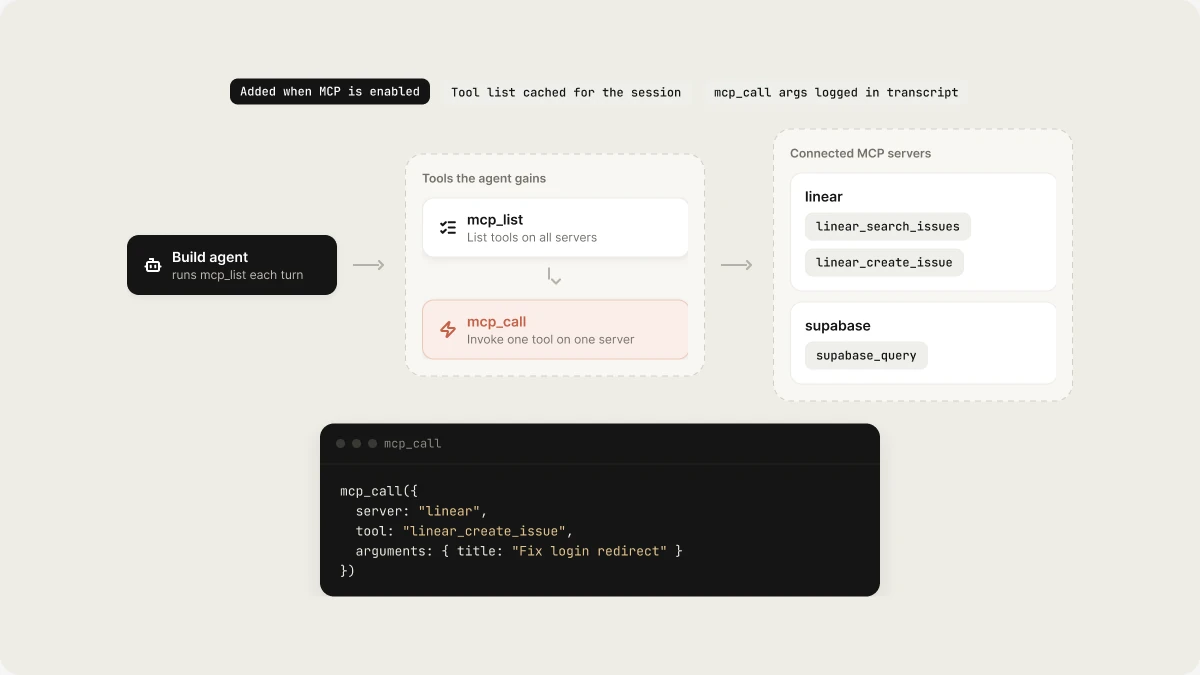
> Tools the build agent gains when MCP servers are connected
When MCP is enabled, the build agent gains two additional tools.
 ## `mcp_list`
Lists all tools from all connected MCP servers.
```
Agent: "What tools do I have access to?"
→ mcp_list()
→ [
{ server: "linear", tool: "linear_search_issues", ... },
{ server: "linear", tool: "linear_create_issue", ... },
{ server: "supabase", tool: "supabase_query", ... },
]
```
## `mcp_call`
Invokes a specific tool on a specific server.
```
Agent: "Create a Linear issue for this bug"
→ mcp_call({
server: "linear",
tool: "linear_create_issue",
arguments: { title: "Fix login redirect", ... }
})
```
## Tool discovery
The agent discovers available tools at the start of each turn by calling `mcp_list`. It caches the tool list for the session — if you add a server mid-build, the agent will pick it up on the next turn.
## Security
* MCP servers run in the same network as the build agent
* Server credentials are stored in `.mana/mcp.json` (never committed)
* The agent only calls tools the user's prompt implicitly or explicitly requests
* `mcp_call` arguments are logged and visible in the turn transcript
## Related topics
- [Publish your app as an MCP server](/features/grow/agent-integrations.md)
- [Tools](/reference/engine/tools.md)
- [Vibely MCP server](/integrations/vibely-mcp-server.md)
- [MCP Servers API](/api-reference/mcp-servers.md)
- [External MCP Servers](/reference/mcp/external-servers.md)
This documentation is built and hosted on [Mintlify](https://mintlify.com), a developer documentation platform.
## `mcp_list`
Lists all tools from all connected MCP servers.
```
Agent: "What tools do I have access to?"
→ mcp_list()
→ [
{ server: "linear", tool: "linear_search_issues", ... },
{ server: "linear", tool: "linear_create_issue", ... },
{ server: "supabase", tool: "supabase_query", ... },
]
```
## `mcp_call`
Invokes a specific tool on a specific server.
```
Agent: "Create a Linear issue for this bug"
→ mcp_call({
server: "linear",
tool: "linear_create_issue",
arguments: { title: "Fix login redirect", ... }
})
```
## Tool discovery
The agent discovers available tools at the start of each turn by calling `mcp_list`. It caches the tool list for the session — if you add a server mid-build, the agent will pick it up on the next turn.
## Security
* MCP servers run in the same network as the build agent
* Server credentials are stored in `.mana/mcp.json` (never committed)
* The agent only calls tools the user's prompt implicitly or explicitly requests
* `mcp_call` arguments are logged and visible in the turn transcript
## Related topics
- [Publish your app as an MCP server](/features/grow/agent-integrations.md)
- [Tools](/reference/engine/tools.md)
- [Vibely MCP server](/integrations/vibely-mcp-server.md)
- [MCP Servers API](/api-reference/mcp-servers.md)
- [External MCP Servers](/reference/mcp/external-servers.md)
This documentation is built and hosted on [Mintlify](https://mintlify.com), a developer documentation platform.