> ## Documentation Index
> Fetch the complete documentation index at: https://docs.vibely.sh/llms.txt
> Use this file to discover all available pages before exploring further.
# Debugging
> Report a bug so it gets fixed on the first turn, and unstick a build that has gone in circles
Most "the agent can't fix it" sessions are a description problem, not a model problem. The agent gets your words and the code — not your screen. This page is the loop: describe it properly, make it investigate before it edits, escalate to plan mode when it repeats itself, and reset the things that are genuinely wedged.
 ## What gets checked automatically, and what does not
| Runs on every turn, no prompt needed | Only when you ask for it |
| - | - |
| TypeScript type-check of the project | Clicking through a flow in a browser |
| Web: every route loaded in a headless browser to catch runtime errors | Taking a screenshot to judge how something looks |
| Mobile: the Metro bundle gate | Testing a form actually submits |
| Failures handed back to the agent to fix before the turn ends | Checking a fix on a real device |
The second column is the important one. **Verification is on-demand.** The agent does not self-review its work and does not drive the browser unless your prompt asks it to — forced self-review is switched off. So if you want proof rather than a claim, type the words:
> "Test the login flow in the browser and tell me what you saw."
Without that, "I've fixed it" means "the code type-checks and the routes load", which is a real gate but not the same as "the button works".
On a broken preview the agent's first move is to read the console the preview already captured — no browser round-trip, no waiting. It only opens a browser when that log does not explain the failure, or when you asked it to.
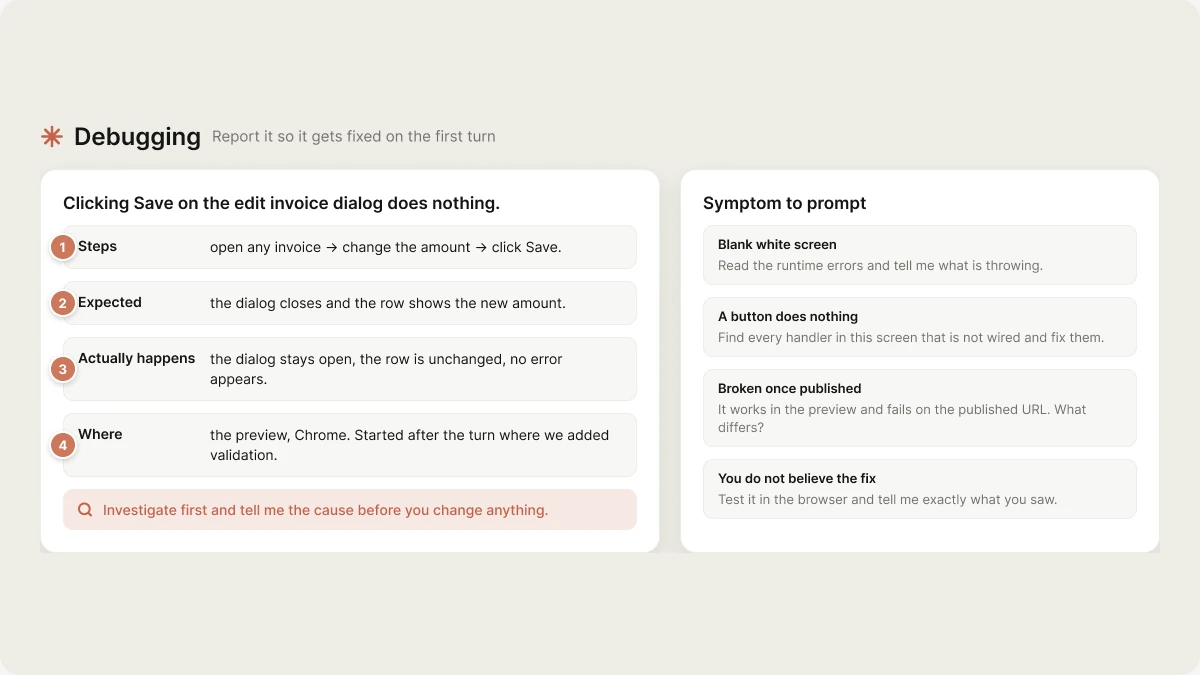
## Describe the bug in four lines
| Line | Why it matters |
| - | - |
| **Steps** | Without a repro the agent guesses which code path you're on. Half of wrong fixes start here. |
| **Expected** | Sometimes the code is right and the expectation moved. That is a spec change, not a bug. |
| **Actually happens** | "Nothing happens", "it spins forever" and "it shows an error" are three different causes. |
| **Where** | Preview or published; web preview or a real device; which browser. This one line often names the cause by itself. |
```text theme={"system"}
Clicking Save on the edit invoice dialog does nothing.
Steps: open any invoice → change the amount → click Save.
Expected: the dialog closes and the row shows the new amount.
Actually happens: the dialog stays open, the row is unchanged, no error appears.
Where: the preview, Chrome. Started after the turn where we added validation.
Investigate first and tell me the cause before you change anything.
```
"Started after X" is worth more than it looks — it narrows the search to one turn's diff.
**Paste errors verbatim.** The full message and stack, not a paraphrase. A retyped error loses the file, the line and the exact identifier, which is most of the information. If the app is live, its runtime errors come back to your project automatically — see [Runtime errors](/features/grow/monitoring).
## Investigate before fixing
The single highest-leverage sentence in a bug report:
> "Investigate first and tell me the cause before you change anything."
The default is to build, which is right for feature work and wrong for a bug you cannot yet explain. That sentence buys a diagnosis turn. Read it, confirm it matches your symptom, then say "yes, fix that".
For anything that spans several files:
> "Trace what happens between clicking Save and the row updating. List every file involved, then tell me where it breaks."
## When it keeps making the same wrong edit
Three attempts on the same bug means the agent is working from a wrong assumption, and a fourth build turn will make the same edit again. Escalate instead of repeating.
Half the time a stuck agent is acting on an outdated assumption from earlier in the chat. A short restatement of what you actually want is the cheapest reset available.
```text theme={"system"}
Switch to plan mode. Don't change anything. Read the save path end to end
and tell me what's actually causing this — including anything you assumed
earlier that turned out to be wrong.
```
Plan mode is read-only, so the agent cannot patch its way out of thinking. You get a diagnosis you can argue with.
If it keeps reverting to an approach you rejected, say so explicitly: "We already tried X and it didn't work — don't propose it again. Why didn't it work?"
```text theme={"system"}
If you're uncertain which of these is happening, ask me — don't guess.
```
The agent will pause and ask a real question rather than picking a branch.
If the chat is long and the agent is contradicting its own earlier decisions, the context is the problem. Your files are safe in Postgres. Move anything load-bearing into Knowledge first, open a new chat, and restate the bug in the four lines above.
## Restart a wedged dev server
Distinguish two failures. A **build or type error** is code — restarting changes nothing, and asking for a restart to clear one just wastes a turn. A **wedged server** is the preview being unreachable, stuck on an old bundle, or hung after a dependency change.
For a genuinely wedged one:
> "Restart the dev server."
Edits land in the preview over HMR within about a second, and the platform reloads it for new files, config changes and dependency installs. You should not need a restart to make an edit appear — if you do, that is worth reporting as the bug.
If the sandbox itself is unresponsive rather than the dev server, use **Restart** in the project menu. That rebuilds the sandbox from your current files in the database. The preview URL does not change.
On mobile, a stale device build is usually Expo Go holding an old bundle: shake the device, Reload, and re-scan the QR if it does not come back.
## Ask for an audit
An audit is a plan-mode question, not a build. Scope it or you get a list too long to act on.
```text theme={"system"}
Switch to plan mode. Audit the database policies: list every table, whether RLS
is on, and whether the policies actually restrict rows to their owner. Flag
anything a logged-in user could read that isn't theirs. Don't change anything.
```
```text theme={"system"}
Switch to plan mode. Audit accessibility on the checkout flow only: labels,
focus order, contrast, and whether the errors are announced. Give me a ranked
list with the file and line for each.
```
```text theme={"system"}
Switch to plan mode. Find every place we still have placeholder content,
dead buttons, or a control that looks interactive and does nothing.
```
Then pick from the list one turn at a time. "Fix everything you found" produces a large diff you cannot review.
## Ask for a performance pass
Name the symptom and the surface — "make it faster" is not actionable.
```text theme={"system"}
The invoice list takes about four seconds to render with 2,000 rows, and typing
in the filter box lags. Find out why, then fix it. Don't change the design.
```
```text theme={"system"}
The app takes too long to show anything on a cold load. Investigate what's
blocking the first paint and tell me the three biggest wins before fixing.
```
On mobile, the common ones are a long list rendered with `.map()` inside a scroll view instead of a virtualized list, and images loaded without an explicit box. Both are worth naming if you suspect them.
## Symptom to prompt
| Symptom | Type this |
| - | - |
| Blank white screen | "The preview is blank. Read the runtime errors and tell me what's throwing." |
| A button does nothing | "This control is a no-op. Find every handler in this screen that isn't wired and fix them." |
| Works in preview, broken once published | "It works in the preview and fails on the published URL. What differs between the two?" |
| Works in the web preview, broken on device | "It works in the web preview but fails in Expo Go on my phone. That means it's native — investigate." |
| A query returns nothing but there is data | "The query returns an empty array but rows exist. Check the RLS policies and the grants on that table." |
| Something broke that used to work | "This worked before \[turn/feature]. Compare against how it was and tell me what changed." |
| Dark mode is unreadable | "Find every hard-coded colour in these screens and move them onto theme tokens." |
| You do not believe the fix | "Test it in the browser and tell me exactly what you saw, step by step." |
## Next
Prompt shape, plan mode, and Knowledge.
The bug-report and refactor templates, ready to copy.
What the agent can and cannot do in plan mode.
Build mode, plan mode, visual edits.
## Related topics
- [Implement changes in Build mode](/features/agent/build-mode.md)
- [Add a third-party analytics tool](/integrations/connectors/analytics.md)
- [Plan a change in Plan mode](/features/agent/plan-mode.md)
- [Iterate](/features/web-apps/iterate.md)
- [Prompt library](/prompting/library.md)
This documentation is built and hosted on [Mintlify](https://mintlify.com), a developer documentation platform.
## What gets checked automatically, and what does not
| Runs on every turn, no prompt needed | Only when you ask for it |
| - | - |
| TypeScript type-check of the project | Clicking through a flow in a browser |
| Web: every route loaded in a headless browser to catch runtime errors | Taking a screenshot to judge how something looks |
| Mobile: the Metro bundle gate | Testing a form actually submits |
| Failures handed back to the agent to fix before the turn ends | Checking a fix on a real device |
The second column is the important one. **Verification is on-demand.** The agent does not self-review its work and does not drive the browser unless your prompt asks it to — forced self-review is switched off. So if you want proof rather than a claim, type the words:
> "Test the login flow in the browser and tell me what you saw."
Without that, "I've fixed it" means "the code type-checks and the routes load", which is a real gate but not the same as "the button works".
On a broken preview the agent's first move is to read the console the preview already captured — no browser round-trip, no waiting. It only opens a browser when that log does not explain the failure, or when you asked it to.
## Describe the bug in four lines
| Line | Why it matters |
| - | - |
| **Steps** | Without a repro the agent guesses which code path you're on. Half of wrong fixes start here. |
| **Expected** | Sometimes the code is right and the expectation moved. That is a spec change, not a bug. |
| **Actually happens** | "Nothing happens", "it spins forever" and "it shows an error" are three different causes. |
| **Where** | Preview or published; web preview or a real device; which browser. This one line often names the cause by itself. |
```text theme={"system"}
Clicking Save on the edit invoice dialog does nothing.
Steps: open any invoice → change the amount → click Save.
Expected: the dialog closes and the row shows the new amount.
Actually happens: the dialog stays open, the row is unchanged, no error appears.
Where: the preview, Chrome. Started after the turn where we added validation.
Investigate first and tell me the cause before you change anything.
```
"Started after X" is worth more than it looks — it narrows the search to one turn's diff.
**Paste errors verbatim.** The full message and stack, not a paraphrase. A retyped error loses the file, the line and the exact identifier, which is most of the information. If the app is live, its runtime errors come back to your project automatically — see [Runtime errors](/features/grow/monitoring).
## Investigate before fixing
The single highest-leverage sentence in a bug report:
> "Investigate first and tell me the cause before you change anything."
The default is to build, which is right for feature work and wrong for a bug you cannot yet explain. That sentence buys a diagnosis turn. Read it, confirm it matches your symptom, then say "yes, fix that".
For anything that spans several files:
> "Trace what happens between clicking Save and the row updating. List every file involved, then tell me where it breaks."
## When it keeps making the same wrong edit
Three attempts on the same bug means the agent is working from a wrong assumption, and a fourth build turn will make the same edit again. Escalate instead of repeating.
Half the time a stuck agent is acting on an outdated assumption from earlier in the chat. A short restatement of what you actually want is the cheapest reset available.
```text theme={"system"}
Switch to plan mode. Don't change anything. Read the save path end to end
and tell me what's actually causing this — including anything you assumed
earlier that turned out to be wrong.
```
Plan mode is read-only, so the agent cannot patch its way out of thinking. You get a diagnosis you can argue with.
If it keeps reverting to an approach you rejected, say so explicitly: "We already tried X and it didn't work — don't propose it again. Why didn't it work?"
```text theme={"system"}
If you're uncertain which of these is happening, ask me — don't guess.
```
The agent will pause and ask a real question rather than picking a branch.
If the chat is long and the agent is contradicting its own earlier decisions, the context is the problem. Your files are safe in Postgres. Move anything load-bearing into Knowledge first, open a new chat, and restate the bug in the four lines above.
## Restart a wedged dev server
Distinguish two failures. A **build or type error** is code — restarting changes nothing, and asking for a restart to clear one just wastes a turn. A **wedged server** is the preview being unreachable, stuck on an old bundle, or hung after a dependency change.
For a genuinely wedged one:
> "Restart the dev server."
Edits land in the preview over HMR within about a second, and the platform reloads it for new files, config changes and dependency installs. You should not need a restart to make an edit appear — if you do, that is worth reporting as the bug.
If the sandbox itself is unresponsive rather than the dev server, use **Restart** in the project menu. That rebuilds the sandbox from your current files in the database. The preview URL does not change.
On mobile, a stale device build is usually Expo Go holding an old bundle: shake the device, Reload, and re-scan the QR if it does not come back.
## Ask for an audit
An audit is a plan-mode question, not a build. Scope it or you get a list too long to act on.
```text theme={"system"}
Switch to plan mode. Audit the database policies: list every table, whether RLS
is on, and whether the policies actually restrict rows to their owner. Flag
anything a logged-in user could read that isn't theirs. Don't change anything.
```
```text theme={"system"}
Switch to plan mode. Audit accessibility on the checkout flow only: labels,
focus order, contrast, and whether the errors are announced. Give me a ranked
list with the file and line for each.
```
```text theme={"system"}
Switch to plan mode. Find every place we still have placeholder content,
dead buttons, or a control that looks interactive and does nothing.
```
Then pick from the list one turn at a time. "Fix everything you found" produces a large diff you cannot review.
## Ask for a performance pass
Name the symptom and the surface — "make it faster" is not actionable.
```text theme={"system"}
The invoice list takes about four seconds to render with 2,000 rows, and typing
in the filter box lags. Find out why, then fix it. Don't change the design.
```
```text theme={"system"}
The app takes too long to show anything on a cold load. Investigate what's
blocking the first paint and tell me the three biggest wins before fixing.
```
On mobile, the common ones are a long list rendered with `.map()` inside a scroll view instead of a virtualized list, and images loaded without an explicit box. Both are worth naming if you suspect them.
## Symptom to prompt
| Symptom | Type this |
| - | - |
| Blank white screen | "The preview is blank. Read the runtime errors and tell me what's throwing." |
| A button does nothing | "This control is a no-op. Find every handler in this screen that isn't wired and fix them." |
| Works in preview, broken once published | "It works in the preview and fails on the published URL. What differs between the two?" |
| Works in the web preview, broken on device | "It works in the web preview but fails in Expo Go on my phone. That means it's native — investigate." |
| A query returns nothing but there is data | "The query returns an empty array but rows exist. Check the RLS policies and the grants on that table." |
| Something broke that used to work | "This worked before \[turn/feature]. Compare against how it was and tell me what changed." |
| Dark mode is unreadable | "Find every hard-coded colour in these screens and move them onto theme tokens." |
| You do not believe the fix | "Test it in the browser and tell me exactly what you saw, step by step." |
## Next
Prompt shape, plan mode, and Knowledge.
The bug-report and refactor templates, ready to copy.
What the agent can and cannot do in plan mode.
Build mode, plan mode, visual edits.
## Related topics
- [Implement changes in Build mode](/features/agent/build-mode.md)
- [Add a third-party analytics tool](/integrations/connectors/analytics.md)
- [Plan a change in Plan mode](/features/agent/plan-mode.md)
- [Iterate](/features/web-apps/iterate.md)
- [Prompt library](/prompting/library.md)
This documentation is built and hosted on [Mintlify](https://mintlify.com), a developer documentation platform.