> ## Documentation Index
> Fetch the complete documentation index at: https://docs.vibely.sh/llms.txt
> Use this file to discover all available pages before exploring further.
# Welcome to Vibely
> Vibely builds, iterates on, and publishes web apps and native iOS and Android apps from natural language, with real code you own.
Vibely lets individuals and teams build working applications by describing them in plain language. You write what you want; Vibely writes the code, runs it in a cloud sandbox with a live preview, and publishes it to a URL you can share. Web projects are real React apps. Mobile projects are real Expo apps you can open on your phone and submit to the App Store and Google Play.
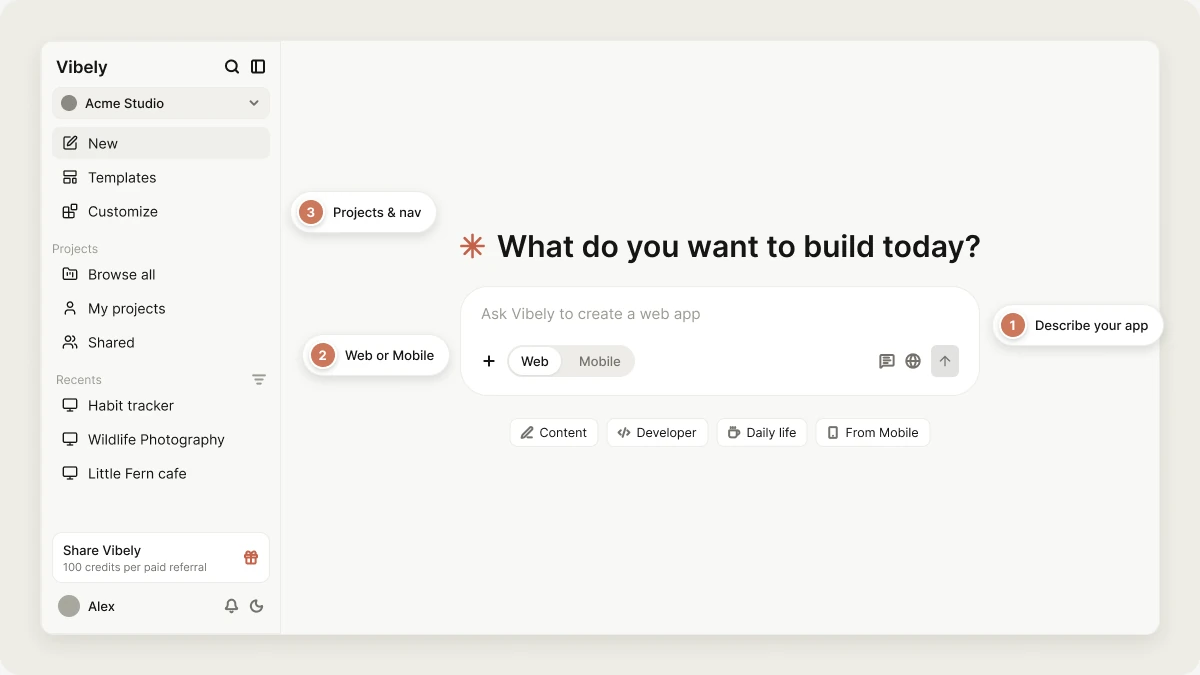 Vibely covers the whole loop, from a first rough idea to a published app you keep improving. Every project produces a codebase you can read, edit in the browser, download, or sync to GitHub, so nothing you build is locked in.
Projects live in [workspaces](/features/workspace/overview), where a team shares one plan and one pool of credits. You can start for free, and plans are priced by [credits](/features/account/credits), not by projects. See [Plans](/features/account/plans).
Create a free account with Google or email, and start building immediately.
Build and publish your first app in about ten minutes.
Start from a working app instead of a blank prompt.
The full journey, from first prompt to a shipped mobile app.
## Core concepts
Three terms come up everywhere in Vibely:
* **Account**: Your personal identity on Vibely. You [sign in with one account](/introduction/create-account) and use it in every workspace you belong to.
* **Workspace**: Where you and your team work. A [workspace](/features/workspace/overview) holds projects, members, billing, and a shared pool of credits.
* **Project**: One app. Each [project](/features/projects/overview) has its own chat, preview, code, and version history, and is either a **Web** project or a **Mobile** project.
## Why use Vibely
**Faster iteration**\
Go from idea to working software by describing it, instead of starting from a blank codebase. Each message builds on the same project, so the app accumulates rather than restarting.
**Web and native mobile from one place**\
The same chat builds a React web app or an Expo app for iOS and Android. Mobile projects preview on your phone through Expo Go and ship to the stores from the editor.
**Code you own**\
Every project is a normal codebase. Edit it in the [code editor](/features/projects/code-editor), sync it to [GitHub](/integrations/github), or take it elsewhere. See [Code ownership](/features/deploy/ownership).
**Your own backend**\
Vibely connects projects to your own [Supabase](/integrations/supabase) account for database, auth, and storage, so the data lives in infrastructure you control.
## Who Vibely is for
**Founders and individuals**
* Turning an idea into a working product without hiring a team first
* Shipping a native mobile app without learning Xcode or Android Studio
**Teams in companies**
* Product managers and designers turning prototypes into tools the business can run on
* Operations, sales, and marketing teams replacing spreadsheets with their own apps
* Marketers building landing pages, campaign sites, and dashboards
**Developers and agencies**
* Developers scaffolding projects, internal tools, and prototypes quickly
* Engineering teams reviewing and extending generated code through GitHub
* Agencies delivering client projects where code ownership matters
## What you can build
**Web apps**\
Landing pages, SaaS products, dashboards, internal tools, marketplaces, and portals. Web projects use Vite, React, TypeScript, Tailwind CSS, and shadcn/ui.
**Native mobile apps**\
iOS and Android apps built with Expo and React Native: habit trackers, journals, workout loggers, and anything else that belongs on a phone. See [Mobile apps](/features/mobile-apps/overview).
**Apps with data, sign-in, and payments**\
Store data and sign users in through [Supabase](/integrations/supabase), take payments with [Stripe](/integrations/stripe) or [RevenueCat](/integrations/revenuecat), and add AI features with [Vibely AI](/features/backend/ai).
## Security, privacy, and compliance
Vibely states plainly what it does and does not hold. For the full picture of identity, governance, and auditability controls, see [Vibely Enterprise](/introduction/enterprise).
### Standards
* **GDPR**: an Article 28 [Data Processing Agreement](https://vibely.sh/dpa) that applies without signature.
* **SOC 2 and ISO 27001**: Vibely holds neither today, and no audit is under way. The [Security page](https://vibely.sh/security) will say so on the day that changes.
### Access and identity
* [Workspace roles and permissions](/features/collaboration/overview)
* [Single sign-on (SSO)](/features/workspace/sso) and [SCIM provisioning](/features/workspace/scim)
* [Workspace groups](/features/workspace/groups)
### Platform security and governance
* [Privacy & security settings](/features/workspace/privacy-security)
* [Per-project security scans](/features/security/project-view) and the [Security center](/features/workspace/security-center)
* Your code, prompts, and project data are never used to train models. The product-improvement setting is off by default on every plan.
### Legal and data protection
* [Privacy Policy](https://vibely.sh/privacy-policy)
* [Terms of Service](https://vibely.sh/terms-of-service)
* [Data Processing Agreement](https://vibely.sh/dpa) and [Subprocessors](https://vibely.sh/subprocessors)
* [Acceptable Use Policy](https://vibely.sh/acceptable-use)
## How Vibely fits into your workflow
1. Describe what you want to build.
2. Review and iterate on it in the [editor](/features/projects/editor).
3. [Publish](/features/deploy/publish) it to a live URL, or [ship it to the stores](/features/mobile-apps/ship).
4. When you want the code in your own pipeline, [sync it to GitHub](/integrations/git-sync) and deploy it on your own terms.
Vibely also works from your AI tools. Connect the [Vibely MCP server](/integrations/vibely-mcp-server) to Claude, ChatGPT, Cursor, Claude Code, or Codex, and create, iterate on, and publish projects without leaving them.
Build and publish your first app in about ten minutes.
How projects work: create, organize, and publish.
Connect Stripe, Supabase, GitHub, Notion, and more.
Get better results with clearer prompts.
The agent loop, tools, and sandbox behind every build.
Learn the key terms.
## Get help
If a project shows an error, ask Vibely in the project chat first. Error cards in the chat offer **Try to fix**, which runs a repair turn at no credit cost. The full workflow is in [Debugging](/prompting/debugging).
For other questions:
* The [FAQ](/faq) answers the most common ones.
* The community on [Discord](https://discord.gg/VqrAzMYh8e) is open to every plan.
* **Help** in the account menu opens a support form, or you can email [support@vibely.sh](mailto:support@vibely.sh). The [Support policy](https://vibely.sh/support-policy) explains what to expect on each plan.
## Related topics
- [FAQ](/faq.md)
- [Build your first web app](/features/web-apps/quickstart.md)
- [Vibely for Enterprise](/introduction/enterprise.md)
- [Projects in Vibely](/features/projects/overview.md)
- [Vibely workspace](/features/workspace/overview.md)
This documentation is built and hosted on [Mintlify](https://mintlify.com), a developer documentation platform.
Vibely covers the whole loop, from a first rough idea to a published app you keep improving. Every project produces a codebase you can read, edit in the browser, download, or sync to GitHub, so nothing you build is locked in.
Projects live in [workspaces](/features/workspace/overview), where a team shares one plan and one pool of credits. You can start for free, and plans are priced by [credits](/features/account/credits), not by projects. See [Plans](/features/account/plans).
Create a free account with Google or email, and start building immediately.
Build and publish your first app in about ten minutes.
Start from a working app instead of a blank prompt.
The full journey, from first prompt to a shipped mobile app.
## Core concepts
Three terms come up everywhere in Vibely:
* **Account**: Your personal identity on Vibely. You [sign in with one account](/introduction/create-account) and use it in every workspace you belong to.
* **Workspace**: Where you and your team work. A [workspace](/features/workspace/overview) holds projects, members, billing, and a shared pool of credits.
* **Project**: One app. Each [project](/features/projects/overview) has its own chat, preview, code, and version history, and is either a **Web** project or a **Mobile** project.
## Why use Vibely
**Faster iteration**\
Go from idea to working software by describing it, instead of starting from a blank codebase. Each message builds on the same project, so the app accumulates rather than restarting.
**Web and native mobile from one place**\
The same chat builds a React web app or an Expo app for iOS and Android. Mobile projects preview on your phone through Expo Go and ship to the stores from the editor.
**Code you own**\
Every project is a normal codebase. Edit it in the [code editor](/features/projects/code-editor), sync it to [GitHub](/integrations/github), or take it elsewhere. See [Code ownership](/features/deploy/ownership).
**Your own backend**\
Vibely connects projects to your own [Supabase](/integrations/supabase) account for database, auth, and storage, so the data lives in infrastructure you control.
## Who Vibely is for
**Founders and individuals**
* Turning an idea into a working product without hiring a team first
* Shipping a native mobile app without learning Xcode or Android Studio
**Teams in companies**
* Product managers and designers turning prototypes into tools the business can run on
* Operations, sales, and marketing teams replacing spreadsheets with their own apps
* Marketers building landing pages, campaign sites, and dashboards
**Developers and agencies**
* Developers scaffolding projects, internal tools, and prototypes quickly
* Engineering teams reviewing and extending generated code through GitHub
* Agencies delivering client projects where code ownership matters
## What you can build
**Web apps**\
Landing pages, SaaS products, dashboards, internal tools, marketplaces, and portals. Web projects use Vite, React, TypeScript, Tailwind CSS, and shadcn/ui.
**Native mobile apps**\
iOS and Android apps built with Expo and React Native: habit trackers, journals, workout loggers, and anything else that belongs on a phone. See [Mobile apps](/features/mobile-apps/overview).
**Apps with data, sign-in, and payments**\
Store data and sign users in through [Supabase](/integrations/supabase), take payments with [Stripe](/integrations/stripe) or [RevenueCat](/integrations/revenuecat), and add AI features with [Vibely AI](/features/backend/ai).
## Security, privacy, and compliance
Vibely states plainly what it does and does not hold. For the full picture of identity, governance, and auditability controls, see [Vibely Enterprise](/introduction/enterprise).
### Standards
* **GDPR**: an Article 28 [Data Processing Agreement](https://vibely.sh/dpa) that applies without signature.
* **SOC 2 and ISO 27001**: Vibely holds neither today, and no audit is under way. The [Security page](https://vibely.sh/security) will say so on the day that changes.
### Access and identity
* [Workspace roles and permissions](/features/collaboration/overview)
* [Single sign-on (SSO)](/features/workspace/sso) and [SCIM provisioning](/features/workspace/scim)
* [Workspace groups](/features/workspace/groups)
### Platform security and governance
* [Privacy & security settings](/features/workspace/privacy-security)
* [Per-project security scans](/features/security/project-view) and the [Security center](/features/workspace/security-center)
* Your code, prompts, and project data are never used to train models. The product-improvement setting is off by default on every plan.
### Legal and data protection
* [Privacy Policy](https://vibely.sh/privacy-policy)
* [Terms of Service](https://vibely.sh/terms-of-service)
* [Data Processing Agreement](https://vibely.sh/dpa) and [Subprocessors](https://vibely.sh/subprocessors)
* [Acceptable Use Policy](https://vibely.sh/acceptable-use)
## How Vibely fits into your workflow
1. Describe what you want to build.
2. Review and iterate on it in the [editor](/features/projects/editor).
3. [Publish](/features/deploy/publish) it to a live URL, or [ship it to the stores](/features/mobile-apps/ship).
4. When you want the code in your own pipeline, [sync it to GitHub](/integrations/git-sync) and deploy it on your own terms.
Vibely also works from your AI tools. Connect the [Vibely MCP server](/integrations/vibely-mcp-server) to Claude, ChatGPT, Cursor, Claude Code, or Codex, and create, iterate on, and publish projects without leaving them.
Build and publish your first app in about ten minutes.
How projects work: create, organize, and publish.
Connect Stripe, Supabase, GitHub, Notion, and more.
Get better results with clearer prompts.
The agent loop, tools, and sandbox behind every build.
Learn the key terms.
## Get help
If a project shows an error, ask Vibely in the project chat first. Error cards in the chat offer **Try to fix**, which runs a repair turn at no credit cost. The full workflow is in [Debugging](/prompting/debugging).
For other questions:
* The [FAQ](/faq) answers the most common ones.
* The community on [Discord](https://discord.gg/VqrAzMYh8e) is open to every plan.
* **Help** in the account menu opens a support form, or you can email [support@vibely.sh](mailto:support@vibely.sh). The [Support policy](https://vibely.sh/support-policy) explains what to expect on each plan.
## Related topics
- [FAQ](/faq.md)
- [Build your first web app](/features/web-apps/quickstart.md)
- [Vibely for Enterprise](/introduction/enterprise.md)
- [Projects in Vibely](/features/projects/overview.md)
- [Vibely workspace](/features/workspace/overview.md)
This documentation is built and hosted on [Mintlify](https://mintlify.com), a developer documentation platform.