> ## Documentation Index
> Fetch the complete documentation index at: https://docs.vibely.sh/llms.txt
> Use this file to discover all available pages before exploring further.
# Vibely MCP server
> Build, edit, inspect, and publish Vibely web and mobile apps from Claude, ChatGPT, Cursor, Claude Code, Codex, and any other MCP client.
 ## What is the Vibely MCP server?
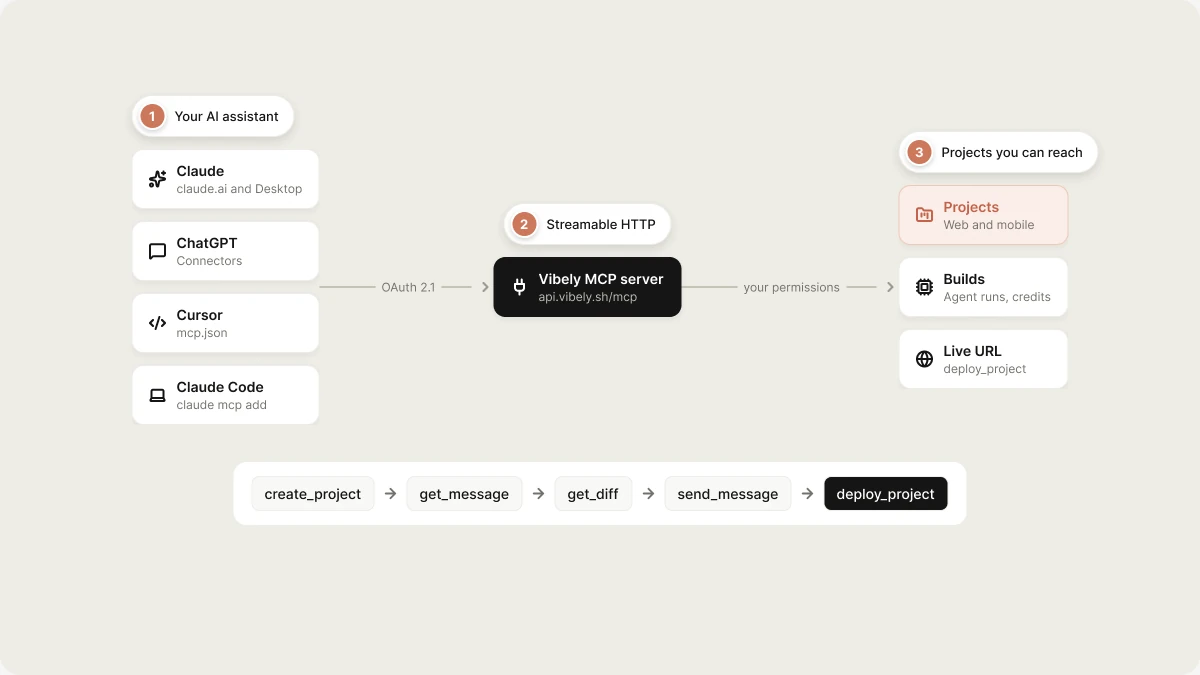
Vibely exposes itself as a [Model Context Protocol](https://modelcontextprotocol.io) (MCP) server at `https://api.vibely.sh/mcp`. Connect it once, and your AI assistant can create Vibely projects, iterate on them, review what changed, query their databases, and publish them, all without leaving the client you're already working in. It works for web apps and native iOS and Android apps, and it is available on every plan.
This is the reverse of [custom MCP servers](/integrations/connectors/custom-mcp), which let the **Vibely agent** call your tools while it builds. The Vibely MCP server lets **your AI assistant** call Vibely.
### What MCP is
MCP is an open standard that lets AI agents discover and call external tools. When an assistant connects to an MCP server, it sees the tools available and decides when to use them. The Vibely MCP server makes Vibely one of those tools.
The server uses Streamable HTTP and signs you in with OAuth 2.1. There is no API key to copy or paste.
### Supported AI clients
Vibely provides setup steps for:
* **Claude** (claude.ai and Claude Desktop)
* **ChatGPT**
* **Claude Code**
* **Cursor**
* **VS Code**
* **Codex**
Any other MCP client that supports Streamable HTTP and OAuth can connect too. Clients register themselves automatically when you add the server URL and sign in.
### The flow
1. Your assistant calls `create_project` with a description of what to build.
2. Vibely builds the project. The call waits for the first build, or your assistant polls `get_message` if the build takes longer.
3. Your assistant reviews the result with `get_diff`, `list_files`, and `read_file`.
4. You keep refining through `send_message`, and Vibely keeps building.
5. When you're happy, `deploy_project` publishes it and returns the live URL. Mobile projects can also be built and submitted to the stores.
## Who this is for
* **People who work in an AI assistant or editor** such as Claude, ChatGPT, Cursor, or Claude Code, and want to create and iterate on Vibely projects without switching windows
* **Teams** who want Vibely as one step in a larger agent workflow: scaffold an app, publish it, and hand off the URL
## Why use the Vibely MCP server
* **Agent-driven building**: let your assistant scaffold and iterate on Vibely projects in natural language.
* **Code inspection**: read files, diff changes, and browse edit history.
* **Web and mobile**: preview mobile apps on a phone, start native builds, and submit to TestFlight or Google Play from the same conversation.
* **Cross-tool workflows**: combine Vibely with other MCP-connected tools in one session.
## Common use cases
| Scenario | Example prompt to your assistant | Outcome |
| - | - | - |
| Scaffold a new app | *Create a Vibely project called "Feedback Hub" with a form for collecting user feedback* | Project created and first build completed |
| Build a mobile app | *Create a Vibely mobile app for logging workouts and give me the Expo Go link* | Mobile project built; Expo Go link returned |
| Iterate on a project | *Add a dark mode toggle to my Feedback Hub project* | Message sent; the assistant waits for Vibely to finish |
| Review recent changes | *Show me what changed in the last three edits* | Unified diff of the recent edits |
| Publish an app | *Publish Feedback Hub and give me the live URL* | Project published; live URL returned |
| Inspect the code | *List the files in my project and read the main App.tsx* | File list and file contents returned |
## Prerequisites
* A Vibely account on any plan
* **Allow third-party AI apps** turned on for your workspace. It is on by default; owners and admins can turn it off. See [Controls for workspace owners and admins](#controls-for-workspace-owners-and-admins).
* An MCP client, such as one of the [supported AI clients](#supported-ai-clients)
## Before you connect
A connected assistant acts with **your** Vibely permissions. Before connecting:
* **The scope is your account, not one project.** The assistant can reach every project you can reach, within the permissions you grant.
* **Calls run live.** `create_project`, `send_message`, and `approve_plan` spend real credits and change real projects.
* **`deploy_project` publishes to a live URL** that follows the project's website access settings.
* **`query_database` runs SQL with full privileges** on the project's linked Supabase database: reads, writes, and schema changes.
## How to connect
Workspace members can also find the server URL and the setup snippet for each client inside Vibely, under **Settings → Connected AI apps** ([vibely.sh/settings/connected-apps](https://vibely.sh/settings/connected-apps)).
Open **Settings → Connectors → Add custom connector**, paste `https://api.vibely.sh/mcp`, and sign in to Vibely when prompted. This works in claude.ai and Claude Desktop.
Open **Settings → Connectors → Create**, choose **MCP server**, paste `https://api.vibely.sh/mcp`, and pick **OAuth**.
Run this in your terminal:
```bash theme={"system"}
claude mcp add --transport http vibely https://api.vibely.sh/mcp
```
Then run `/mcp` inside Claude Code and choose **Authenticate**.
Add this to `~/.cursor/mcp.json`, or use **Settings → MCP → Add server**:
```json theme={"system"}
{ "mcpServers": { "vibely": { "url": "https://api.vibely.sh/mcp" } } }
```
Add this to `.vscode/mcp.json`, then start the server from the MCP view:
```json theme={"system"}
{ "servers": { "vibely": { "type": "http", "url": "https://api.vibely.sh/mcp" } } }
```
```bash theme={"system"}
codex mcp add vibely --url https://api.vibely.sh/mcp
codex mcp login vibely
```
The first time you connect, your browser opens a Vibely page that shows:
* which app is asking;
* where you will be sent back to; and
* what the app will be able to do.
You can untick any permission before you select **Allow access**.
### Permissions
Every token acts with your Vibely permissions, so an assistant can never do anything you couldn't do yourself in Vibely. Access is granted per scope:
| Scope | Allows |
| - | - |
| `workspaces:read` | Your profile, workspaces, plan, credits, members, knowledge, and skills |
| `workspaces:write` | Editing workspace knowledge and skills, and managing connectors |
| `projects:read` | Projects, files, edit history, chat messages, and analytics |
| `projects:write` | Creating, remixing, and changing projects, and messaging the agent (uses credits) |
| `projects:deploy` | Publishing to the web and submitting mobile apps to the stores |
| `database:write` | Running SQL against a project's linked Supabase database |
| `offline_access` | Staying connected without signing in again |
If an assistant calls a tool it wasn't granted, the server responds with a standards-compliant `insufficient_scope` challenge, and the assistant can ask you for the extra permission.
## Manage connected apps
**Settings → Connected AI apps** lists every app with access to your account under **Apps with access**, showing:
* the permissions it holds;
* when it connected;
* when it was last used; and
* a feed of its recent tool calls.
**Disconnect** revokes every token that app holds, immediately. It has to ask for access again to reconnect.
## Controls for workspace owners and admins
Under **Settings → Connected AI apps → AI app access**, owners and admins can:
* Turn off **Allow third-party AI apps**. The workspace's projects become invisible to every connected app, even for members whose other workspaces allow them.
* Set **Approved apps only**: an allowlist of app domains (for example `claude.ai`) or client IDs, one per line. Leave it empty to allow any app your members approve.
* Turn off **Allow running SQL** or **Allow publishing** for AI apps, while still allowing everything else.
Workspaces that require two-factor authentication also block publishing from AI apps. Members publish from the editor instead, where Vibely asks for their two-factor code. See [Two-factor authentication](/features/account/settings#two-factor-authentication).
## Credits
`create_project`, `send_message`, and `approve_plan` run the Vibely agent, which spends your workspace's credits exactly as it does in the editor. Every other tool is free.
Before an agent run starts, the server checks the balance. If the workspace is out of credits, the tool returns `OUT_OF_CREDITS` with an `upgrade_url` instead of starting. Retrying an identical `create_project` or `send_message` within about two minutes returns the original run (`deduplicated: true`), so you are never charged twice.
## Secrets stay in Vibely
When the agent needs an API key, the run reports `waiting_for_input`, and the assistant sends you to the editor to enter it. Keys never pass through an AI app. The same goes for connecting OAuth services such as Stripe: you finish those in the browser.
## Available tools
The machine-readable version of this list is at [`https://api.vibely.sh/mcp/skill.md`](https://api.vibely.sh/mcp/skill.md). Tools are grouped by the scope they need.
### `workspaces:read`
| Tool | Parameters | What it does |
| - | - | - |
| `get_me` | — | Get your profile, default workspace, and every workspace you belong to. |
| `list_workspaces` | `limit?`, `cursor?` | List the workspaces you belong to, with your role and plan. |
| `get_workspace` | `workspace_id`, `include_members?` | Get a workspace's plan, credit balance, your role, member count, and settings links. |
| `get_credits` | `workspace_id?` | Get the credit balance for a workspace (defaults to your default workspace). |
| `get_workspace_knowledge` | `workspace_id` | Read the workspace knowledge the agent follows in every project. |
| `list_workspace_skills` | `workspace_id`, `limit?`, `cursor?` | List the workspace's skills (name, description, when to use, triggers, enabled). |
| `get_workspace_skill` | `workspace_id`, `skill_id` | Get one workspace skill, including its full instructions. |
| `list_connectors` | `workspace_id?`, `project_id?`, `category?`, `connected_only?` | List the integrations the agent can use, with whether each is connected. |
| `list_connections` | `workspace_id`, `connector_id` | List the authenticated accounts for one connector in a workspace. |
| `list_custom_connectors` | `workspace_id?` | List the custom MCP servers the agent can call: yours and, with `workspace_id`, the workspace's. |
| `list_available_connectors` | `query?`, `limit?`, `cursor?` | Browse Vibely's catalog of featured MCP servers you can add as connectors. |
### `workspaces:write`
| Tool | Parameters | What it does |
| - | - | - |
| `set_workspace_knowledge` | `workspace_id`, `content` | Replace the workspace knowledge entirely (owners and admins only). |
| `create_workspace_skill` | `workspace_id`, `name`, `description?`, `content`, `when_to_use?`, `triggers?`, `enabled?` | Create a workspace skill (owners and admins only). |
| `update_workspace_skill` | `workspace_id`, `skill_id`, `name?`, `description?`, `content?`, `when_to_use?`, `triggers?`, `enabled?` | Update a workspace skill (owners and admins only). |
| `delete_workspace_skill` | `workspace_id`, `skill_id` | Permanently delete a workspace skill (owners and admins only). |
| `add_connector` | `connector_id?`, `url?`, `name?`, `auth?`, `api_key?` | Add a connector. |
| `remove_connector` | `mcp_server_id?`, `workspace_id?`, `slug?`, `connector_id?`, `connection_id?` | Remove a personal MCP server, a workspace custom connector (admins only), or disconnect a built-in connector account. |
### `projects:read`
| Tool | Parameters | What it does |
| - | - | - |
| `list_projects` | `workspace_id?`, `query?`, `scope?`, `platform?`, `starred?`, `limit?`, `cursor?` | List projects you can access, most recently active first. |
| `get_project` | `project_id` | Get a project's name, platform, workspace, visibility, your role, preview and editor URLs, latest screenshot, published URL, and whether the agent is running. |
| `get_deployment` | `project_id`, `deployment_id?` | Get the status and live URL of a deployment, or of the most recent one. |
| `list_template_projects` | `workspace_id?`, `query?`, `limit?` | List templates to start from: the workspace's own plus Vibely's featured templates. |
| `list_design_systems` | `workspace_id?` | List design systems available for new web projects. |
| `get_message` | `project_id`, `message_id?`, `run_id?`, `wait?`, `timeout_seconds?` | Check an agent run's status and read its reply. |
| `list_messages` | `project_id`, `limit?`, `cursor?`, `max_chars_per_message?` | List the project's chat messages, newest first. |
| `list_edits` | `project_id`, `limit?`, `cursor?`, `before?` | List the project's edit history, newest first: one entry per agent turn that changed files. |
| `get_diff` | `project_id`, `message_id?`, `sha?`, `base_sha?`, `paths?`, `max_chars?` | Unified diff of what changed. |
| `list_files` | `project_id`, `ref?`, `path_prefix?`, `limit?`, `cursor?` | List the project's file paths and sizes at a ref. |
| `read_file` | `project_id`, `path`, `ref?`, `offset_lines?`, `limit_lines?` | Read one file at a ref (default: current). |
| `get_project_knowledge` | `project_id` | Read the project knowledge the agent follows for this project. |
| `get_database_status` | `project_id` | Check whether the project has a Supabase database linked, and whether your Supabase account is connected. |
| `get_project_analytics` | `project_id`, `period?` | Visitor analytics for a published project: visitors, pageviews, bounce rate, visit duration, and breakdowns by page, source, device, and country. |
| `get_project_analytics_trend` | `project_id` | Visitors active right now and the hourly trend over the last 24 hours. |
| `get_mobile_preview` | `project_id` | Start or reuse a mobile project's live preview and return the Expo Go link and the web preview URL. |
| `list_mobile_builds` | `project_id` | List native iOS and Android builds (EAS) with status and download links. |
| `get_mobile_publish_status` | `project_id`, `store` | Status of the latest App Store or Google Play submission. |
### `projects:write`
| Tool | Parameters | What it does |
| - | - | - |
| `create_project` | `initial_message`, `workspace_id?`, `platform?`, `template_id?`, `design_system_id?`, `plan_mode?`, `files?`, `wait?`, `timeout_seconds?` | Create a web or mobile project and start the agent building it. Uses credits. |
| `remix_project` | `project_id`, `workspace_id`, `project_name?`, `include_history?` | Copy a project you can access into a workspace as a new project. |
| `rename_project` | `project_id`, `name` | Rename a project. |
| `set_project_visibility` | `project_id`, `visibility` | Set who in the workspace can see a project: `workspace` or `private` (Business plan). |
| `star_project` | `project_id`, `starred` | Star or unstar a project. |
| `send_message` | `project_id`, `message`, `plan_mode?`, `mode?`, `interrupt?`, `files?`, `wait?`, `timeout_seconds?` | Send a message to the project's agent. Uses credits. |
| `answer_question` | `project_id`, `question_id`, `answers` | Answer a question the agent asked mid-run. |
| `approve_plan` | `project_id`, `approved`, `feedback?`, `edited_plan?`, `approval_id?` | Approve a proposed plan to build it, or reject it with feedback. Uses credits. |
| `stop_agent` | `project_id` | Stop the agent's current run. |
| `get_file_upload_url` | `file_name`, `content_type?` | Get a presigned URL to upload an attachment (up to 10 MB). |
| `set_project_knowledge` | `project_id`, `content` | Replace the project knowledge entirely. |
### `projects:deploy`
| Tool | Parameters | What it does |
| - | - | - |
| `deploy_project` | `project_id`, `subdomain?`, `wait?`, `timeout_seconds?` | Publish the project to the web and return the live URL. |
| `unpublish_project` | `project_id` | Take a published project offline. |
| `start_mobile_build` | `project_id`, `platform`, `profile?` | Start a native build on EAS (iOS `.ipa` or Android `.aab`). |
| `publish_mobile_app` | `project_id`, `store`, `build_id`, `track?`, `tester_emails?` | Submit a finished build to TestFlight or Google Play. |
### `database:write`
| Tool | Parameters | What it does |
| - | - | - |
| `enable_database` | `project_id`, `supabase_organization_id?`, `region?`, `name?`, `existing_supabase_project_ref?` | Create a Supabase project in your connected Supabase account, or link an existing one, and connect it to the Vibely project. |
| `query_database` | `project_id`, `sql`, `max_rows?` | Run SQL against the project's linked database with full privileges. |
## Skill file
A skill file tells your assistant how to drive the Vibely MCP server well: when to use it, how to sequence tool calls, and which patterns to follow. Vibely publishes it at [`api.vibely.sh/mcp/skill.md`](https://api.vibely.sh/mcp/skill.md). It is generated from the server's tool registry, so it always matches the tools the server exposes. Download it and add it to your client's skills or instructions, for example `.claude/skills/vibely-mcp/SKILL.md` for Claude Code.
## Security
The authorization server implements the MCP authorization specification in full:
* **OAuth 2.1 with PKCE (S256)**, required on every sign-in.
* **Client registration** through Dynamic Client Registration (RFC 7591) or a Client ID Metadata Document, fetched with SSRF protection. Plain `http` redirect addresses are only accepted for `localhost`.
* **Server discovery** through Protected Resource Metadata (RFC 9728) and Authorization Server Metadata (RFC 8414).
* **Audience-bound tokens** (RFC 8707). A token issued for this server is refused anywhere else.
* **Short-lived access tokens** that last one hour.
* **Rotating refresh tokens with theft detection.** A replayed refresh token revokes its whole token family.
* **Hashed storage.** Tokens, codes, and client secrets are stored only as SHA-256 hashes.
* **Rate limits** per connection and per IP.
* **Audit log.** Every tool call is recorded, without its arguments.
## Troubleshooting
* **Connected through the client's UI:** remove the Vibely connector and add it again to re-run sign-in.
* **Using a config file:** check the JSON is valid and the `vibely` entry is inside the existing `mcpServers` (or `servers`) object, then restart the client.
Call `list_workspaces` to get valid workspace IDs. If you have several workspaces and don't pass `workspace_id` to `create_project`, the response lists `available_workspaces` so you can choose one.
The project ID is wrong, the project was deleted, or you no longer have access. Call `list_projects` to find the right ID.
Call `enable_database` first. It shows what it would create and waits for you to confirm before creating a Supabase project in your account.
An owner or admin has turned off **Allow publishing** or **Allow running SQL** under **AI app access**. Publish or run SQL from the Vibely editor instead, or ask them to change the setting.
Publish from the Vibely editor, and enter your two-factor code when asked. Set up two-factor authentication in **Settings → Account** if you haven't yet.
You hit the per-connection rate limit. Wait a minute and try again.
## FAQ
[Custom MCP servers](/integrations/connectors/custom-mcp) let the **Vibely agent** call your external tools while it builds. The Vibely MCP server is the reverse: it lets **your assistant**, such as Claude, ChatGPT, or Cursor, call Vibely and manage your projects.
All plans. Owners and admins can turn it off for their workspace, or limit it to approved apps.
No. OAuth is the only way to connect.
Only `create_project`, `send_message`, and `approve_plan`, which run the agent. Every other tool is free.
Exactly yours, narrowed to the scopes you granted. An assistant can never do more than you could in Vibely.
## Related
Give the Vibely agent access to your own tools.
Make the apps you build usable by AI agents.
Everything Vibely can connect to.
What spends credits and what is free.
## Related topics
- [Connect a custom MCP server](/integrations/connectors/custom-mcp.md)
- [Publish your app as an MCP server](/features/grow/agent-integrations.md)
- [Start a build from outside Vibely](/guides/build-from-chat.md)
- [Workspace admin settings](/features/workspace/admin-settings.md)
- [Glossary](/glossary.md)
This documentation is built and hosted on [Mintlify](https://mintlify.com), a developer documentation platform.
## What is the Vibely MCP server?
Vibely exposes itself as a [Model Context Protocol](https://modelcontextprotocol.io) (MCP) server at `https://api.vibely.sh/mcp`. Connect it once, and your AI assistant can create Vibely projects, iterate on them, review what changed, query their databases, and publish them, all without leaving the client you're already working in. It works for web apps and native iOS and Android apps, and it is available on every plan.
This is the reverse of [custom MCP servers](/integrations/connectors/custom-mcp), which let the **Vibely agent** call your tools while it builds. The Vibely MCP server lets **your AI assistant** call Vibely.
### What MCP is
MCP is an open standard that lets AI agents discover and call external tools. When an assistant connects to an MCP server, it sees the tools available and decides when to use them. The Vibely MCP server makes Vibely one of those tools.
The server uses Streamable HTTP and signs you in with OAuth 2.1. There is no API key to copy or paste.
### Supported AI clients
Vibely provides setup steps for:
* **Claude** (claude.ai and Claude Desktop)
* **ChatGPT**
* **Claude Code**
* **Cursor**
* **VS Code**
* **Codex**
Any other MCP client that supports Streamable HTTP and OAuth can connect too. Clients register themselves automatically when you add the server URL and sign in.
### The flow
1. Your assistant calls `create_project` with a description of what to build.
2. Vibely builds the project. The call waits for the first build, or your assistant polls `get_message` if the build takes longer.
3. Your assistant reviews the result with `get_diff`, `list_files`, and `read_file`.
4. You keep refining through `send_message`, and Vibely keeps building.
5. When you're happy, `deploy_project` publishes it and returns the live URL. Mobile projects can also be built and submitted to the stores.
## Who this is for
* **People who work in an AI assistant or editor** such as Claude, ChatGPT, Cursor, or Claude Code, and want to create and iterate on Vibely projects without switching windows
* **Teams** who want Vibely as one step in a larger agent workflow: scaffold an app, publish it, and hand off the URL
## Why use the Vibely MCP server
* **Agent-driven building**: let your assistant scaffold and iterate on Vibely projects in natural language.
* **Code inspection**: read files, diff changes, and browse edit history.
* **Web and mobile**: preview mobile apps on a phone, start native builds, and submit to TestFlight or Google Play from the same conversation.
* **Cross-tool workflows**: combine Vibely with other MCP-connected tools in one session.
## Common use cases
| Scenario | Example prompt to your assistant | Outcome |
| - | - | - |
| Scaffold a new app | *Create a Vibely project called "Feedback Hub" with a form for collecting user feedback* | Project created and first build completed |
| Build a mobile app | *Create a Vibely mobile app for logging workouts and give me the Expo Go link* | Mobile project built; Expo Go link returned |
| Iterate on a project | *Add a dark mode toggle to my Feedback Hub project* | Message sent; the assistant waits for Vibely to finish |
| Review recent changes | *Show me what changed in the last three edits* | Unified diff of the recent edits |
| Publish an app | *Publish Feedback Hub and give me the live URL* | Project published; live URL returned |
| Inspect the code | *List the files in my project and read the main App.tsx* | File list and file contents returned |
## Prerequisites
* A Vibely account on any plan
* **Allow third-party AI apps** turned on for your workspace. It is on by default; owners and admins can turn it off. See [Controls for workspace owners and admins](#controls-for-workspace-owners-and-admins).
* An MCP client, such as one of the [supported AI clients](#supported-ai-clients)
## Before you connect
A connected assistant acts with **your** Vibely permissions. Before connecting:
* **The scope is your account, not one project.** The assistant can reach every project you can reach, within the permissions you grant.
* **Calls run live.** `create_project`, `send_message`, and `approve_plan` spend real credits and change real projects.
* **`deploy_project` publishes to a live URL** that follows the project's website access settings.
* **`query_database` runs SQL with full privileges** on the project's linked Supabase database: reads, writes, and schema changes.
## How to connect
Workspace members can also find the server URL and the setup snippet for each client inside Vibely, under **Settings → Connected AI apps** ([vibely.sh/settings/connected-apps](https://vibely.sh/settings/connected-apps)).
Open **Settings → Connectors → Add custom connector**, paste `https://api.vibely.sh/mcp`, and sign in to Vibely when prompted. This works in claude.ai and Claude Desktop.
Open **Settings → Connectors → Create**, choose **MCP server**, paste `https://api.vibely.sh/mcp`, and pick **OAuth**.
Run this in your terminal:
```bash theme={"system"}
claude mcp add --transport http vibely https://api.vibely.sh/mcp
```
Then run `/mcp` inside Claude Code and choose **Authenticate**.
Add this to `~/.cursor/mcp.json`, or use **Settings → MCP → Add server**:
```json theme={"system"}
{ "mcpServers": { "vibely": { "url": "https://api.vibely.sh/mcp" } } }
```
Add this to `.vscode/mcp.json`, then start the server from the MCP view:
```json theme={"system"}
{ "servers": { "vibely": { "type": "http", "url": "https://api.vibely.sh/mcp" } } }
```
```bash theme={"system"}
codex mcp add vibely --url https://api.vibely.sh/mcp
codex mcp login vibely
```
The first time you connect, your browser opens a Vibely page that shows:
* which app is asking;
* where you will be sent back to; and
* what the app will be able to do.
You can untick any permission before you select **Allow access**.
### Permissions
Every token acts with your Vibely permissions, so an assistant can never do anything you couldn't do yourself in Vibely. Access is granted per scope:
| Scope | Allows |
| - | - |
| `workspaces:read` | Your profile, workspaces, plan, credits, members, knowledge, and skills |
| `workspaces:write` | Editing workspace knowledge and skills, and managing connectors |
| `projects:read` | Projects, files, edit history, chat messages, and analytics |
| `projects:write` | Creating, remixing, and changing projects, and messaging the agent (uses credits) |
| `projects:deploy` | Publishing to the web and submitting mobile apps to the stores |
| `database:write` | Running SQL against a project's linked Supabase database |
| `offline_access` | Staying connected without signing in again |
If an assistant calls a tool it wasn't granted, the server responds with a standards-compliant `insufficient_scope` challenge, and the assistant can ask you for the extra permission.
## Manage connected apps
**Settings → Connected AI apps** lists every app with access to your account under **Apps with access**, showing:
* the permissions it holds;
* when it connected;
* when it was last used; and
* a feed of its recent tool calls.
**Disconnect** revokes every token that app holds, immediately. It has to ask for access again to reconnect.
## Controls for workspace owners and admins
Under **Settings → Connected AI apps → AI app access**, owners and admins can:
* Turn off **Allow third-party AI apps**. The workspace's projects become invisible to every connected app, even for members whose other workspaces allow them.
* Set **Approved apps only**: an allowlist of app domains (for example `claude.ai`) or client IDs, one per line. Leave it empty to allow any app your members approve.
* Turn off **Allow running SQL** or **Allow publishing** for AI apps, while still allowing everything else.
Workspaces that require two-factor authentication also block publishing from AI apps. Members publish from the editor instead, where Vibely asks for their two-factor code. See [Two-factor authentication](/features/account/settings#two-factor-authentication).
## Credits
`create_project`, `send_message`, and `approve_plan` run the Vibely agent, which spends your workspace's credits exactly as it does in the editor. Every other tool is free.
Before an agent run starts, the server checks the balance. If the workspace is out of credits, the tool returns `OUT_OF_CREDITS` with an `upgrade_url` instead of starting. Retrying an identical `create_project` or `send_message` within about two minutes returns the original run (`deduplicated: true`), so you are never charged twice.
## Secrets stay in Vibely
When the agent needs an API key, the run reports `waiting_for_input`, and the assistant sends you to the editor to enter it. Keys never pass through an AI app. The same goes for connecting OAuth services such as Stripe: you finish those in the browser.
## Available tools
The machine-readable version of this list is at [`https://api.vibely.sh/mcp/skill.md`](https://api.vibely.sh/mcp/skill.md). Tools are grouped by the scope they need.
### `workspaces:read`
| Tool | Parameters | What it does |
| - | - | - |
| `get_me` | — | Get your profile, default workspace, and every workspace you belong to. |
| `list_workspaces` | `limit?`, `cursor?` | List the workspaces you belong to, with your role and plan. |
| `get_workspace` | `workspace_id`, `include_members?` | Get a workspace's plan, credit balance, your role, member count, and settings links. |
| `get_credits` | `workspace_id?` | Get the credit balance for a workspace (defaults to your default workspace). |
| `get_workspace_knowledge` | `workspace_id` | Read the workspace knowledge the agent follows in every project. |
| `list_workspace_skills` | `workspace_id`, `limit?`, `cursor?` | List the workspace's skills (name, description, when to use, triggers, enabled). |
| `get_workspace_skill` | `workspace_id`, `skill_id` | Get one workspace skill, including its full instructions. |
| `list_connectors` | `workspace_id?`, `project_id?`, `category?`, `connected_only?` | List the integrations the agent can use, with whether each is connected. |
| `list_connections` | `workspace_id`, `connector_id` | List the authenticated accounts for one connector in a workspace. |
| `list_custom_connectors` | `workspace_id?` | List the custom MCP servers the agent can call: yours and, with `workspace_id`, the workspace's. |
| `list_available_connectors` | `query?`, `limit?`, `cursor?` | Browse Vibely's catalog of featured MCP servers you can add as connectors. |
### `workspaces:write`
| Tool | Parameters | What it does |
| - | - | - |
| `set_workspace_knowledge` | `workspace_id`, `content` | Replace the workspace knowledge entirely (owners and admins only). |
| `create_workspace_skill` | `workspace_id`, `name`, `description?`, `content`, `when_to_use?`, `triggers?`, `enabled?` | Create a workspace skill (owners and admins only). |
| `update_workspace_skill` | `workspace_id`, `skill_id`, `name?`, `description?`, `content?`, `when_to_use?`, `triggers?`, `enabled?` | Update a workspace skill (owners and admins only). |
| `delete_workspace_skill` | `workspace_id`, `skill_id` | Permanently delete a workspace skill (owners and admins only). |
| `add_connector` | `connector_id?`, `url?`, `name?`, `auth?`, `api_key?` | Add a connector. |
| `remove_connector` | `mcp_server_id?`, `workspace_id?`, `slug?`, `connector_id?`, `connection_id?` | Remove a personal MCP server, a workspace custom connector (admins only), or disconnect a built-in connector account. |
### `projects:read`
| Tool | Parameters | What it does |
| - | - | - |
| `list_projects` | `workspace_id?`, `query?`, `scope?`, `platform?`, `starred?`, `limit?`, `cursor?` | List projects you can access, most recently active first. |
| `get_project` | `project_id` | Get a project's name, platform, workspace, visibility, your role, preview and editor URLs, latest screenshot, published URL, and whether the agent is running. |
| `get_deployment` | `project_id`, `deployment_id?` | Get the status and live URL of a deployment, or of the most recent one. |
| `list_template_projects` | `workspace_id?`, `query?`, `limit?` | List templates to start from: the workspace's own plus Vibely's featured templates. |
| `list_design_systems` | `workspace_id?` | List design systems available for new web projects. |
| `get_message` | `project_id`, `message_id?`, `run_id?`, `wait?`, `timeout_seconds?` | Check an agent run's status and read its reply. |
| `list_messages` | `project_id`, `limit?`, `cursor?`, `max_chars_per_message?` | List the project's chat messages, newest first. |
| `list_edits` | `project_id`, `limit?`, `cursor?`, `before?` | List the project's edit history, newest first: one entry per agent turn that changed files. |
| `get_diff` | `project_id`, `message_id?`, `sha?`, `base_sha?`, `paths?`, `max_chars?` | Unified diff of what changed. |
| `list_files` | `project_id`, `ref?`, `path_prefix?`, `limit?`, `cursor?` | List the project's file paths and sizes at a ref. |
| `read_file` | `project_id`, `path`, `ref?`, `offset_lines?`, `limit_lines?` | Read one file at a ref (default: current). |
| `get_project_knowledge` | `project_id` | Read the project knowledge the agent follows for this project. |
| `get_database_status` | `project_id` | Check whether the project has a Supabase database linked, and whether your Supabase account is connected. |
| `get_project_analytics` | `project_id`, `period?` | Visitor analytics for a published project: visitors, pageviews, bounce rate, visit duration, and breakdowns by page, source, device, and country. |
| `get_project_analytics_trend` | `project_id` | Visitors active right now and the hourly trend over the last 24 hours. |
| `get_mobile_preview` | `project_id` | Start or reuse a mobile project's live preview and return the Expo Go link and the web preview URL. |
| `list_mobile_builds` | `project_id` | List native iOS and Android builds (EAS) with status and download links. |
| `get_mobile_publish_status` | `project_id`, `store` | Status of the latest App Store or Google Play submission. |
### `projects:write`
| Tool | Parameters | What it does |
| - | - | - |
| `create_project` | `initial_message`, `workspace_id?`, `platform?`, `template_id?`, `design_system_id?`, `plan_mode?`, `files?`, `wait?`, `timeout_seconds?` | Create a web or mobile project and start the agent building it. Uses credits. |
| `remix_project` | `project_id`, `workspace_id`, `project_name?`, `include_history?` | Copy a project you can access into a workspace as a new project. |
| `rename_project` | `project_id`, `name` | Rename a project. |
| `set_project_visibility` | `project_id`, `visibility` | Set who in the workspace can see a project: `workspace` or `private` (Business plan). |
| `star_project` | `project_id`, `starred` | Star or unstar a project. |
| `send_message` | `project_id`, `message`, `plan_mode?`, `mode?`, `interrupt?`, `files?`, `wait?`, `timeout_seconds?` | Send a message to the project's agent. Uses credits. |
| `answer_question` | `project_id`, `question_id`, `answers` | Answer a question the agent asked mid-run. |
| `approve_plan` | `project_id`, `approved`, `feedback?`, `edited_plan?`, `approval_id?` | Approve a proposed plan to build it, or reject it with feedback. Uses credits. |
| `stop_agent` | `project_id` | Stop the agent's current run. |
| `get_file_upload_url` | `file_name`, `content_type?` | Get a presigned URL to upload an attachment (up to 10 MB). |
| `set_project_knowledge` | `project_id`, `content` | Replace the project knowledge entirely. |
### `projects:deploy`
| Tool | Parameters | What it does |
| - | - | - |
| `deploy_project` | `project_id`, `subdomain?`, `wait?`, `timeout_seconds?` | Publish the project to the web and return the live URL. |
| `unpublish_project` | `project_id` | Take a published project offline. |
| `start_mobile_build` | `project_id`, `platform`, `profile?` | Start a native build on EAS (iOS `.ipa` or Android `.aab`). |
| `publish_mobile_app` | `project_id`, `store`, `build_id`, `track?`, `tester_emails?` | Submit a finished build to TestFlight or Google Play. |
### `database:write`
| Tool | Parameters | What it does |
| - | - | - |
| `enable_database` | `project_id`, `supabase_organization_id?`, `region?`, `name?`, `existing_supabase_project_ref?` | Create a Supabase project in your connected Supabase account, or link an existing one, and connect it to the Vibely project. |
| `query_database` | `project_id`, `sql`, `max_rows?` | Run SQL against the project's linked database with full privileges. |
## Skill file
A skill file tells your assistant how to drive the Vibely MCP server well: when to use it, how to sequence tool calls, and which patterns to follow. Vibely publishes it at [`api.vibely.sh/mcp/skill.md`](https://api.vibely.sh/mcp/skill.md). It is generated from the server's tool registry, so it always matches the tools the server exposes. Download it and add it to your client's skills or instructions, for example `.claude/skills/vibely-mcp/SKILL.md` for Claude Code.
## Security
The authorization server implements the MCP authorization specification in full:
* **OAuth 2.1 with PKCE (S256)**, required on every sign-in.
* **Client registration** through Dynamic Client Registration (RFC 7591) or a Client ID Metadata Document, fetched with SSRF protection. Plain `http` redirect addresses are only accepted for `localhost`.
* **Server discovery** through Protected Resource Metadata (RFC 9728) and Authorization Server Metadata (RFC 8414).
* **Audience-bound tokens** (RFC 8707). A token issued for this server is refused anywhere else.
* **Short-lived access tokens** that last one hour.
* **Rotating refresh tokens with theft detection.** A replayed refresh token revokes its whole token family.
* **Hashed storage.** Tokens, codes, and client secrets are stored only as SHA-256 hashes.
* **Rate limits** per connection and per IP.
* **Audit log.** Every tool call is recorded, without its arguments.
## Troubleshooting
* **Connected through the client's UI:** remove the Vibely connector and add it again to re-run sign-in.
* **Using a config file:** check the JSON is valid and the `vibely` entry is inside the existing `mcpServers` (or `servers`) object, then restart the client.
Call `list_workspaces` to get valid workspace IDs. If you have several workspaces and don't pass `workspace_id` to `create_project`, the response lists `available_workspaces` so you can choose one.
The project ID is wrong, the project was deleted, or you no longer have access. Call `list_projects` to find the right ID.
Call `enable_database` first. It shows what it would create and waits for you to confirm before creating a Supabase project in your account.
An owner or admin has turned off **Allow publishing** or **Allow running SQL** under **AI app access**. Publish or run SQL from the Vibely editor instead, or ask them to change the setting.
Publish from the Vibely editor, and enter your two-factor code when asked. Set up two-factor authentication in **Settings → Account** if you haven't yet.
You hit the per-connection rate limit. Wait a minute and try again.
## FAQ
[Custom MCP servers](/integrations/connectors/custom-mcp) let the **Vibely agent** call your external tools while it builds. The Vibely MCP server is the reverse: it lets **your assistant**, such as Claude, ChatGPT, or Cursor, call Vibely and manage your projects.
All plans. Owners and admins can turn it off for their workspace, or limit it to approved apps.
No. OAuth is the only way to connect.
Only `create_project`, `send_message`, and `approve_plan`, which run the agent. Every other tool is free.
Exactly yours, narrowed to the scopes you granted. An assistant can never do more than you could in Vibely.
## Related
Give the Vibely agent access to your own tools.
Make the apps you build usable by AI agents.
Everything Vibely can connect to.
What spends credits and what is free.
## Related topics
- [Connect a custom MCP server](/integrations/connectors/custom-mcp.md)
- [Publish your app as an MCP server](/features/grow/agent-integrations.md)
- [Start a build from outside Vibely](/guides/build-from-chat.md)
- [Workspace admin settings](/features/workspace/admin-settings.md)
- [Glossary](/glossary.md)
This documentation is built and hosted on [Mintlify](https://mintlify.com), a developer documentation platform.