> ## Documentation Index
> Fetch the complete documentation index at: https://docs.vibely.sh/llms.txt
> Use this file to discover all available pages before exploring further.
# Sell in-app purchases with RevenueCat
> Add subscriptions and in-app purchases to your iOS and Android app through Apple and Google, with no billing backend of your own.
RevenueCat sits on top of Apple's StoreKit and Google Play Billing and keeps track of what each customer has paid for. It's the store-compliant way to charge for digital goods in a mobile app: premium features, credits, ad removal, and subscriptions. Apple and Google don't allow Stripe for these.
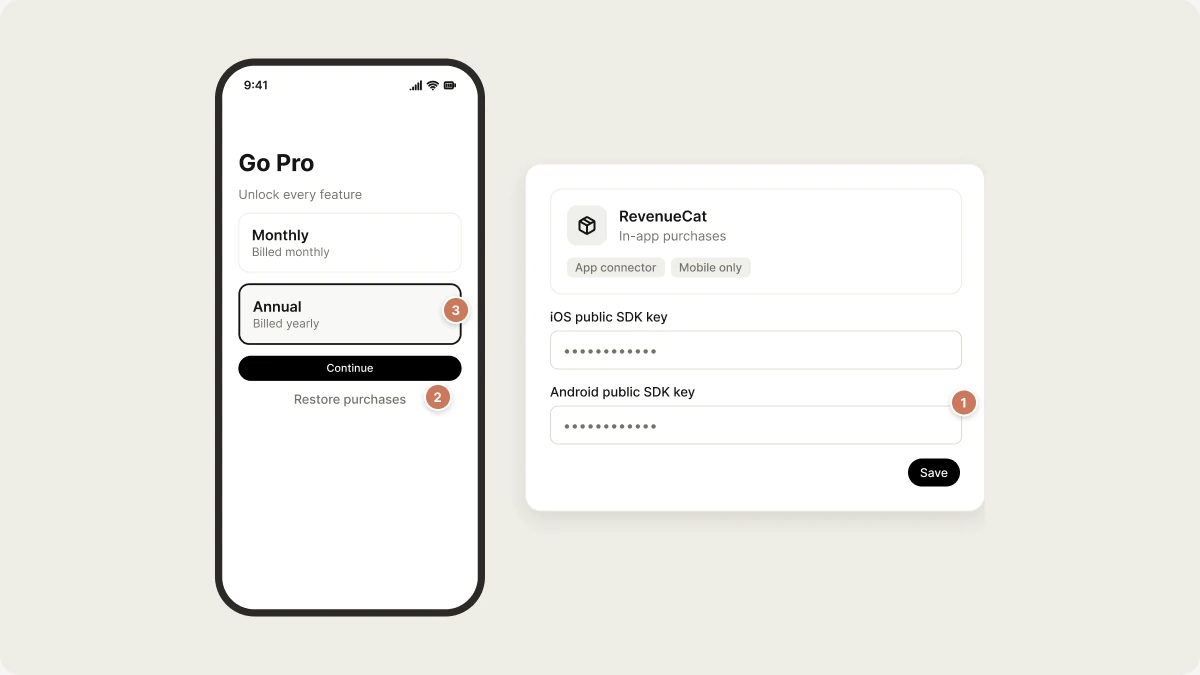 Connect RevenueCat, describe your paywall, and Vibely builds it. RevenueCat holds the purchase state, so there's no billing database for you to build or maintain.
RevenueCat is for **mobile projects** only. For payments in a web app, or for physical goods in a mobile app, use [Stripe](/integrations/stripe).
## What you can build
Every example below is a screen in your Expo app.
| Use case | Example prompt | What Vibely builds |
| - | - | - |
| Premium tier | `Add a Pro subscription with monthly and annual options, and gate the export button behind it.` | A paywall that shows your current offering and checks the `pro` entitlement |
| Free trial | `Give new users a 7-day trial, then show the paywall.` | The trial is configured in App Store Connect; the app reads the entitlement |
| Remove ads | `Add a one-time purchase that removes the banner ads.` | A non-consumable purchase and an entitlement check |
| Credit packs | `Sell packs of 50 credits and show the balance in the header.` | Consumable purchases tied to the signed-in account |
| Restore purchases | `Add a Restore purchases button to the settings screen.` | A restore button, which App Store review requires for paid apps |
## Before you start
* **App Store Connect and/or Google Play Console accounts** with your products created. For iOS, the Paid Apps agreement must be signed.
* **A RevenueCat project** with your iOS and Android apps added, your products imported, an **entitlement** (for example `pro`), and an **offering** that contains the packages you want on the paywall. Your code checks the entitlement ID, not the product ID.
* **A native build to test purchases.** See [Limitations](#limitations).
* **Permission to add connectors** in your workspace. See [Admin controls](/integrations/admin-controls).
RevenueCat bills you on its own plan, and Apple and Google take their store commission from each sale. Vibely takes no cut and isn't in the payment path.
## Connect RevenueCat
In the RevenueCat dashboard, open your project's API keys and copy the **public** SDK key for your iOS app and for your Android app.
In the sidebar, go to **Customize → Connectors**, select **RevenueCat**, and click **Add connection**. Paste the two keys and save.
In your mobile project's chat, describe what you want, for example `Add a Pro subscription and gate the export screen.`
The keys are stored as `EXPO_PUBLIC_REVENUECAT_IOS_KEY` and `EXPO_PUBLIC_REVENUECAT_ANDROID_KEY`. The `EXPO_PUBLIC_` prefix is intentional: these keys are public, scoped to one app each, and designed to ship inside your app.
RevenueCat's **secret** API key is a different credential. Your app never needs it, so don't paste it anywhere in your project.
## What Vibely adds to your project
* `src/lib/purchases.ts`, with helpers to load the current offering, buy a package, restore purchases, and link purchases to the signed-in user.
* `src/hooks/use-entitlement.ts`, a hook that gates your UI and updates as soon as a purchase, restore, or renewal happens.
* Setup in `src/app/_layout.tsx`, so RevenueCat starts when the app opens. Vibely also links purchases to your user on sign-in and clears them on sign-out, so purchases follow the account rather than the device.
RevenueCat doesn't need Supabase. Entitlements come from RevenueCat's servers, not from a table of your own.
## Limitations
* **No purchases in Expo Go.** Expo Go has no StoreKit or Play Billing, so purchase calls do nothing and the paywall appears empty. That's expected. Test with a development build or a store build. See [Ship your app](/features/mobile-apps/ship).
* **Mobile only.** Vibely doesn't add RevenueCat to web projects.
* **Products come from the stores.** Create them in App Store Connect and Play Console first. RevenueCat imports them; it doesn't create them.
## Troubleshooting
You're probably in Expo Go, which can't load store products. Otherwise, check that your offering contains packages, and that the products have finished review in App Store Connect.
The app checks the **entitlement ID**, not the product ID. In the RevenueCat dashboard, make sure the product is attached to the entitlement your code checks (for example `pro`).
## Manage or disconnect RevenueCat
Open **Customize → Connectors → RevenueCat** to see or remove the connection. The generated code stays in your project.
Active subscriptions are held by Apple and Google. Your customers cancel them in their store account. Disconnecting RevenueCat in Vibely doesn't cancel or refund anything.
## Related
Web payments and physical goods.
Build and submit to the stores.
Choose how your app takes money.
How connectors work.
## Related topics
- [Accept payments with Stripe](/integrations/stripe.md)
- [Add payments to your app](/features/grow/payments.md)
- [FAQ](/faq.md)
- [Built-in integrations](/integrations/connectors/native.md)
- [Native capabilities](/features/mobile-apps/native.md)
This documentation is built and hosted on [Mintlify](https://mintlify.com), a developer documentation platform.
Connect RevenueCat, describe your paywall, and Vibely builds it. RevenueCat holds the purchase state, so there's no billing database for you to build or maintain.
RevenueCat is for **mobile projects** only. For payments in a web app, or for physical goods in a mobile app, use [Stripe](/integrations/stripe).
## What you can build
Every example below is a screen in your Expo app.
| Use case | Example prompt | What Vibely builds |
| - | - | - |
| Premium tier | `Add a Pro subscription with monthly and annual options, and gate the export button behind it.` | A paywall that shows your current offering and checks the `pro` entitlement |
| Free trial | `Give new users a 7-day trial, then show the paywall.` | The trial is configured in App Store Connect; the app reads the entitlement |
| Remove ads | `Add a one-time purchase that removes the banner ads.` | A non-consumable purchase and an entitlement check |
| Credit packs | `Sell packs of 50 credits and show the balance in the header.` | Consumable purchases tied to the signed-in account |
| Restore purchases | `Add a Restore purchases button to the settings screen.` | A restore button, which App Store review requires for paid apps |
## Before you start
* **App Store Connect and/or Google Play Console accounts** with your products created. For iOS, the Paid Apps agreement must be signed.
* **A RevenueCat project** with your iOS and Android apps added, your products imported, an **entitlement** (for example `pro`), and an **offering** that contains the packages you want on the paywall. Your code checks the entitlement ID, not the product ID.
* **A native build to test purchases.** See [Limitations](#limitations).
* **Permission to add connectors** in your workspace. See [Admin controls](/integrations/admin-controls).
RevenueCat bills you on its own plan, and Apple and Google take their store commission from each sale. Vibely takes no cut and isn't in the payment path.
## Connect RevenueCat
In the RevenueCat dashboard, open your project's API keys and copy the **public** SDK key for your iOS app and for your Android app.
In the sidebar, go to **Customize → Connectors**, select **RevenueCat**, and click **Add connection**. Paste the two keys and save.
In your mobile project's chat, describe what you want, for example `Add a Pro subscription and gate the export screen.`
The keys are stored as `EXPO_PUBLIC_REVENUECAT_IOS_KEY` and `EXPO_PUBLIC_REVENUECAT_ANDROID_KEY`. The `EXPO_PUBLIC_` prefix is intentional: these keys are public, scoped to one app each, and designed to ship inside your app.
RevenueCat's **secret** API key is a different credential. Your app never needs it, so don't paste it anywhere in your project.
## What Vibely adds to your project
* `src/lib/purchases.ts`, with helpers to load the current offering, buy a package, restore purchases, and link purchases to the signed-in user.
* `src/hooks/use-entitlement.ts`, a hook that gates your UI and updates as soon as a purchase, restore, or renewal happens.
* Setup in `src/app/_layout.tsx`, so RevenueCat starts when the app opens. Vibely also links purchases to your user on sign-in and clears them on sign-out, so purchases follow the account rather than the device.
RevenueCat doesn't need Supabase. Entitlements come from RevenueCat's servers, not from a table of your own.
## Limitations
* **No purchases in Expo Go.** Expo Go has no StoreKit or Play Billing, so purchase calls do nothing and the paywall appears empty. That's expected. Test with a development build or a store build. See [Ship your app](/features/mobile-apps/ship).
* **Mobile only.** Vibely doesn't add RevenueCat to web projects.
* **Products come from the stores.** Create them in App Store Connect and Play Console first. RevenueCat imports them; it doesn't create them.
## Troubleshooting
You're probably in Expo Go, which can't load store products. Otherwise, check that your offering contains packages, and that the products have finished review in App Store Connect.
The app checks the **entitlement ID**, not the product ID. In the RevenueCat dashboard, make sure the product is attached to the entitlement your code checks (for example `pro`).
## Manage or disconnect RevenueCat
Open **Customize → Connectors → RevenueCat** to see or remove the connection. The generated code stays in your project.
Active subscriptions are held by Apple and Google. Your customers cancel them in their store account. Disconnecting RevenueCat in Vibely doesn't cancel or refund anything.
## Related
Web payments and physical goods.
Build and submit to the stores.
Choose how your app takes money.
How connectors work.
## Related topics
- [Accept payments with Stripe](/integrations/stripe.md)
- [Add payments to your app](/features/grow/payments.md)
- [FAQ](/faq.md)
- [Built-in integrations](/integrations/connectors/native.md)
- [Native capabilities](/features/mobile-apps/native.md)
This documentation is built and hosted on [Mintlify](https://mintlify.com), a developer documentation platform.