> ## Documentation Index
> Fetch the complete documentation index at: https://docs.vibely.sh/llms.txt
> Use this file to discover all available pages before exploring further.
# Built-in integrations
> Supabase, Vibely AI, Stripe, and RevenueCat are wired deeper than a regular connector, and the agent has its own tools for research and images.
A few integrations go deeper than a catalog connector. The agent's instructions, the project templates, and dedicated agent tools all know about them, so you describe the feature and the agent handles the setup.
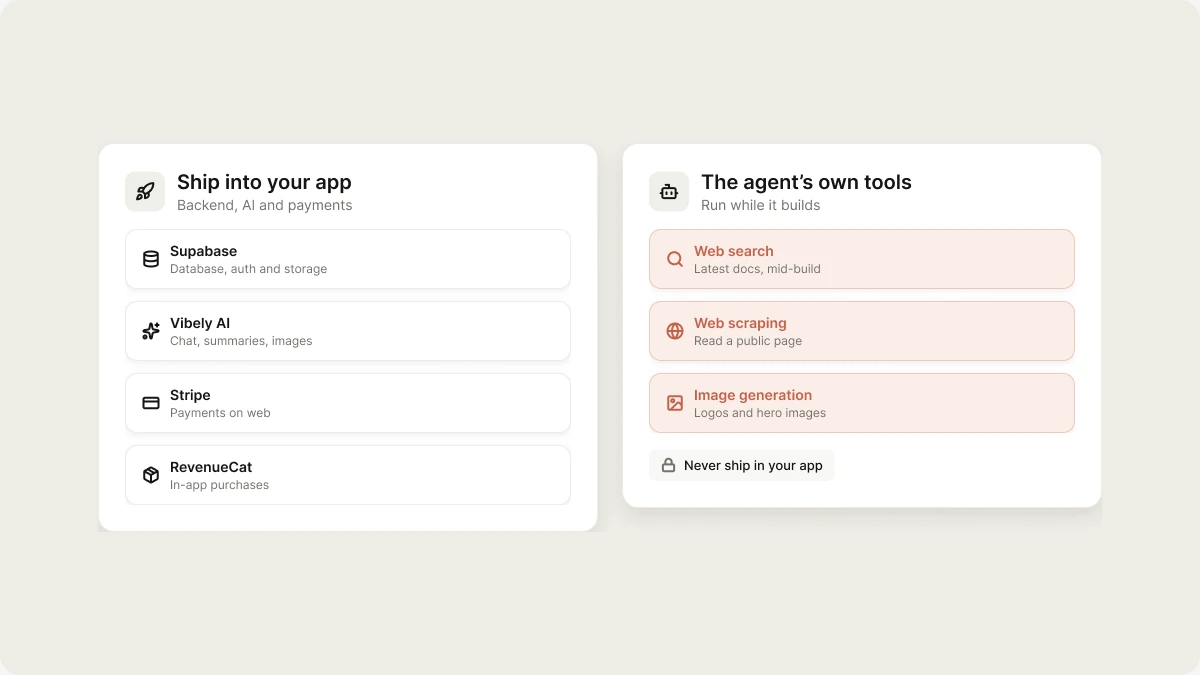 There are two different kinds on this page:
* **Supabase, Vibely AI, Stripe, and RevenueCat** ship into **your app**. They are its backend, its AI, and its payments.
* **Web search, web scraping, and image generation** are the **agent's** tools. They run while the agent builds and never become part of your app.
## Supabase
Supabase is the backend for every Vibely app: a Postgres database, user authentication, file storage, realtime, and Edge Functions. It is **your own** Supabase project, in your Supabase account. Vibely doesn't host a backend of its own.
What the agent does once a Supabase project is linked:
* Writes SQL migrations for the tables you describe and applies them to your project.
* Turns on row-level security (RLS) for every new table, with policies in the same migration.
* Reads the live schema before writing queries, so code matches what actually exists.
* Writes Supabase Edge Functions for anything that needs a secret, such as webhooks, scheduled jobs, and calls to third-party APIs.
If your project isn't linked yet, the agent shows a **Connect Supabase** card in the chat and keeps building on mock data until you connect.
Most other integrations depend on Supabase, because Edge Functions are where server-side code and secrets run. See [Backend (Supabase)](/integrations/supabase).
## Vibely AI
Vibely AI gives your app AI features, such as chat, summaries, image generation, and classification, without an API key from an AI provider. Usage spends your workspace's shared credits, the same balance a build uses. Calls run from a Supabase Edge Function, so it needs a linked Supabase project. See [Vibely AI](/features/backend/ai).
There are two different kinds on this page:
* **Supabase, Vibely AI, Stripe, and RevenueCat** ship into **your app**. They are its backend, its AI, and its payments.
* **Web search, web scraping, and image generation** are the **agent's** tools. They run while the agent builds and never become part of your app.
## Supabase
Supabase is the backend for every Vibely app: a Postgres database, user authentication, file storage, realtime, and Edge Functions. It is **your own** Supabase project, in your Supabase account. Vibely doesn't host a backend of its own.
What the agent does once a Supabase project is linked:
* Writes SQL migrations for the tables you describe and applies them to your project.
* Turns on row-level security (RLS) for every new table, with policies in the same migration.
* Reads the live schema before writing queries, so code matches what actually exists.
* Writes Supabase Edge Functions for anything that needs a secret, such as webhooks, scheduled jobs, and calls to third-party APIs.
If your project isn't linked yet, the agent shows a **Connect Supabase** card in the chat and keeps building on mock data until you connect.
Most other integrations depend on Supabase, because Edge Functions are where server-side code and secrets run. See [Backend (Supabase)](/integrations/supabase).
## Vibely AI
Vibely AI gives your app AI features, such as chat, summaries, image generation, and classification, without an API key from an AI provider. Usage spends your workspace's shared credits, the same balance a build uses. Calls run from a Supabase Edge Function, so it needs a linked Supabase project. See [Vibely AI](/features/backend/ai).
 ## Payments: Stripe and RevenueCat
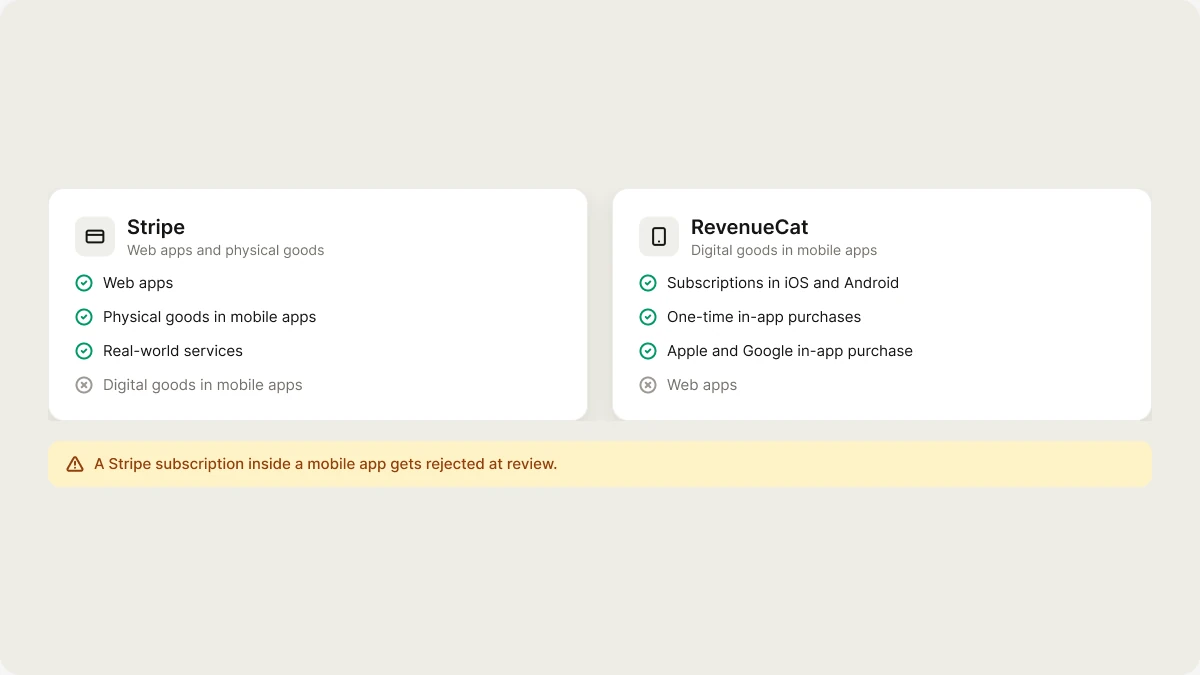
Two connectors accept money, and they aren't interchangeable:
| | Use it for | Not for |
| :- | :- | :- |
| **Stripe** | Web apps. Physical goods and real-world services in mobile apps. | Digital goods or subscriptions inside a mobile app |
| **RevenueCat** | Digital goods and subscriptions inside an iOS or Android app | Web apps |
The mobile split isn't a preference. Apple and Google require their own in-app purchase for anything used inside the app, so a Stripe checkout for a subscription in a mobile app gets rejected at review.
Ask for payments in the chat, for example "Add a Pro plan at \$19/month with Stripe checkout". The agent asks you to connect Stripe, then writes the checkout and webhook as Edge Functions that read `STRIPE_SECRET_KEY` and `STRIPE_WEBHOOK_SECRET`. With Supabase linked, your Stripe secret key goes straight into your Supabase project's Edge Function secrets. See [Stripe](/integrations/stripe) and [RevenueCat](/integrations/revenuecat).
## The agent's own tools
These tools help the agent while it builds. They run on Vibely's own provider accounts, so you don't need keys for them, and they never ship in your app.
| Tool | What the agent uses it for |
| :- | :- |
| **Web search** | Looking up current information mid-build, such as a library's latest API, instead of guessing |
| **Web scraping** | Reading a documentation page or a public site you point it at |
| **Image generation** | Creating logos, hero images, and illustrations for your app's assets |
If you want any of these **inside your published app**, for example a search box that queries the web, ask for it. The agent wires the provider you choose behind a Supabase Edge Function and asks for your own key in a secure dialog.
## Related
* [Connectors overview](/integrations/connectors/overview)
* [App and chat connectors](/integrations/connectors/catalog)
* [Auth and credentials](/integrations/connectors/auth)
* [Secrets](/features/backend/secrets)
## Related topics
- [Connect tools, services, and APIs](/integrations/connectors/overview.md)
- [Define reusable instructions with skills](/features/context/skills.md)
- [Design systems](/features/design/design-systems.md)
- [Glossary](/glossary.md)
- [Publish your app as an MCP server](/features/grow/agent-integrations.md)
This documentation is built and hosted on [Mintlify](https://mintlify.com), a developer documentation platform.
## Payments: Stripe and RevenueCat
Two connectors accept money, and they aren't interchangeable:
| | Use it for | Not for |
| :- | :- | :- |
| **Stripe** | Web apps. Physical goods and real-world services in mobile apps. | Digital goods or subscriptions inside a mobile app |
| **RevenueCat** | Digital goods and subscriptions inside an iOS or Android app | Web apps |
The mobile split isn't a preference. Apple and Google require their own in-app purchase for anything used inside the app, so a Stripe checkout for a subscription in a mobile app gets rejected at review.
Ask for payments in the chat, for example "Add a Pro plan at \$19/month with Stripe checkout". The agent asks you to connect Stripe, then writes the checkout and webhook as Edge Functions that read `STRIPE_SECRET_KEY` and `STRIPE_WEBHOOK_SECRET`. With Supabase linked, your Stripe secret key goes straight into your Supabase project's Edge Function secrets. See [Stripe](/integrations/stripe) and [RevenueCat](/integrations/revenuecat).
## The agent's own tools
These tools help the agent while it builds. They run on Vibely's own provider accounts, so you don't need keys for them, and they never ship in your app.
| Tool | What the agent uses it for |
| :- | :- |
| **Web search** | Looking up current information mid-build, such as a library's latest API, instead of guessing |
| **Web scraping** | Reading a documentation page or a public site you point it at |
| **Image generation** | Creating logos, hero images, and illustrations for your app's assets |
If you want any of these **inside your published app**, for example a search box that queries the web, ask for it. The agent wires the provider you choose behind a Supabase Edge Function and asks for your own key in a secure dialog.
## Related
* [Connectors overview](/integrations/connectors/overview)
* [App and chat connectors](/integrations/connectors/catalog)
* [Auth and credentials](/integrations/connectors/auth)
* [Secrets](/features/backend/secrets)
## Related topics
- [Connect tools, services, and APIs](/integrations/connectors/overview.md)
- [Define reusable instructions with skills](/features/context/skills.md)
- [Design systems](/features/design/design-systems.md)
- [Glossary](/glossary.md)
- [Publish your app as an MCP server](/features/grow/agent-integrations.md)
This documentation is built and hosted on [Mintlify](https://mintlify.com), a developer documentation platform.