> ## Documentation Index
> Fetch the complete documentation index at: https://docs.vibely.sh/llms.txt
> Use this file to discover all available pages before exploring further.
# Connector authentication and credentials
> How connectors sign in, where their credentials are stored, and how to let each user of your app connect their own account.
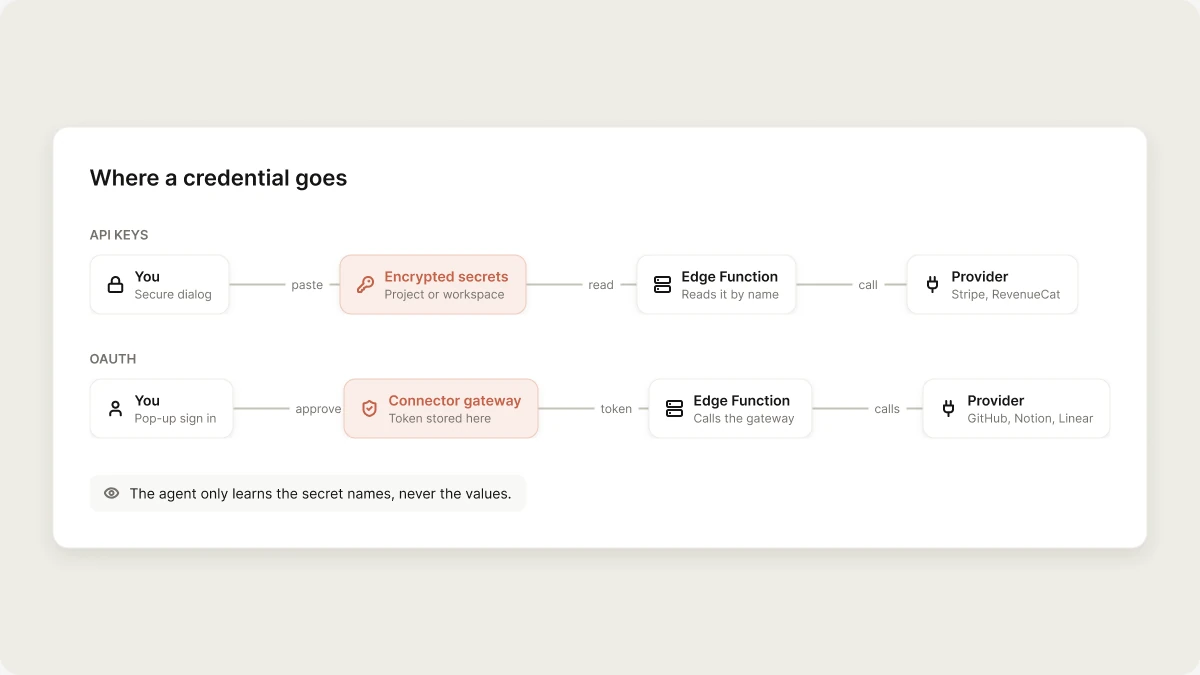
Connectors talk to other services, which means credentials. Vibely keeps them out of three places: your app's source code, the agent's context, and the chat log. This page explains how each connector signs in, where the credential ends up, and how to give each user of your published app a connection of their own.
 ## How connectors sign in
| Method | Used by | What you do |
| :- | :- | :- |
| **OAuth** | GitHub, Notion, Linear, Supabase, Stripe (**Connect with Stripe**) | Sign in to the tool in a pop-up window and approve access. |
| **API keys** | RevenueCat, Stripe (**Use API keys manually instead**), custom REST connectors | Paste the keys into the connector's form or the secure dialog the agent opens. |
| **MCP authorization** | Figma, Miro, the chat side of Notion and Linear, custom MCP servers | Authorize in a pop-up (OAuth), paste an API key, or connect with no authentication, depending on the server. |
| **Nothing** | Vibely AI | Built in. There's no credential to manage. |
The agent never asks for a key in the chat. If you paste one into a message anyway, Vibely removes it before sending ("Removed a … from your message") and offers **Open Secrets** so you can store it properly.
## Where credentials live
| Credential | Where it's stored | Who can use it |
| :- | :- | :- |
| App connector OAuth tokens | The Vibely connector gateway, encrypted at rest | The gateway, when your app or the agent makes a call |
| Chat connector and custom MCP tokens or keys | Your MCP server record, encrypted at rest | The agent's MCP client, during your builds |
| Connector API keys and workspace connection values | Workspace or project secrets, encrypted at rest | Your app's Edge Functions at runtime |
| Keys you add for your own integrations | Project [Secrets](/features/backend/secrets), encrypted at rest | Your Supabase Edge Functions, through `Deno.env.get("NAME")` |
| Stripe secret key, with Supabase linked | Your Supabase project's Edge Function secret store | Your Edge Functions |
Who can use a connection follows from where it's stored, and the **Who can use this connection** box on the new-connection screen says which applies:
* **Chat connectors** are personal. Only you use them, in your chats and builds.
* **App connectors saved to a project** can be used by everyone who can build in that project, and by the published app.
* **App connectors saved to the workspace** can be used in every project in the workspace, and by those projects' published apps.
You can't limit an app connection to certain members, because the published app uses it for every visitor.
Project secrets are pushed to your Supabase project's Edge Function secrets before each deploy. They are never written into your project's files, so connecting GitHub, exporting, or downloading the project can't leak them.
Names that start with `VIBELY_` or `SUPABASE_` are reserved. Vibely sets them automatically, and you can't create or override them.
### Public values are the exception
Some values are meant to be public and ship in your app: a Stripe publishable key, RevenueCat's per-store SDK keys, an analytics project key. These use the `VITE_` prefix on web and `EXPO_PUBLIC_` on mobile, and they live in the project's checked-in `.env`.
Never give a secret key a `VITE_` or `EXPO_PUBLIC_` prefix. Anything with those prefixes is bundled into your app and anyone can extract it. Vibely's secret dialog refuses secret names with a public prefix for this reason.
## What the agent can and can't see
The agent reads and writes your project files, but it **can't read connector credentials**:
* When the agent asks for a key, you type it into a secure dialog. The agent only learns which names were saved.
* When your app calls an OAuth connector, the request goes through the gateway, which attaches the token on the server.
* The agent references secrets by name in code, for example `Deno.env.get("RESEND_API_KEY")`. It never writes the value into a file.
## How connectors sign in
| Method | Used by | What you do |
| :- | :- | :- |
| **OAuth** | GitHub, Notion, Linear, Supabase, Stripe (**Connect with Stripe**) | Sign in to the tool in a pop-up window and approve access. |
| **API keys** | RevenueCat, Stripe (**Use API keys manually instead**), custom REST connectors | Paste the keys into the connector's form or the secure dialog the agent opens. |
| **MCP authorization** | Figma, Miro, the chat side of Notion and Linear, custom MCP servers | Authorize in a pop-up (OAuth), paste an API key, or connect with no authentication, depending on the server. |
| **Nothing** | Vibely AI | Built in. There's no credential to manage. |
The agent never asks for a key in the chat. If you paste one into a message anyway, Vibely removes it before sending ("Removed a … from your message") and offers **Open Secrets** so you can store it properly.
## Where credentials live
| Credential | Where it's stored | Who can use it |
| :- | :- | :- |
| App connector OAuth tokens | The Vibely connector gateway, encrypted at rest | The gateway, when your app or the agent makes a call |
| Chat connector and custom MCP tokens or keys | Your MCP server record, encrypted at rest | The agent's MCP client, during your builds |
| Connector API keys and workspace connection values | Workspace or project secrets, encrypted at rest | Your app's Edge Functions at runtime |
| Keys you add for your own integrations | Project [Secrets](/features/backend/secrets), encrypted at rest | Your Supabase Edge Functions, through `Deno.env.get("NAME")` |
| Stripe secret key, with Supabase linked | Your Supabase project's Edge Function secret store | Your Edge Functions |
Who can use a connection follows from where it's stored, and the **Who can use this connection** box on the new-connection screen says which applies:
* **Chat connectors** are personal. Only you use them, in your chats and builds.
* **App connectors saved to a project** can be used by everyone who can build in that project, and by the published app.
* **App connectors saved to the workspace** can be used in every project in the workspace, and by those projects' published apps.
You can't limit an app connection to certain members, because the published app uses it for every visitor.
Project secrets are pushed to your Supabase project's Edge Function secrets before each deploy. They are never written into your project's files, so connecting GitHub, exporting, or downloading the project can't leak them.
Names that start with `VIBELY_` or `SUPABASE_` are reserved. Vibely sets them automatically, and you can't create or override them.
### Public values are the exception
Some values are meant to be public and ship in your app: a Stripe publishable key, RevenueCat's per-store SDK keys, an analytics project key. These use the `VITE_` prefix on web and `EXPO_PUBLIC_` on mobile, and they live in the project's checked-in `.env`.
Never give a secret key a `VITE_` or `EXPO_PUBLIC_` prefix. Anything with those prefixes is bundled into your app and anyone can extract it. Vibely's secret dialog refuses secret names with a public prefix for this reason.
## What the agent can and can't see
The agent reads and writes your project files, but it **can't read connector credentials**:
* When the agent asks for a key, you type it into a secure dialog. The agent only learns which names were saved.
* When your app calls an OAuth connector, the request goes through the gateway, which attaches the token on the server.
* The agent references secrets by name in code, for example `Deno.env.get("RESEND_API_KEY")`. It never writes the value into a file.
 ## Per-user connections
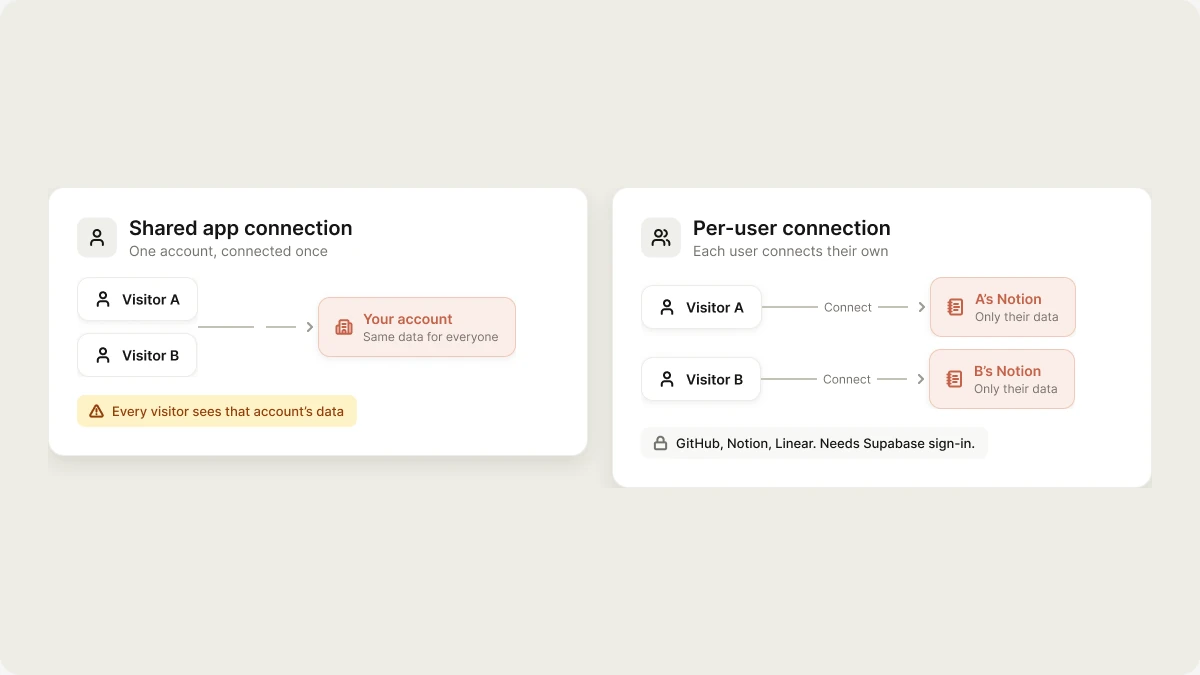
A normal app connection uses **one shared account**, so every visitor of your app acts through it. A **per-user connection** lets each person who signs in to your published app connect **their own** account, and your app acts on their behalf with their own permissions.
| | Shared app connection | Per-user connection |
| :- | :- | :- |
| **Whose account** | One account you connect once | Each user's own account |
| **Who authorizes** | You, or a workspace admin | Every user, the first time they use it |
| **Data the app sees** | The shared account's data, the same for everyone | Only the signed-in user's data |
| **Typical use** | Post to your team's Linear, read the company Notion | "Connect your GitHub", "Connect your Notion" |
Choosing the shared model when you meant per-user shows every visitor the data in your account. Say "each user connects their own account" when that's what you want.
### Available providers
Per-user connections work with **GitHub**, **Notion**, and **Linear**. They need your app to have sign-in through Supabase auth, because each connection is tied to a signed-in user. Stripe and API-key connectors don't support them.
### Set one up
Ask for it in your project chat, for example:
```text wrap theme={"system"}
Let each signed-in user connect their own Notion and show a list of their pages.
```
The agent writes a **Connect** flow into your app and a Supabase Edge Function that makes requests for the signed-in user. When a user connects, they go through the provider's normal consent screen. Their token is stored encrypted in the connector gateway, linked to that user, and your app code never sees it. Every request is checked against the signed-in user, so one user's connection can never be used to act as another.
## Rotate or revoke a credential
* **OAuth connections:** open the connector in **Customize → Connectors** and click **Disconnect**, then connect again. You can also revoke Vibely's access in the tool's own settings.
* **Keys:** add the secret again with the new value in your project's **Secrets**, or ask the agent to update it. The new value replaces the old one.
* **Custom MCP servers:** remove the server and add it again with new credentials.
### If a secret leaks
1. Rotate the key at the source first: the provider's dashboard, such as Stripe or RevenueCat.
2. Save the new value in Vibely.
3. Ask the agent to check the project for other exposed keys, or run a scan from the [Security view](/features/security/project-view).
## Related
* [Secrets](/features/backend/secrets)
* [App and chat connectors](/integrations/connectors/catalog)
* [Admin controls](/integrations/admin-controls)
* [Security best practices](/features/security/best-practices)
## Related topics
- [Manage connectors in your workspace](/integrations/admin-controls.md)
- [Add users and authentication](/features/backend/auth.md)
- [Connect a custom MCP server](/integrations/connectors/custom-mcp.md)
- [Authentication in mobile apps](/features/mobile-apps/auth.md)
- [App and chat connectors](/integrations/connectors/catalog.md)
This documentation is built and hosted on [Mintlify](https://mintlify.com), a developer documentation platform.
## Per-user connections
A normal app connection uses **one shared account**, so every visitor of your app acts through it. A **per-user connection** lets each person who signs in to your published app connect **their own** account, and your app acts on their behalf with their own permissions.
| | Shared app connection | Per-user connection |
| :- | :- | :- |
| **Whose account** | One account you connect once | Each user's own account |
| **Who authorizes** | You, or a workspace admin | Every user, the first time they use it |
| **Data the app sees** | The shared account's data, the same for everyone | Only the signed-in user's data |
| **Typical use** | Post to your team's Linear, read the company Notion | "Connect your GitHub", "Connect your Notion" |
Choosing the shared model when you meant per-user shows every visitor the data in your account. Say "each user connects their own account" when that's what you want.
### Available providers
Per-user connections work with **GitHub**, **Notion**, and **Linear**. They need your app to have sign-in through Supabase auth, because each connection is tied to a signed-in user. Stripe and API-key connectors don't support them.
### Set one up
Ask for it in your project chat, for example:
```text wrap theme={"system"}
Let each signed-in user connect their own Notion and show a list of their pages.
```
The agent writes a **Connect** flow into your app and a Supabase Edge Function that makes requests for the signed-in user. When a user connects, they go through the provider's normal consent screen. Their token is stored encrypted in the connector gateway, linked to that user, and your app code never sees it. Every request is checked against the signed-in user, so one user's connection can never be used to act as another.
## Rotate or revoke a credential
* **OAuth connections:** open the connector in **Customize → Connectors** and click **Disconnect**, then connect again. You can also revoke Vibely's access in the tool's own settings.
* **Keys:** add the secret again with the new value in your project's **Secrets**, or ask the agent to update it. The new value replaces the old one.
* **Custom MCP servers:** remove the server and add it again with new credentials.
### If a secret leaks
1. Rotate the key at the source first: the provider's dashboard, such as Stripe or RevenueCat.
2. Save the new value in Vibely.
3. Ask the agent to check the project for other exposed keys, or run a scan from the [Security view](/features/security/project-view).
## Related
* [Secrets](/features/backend/secrets)
* [App and chat connectors](/integrations/connectors/catalog)
* [Admin controls](/integrations/admin-controls)
* [Security best practices](/features/security/best-practices)
## Related topics
- [Manage connectors in your workspace](/integrations/admin-controls.md)
- [Add users and authentication](/features/backend/auth.md)
- [Connect a custom MCP server](/integrations/connectors/custom-mcp.md)
- [Authentication in mobile apps](/features/mobile-apps/auth.md)
- [App and chat connectors](/integrations/connectors/catalog.md)
This documentation is built and hosted on [Mintlify](https://mintlify.com), a developer documentation platform.