> ## Documentation Index
> Fetch the complete documentation index at: https://docs.vibely.sh/llms.txt
> Use this file to discover all available pages before exploring further.
# Add a third-party analytics tool
> Vibely shows built-in visitor analytics for published web apps; ask the agent when you also want a product analytics tool such as PostHog, Google Analytics 4, or Amplitude.
Every published web app already has built-in visitor analytics under **Manage → Analytics** in the editor, with no setup. See [Analytics](/features/grow/analytics).
 When you need more, such as event funnels, feature flags, session replay, or ad attribution, add a product analytics tool. Analytics tools **aren't in the Connectors catalog**, so there's no tile to click. You add one by asking the agent in your project chat, and you bring your own account and key.
## Add an analytics tool
Sign up with the analytics tool and create a project there. Note the project key or measurement ID, and which region the project is in (US or EU).
Name the tool in your project chat, for example:
```text wrap theme={"system"}
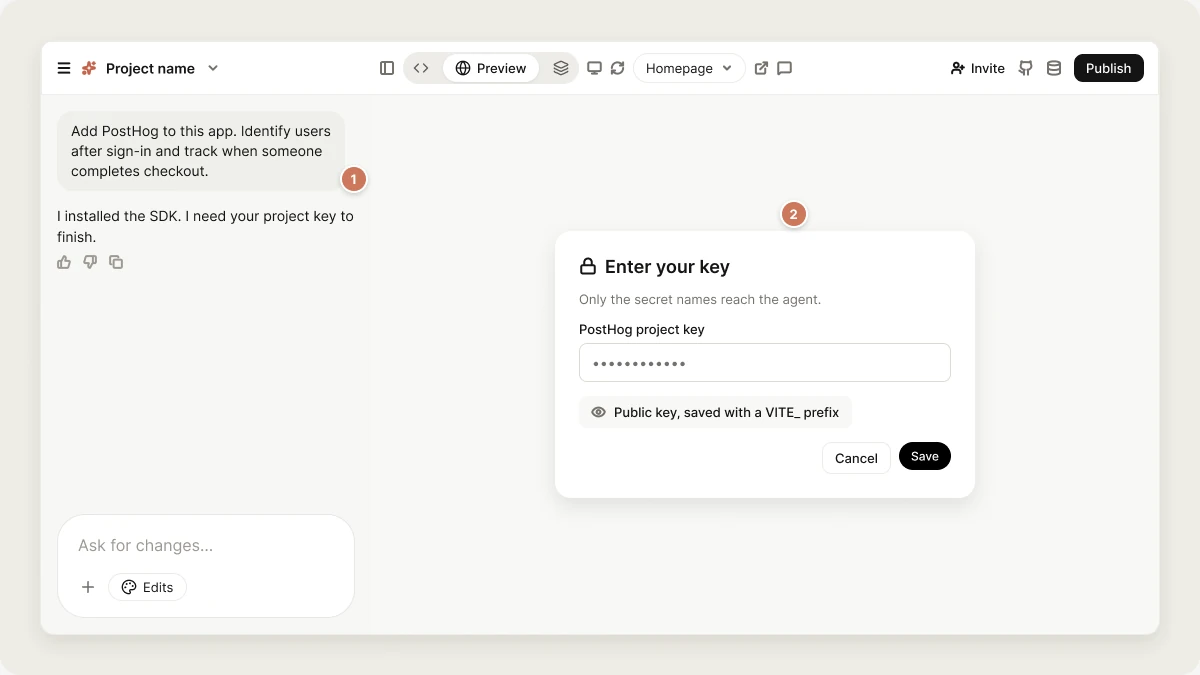
Add PostHog to this app. Identify users after sign-in and track when someone completes checkout.
```
The agent installs the SDK, initializes it once at app start, and adds the events you describe.
The agent opens a secure dialog for the key. Keys meant to be public, such as a PostHog project key or a GA4 measurement ID, are saved with a `VITE_` prefix (web) or `EXPO_PUBLIC_` prefix (mobile) and ship in your app, which is what those keys are for. Secret keys are stored as project [secrets](/features/backend/secrets) and only used from a Supabase Edge Function.
Open your preview, click around, and look for events in the provider's live or debug view. Standard reports can lag by hours.
If you already have the key, you can add it yourself first: open the project name menu → **Project settings** → **Secrets**, add it under the exact name the provider's SDK expects, and then ask the agent to wire the integration.
## Choosing a tool
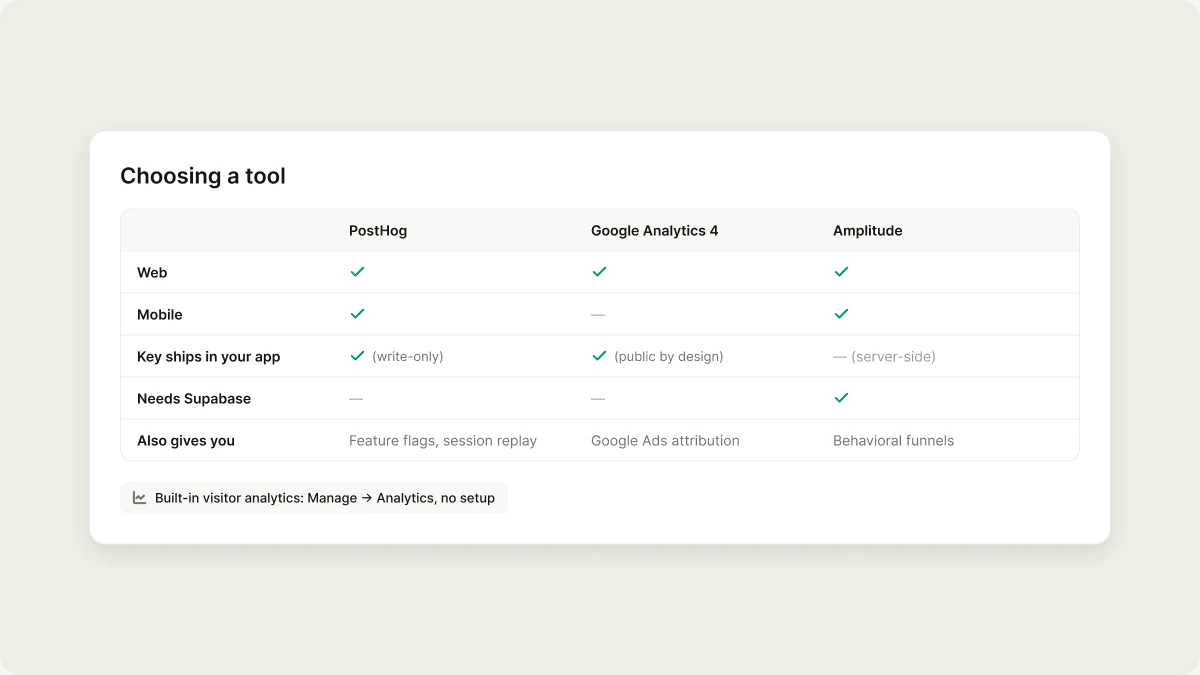
These are the tools the agent is most familiar with. It can wire others too; describe the one you use.
| | PostHog | Google Analytics 4 | Amplitude |
| :- | :-: | :-: | :-: |
| Web | ✅ | ✅ | ✅ |
| Mobile | ✅ | — | ✅ |
| Key ships in your app | ✅ (write-only) | ✅ (public by design) | — (server-side) |
| Needs Supabase | — | — | ✅ |
| Also gives you | Feature flags, session replay | Google Ads attribution | Behavioral funnels |
Amplitude's API key is secret, so your app sends events to a Supabase Edge Function, which forwards them to Amplitude. That also lets the function attach the signed-in user's ID instead of trusting whatever the client sends. For GA4 on mobile, Google's path is Firebase, which Vibely doesn't set up.
When you need more, such as event funnels, feature flags, session replay, or ad attribution, add a product analytics tool. Analytics tools **aren't in the Connectors catalog**, so there's no tile to click. You add one by asking the agent in your project chat, and you bring your own account and key.
## Add an analytics tool
Sign up with the analytics tool and create a project there. Note the project key or measurement ID, and which region the project is in (US or EU).
Name the tool in your project chat, for example:
```text wrap theme={"system"}
Add PostHog to this app. Identify users after sign-in and track when someone completes checkout.
```
The agent installs the SDK, initializes it once at app start, and adds the events you describe.
The agent opens a secure dialog for the key. Keys meant to be public, such as a PostHog project key or a GA4 measurement ID, are saved with a `VITE_` prefix (web) or `EXPO_PUBLIC_` prefix (mobile) and ship in your app, which is what those keys are for. Secret keys are stored as project [secrets](/features/backend/secrets) and only used from a Supabase Edge Function.
Open your preview, click around, and look for events in the provider's live or debug view. Standard reports can lag by hours.
If you already have the key, you can add it yourself first: open the project name menu → **Project settings** → **Secrets**, add it under the exact name the provider's SDK expects, and then ask the agent to wire the integration.
## Choosing a tool
These are the tools the agent is most familiar with. It can wire others too; describe the one you use.
| | PostHog | Google Analytics 4 | Amplitude |
| :- | :-: | :-: | :-: |
| Web | ✅ | ✅ | ✅ |
| Mobile | ✅ | — | ✅ |
| Key ships in your app | ✅ (write-only) | ✅ (public by design) | — (server-side) |
| Needs Supabase | — | — | ✅ |
| Also gives you | Feature flags, session replay | Google Ads attribution | Behavioral funnels |
Amplitude's API key is secret, so your app sends events to a Supabase Edge Function, which forwards them to Amplitude. That also lets the function attach the signed-in user's ID instead of trusting whatever the client sends. For GA4 on mobile, Google's path is Firebase, which Vibely doesn't set up.
 ## Tips that save a debugging session
The host is region-specific: `https://us.i.posthog.com` or `https://eu.i.posthog.com`, matching where you created the PostHog project. Pointing an EU project at the US host drops every event without an error, so the dashboard just stays empty.
Also call `posthog.identify(user.id)` after sign-in and `posthog.reset()` on sign-out, or every visitor merges into one anonymous person.
`gtag` records a page view only on the first page load. Vibely apps change routes without reloading, so the app needs to send a `page_view` event on every route change. Ask the agent to "send a GA4 page view on every route change".
GA4 standard reports lag up to 24 hours. Use **DebugView** or **Realtime** in GA4 to check that events arrive.
Every event needs a `user_id` or `device_id`, and `user_id` must be at least 5 characters. EU accounts must send to `https://api.eu.amplitude.com/2/httpapi`, because the US endpoint rejects an EU key. Rejections come back as a 400 response, so ask the agent to log non-200 responses from the Edge Function.
Ad blockers drop a noticeable share of analytics requests, and each tool counts sessions differently. Never use analytics counts for billing or access decisions.
## Mobile apps: declare analytics in the stores
Shipping an analytics SDK in a native build means you collect usage data, and both stores require you to say so:
* **App Store:** declare it in the privacy nutrition label under *Usage Data*, and *Identifiers* if you send a user ID.
* **Google Play:** declare it in the Data safety form under *App activity*.
An undeclared SDK is a rejection, not a warning. See [Ship your mobile app](/features/mobile-apps/ship).
## Related
Visitor stats for your published web app, with no setup.
Runtime errors from your live app, which analytics won't show you.
## Related topics
- [FAQ](/faq.md)
- [Build your first web app](/features/web-apps/quickstart.md)
- [Vibely MCP server](/integrations/vibely-mcp-server.md)
- [Add a backend with Supabase](/integrations/supabase.md)
- [Monitor your live app](/features/grow/monitoring.md)
This documentation is built and hosted on [Mintlify](https://mintlify.com), a developer documentation platform.
## Tips that save a debugging session
The host is region-specific: `https://us.i.posthog.com` or `https://eu.i.posthog.com`, matching where you created the PostHog project. Pointing an EU project at the US host drops every event without an error, so the dashboard just stays empty.
Also call `posthog.identify(user.id)` after sign-in and `posthog.reset()` on sign-out, or every visitor merges into one anonymous person.
`gtag` records a page view only on the first page load. Vibely apps change routes without reloading, so the app needs to send a `page_view` event on every route change. Ask the agent to "send a GA4 page view on every route change".
GA4 standard reports lag up to 24 hours. Use **DebugView** or **Realtime** in GA4 to check that events arrive.
Every event needs a `user_id` or `device_id`, and `user_id` must be at least 5 characters. EU accounts must send to `https://api.eu.amplitude.com/2/httpapi`, because the US endpoint rejects an EU key. Rejections come back as a 400 response, so ask the agent to log non-200 responses from the Edge Function.
Ad blockers drop a noticeable share of analytics requests, and each tool counts sessions differently. Never use analytics counts for billing or access decisions.
## Mobile apps: declare analytics in the stores
Shipping an analytics SDK in a native build means you collect usage data, and both stores require you to say so:
* **App Store:** declare it in the privacy nutrition label under *Usage Data*, and *Identifiers* if you send a user ID.
* **Google Play:** declare it in the Data safety form under *App activity*.
An undeclared SDK is a rejection, not a warning. See [Ship your mobile app](/features/mobile-apps/ship).
## Related
Visitor stats for your published web app, with no setup.
Runtime errors from your live app, which analytics won't show you.
## Related topics
- [FAQ](/faq.md)
- [Build your first web app](/features/web-apps/quickstart.md)
- [Vibely MCP server](/integrations/vibely-mcp-server.md)
- [Add a backend with Supabase](/integrations/supabase.md)
- [Monitor your live app](/features/grow/monitoring.md)
This documentation is built and hosted on [Mintlify](https://mintlify.com), a developer documentation platform.