> ## Documentation Index
> Fetch the complete documentation index at: https://docs.vibely.sh/llms.txt
> Use this file to discover all available pages before exploring further.
# Start a build from outside Vibely
> Shareable build links, the build stream API, and MCP in both directions: Vibely as an MCP server and as an MCP client
Most builds start by typing into the Vibely app. Some do not — an idea lands in a group chat, a teammate should be the one to build it, or a script needs to kick off a project with no human at the keyboard.
Four things are real today. Start with what you actually need.
| You want | Use |
| - | - |
| Someone else to open Vibely with your idea already written | [A build link](#a-build-link-anyone-can-open) |
| A script, CI job or agent to start and drive a build | [The build stream API](#the-build-stream-api) |
| Claude, ChatGPT, Cursor or another AI tool to build and publish for you | [The Vibely MCP server](/integrations/vibely-mcp-server) |
| The build agent to reach *your* systems while it works | [MCP client](#mcp-works-in-both-directions) |
There is no Slack app, Telegram bot, or ChatGPT integration. If you have seen one advertised, it was not ours. Everything on this page is what ships.
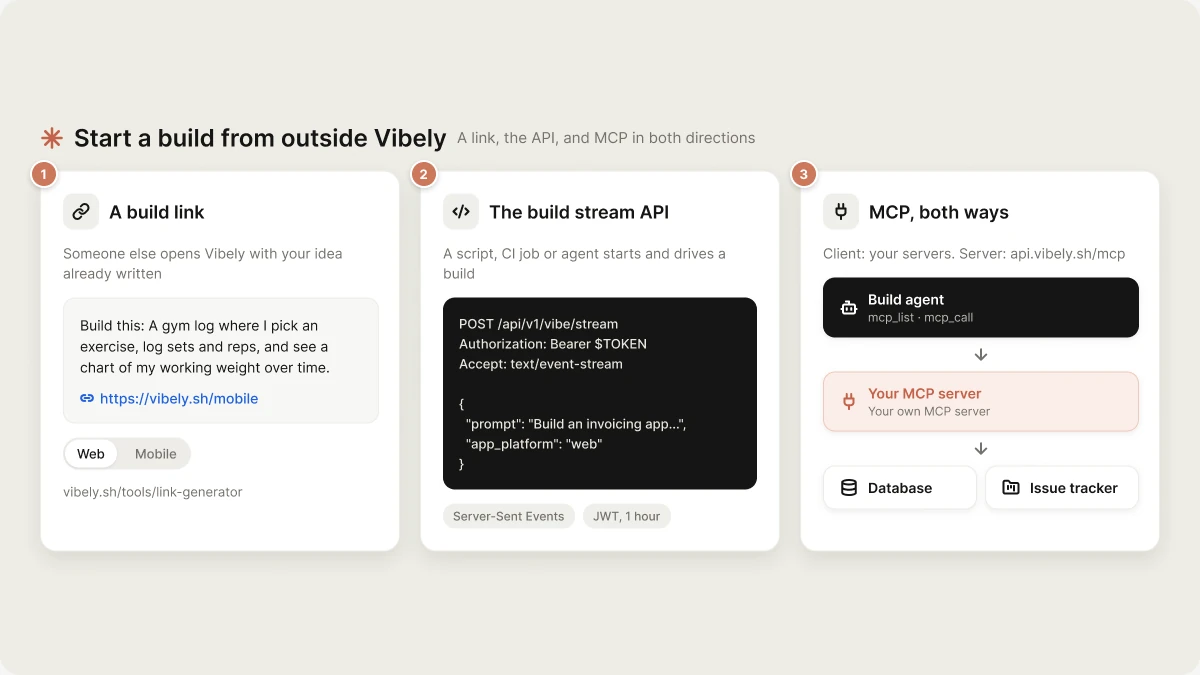 ## A build link anyone can open
[**vibely.sh/tools/link-generator**](https://vibely.sh/tools/link-generator) turns an idea into a post you can paste into a thread, a channel, or a DM.
Up to 2,000 characters. It is a prompt, not a spec document — name the job, the sections and the feel, and let the build ask about the rest.
**Web app** for something that lands on a live URL. **Native mobile app** for a real Expo app the builder can open on their own phone while it is still being written.
You get the prompt and the matching link, formatted and ready to paste.
The result looks like this:
```text theme={"system"}
Build this: A gym log where I pick an exercise, log sets and reps,
and see a chart of my working weight over time.
https://vibely.sh/mobile
```
The prompt travels **as text next to the link**, not inside it. Whoever opens the link lands on Vibely with the prompt sitting right there in the post to paste. That is the whole trick, and it is why the post is worth copying rather than just the URL.
No account is needed to share one. The person who opens it needs one to build.
## The build stream API
`POST /api/v1/vibe/stream` is the same endpoint the Vibely app itself calls. Anything the app can start, an external caller can start.
```bash theme={"system"}
curl -N https://api.vibely.sh/api/v1/vibe/stream \
-H "Authorization: Bearer $TOKEN" \
-H "Content-Type: application/json" \
-H "Accept: text/event-stream" \
-d '{"prompt":"Build an invoicing app with clients, line items and PDF export","app_platform":"web"}'
```
It returns Server-Sent Events as the build runs. Omit `project_id` to create a project; pass it to continue one, which is how an agent carries a build across several turns.
Auth is a Supabase-issued JWT, short-lived (1 hour) — so a long-running caller has to handle `401` by re-authenticating rather than holding a token forever. The AI gateway your *generated app* calls is a different surface with a different key; see [Authentication](/api-reference/auth) for both.
Full request schema, every event type, and the error shapes are in [Build Stream](/api-reference/vibe-stream).
## MCP works in both directions
**Vibely as an MCP server.** AI tools such as Claude, ChatGPT, Cursor, Claude Code and Codex can connect to Vibely and create, edit, inspect and publish your apps with your account's access. See the [Vibely MCP server](/integrations/vibely-mcp-server) page for the server URL and per-client setup, or open **Settings → MCP server** in the app.
**Vibely as an MCP client.** The other direction is just as useful: connect your own MCP servers, and the build agent gains `mcp_list` and `mcp_call`. It can then query your database, hit your internal API, or read your issue tracker *while it is building* — so the app it writes matches your real schema instead of an invented one.
* [MCP Client Overview](/reference/mcp/overview) — how the agent sees connected tools
* [Connection](/reference/mcp/connection) — adding a server, and the OAuth round trip
* [External MCP Servers](/reference/mcp/external-servers) — ready-made config for Linear, Notion and others
## Related
* [Sharing and visibility](/features/collaboration/sharing) — who can open the project, the preview, and the published site
* [Remix](/features/projects/remix) — starting from someone else's project instead of a blank one
* [Prompting best practices](/prompting/best-practices) — making a one-paragraph prompt land
## Related topics
- [Deploy and host outside Vibely](/features/deploy/external-hosting.md)
- [Vibely for Enterprise](/introduction/enterprise.md)
- [Security best practices for Vibely apps](/features/security/best-practices.md)
- [Quick start](/introduction/quickstart.md)
- [Deployment, hosting and ownership options](/features/deploy/ownership.md)
This documentation is built and hosted on [Mintlify](https://mintlify.com), a developer documentation platform.
## A build link anyone can open
[**vibely.sh/tools/link-generator**](https://vibely.sh/tools/link-generator) turns an idea into a post you can paste into a thread, a channel, or a DM.
Up to 2,000 characters. It is a prompt, not a spec document — name the job, the sections and the feel, and let the build ask about the rest.
**Web app** for something that lands on a live URL. **Native mobile app** for a real Expo app the builder can open on their own phone while it is still being written.
You get the prompt and the matching link, formatted and ready to paste.
The result looks like this:
```text theme={"system"}
Build this: A gym log where I pick an exercise, log sets and reps,
and see a chart of my working weight over time.
https://vibely.sh/mobile
```
The prompt travels **as text next to the link**, not inside it. Whoever opens the link lands on Vibely with the prompt sitting right there in the post to paste. That is the whole trick, and it is why the post is worth copying rather than just the URL.
No account is needed to share one. The person who opens it needs one to build.
## The build stream API
`POST /api/v1/vibe/stream` is the same endpoint the Vibely app itself calls. Anything the app can start, an external caller can start.
```bash theme={"system"}
curl -N https://api.vibely.sh/api/v1/vibe/stream \
-H "Authorization: Bearer $TOKEN" \
-H "Content-Type: application/json" \
-H "Accept: text/event-stream" \
-d '{"prompt":"Build an invoicing app with clients, line items and PDF export","app_platform":"web"}'
```
It returns Server-Sent Events as the build runs. Omit `project_id` to create a project; pass it to continue one, which is how an agent carries a build across several turns.
Auth is a Supabase-issued JWT, short-lived (1 hour) — so a long-running caller has to handle `401` by re-authenticating rather than holding a token forever. The AI gateway your *generated app* calls is a different surface with a different key; see [Authentication](/api-reference/auth) for both.
Full request schema, every event type, and the error shapes are in [Build Stream](/api-reference/vibe-stream).
## MCP works in both directions
**Vibely as an MCP server.** AI tools such as Claude, ChatGPT, Cursor, Claude Code and Codex can connect to Vibely and create, edit, inspect and publish your apps with your account's access. See the [Vibely MCP server](/integrations/vibely-mcp-server) page for the server URL and per-client setup, or open **Settings → MCP server** in the app.
**Vibely as an MCP client.** The other direction is just as useful: connect your own MCP servers, and the build agent gains `mcp_list` and `mcp_call`. It can then query your database, hit your internal API, or read your issue tracker *while it is building* — so the app it writes matches your real schema instead of an invented one.
* [MCP Client Overview](/reference/mcp/overview) — how the agent sees connected tools
* [Connection](/reference/mcp/connection) — adding a server, and the OAuth round trip
* [External MCP Servers](/reference/mcp/external-servers) — ready-made config for Linear, Notion and others
## Related
* [Sharing and visibility](/features/collaboration/sharing) — who can open the project, the preview, and the published site
* [Remix](/features/projects/remix) — starting from someone else's project instead of a blank one
* [Prompting best practices](/prompting/best-practices) — making a one-paragraph prompt land
## Related topics
- [Deploy and host outside Vibely](/features/deploy/external-hosting.md)
- [Vibely for Enterprise](/introduction/enterprise.md)
- [Security best practices for Vibely apps](/features/security/best-practices.md)
- [Quick start](/introduction/quickstart.md)
- [Deployment, hosting and ownership options](/features/deploy/ownership.md)
This documentation is built and hosted on [Mintlify](https://mintlify.com), a developer documentation platform.