> ## Documentation Index
> Fetch the complete documentation index at: https://docs.vibely.sh/llms.txt
> Use this file to discover all available pages before exploring further.
# Workspace Insights
> Find the projects in your workspace that need a security review first, ranked by findings, publish status, ownership, and activity.
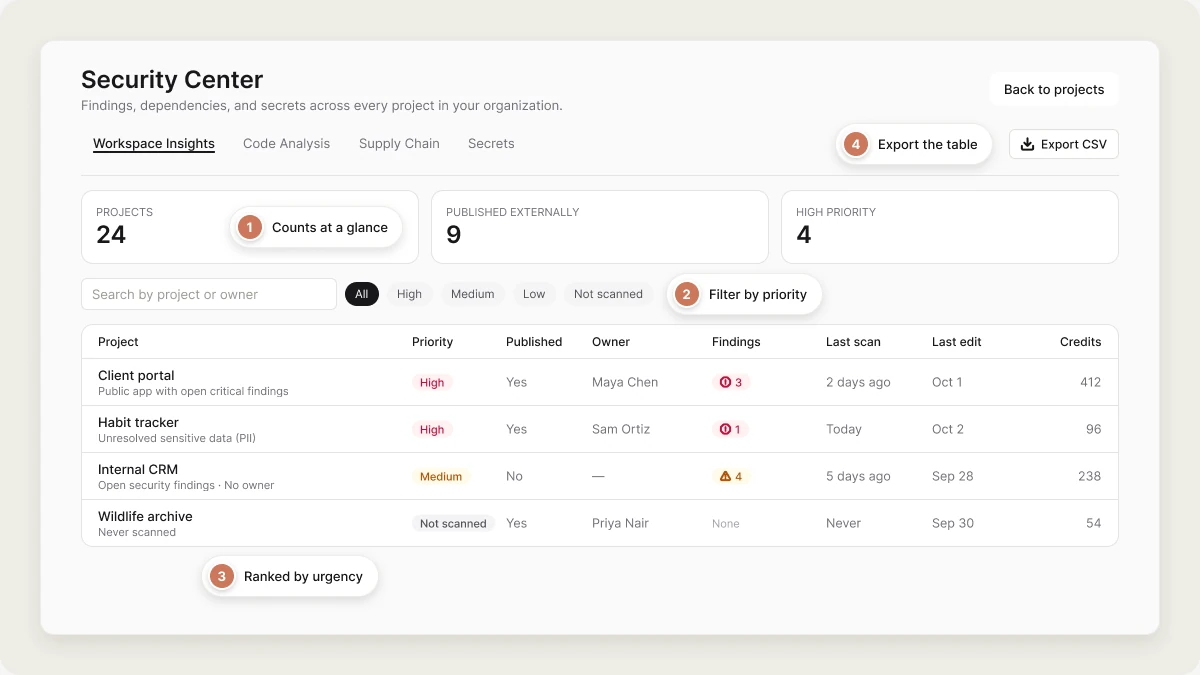
Once a workspace has more than a handful of projects, the useful question stops being "is this app safe?" and becomes "which of these forty should I look at first?". **Workspace Insights** answers that: one row per active project, ranked by how urgently it needs attention.
 * **Available on:** Business
* **Access:** workspace owners and admins
* **Location:** `vibely.sh/security-center` → **Workspace Insights** (the first tab of the [security dashboard](/features/workspace/security-center#the-security-dashboard)), or **Settings → Security center** → **Open Workspace Insights**
Insights shows the workspace selected in the workspace switcher. Switch workspaces to see another one.
## What you can do
* See which projects are **high priority** for review, and why.
* Find projects that have **never been scanned**.
* Spot **published apps nobody has touched in a while** (60 days by default).
* Find projects with **no owner** or with **secrets** configured.
* Compare **credit use** across projects.
* **Export** the whole table to CSV for a spreadsheet or a ticket.
## How Workspace Insights works
### Where findings and signals come from
Findings come from the same five scanners the per-project [security view](/features/security/project-view) runs: database access rules (RLS), database, code, dependencies, and sensitive data. Publish status, ownership, activity, secrets, and credits come from the project itself.
### Review priority
Each project collects signals, and its priority is the highest level any of its signals reaches:
| Signal | Level |
| - | - |
| Public app with open critical findings | High |
| Unresolved sensitive-data (PII) findings | High |
| Published but inactive for N+ days | High |
| Open security findings | Medium |
| No project owner | Medium |
| Secrets configured | Low |
N comes from **Mark as abandoned after** in [Privacy & security](/features/workspace/privacy-security#abandoned-projects): 60 days by default, or 30, 90, or 180. Set it to **Never** to turn the signal off. "Inactive" means no edit, message, or deploy in that time.
A project that has never been scanned is **Not scanned**, whatever else is true about it: no findings isn't evidence of safety.
"Published but inactive for N+ days" is the signal teams underrate. It's a live public app that nobody is watching, which is exactly how an incident goes unnoticed.
## Dashboard overview
### Summary cards
Three counts across the top: **Projects**, **Published externally**, and **High priority**.
### Quick filters
Filter the table by priority: **All**, **High**, **Medium**, **Low**, or **Not scanned**.
### Search
Search by project name or owner name.
### Project table
Rows are ordered by urgency: **High**, then **Medium**, then **Not scanned**, then **Low**. Unscanned projects sit above clean ones on purpose, because "we don't know" is a worse position than "we looked and it was fine".
| Column | What it shows |
| - | - |
| **Project** | The project name, with its signals listed underneath. Click it to open the project's security view. |
| **Priority** | High, Medium, Low, or Not scanned. |
| **Published** | Whether the project has a live Vibely deployment. |
| **Owner** | The project owner's name, or blank if it has none. |
| **Findings** | Open errors, warnings, and info findings. |
| **Last scan** | When any scanner last finished for this project. |
| **Last edit** | When the project was last changed. |
| **Credits** | All-time credits the project has used. |
## Export to CSV
Click **Export CSV** to download the table. The file includes, per project: name, priority, published, owner, errors, warnings, info, PII findings, secrets count, credits used, last scan, last edit, and the full list of signals.
## Work the list
Filter to **Not scanned** and run a scan on anything published.
Filter to **High**. Fix critical findings on public apps and resolve sensitive-data findings first.
For each "published but inactive" project, decide whether it should still be live at all. If not, unpublish it.
## Important notes
| Limit | Value |
| - | - |
| Projects listed | Up to 200, most recently edited first |
| Project status | Active only. Archived and deleted projects aren't listed. |
| Credit totals | Summed from up to 20,000 usage records, so very large workspaces may see undercounts. |
### Mobile projects
The table covers web and mobile projects, but **Published** means one thing: a live Vibely deployment. For a mobile project that's the web export, not an App Store or Google Play release. A mobile app with thousands of installs can show as unpublished here, and the 60-day signal won't fire for it. Track store releases in [Ship](/features/mobile-apps/ship).
Findings, owner, secrets, credits, and last edit are accurate for both kinds of project.
## Related
Posture, scheduled scans, and the rest of the security dashboard.
Scan one project and fix its findings.
## Related topics
- [Workspace security center](/features/workspace/security-center.md)
- [Workspace admin settings](/features/workspace/admin-settings.md)
- [Privacy & security settings](/features/workspace/privacy-security.md)
- [Project analytics](/features/grow/analytics.md)
- [Glossary](/glossary.md)
This documentation is built and hosted on [Mintlify](https://mintlify.com), a developer documentation platform.
* **Available on:** Business
* **Access:** workspace owners and admins
* **Location:** `vibely.sh/security-center` → **Workspace Insights** (the first tab of the [security dashboard](/features/workspace/security-center#the-security-dashboard)), or **Settings → Security center** → **Open Workspace Insights**
Insights shows the workspace selected in the workspace switcher. Switch workspaces to see another one.
## What you can do
* See which projects are **high priority** for review, and why.
* Find projects that have **never been scanned**.
* Spot **published apps nobody has touched in a while** (60 days by default).
* Find projects with **no owner** or with **secrets** configured.
* Compare **credit use** across projects.
* **Export** the whole table to CSV for a spreadsheet or a ticket.
## How Workspace Insights works
### Where findings and signals come from
Findings come from the same five scanners the per-project [security view](/features/security/project-view) runs: database access rules (RLS), database, code, dependencies, and sensitive data. Publish status, ownership, activity, secrets, and credits come from the project itself.
### Review priority
Each project collects signals, and its priority is the highest level any of its signals reaches:
| Signal | Level |
| - | - |
| Public app with open critical findings | High |
| Unresolved sensitive-data (PII) findings | High |
| Published but inactive for N+ days | High |
| Open security findings | Medium |
| No project owner | Medium |
| Secrets configured | Low |
N comes from **Mark as abandoned after** in [Privacy & security](/features/workspace/privacy-security#abandoned-projects): 60 days by default, or 30, 90, or 180. Set it to **Never** to turn the signal off. "Inactive" means no edit, message, or deploy in that time.
A project that has never been scanned is **Not scanned**, whatever else is true about it: no findings isn't evidence of safety.
"Published but inactive for N+ days" is the signal teams underrate. It's a live public app that nobody is watching, which is exactly how an incident goes unnoticed.
## Dashboard overview
### Summary cards
Three counts across the top: **Projects**, **Published externally**, and **High priority**.
### Quick filters
Filter the table by priority: **All**, **High**, **Medium**, **Low**, or **Not scanned**.
### Search
Search by project name or owner name.
### Project table
Rows are ordered by urgency: **High**, then **Medium**, then **Not scanned**, then **Low**. Unscanned projects sit above clean ones on purpose, because "we don't know" is a worse position than "we looked and it was fine".
| Column | What it shows |
| - | - |
| **Project** | The project name, with its signals listed underneath. Click it to open the project's security view. |
| **Priority** | High, Medium, Low, or Not scanned. |
| **Published** | Whether the project has a live Vibely deployment. |
| **Owner** | The project owner's name, or blank if it has none. |
| **Findings** | Open errors, warnings, and info findings. |
| **Last scan** | When any scanner last finished for this project. |
| **Last edit** | When the project was last changed. |
| **Credits** | All-time credits the project has used. |
## Export to CSV
Click **Export CSV** to download the table. The file includes, per project: name, priority, published, owner, errors, warnings, info, PII findings, secrets count, credits used, last scan, last edit, and the full list of signals.
## Work the list
Filter to **Not scanned** and run a scan on anything published.
Filter to **High**. Fix critical findings on public apps and resolve sensitive-data findings first.
For each "published but inactive" project, decide whether it should still be live at all. If not, unpublish it.
## Important notes
| Limit | Value |
| - | - |
| Projects listed | Up to 200, most recently edited first |
| Project status | Active only. Archived and deleted projects aren't listed. |
| Credit totals | Summed from up to 20,000 usage records, so very large workspaces may see undercounts. |
### Mobile projects
The table covers web and mobile projects, but **Published** means one thing: a live Vibely deployment. For a mobile project that's the web export, not an App Store or Google Play release. A mobile app with thousands of installs can show as unpublished here, and the 60-day signal won't fire for it. Track store releases in [Ship](/features/mobile-apps/ship).
Findings, owner, secrets, credits, and last edit are accurate for both kinds of project.
## Related
Posture, scheduled scans, and the rest of the security dashboard.
Scan one project and fix its findings.
## Related topics
- [Workspace security center](/features/workspace/security-center.md)
- [Workspace admin settings](/features/workspace/admin-settings.md)
- [Privacy & security settings](/features/workspace/privacy-security.md)
- [Project analytics](/features/grow/analytics.md)
- [Glossary](/glossary.md)
This documentation is built and hosted on [Mintlify](https://mintlify.com), a developer documentation platform.