> ## Documentation Index
> Fetch the complete documentation index at: https://docs.vibely.sh/llms.txt
> Use this file to discover all available pages before exploring further.
# Workspace admin settings
> Every section of workspace Settings, what it controls, who can change it, and which plan it needs.
Workspace settings are where **owners and admins** keep the workspace organized, secure, and set up the way your team works. Settings take effect immediately and apply across the whole workspace, as defaults for every project and member unless you override them for one project or person.
 Open Settings from the **workspace switcher → Settings**, or go to `vibely.sh/settings`. Every section has its own address (for example `vibely.sh/settings/people`), so you can send a teammate straight to the one you mean.
Some sections carry a plan badge (**Pro**, **Business**, or **Enterprise**). A gated section stays visible so you can see what it does; its controls unlock when the workspace is on that plan. The check is enforced on the server, not just in the page.
## General workspace settings
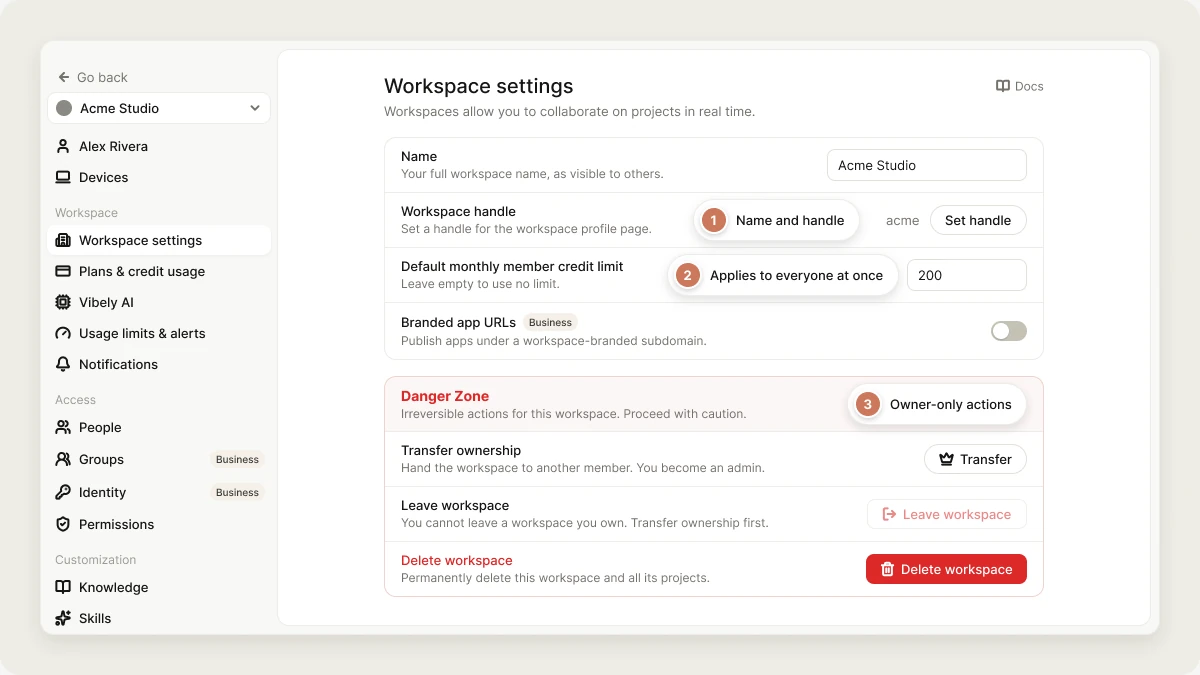
**Settings → Workspace settings** holds the workspace's identity and the actions that affect the whole workspace.
| Setting | Description |
| - | - |
| **Avatar** | The workspace icon shown next to its name, including in the workspace switcher. |
| **Name** | The workspace's display name, up to 50 characters. |
| **Workspace handle** | The workspace's unique handle: lowercase letters, numbers, and hyphens. Click **Set handle** to change it. |
| **Default monthly member credit limit** | The most credits each member can spend per calendar month (UTC) unless they have a personal limit set in **People** (Business). Leave it empty for no limit. |
| **Branded app URLs** (Business) | Publish apps under a workspace-branded subdomain. See [Branded workspace URLs](/features/deploy/branded-urls). |
| **Transfer ownership** | Hand the workspace to another member. Only the owner sees this. You're demoted to admin in the same step. |
| **Leave workspace** | Remove your own access. The owner can't leave, and you can't leave your only workspace. See [Leave a workspace](/features/workspace/overview#leave-a-workspace). |
| **Delete workspace** | Permanently delete the workspace and everything in it. Owner only. See [Delete a workspace](#delete-a-workspace). |
If you ever turn on the [managed registry](/features/build/managed-registry), the workspace's npm scope comes from the handle (`acme` becomes `@acme`). Pick a handle you're happy to publish packages under.
## Billing and usage
These sections answer "what is this workspace spending?"
| Section | What it's for |
| - | - |
| **Plans & credit usage** | Your plan, credit balance, top-ups, invoices, and canceling. Only the owner can change billing, unless you grant **Manage billing** to other roles in **Permissions**. See [Subscription plans](/features/account/plans). |
| **Usage** | Monthly credits used against your allowance, credits by project and by teammate for the current cycle, and extra usage you've bought. See [Credits and usage](/features/account/credits#check-your-usage). |
| **Vibely AI** | Which models are available and what your published apps' AI features have used through Vibely AI. See [Vibely AI](/features/backend/ai). |
| **Usage limits & alerts** | Monthly credit caps for the workspace, a project, or a member, plus low-balance alerts. See [Limits and alerts](/features/account/credits#usage-limits-and-alerts). |
| **Notifications** | Your email and push notification preferences. |
## Access
### People
Invite members, change roles, remove people, approve join and access requests, set per-member credit limits, and export the member list. See [People](/features/workspace/people).
### Groups (Business)
Named sets of members you can grant project access to, and use to restrict who can open a published app. See [Groups](/features/workspace/groups).
### Permissions
A matrix of what each role may do: create web or mobile projects, publish, submit to the app stores, manage connectors and domains, manage billing, invite members, set credit limits, and read audit logs. The owner always has every permission.
### Identity (Business)
Verify your email domain, set up single sign-on (SAML 2.0 or OIDC), and provision users automatically. See [Identity](/features/workspace/identity), [SSO](/features/workspace/sso), and [SCIM](/features/workspace/scim).
## Customization
### Knowledge
Standing instructions the agent reads in every project in the workspace, such as coding standards, preferred libraries, and tone. Owners and admins can edit it; everyone else can read it. See [Knowledge](/features/context/knowledge).
### Skills
Reusable, on-demand instructions the agent loads only when they're relevant. Opens the **Customize** area. See [Skills](/features/context/skills).
### Templates (Business)
Your workspace's own starting points, shown alongside Vibely's templates. See [Templates](/features/design/workspace-templates).
### Design systems (Business)
Turn a web project into a design system and attach it to other projects. See [Design systems](/features/design/design-systems).
### Connectors (Business)
Connector credentials the whole workspace shares. Opens the **Customize** area. See [Connectors](/integrations/connectors/overview) and [Admin controls](/integrations/admin-controls).
## Build & deploy
### Git
The workspace's GitHub connection and export defaults. See [GitHub](/integrations/github).
### Build secrets (Enterprise)
Encrypted values that exist only while a project installs and builds, such as a private npm token. See [Build secrets](/features/build/build-secrets).
### Managed registry (Enterprise)
A private npm registry for your workspace. See [Managed registry](/features/build/managed-registry).
### MCP
External MCP servers the agent can call while it builds. See [Custom MCP servers](/integrations/connectors/custom-mcp).
### Connected AI apps
Use Vibely from Claude, ChatGPT, Cursor, and other AI apps through the Vibely MCP server. See [Vibely MCP server](/integrations/vibely-mcp-server).
### Workspace domains
Domains the workspace owns, available to any project when you publish. See [Custom domains](/features/deploy/custom-domain).
## Security
### Privacy & security
Workspace-wide rules for project access, invitations, two-factor authentication, publishing, sharing, abandoned projects, MCP, and data protection. See [Privacy & security](/features/workspace/privacy-security).
### Security center (Business)
Your security posture score, SSO and SCIM status, scheduled scans, invitation restrictions, recent workspace activity, and a link to Workspace Insights. See [Security center](/features/workspace/security-center).
### Audit logs (Business)
A filterable, exportable record of every membership, project, and security change, with CSV export. See [Audit logs](/features/workspace/security-center#audit-logs).
## Delete a workspace
The workspace **owner** can delete a workspace from **Settings → Workspace settings**. Deleting removes the workspace, every project in it, all member access, and its credits and billing history.
Deleting a workspace is **immediate and permanent**. There's no grace period, no trash, and support can't restore it.
Deleting a workspace is different from:
* **Leaving it.** To step away from a team, see [Leave a workspace](/features/workspace/overview#leave-a-workspace).
* **Canceling the plan.** To stop paying, see [Cancel your subscription](/features/account/plans#cancel-your-subscription).
* **Deleting your account.** To remove your Vibely account entirely, see [Delete your account](/features/account/deleting).
### Before you delete
A workspace with an active paid subscription can't be deleted. Cancel it in **Settings → Plans & credit usage** first.
Export each project you want to keep to GitHub. See [GitHub](/integrations/github).
Deleting a workspace doesn't take its published sites offline. Unpublish each one first so its URL and custom domain are released. See [Publish your web app](/features/deploy/publish).
Invoices are deleted with the workspace. Download any you need from **Settings → Plans & credit usage**.
Mobile apps you shipped live in your own Apple and Google developer accounts. They stay on sale after you delete the workspace, but you can no longer build updates. Remove or keep them in App Store Connect and Play Console. See [Ship your mobile app](/features/mobile-apps/ship).
### What gets deleted
Everything that belongs to the workspace is removed at once:
* All projects, and everything attached to them
* Members and pending invitations
* Connector connections held by the workspace
* The subscription record, credit balance, and rollover
* The credit ledger and invoices
* Audit logs, including the record of the deletion itself
### How to delete a workspace
1. Open **Settings → Workspace settings**.
2. Under **Danger zone**, click **Delete workspace**.
3. Type the workspace name exactly as shown.
4. Click **Delete workspace**.
Vibely returns you to the dashboard in another workspace you belong to.
## Related
Roles, joining, leaving, and switching workspaces.
Settings that apply to one project only.
## Related topics
- [Workspace templates](/features/design/workspace-templates.md)
- [Define workspace and project knowledge](/features/context/knowledge.md)
- [Define reusable instructions with skills](/features/context/skills.md)
- [Vibely MCP server](/integrations/vibely-mcp-server.md)
- [Vibely workspace](/features/workspace/overview.md)
This documentation is built and hosted on [Mintlify](https://mintlify.com), a developer documentation platform.
Open Settings from the **workspace switcher → Settings**, or go to `vibely.sh/settings`. Every section has its own address (for example `vibely.sh/settings/people`), so you can send a teammate straight to the one you mean.
Some sections carry a plan badge (**Pro**, **Business**, or **Enterprise**). A gated section stays visible so you can see what it does; its controls unlock when the workspace is on that plan. The check is enforced on the server, not just in the page.
## General workspace settings
**Settings → Workspace settings** holds the workspace's identity and the actions that affect the whole workspace.
| Setting | Description |
| - | - |
| **Avatar** | The workspace icon shown next to its name, including in the workspace switcher. |
| **Name** | The workspace's display name, up to 50 characters. |
| **Workspace handle** | The workspace's unique handle: lowercase letters, numbers, and hyphens. Click **Set handle** to change it. |
| **Default monthly member credit limit** | The most credits each member can spend per calendar month (UTC) unless they have a personal limit set in **People** (Business). Leave it empty for no limit. |
| **Branded app URLs** (Business) | Publish apps under a workspace-branded subdomain. See [Branded workspace URLs](/features/deploy/branded-urls). |
| **Transfer ownership** | Hand the workspace to another member. Only the owner sees this. You're demoted to admin in the same step. |
| **Leave workspace** | Remove your own access. The owner can't leave, and you can't leave your only workspace. See [Leave a workspace](/features/workspace/overview#leave-a-workspace). |
| **Delete workspace** | Permanently delete the workspace and everything in it. Owner only. See [Delete a workspace](#delete-a-workspace). |
If you ever turn on the [managed registry](/features/build/managed-registry), the workspace's npm scope comes from the handle (`acme` becomes `@acme`). Pick a handle you're happy to publish packages under.
## Billing and usage
These sections answer "what is this workspace spending?"
| Section | What it's for |
| - | - |
| **Plans & credit usage** | Your plan, credit balance, top-ups, invoices, and canceling. Only the owner can change billing, unless you grant **Manage billing** to other roles in **Permissions**. See [Subscription plans](/features/account/plans). |
| **Usage** | Monthly credits used against your allowance, credits by project and by teammate for the current cycle, and extra usage you've bought. See [Credits and usage](/features/account/credits#check-your-usage). |
| **Vibely AI** | Which models are available and what your published apps' AI features have used through Vibely AI. See [Vibely AI](/features/backend/ai). |
| **Usage limits & alerts** | Monthly credit caps for the workspace, a project, or a member, plus low-balance alerts. See [Limits and alerts](/features/account/credits#usage-limits-and-alerts). |
| **Notifications** | Your email and push notification preferences. |
## Access
### People
Invite members, change roles, remove people, approve join and access requests, set per-member credit limits, and export the member list. See [People](/features/workspace/people).
### Groups (Business)
Named sets of members you can grant project access to, and use to restrict who can open a published app. See [Groups](/features/workspace/groups).
### Permissions
A matrix of what each role may do: create web or mobile projects, publish, submit to the app stores, manage connectors and domains, manage billing, invite members, set credit limits, and read audit logs. The owner always has every permission.
### Identity (Business)
Verify your email domain, set up single sign-on (SAML 2.0 or OIDC), and provision users automatically. See [Identity](/features/workspace/identity), [SSO](/features/workspace/sso), and [SCIM](/features/workspace/scim).
## Customization
### Knowledge
Standing instructions the agent reads in every project in the workspace, such as coding standards, preferred libraries, and tone. Owners and admins can edit it; everyone else can read it. See [Knowledge](/features/context/knowledge).
### Skills
Reusable, on-demand instructions the agent loads only when they're relevant. Opens the **Customize** area. See [Skills](/features/context/skills).
### Templates (Business)
Your workspace's own starting points, shown alongside Vibely's templates. See [Templates](/features/design/workspace-templates).
### Design systems (Business)
Turn a web project into a design system and attach it to other projects. See [Design systems](/features/design/design-systems).
### Connectors (Business)
Connector credentials the whole workspace shares. Opens the **Customize** area. See [Connectors](/integrations/connectors/overview) and [Admin controls](/integrations/admin-controls).
## Build & deploy
### Git
The workspace's GitHub connection and export defaults. See [GitHub](/integrations/github).
### Build secrets (Enterprise)
Encrypted values that exist only while a project installs and builds, such as a private npm token. See [Build secrets](/features/build/build-secrets).
### Managed registry (Enterprise)
A private npm registry for your workspace. See [Managed registry](/features/build/managed-registry).
### MCP
External MCP servers the agent can call while it builds. See [Custom MCP servers](/integrations/connectors/custom-mcp).
### Connected AI apps
Use Vibely from Claude, ChatGPT, Cursor, and other AI apps through the Vibely MCP server. See [Vibely MCP server](/integrations/vibely-mcp-server).
### Workspace domains
Domains the workspace owns, available to any project when you publish. See [Custom domains](/features/deploy/custom-domain).
## Security
### Privacy & security
Workspace-wide rules for project access, invitations, two-factor authentication, publishing, sharing, abandoned projects, MCP, and data protection. See [Privacy & security](/features/workspace/privacy-security).
### Security center (Business)
Your security posture score, SSO and SCIM status, scheduled scans, invitation restrictions, recent workspace activity, and a link to Workspace Insights. See [Security center](/features/workspace/security-center).
### Audit logs (Business)
A filterable, exportable record of every membership, project, and security change, with CSV export. See [Audit logs](/features/workspace/security-center#audit-logs).
## Delete a workspace
The workspace **owner** can delete a workspace from **Settings → Workspace settings**. Deleting removes the workspace, every project in it, all member access, and its credits and billing history.
Deleting a workspace is **immediate and permanent**. There's no grace period, no trash, and support can't restore it.
Deleting a workspace is different from:
* **Leaving it.** To step away from a team, see [Leave a workspace](/features/workspace/overview#leave-a-workspace).
* **Canceling the plan.** To stop paying, see [Cancel your subscription](/features/account/plans#cancel-your-subscription).
* **Deleting your account.** To remove your Vibely account entirely, see [Delete your account](/features/account/deleting).
### Before you delete
A workspace with an active paid subscription can't be deleted. Cancel it in **Settings → Plans & credit usage** first.
Export each project you want to keep to GitHub. See [GitHub](/integrations/github).
Deleting a workspace doesn't take its published sites offline. Unpublish each one first so its URL and custom domain are released. See [Publish your web app](/features/deploy/publish).
Invoices are deleted with the workspace. Download any you need from **Settings → Plans & credit usage**.
Mobile apps you shipped live in your own Apple and Google developer accounts. They stay on sale after you delete the workspace, but you can no longer build updates. Remove or keep them in App Store Connect and Play Console. See [Ship your mobile app](/features/mobile-apps/ship).
### What gets deleted
Everything that belongs to the workspace is removed at once:
* All projects, and everything attached to them
* Members and pending invitations
* Connector connections held by the workspace
* The subscription record, credit balance, and rollover
* The credit ledger and invoices
* Audit logs, including the record of the deletion itself
### How to delete a workspace
1. Open **Settings → Workspace settings**.
2. Under **Danger zone**, click **Delete workspace**.
3. Type the workspace name exactly as shown.
4. Click **Delete workspace**.
Vibely returns you to the dashboard in another workspace you belong to.
## Related
Roles, joining, leaving, and switching workspaces.
Settings that apply to one project only.
## Related topics
- [Workspace templates](/features/design/workspace-templates.md)
- [Define workspace and project knowledge](/features/context/knowledge.md)
- [Define reusable instructions with skills](/features/context/skills.md)
- [Vibely MCP server](/integrations/vibely-mcp-server.md)
- [Vibely workspace](/features/workspace/overview.md)
This documentation is built and hosted on [Mintlify](https://mintlify.com), a developer documentation platform.