> ## Documentation Index
> Fetch the complete documentation index at: https://docs.vibely.sh/llms.txt
> Use this file to discover all available pages before exploring further.
# Web App Mode
> Build full-stack web applications from natural language
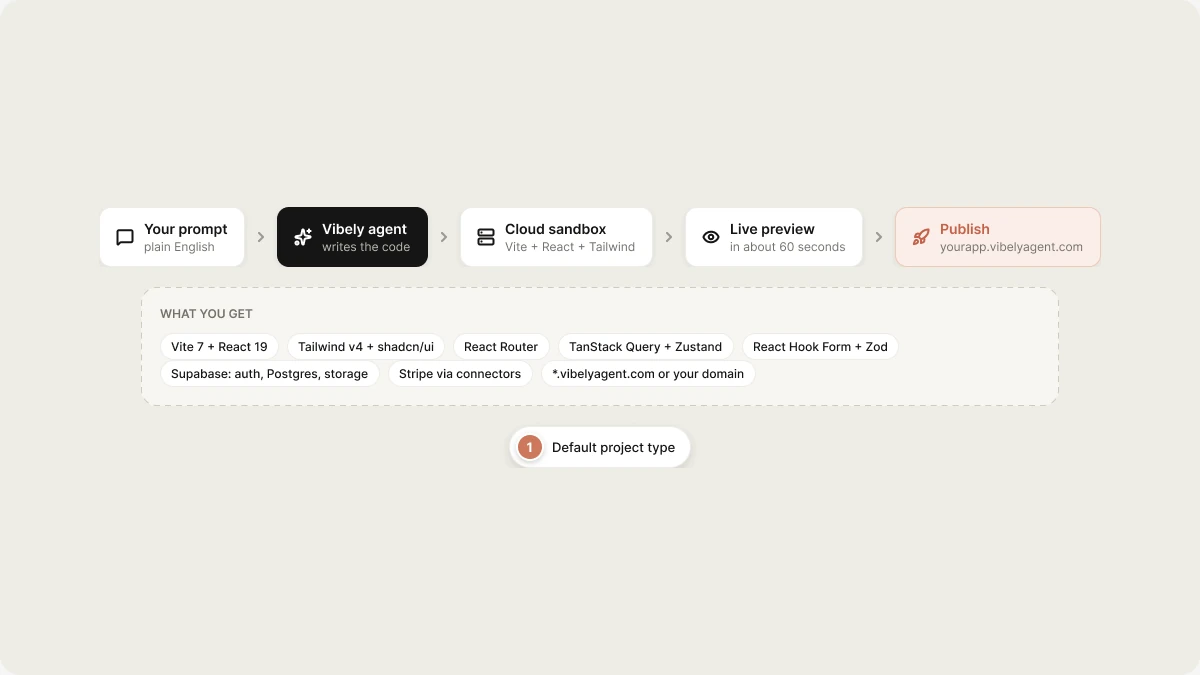
Web app mode is the default project type. Describe a web app in plain English; Vibely writes Vite + React + Tailwind code, builds it in a cloud sandbox, and returns a live preview URL — usually within 60 seconds of your first prompt.
 Build your first web app in under 5 minutes.
What `vibely-web` ships with: routes, components, design tokens.
Edit, refine, and add features after the initial build.
Custom domains, branded URLs, and how the Cloudflare proxy works.
## What you get
| Layer | Stack |
| - | - |
| Framework | Vite 7 + React 19 |
| Styling | Tailwind CSS v4 + shadcn/ui |
| Routing | React Router v6 (SPA) — file-based routes added on demand |
| State | TanStack Query for server state, Zustand for UI state |
| Forms | React Hook Form + Zod |
| Backend | Supabase (auth, Postgres, storage) — wired automatically when used |
| Payments | Stripe via [Connectors](/integrations/connectors/overview) |
| Email | Any provider — wired behind a Supabase Edge Function with your key |
| Deployment | Branded `*.vibelyagent.com` URL via Cloudflare proxy; or your own domain |
## How a build works
```
1. You prompt: "Build a Trello clone with team-based boards and Supabase auth"
2. Sandbox spawns from `vibely-web` (~5–15 s, cached after first run)
3. Dev server starts, preview URL emitted (you see the iframe)
4. Agent writes code:
- schema migrations
- components, routes, hooks
- supabase client wiring
5. HMR refreshes the iframe as files land
6. Done event when the agent stops
```
Code is real — no proprietary DSL, no lock-in. You can export the project to a GitHub repo at any time and run it yourself with `bun install && bun dev`.
## When to use Web App Mode
| Use it for | Not the right fit |
| - | - |
| SaaS dashboards, CRUD apps, internal tools | iOS / Android apps (use [Mobile App Mode](/features/mobile-apps/overview)) |
| Marketplaces, e-commerce, content sites | Native-only features like camera, push, or biometrics |
| Auth + database + payments | Server-rendered frameworks — the template is a SPA |
| Prototypes that need to become production | A static one-pager — overkill |
## Limits
* Output is currently **single-page-app** (SPA) by default. Server-side rendering (Next.js / Remix) is on the roadmap but not the default template.
* Scheduled and server-only work runs on Supabase Edge Functions or `pg_cron` — Vibely doesn't host arbitrary background workers itself.
* The dev preview is for development only. For production, deploy with `bun run build` to your platform of choice (Vercel, Netlify, Cloudflare Pages, your own server).
## Related topics
- [Mobile App Mode](/features/mobile-apps/overview.md)
- [Build your first web app](/features/web-apps/quickstart.md)
- [Find and search projects](/features/projects/projects-and-folders.md)
- [Web app templates](/features/web-apps/templates.md)
- [Build Mode Overview](/reference/engine/overview.md)
This documentation is built and hosted on [Mintlify](https://mintlify.com), a developer documentation platform.
Build your first web app in under 5 minutes.
What `vibely-web` ships with: routes, components, design tokens.
Edit, refine, and add features after the initial build.
Custom domains, branded URLs, and how the Cloudflare proxy works.
## What you get
| Layer | Stack |
| - | - |
| Framework | Vite 7 + React 19 |
| Styling | Tailwind CSS v4 + shadcn/ui |
| Routing | React Router v6 (SPA) — file-based routes added on demand |
| State | TanStack Query for server state, Zustand for UI state |
| Forms | React Hook Form + Zod |
| Backend | Supabase (auth, Postgres, storage) — wired automatically when used |
| Payments | Stripe via [Connectors](/integrations/connectors/overview) |
| Email | Any provider — wired behind a Supabase Edge Function with your key |
| Deployment | Branded `*.vibelyagent.com` URL via Cloudflare proxy; or your own domain |
## How a build works
```
1. You prompt: "Build a Trello clone with team-based boards and Supabase auth"
2. Sandbox spawns from `vibely-web` (~5–15 s, cached after first run)
3. Dev server starts, preview URL emitted (you see the iframe)
4. Agent writes code:
- schema migrations
- components, routes, hooks
- supabase client wiring
5. HMR refreshes the iframe as files land
6. Done event when the agent stops
```
Code is real — no proprietary DSL, no lock-in. You can export the project to a GitHub repo at any time and run it yourself with `bun install && bun dev`.
## When to use Web App Mode
| Use it for | Not the right fit |
| - | - |
| SaaS dashboards, CRUD apps, internal tools | iOS / Android apps (use [Mobile App Mode](/features/mobile-apps/overview)) |
| Marketplaces, e-commerce, content sites | Native-only features like camera, push, or biometrics |
| Auth + database + payments | Server-rendered frameworks — the template is a SPA |
| Prototypes that need to become production | A static one-pager — overkill |
## Limits
* Output is currently **single-page-app** (SPA) by default. Server-side rendering (Next.js / Remix) is on the roadmap but not the default template.
* Scheduled and server-only work runs on Supabase Edge Functions or `pg_cron` — Vibely doesn't host arbitrary background workers itself.
* The dev preview is for development only. For production, deploy with `bun run build` to your platform of choice (Vercel, Netlify, Cloudflare Pages, your own server).
## Related topics
- [Mobile App Mode](/features/mobile-apps/overview.md)
- [Build your first web app](/features/web-apps/quickstart.md)
- [Find and search projects](/features/projects/projects-and-folders.md)
- [Web app templates](/features/web-apps/templates.md)
- [Build Mode Overview](/reference/engine/overview.md)
This documentation is built and hosted on [Mintlify](https://mintlify.com), a developer documentation platform.