> ## Documentation Index
> Fetch the complete documentation index at: https://docs.vibely.sh/llms.txt
> Use this file to discover all available pages before exploring further.
# Iterate
> Make changes without breaking what works
After turn 1 you have a running app. Iteration is everything that comes after. Most of what makes a build session productive is in the **prompt shape**, not the model.
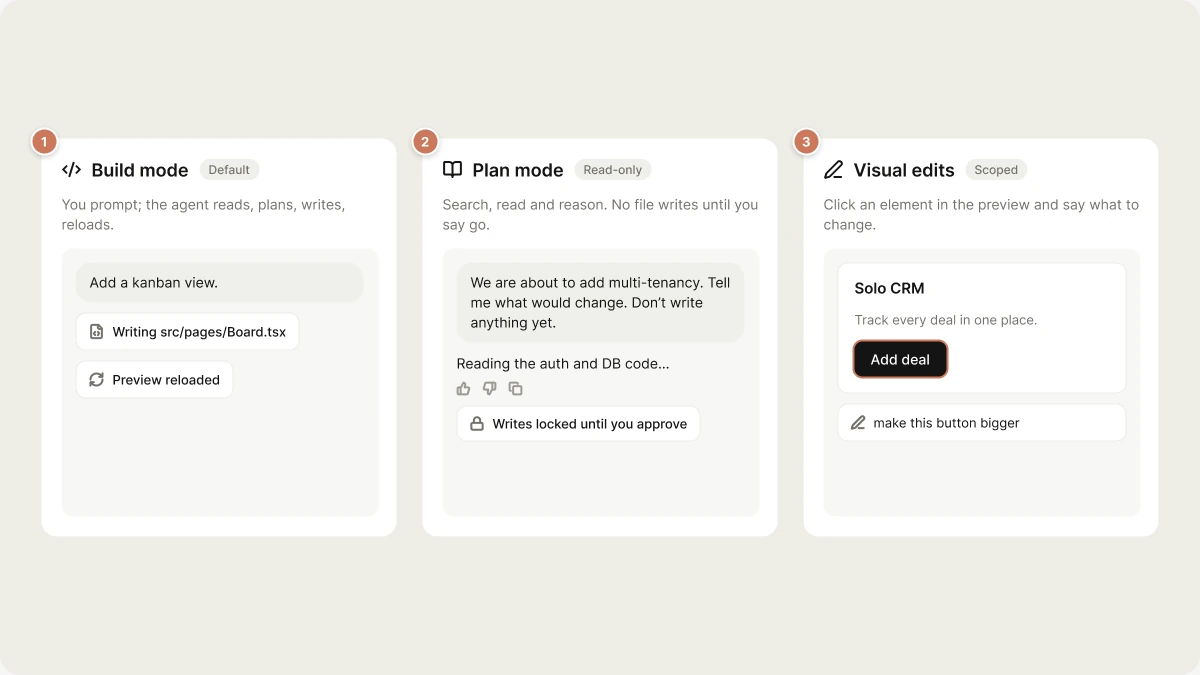 ## Three iteration modes
### 1. Build mode (default)
You prompt; the agent reads, plans, writes, reloads. Use it for anything that touches code: features, refactors, bug fixes, design changes, schema updates.
### 2. Plan mode
Plan mode is **read-only** — the agent can search, read files, browse, and reason, but it cannot write. Use it when you want a recommendation before any change is made:
> "We're about to add multi-tenancy. Read the auth and DB code and tell me what would have to change. Don't write anything yet."
The agent will research and respond. When you're happy with the plan, prompt "Go ahead and implement that" — the agent calls `exit_plan_mode` and the full toolset is unlocked.
### 3. Visual edits
Click any element in the preview, type a change ("make this button bigger", "use the brand purple here") — the agent patches just that element. Visual edits are scoped: they don't trigger a full re-think of the design system.
## Shape your prompts
The prompt-shape table, the first-prompt checklist and the design vocabulary the
agent acts on live on one page: [Prompting](/prompting/best-practices). Copy-paste
prompts for the features people build most are in the
[Prompt library](/prompting/library).
## When the agent gets stuck
Restating the brief, escalating to plan mode, making it ask instead of guess,
and restarting a wedged dev server are all in
[Debugging](/prompting/debugging#when-it-keeps-making-the-same-wrong-edit).
## Memory across turns
Chat context is not durable — it compacts once the conversation crosses 90% of the
model's context window (see [Agent Loop → Context](/reference/engine/agent-loop#context-routing-at-75-%-compaction-at-90-%)),
and a new chat starts empty.
Anything the agent must never forget goes in **Knowledge**, not in a message.
Settings → **Knowledge** holds project-scoped and workspace-scoped instructions,
re-injected into every turn as authoritative context. See
[Prompting → Knowledge](/prompting/best-practices#knowledge-the-memory-that-actually-persists).
## When to start over
Heuristics for abandoning a chat, and what you keep when you do:
[Prompting → When to start over](/prompting/best-practices#when-to-start-over).
## Related topics
- [FAQ](/faq.md)
- [Welcome to Vibely](/introduction/welcome.md)
- [Build your first web app](/features/web-apps/quickstart.md)
- [Debugging](/prompting/debugging.md)
- [Work with Vibely in the project chat](/features/projects/chat.md)
This documentation is built and hosted on [Mintlify](https://mintlify.com), a developer documentation platform.
## Three iteration modes
### 1. Build mode (default)
You prompt; the agent reads, plans, writes, reloads. Use it for anything that touches code: features, refactors, bug fixes, design changes, schema updates.
### 2. Plan mode
Plan mode is **read-only** — the agent can search, read files, browse, and reason, but it cannot write. Use it when you want a recommendation before any change is made:
> "We're about to add multi-tenancy. Read the auth and DB code and tell me what would have to change. Don't write anything yet."
The agent will research and respond. When you're happy with the plan, prompt "Go ahead and implement that" — the agent calls `exit_plan_mode` and the full toolset is unlocked.
### 3. Visual edits
Click any element in the preview, type a change ("make this button bigger", "use the brand purple here") — the agent patches just that element. Visual edits are scoped: they don't trigger a full re-think of the design system.
## Shape your prompts
The prompt-shape table, the first-prompt checklist and the design vocabulary the
agent acts on live on one page: [Prompting](/prompting/best-practices). Copy-paste
prompts for the features people build most are in the
[Prompt library](/prompting/library).
## When the agent gets stuck
Restating the brief, escalating to plan mode, making it ask instead of guess,
and restarting a wedged dev server are all in
[Debugging](/prompting/debugging#when-it-keeps-making-the-same-wrong-edit).
## Memory across turns
Chat context is not durable — it compacts once the conversation crosses 90% of the
model's context window (see [Agent Loop → Context](/reference/engine/agent-loop#context-routing-at-75-%-compaction-at-90-%)),
and a new chat starts empty.
Anything the agent must never forget goes in **Knowledge**, not in a message.
Settings → **Knowledge** holds project-scoped and workspace-scoped instructions,
re-injected into every turn as authoritative context. See
[Prompting → Knowledge](/prompting/best-practices#knowledge-the-memory-that-actually-persists).
## When to start over
Heuristics for abandoning a chat, and what you keep when you do:
[Prompting → When to start over](/prompting/best-practices#when-to-start-over).
## Related topics
- [FAQ](/faq.md)
- [Welcome to Vibely](/introduction/welcome.md)
- [Build your first web app](/features/web-apps/quickstart.md)
- [Debugging](/prompting/debugging.md)
- [Work with Vibely in the project chat](/features/projects/chat.md)
This documentation is built and hosted on [Mintlify](https://mintlify.com), a developer documentation platform.