> ## Documentation Index
> Fetch the complete documentation index at: https://docs.vibely.sh/llms.txt
> Use this file to discover all available pages before exploring further.
# Ship to stores
> EAS builds, TestFlight, Play Console — from button click to live in the store
Vibely drives [EAS](https://expo.dev/eas) (Expo Application Services) on your behalf. You provide credentials once; Vibely handles every subsequent build, TestFlight upload, and Play submission.
 ## Prerequisites
| Platform | What you need | Cost |
| - | - | - |
| iOS | Apple Developer Program account | \$99 / year |
| Android | Google Play Console account | \$25 (one-time) |
| Both | A free Expo account (for EAS) | Free tier OK |
You don't need a Mac for iOS — EAS builds in the cloud.
## First build
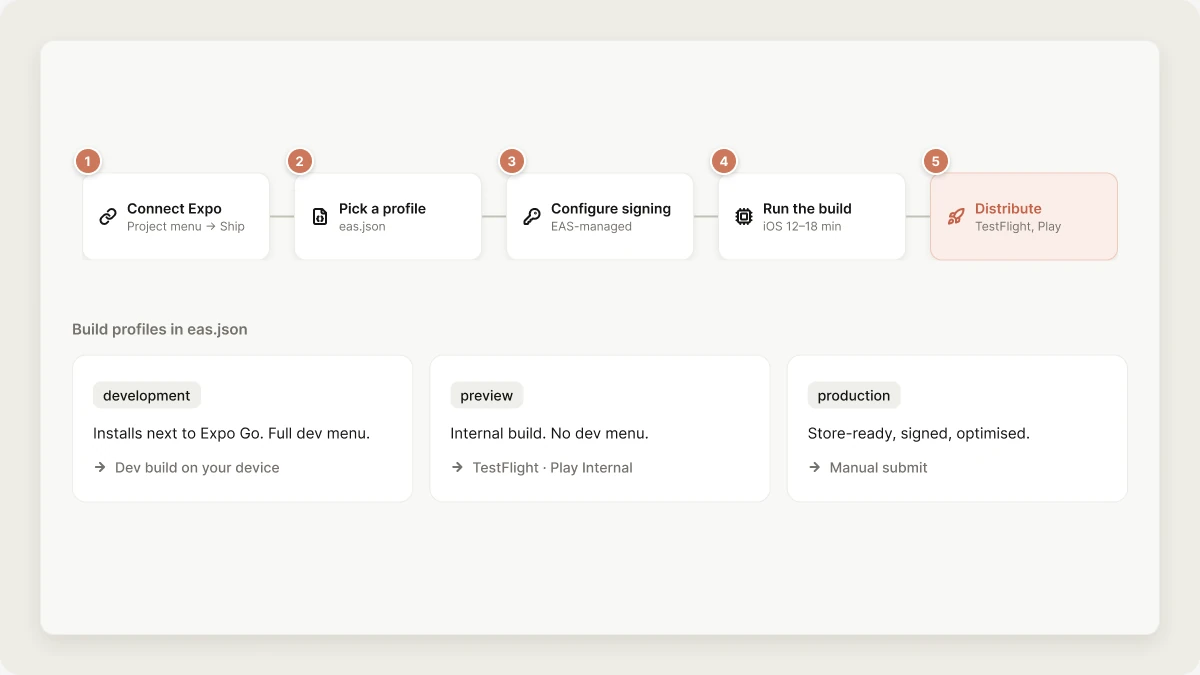
Project menu → **Ship** → **Connect Expo**. Sign in via OAuth.
EAS profiles live in `eas.json`. The template ships three:
* `development` — installable on your device alongside Expo Go; full dev menu.
* `preview` — internal distribution build (TestFlight / Play Internal); no dev menu.
* `production` — store-ready, signed, optimised.
EAS can manage iOS certificates and Android keystores for you. Click **Use EAS-managed credentials** unless you have a reason not to. EAS rotates and renews them automatically.
Click **Build** for the platform + profile you want. Vibely runs `eas build --profile --platform ` in the sandbox. iOS builds typically take 12–18 min; Android 8–12 min, queued behind any other builds in the EAS free tier.
* **iOS preview** → automatically uploaded to TestFlight; testers get an email.
* **Android preview** → uploaded to Play Console internal testing track.
* **Production** → manual submit step; see below.
## TestFlight (iOS)
After the first preview build:
1. App appears in App Store Connect → TestFlight under your team.
2. Add internal testers (up to 100) by email — they get the build instantly, no review needed.
3. For external testers (up to 10K), the first build of each version requires Apple's "beta app review" — usually \<24 h.
4. Testers install via the [TestFlight app](https://apps.apple.com/app/testflight/id899247664) on their device.
## Play Internal Testing (Android)
Same pattern:
1. App appears in Play Console → Testing → Internal testing.
2. Add testers by Google account email or an email list.
3. They get an opt-in URL; once opted in, the app shows up in their Play Store with the test build.
4. No Google review for internal builds.
## Submitting to the App Store
When you're ready for production:
1. Run a `production` profile build.
2. EAS auto-uploads to App Store Connect.
3. In App Store Connect → **App Store** tab, fill out: name, description, keywords, category, age rating, screenshots, privacy policy URL, support URL.
Those fields are the whole of your discoverability — limits, weights and what
to put in each are in [App Store optimization](/features/mobile-apps/aso).
4. **Submit for review.** Apple's review currently averages 24–48 h (occasionally days for the first submission of an app).
5. Once approved, choose "Release this version" — it goes live worldwide within an hour.
Reasons apps get rejected, and how Vibely avoids them:
* **Permissions explained.** Every permission your app requests has a clear `NSCameraUsageDescription` (etc.) string written by the agent at the moment the permission is added.
* **No mock content.** The agent removes placeholder text and `lorem ipsum` before suggesting you ship.
* **Login walls.** If your app can be tried without an account, Apple wants a clear path to do so. The agent flags this if you say "ship it" with no anonymous path.
* **Web checkout for digital goods.** Don't use Stripe to unlock features — see [Native → IAP](/features/mobile-apps/native#in-app-purchases).
* **Sign in with Apple missing.** Offer Google, Facebook, or X login and Guideline 4.8 requires an equivalent option that limits collection to name and email, lets the user hide their email address, and doesn't collect in-app interactions for ads. Email/password doesn't satisfy it — see [Authentication → Guideline 4.8](/features/mobile-apps/auth#guideline-48).
## Submitting to Play
Connect Google Play once (Publish → **Google Play** → paste the service-account
JSON from Google Cloud), then the Publish panel drives the release the same way
the iOS panel drives TestFlight:
1. Pick a **release track** — internal, closed (alpha), open (beta), or
production — and hit Submit. The AAB is uploaded with `eas submit`.
2. The panel polls Google until the release actually appears on that track. An
accepted upload is not a release: a build can sit in `draft`, or be `halted`,
and the panel says which rather than reporting success.
3. **Promote** moves the release onto a wider track when you're ready. Play only
promotes forward through internal → alpha → beta → production, so the panel
offers only the tracks above the one you're on.
Play's first review can take up to a week; updates are usually \<24 h.
Promoting to **production** publishes to every Play user immediately, so it is
always an explicit click — never a side effect of a build or a submission.
### What still happens in Play Console
The Play Developer API cannot create these, so they stay manual — do them once,
before your first production release:
* Store listing (title, descriptions, graphics, screenshots)
* Content rating questionnaire
* Data safety form
* Target audience and pricing
The listing fields themselves — title, short and full description, screenshots —
are covered in [App Store optimization](/features/mobile-apps/aso).
Until the listing exists, submissions to a testing track still work; only the
public listing is missing.
## Updates after launch
You have two update paths:
* **Native update.** Anything that changes native code or `app.json` config (permissions, plugins, native modules) requires a new build + store submission. Slow but unavoidable.
* **OTA via EAS Update.** Anything that's just JavaScript / assets — the vast majority of changes — ships via `eas update`. Users get the new code on next app launch, no store review.
Vibely drives both: when you prompt "ship the latest changes", the agent picks the right update mode based on what changed.
## Rollbacks
OTA updates can be rolled back instantly from EAS dashboard or via `eas update:republish`. Native rollbacks require submitting the previous build to the store and waiting for review. Test on TestFlight / Play Internal before promoting to production.
## Related topics
- [From idea to the App Store](/guides/from-idea-to-store.md)
- [Mobile App Mode](/features/mobile-apps/overview.md)
- [Prompt library](/prompting/library.md)
- [Build your first mobile app](/features/mobile-apps/quickstart.md)
- [Security best practices for Vibely apps](/features/security/best-practices.md)
This documentation is built and hosted on [Mintlify](https://mintlify.com), a developer documentation platform.
## Prerequisites
| Platform | What you need | Cost |
| - | - | - |
| iOS | Apple Developer Program account | \$99 / year |
| Android | Google Play Console account | \$25 (one-time) |
| Both | A free Expo account (for EAS) | Free tier OK |
You don't need a Mac for iOS — EAS builds in the cloud.
## First build
Project menu → **Ship** → **Connect Expo**. Sign in via OAuth.
EAS profiles live in `eas.json`. The template ships three:
* `development` — installable on your device alongside Expo Go; full dev menu.
* `preview` — internal distribution build (TestFlight / Play Internal); no dev menu.
* `production` — store-ready, signed, optimised.
EAS can manage iOS certificates and Android keystores for you. Click **Use EAS-managed credentials** unless you have a reason not to. EAS rotates and renews them automatically.
Click **Build** for the platform + profile you want. Vibely runs `eas build --profile --platform ` in the sandbox. iOS builds typically take 12–18 min; Android 8–12 min, queued behind any other builds in the EAS free tier.
* **iOS preview** → automatically uploaded to TestFlight; testers get an email.
* **Android preview** → uploaded to Play Console internal testing track.
* **Production** → manual submit step; see below.
## TestFlight (iOS)
After the first preview build:
1. App appears in App Store Connect → TestFlight under your team.
2. Add internal testers (up to 100) by email — they get the build instantly, no review needed.
3. For external testers (up to 10K), the first build of each version requires Apple's "beta app review" — usually \<24 h.
4. Testers install via the [TestFlight app](https://apps.apple.com/app/testflight/id899247664) on their device.
## Play Internal Testing (Android)
Same pattern:
1. App appears in Play Console → Testing → Internal testing.
2. Add testers by Google account email or an email list.
3. They get an opt-in URL; once opted in, the app shows up in their Play Store with the test build.
4. No Google review for internal builds.
## Submitting to the App Store
When you're ready for production:
1. Run a `production` profile build.
2. EAS auto-uploads to App Store Connect.
3. In App Store Connect → **App Store** tab, fill out: name, description, keywords, category, age rating, screenshots, privacy policy URL, support URL.
Those fields are the whole of your discoverability — limits, weights and what
to put in each are in [App Store optimization](/features/mobile-apps/aso).
4. **Submit for review.** Apple's review currently averages 24–48 h (occasionally days for the first submission of an app).
5. Once approved, choose "Release this version" — it goes live worldwide within an hour.
Reasons apps get rejected, and how Vibely avoids them:
* **Permissions explained.** Every permission your app requests has a clear `NSCameraUsageDescription` (etc.) string written by the agent at the moment the permission is added.
* **No mock content.** The agent removes placeholder text and `lorem ipsum` before suggesting you ship.
* **Login walls.** If your app can be tried without an account, Apple wants a clear path to do so. The agent flags this if you say "ship it" with no anonymous path.
* **Web checkout for digital goods.** Don't use Stripe to unlock features — see [Native → IAP](/features/mobile-apps/native#in-app-purchases).
* **Sign in with Apple missing.** Offer Google, Facebook, or X login and Guideline 4.8 requires an equivalent option that limits collection to name and email, lets the user hide their email address, and doesn't collect in-app interactions for ads. Email/password doesn't satisfy it — see [Authentication → Guideline 4.8](/features/mobile-apps/auth#guideline-48).
## Submitting to Play
Connect Google Play once (Publish → **Google Play** → paste the service-account
JSON from Google Cloud), then the Publish panel drives the release the same way
the iOS panel drives TestFlight:
1. Pick a **release track** — internal, closed (alpha), open (beta), or
production — and hit Submit. The AAB is uploaded with `eas submit`.
2. The panel polls Google until the release actually appears on that track. An
accepted upload is not a release: a build can sit in `draft`, or be `halted`,
and the panel says which rather than reporting success.
3. **Promote** moves the release onto a wider track when you're ready. Play only
promotes forward through internal → alpha → beta → production, so the panel
offers only the tracks above the one you're on.
Play's first review can take up to a week; updates are usually \<24 h.
Promoting to **production** publishes to every Play user immediately, so it is
always an explicit click — never a side effect of a build or a submission.
### What still happens in Play Console
The Play Developer API cannot create these, so they stay manual — do them once,
before your first production release:
* Store listing (title, descriptions, graphics, screenshots)
* Content rating questionnaire
* Data safety form
* Target audience and pricing
The listing fields themselves — title, short and full description, screenshots —
are covered in [App Store optimization](/features/mobile-apps/aso).
Until the listing exists, submissions to a testing track still work; only the
public listing is missing.
## Updates after launch
You have two update paths:
* **Native update.** Anything that changes native code or `app.json` config (permissions, plugins, native modules) requires a new build + store submission. Slow but unavoidable.
* **OTA via EAS Update.** Anything that's just JavaScript / assets — the vast majority of changes — ships via `eas update`. Users get the new code on next app launch, no store review.
Vibely drives both: when you prompt "ship the latest changes", the agent picks the right update mode based on what changed.
## Rollbacks
OTA updates can be rolled back instantly from EAS dashboard or via `eas update:republish`. Native rollbacks require submitting the previous build to the store and waiting for review. Test on TestFlight / Play Internal before promoting to production.
## Related topics
- [From idea to the App Store](/guides/from-idea-to-store.md)
- [Mobile App Mode](/features/mobile-apps/overview.md)
- [Prompt library](/prompting/library.md)
- [Build your first mobile app](/features/mobile-apps/quickstart.md)
- [Security best practices for Vibely apps](/features/security/best-practices.md)
This documentation is built and hosted on [Mintlify](https://mintlify.com), a developer documentation platform.