> ## Documentation Index
> Fetch the complete documentation index at: https://docs.vibely.sh/llms.txt
> Use this file to discover all available pages before exploring further.
# Build your first mobile app
> Prompt → web preview → Expo Go on your phone in under 10 minutes
Go to [vibely.sh](https://vibely.sh) and sign in.
On the new-project screen, choose **Mobile App**. This selects `vibely-expo` (Expo SDK 57 + React Native).
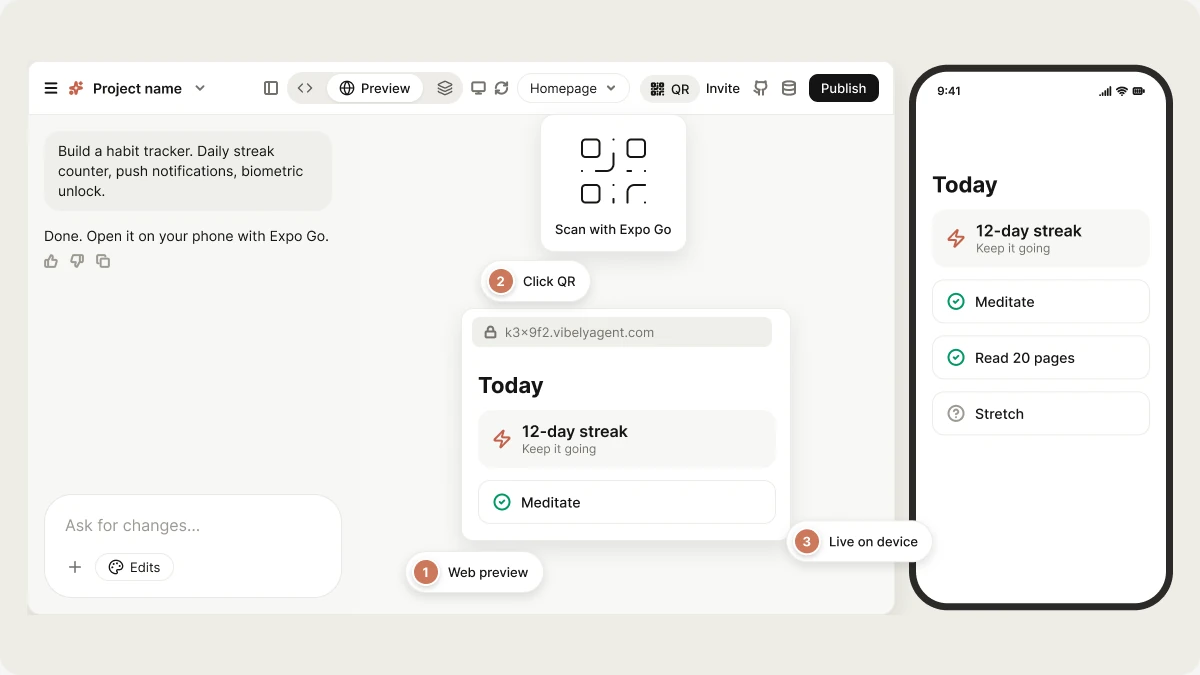
Be specific about platform-flavoured features. "Build a habit tracker. Daily streak counter, push notifications at user-chosen times, biometric unlock. Use Supabase for auth and storage." beats "habit tracker."
Mention native APIs you need (push, camera, biometrics, location, contacts) — the agent will pick the right Expo SDK module.
The right pane shows a `.vibelyagent.com` iframe — the Metro web target. Use this to iterate on layout and logic.
Install [Expo Go](https://expo.dev/go) on your phone. Click **QR** in the project header and scan with your camera (iOS) or the Expo Go app (Android). The app loads on-device with hot reload.
Expo Go is required to test camera, push, biometrics, secure storage, and most other native APIs.
Prompt freely. Each turn updates code; both web preview and the device refresh together. "Add a stats screen with a 30-day heatmap." "Move the streak counter into the header."
See [Ship to stores](/features/mobile-apps/ship). You'll need an Apple Developer account ($99/yr) for iOS and a Play Console account ($25) for Android. Vibely drives the EAS build and uploads on your behalf.
 ## Tips for a good first prompt
The mobile first-prompt checklist — naming native features so they route to the
right Expo module, picking a navigation pattern, orientation, and a vibe in mobile
terms — is in [Prompting → Your first prompt](/prompting/best-practices#your-first-prompt).
## What "good" looks like at the end of turn 1
* File-based routes under `src/app/` (Expo Router) with at least Home + one detail / settings screen.
* Working tab or stack navigation between them.
* `StyleSheet` styling driven by the theme tokens, consistent with your stated vibe.
* Auth wired if you mentioned it (Supabase magic link or OAuth).
* Native modules added if you mentioned them (push, secure-store, etc.).
If the agent shipped only a stack of `` placeholders, prompt: "Replace placeholder content with real screens — no `Coming soon` text."
## Web preview vs Expo Go: when to use which
| Test | Web preview | Expo Go |
| - | :-: | :-: |
| Layout / spacing / typography | ✅ | ✅ |
| Navigation flow | ✅ | ✅ |
| Forms, inputs | ✅ | ✅ |
| Camera | ❌ | ✅ |
| Push notifications | ❌ | ✅ |
| Biometrics | ❌ | ✅ |
| Secure storage | ❌ | ✅ |
| Geolocation | ⚠️ | ✅ |
| Haptics | ❌ | ✅ |
| Real device performance feel | ❌ | ✅ |
Use the web preview for fast iteration; switch to Expo Go before saying "ship it."
## Next
Camera, push, biometrics, geolocation, deep links.
EAS builds, TestFlight, Play Console.
## Related topics
- [Mobile App Mode](/features/mobile-apps/overview.md)
- [Quick start](/introduction/quickstart.md)
- [From idea to the App Store](/guides/from-idea-to-store.md)
- [Build your first web app](/features/web-apps/quickstart.md)
- [FAQ](/faq.md)
This documentation is built and hosted on [Mintlify](https://mintlify.com), a developer documentation platform.
## Tips for a good first prompt
The mobile first-prompt checklist — naming native features so they route to the
right Expo module, picking a navigation pattern, orientation, and a vibe in mobile
terms — is in [Prompting → Your first prompt](/prompting/best-practices#your-first-prompt).
## What "good" looks like at the end of turn 1
* File-based routes under `src/app/` (Expo Router) with at least Home + one detail / settings screen.
* Working tab or stack navigation between them.
* `StyleSheet` styling driven by the theme tokens, consistent with your stated vibe.
* Auth wired if you mentioned it (Supabase magic link or OAuth).
* Native modules added if you mentioned them (push, secure-store, etc.).
If the agent shipped only a stack of `` placeholders, prompt: "Replace placeholder content with real screens — no `Coming soon` text."
## Web preview vs Expo Go: when to use which
| Test | Web preview | Expo Go |
| - | :-: | :-: |
| Layout / spacing / typography | ✅ | ✅ |
| Navigation flow | ✅ | ✅ |
| Forms, inputs | ✅ | ✅ |
| Camera | ❌ | ✅ |
| Push notifications | ❌ | ✅ |
| Biometrics | ❌ | ✅ |
| Secure storage | ❌ | ✅ |
| Geolocation | ⚠️ | ✅ |
| Haptics | ❌ | ✅ |
| Real device performance feel | ❌ | ✅ |
Use the web preview for fast iteration; switch to Expo Go before saying "ship it."
## Next
Camera, push, biometrics, geolocation, deep links.
EAS builds, TestFlight, Play Console.
## Related topics
- [Mobile App Mode](/features/mobile-apps/overview.md)
- [Quick start](/introduction/quickstart.md)
- [From idea to the App Store](/guides/from-idea-to-store.md)
- [Build your first web app](/features/web-apps/quickstart.md)
- [FAQ](/faq.md)
This documentation is built and hosted on [Mintlify](https://mintlify.com), a developer documentation platform.