> ## Documentation Index
> Fetch the complete documentation index at: https://docs.vibely.sh/llms.txt
> Use this file to discover all available pages before exploring further.
# Mobile App Mode
> Build native iOS and Android apps with Expo from a single prompt
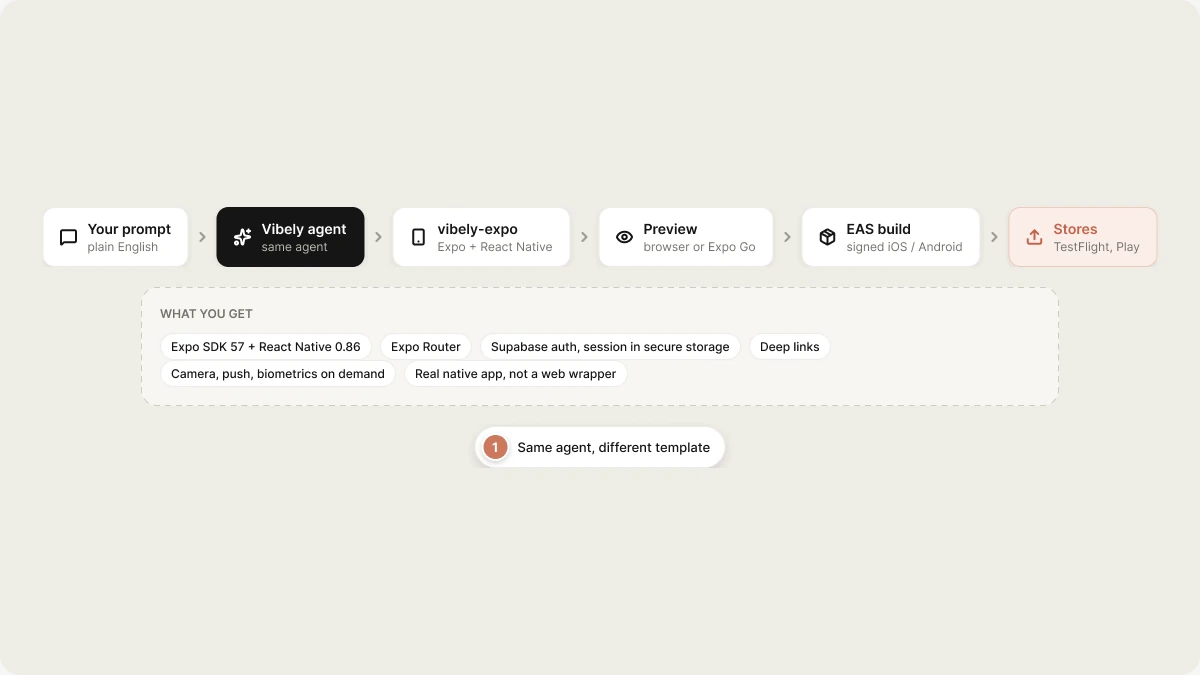
Mobile mode runs the same agent against a different template — **`vibely-expo`** (Expo + React Native). You get a real native app you can preview in a web browser during development, scan with Expo Go for on-device testing, and ship to the App Store or Play Store via EAS.
 Build your first mobile app in under 10 minutes.
What `vibely-expo` ships with: navigation, auth, native modules.
Camera, push, geolocation, biometrics, payments.
EAS builds, TestFlight, Play Console.
## What you get
| Layer | Stack |
| - | - |
| Framework | Expo SDK 57 + React Native 0.86 |
| Navigation | Expo Router (file-based) |
| Styling | `StyleSheet` + theme tokens in `src/constants/theme.ts` |
| State | React state and context (add a state library if you need one) |
| Auth | Supabase (`@supabase/supabase-js`); the session is persisted with `expo-secure-store` — Keychain on iOS, Keystore-backed on Android |
| Storage | `@react-native-async-storage/async-storage` for preferences and drafts — never for identity |
| Native | Deep links (`expo-linking`), device info, fonts, symbols, glass effects |
| Build | EAS (Expo Application Services) |
Anything not in that list — forms, camera, push notifications, biometrics, secure
storage, charts — is one `add_dependency` away; the agent installs it on demand
rather than shipping it unused in every project.
## Preview during development
Two preview modes, simultaneous, kept in sync by Metro:
1. **Web preview** — same iframe pattern as web apps. Metro's web target builds the app for browser, served from `.vibelyagent.com`. Useful for fast iteration; not all native modules work here.
2. **Expo Go on your phone** — scan the QR code in the project header with [Expo Go](https://expo.dev/go) on iOS or Android. Real device, real native modules, hot reload. Use this whenever you touch native APIs.
Web preview is the default because it's instant. For anything camera/push/biometrics, switch to Expo Go.
## How a build works
```
1. You prompt: "Build a habit tracker. Daily streaks, push reminders, secure auth."
2. Sandbox spawns from `vibely-expo` (~10–20 s, cached on subsequent runs)
3. Metro starts (web + native), preview URL emitted
4. Agent writes code:
- file-based routes under `src/app/`
- components styled with `StyleSheet` + theme tokens
- extra native modules installed and wired as the feature needs them
5. Metro hot-reloads on each save (web + Expo Go)
6. Done event when the agent stops
```
## When to use Mobile App Mode
| Use it for | Not the right fit |
| - | - |
| Native iOS / Android with shared code | Browser-only apps (use [Web App Mode](/features/web-apps/overview)) |
| Apps needing camera / push / biometrics | A landing site for your mobile app |
| Tablets + phone (responsive RN) | Desktop apps (Electron / Tauri) |
| Apps you'll ship to the App Store | A purely web-based prototype |
## Limits
* **Native modules** that aren't in the Expo SDK require an EAS build (no longer Expo Go-compatible). The agent will tell you when a feature crosses that line.
* **iOS publishing** requires a paid Apple Developer account (\$99/yr).
* **Android publishing** requires a Play Console account (\$25 one-time).
* **In-app purchases** on iOS/Android still go through Apple/Google — Stripe-style web checkout is not allowed by store policy. Use [`expo-in-app-purchases`](https://docs.expo.dev/) (managed by EAS) or RevenueCat (via [Connectors](/integrations/connectors/overview)).
* The dev web preview doesn't support every native API. Switch to Expo Go before testing camera, push, biometrics, etc.
## Web + mobile from the same brief
If your product needs both, build them as two projects with a shared backend:
1. **Web App Mode** project for the marketing site / admin dashboard.
2. **Mobile App Mode** project for the native app.
Both can talk to the same Supabase database and the same Stripe account. Vibely doesn't currently merge them into a single repo, but the agent is happy to keep their data models aligned across the two projects.
## Related topics
- [Web App Mode](/features/web-apps/overview.md)
- [Mobile app templates](/features/mobile-apps/templates.md)
- [Authentication in mobile apps](/features/mobile-apps/auth.md)
- [Build your first mobile app](/features/mobile-apps/quickstart.md)
- [FAQ](/faq.md)
This documentation is built and hosted on [Mintlify](https://mintlify.com), a developer documentation platform.
Build your first mobile app in under 10 minutes.
What `vibely-expo` ships with: navigation, auth, native modules.
Camera, push, geolocation, biometrics, payments.
EAS builds, TestFlight, Play Console.
## What you get
| Layer | Stack |
| - | - |
| Framework | Expo SDK 57 + React Native 0.86 |
| Navigation | Expo Router (file-based) |
| Styling | `StyleSheet` + theme tokens in `src/constants/theme.ts` |
| State | React state and context (add a state library if you need one) |
| Auth | Supabase (`@supabase/supabase-js`); the session is persisted with `expo-secure-store` — Keychain on iOS, Keystore-backed on Android |
| Storage | `@react-native-async-storage/async-storage` for preferences and drafts — never for identity |
| Native | Deep links (`expo-linking`), device info, fonts, symbols, glass effects |
| Build | EAS (Expo Application Services) |
Anything not in that list — forms, camera, push notifications, biometrics, secure
storage, charts — is one `add_dependency` away; the agent installs it on demand
rather than shipping it unused in every project.
## Preview during development
Two preview modes, simultaneous, kept in sync by Metro:
1. **Web preview** — same iframe pattern as web apps. Metro's web target builds the app for browser, served from `.vibelyagent.com`. Useful for fast iteration; not all native modules work here.
2. **Expo Go on your phone** — scan the QR code in the project header with [Expo Go](https://expo.dev/go) on iOS or Android. Real device, real native modules, hot reload. Use this whenever you touch native APIs.
Web preview is the default because it's instant. For anything camera/push/biometrics, switch to Expo Go.
## How a build works
```
1. You prompt: "Build a habit tracker. Daily streaks, push reminders, secure auth."
2. Sandbox spawns from `vibely-expo` (~10–20 s, cached on subsequent runs)
3. Metro starts (web + native), preview URL emitted
4. Agent writes code:
- file-based routes under `src/app/`
- components styled with `StyleSheet` + theme tokens
- extra native modules installed and wired as the feature needs them
5. Metro hot-reloads on each save (web + Expo Go)
6. Done event when the agent stops
```
## When to use Mobile App Mode
| Use it for | Not the right fit |
| - | - |
| Native iOS / Android with shared code | Browser-only apps (use [Web App Mode](/features/web-apps/overview)) |
| Apps needing camera / push / biometrics | A landing site for your mobile app |
| Tablets + phone (responsive RN) | Desktop apps (Electron / Tauri) |
| Apps you'll ship to the App Store | A purely web-based prototype |
## Limits
* **Native modules** that aren't in the Expo SDK require an EAS build (no longer Expo Go-compatible). The agent will tell you when a feature crosses that line.
* **iOS publishing** requires a paid Apple Developer account (\$99/yr).
* **Android publishing** requires a Play Console account (\$25 one-time).
* **In-app purchases** on iOS/Android still go through Apple/Google — Stripe-style web checkout is not allowed by store policy. Use [`expo-in-app-purchases`](https://docs.expo.dev/) (managed by EAS) or RevenueCat (via [Connectors](/integrations/connectors/overview)).
* The dev web preview doesn't support every native API. Switch to Expo Go before testing camera, push, biometrics, etc.
## Web + mobile from the same brief
If your product needs both, build them as two projects with a shared backend:
1. **Web App Mode** project for the marketing site / admin dashboard.
2. **Mobile App Mode** project for the native app.
Both can talk to the same Supabase database and the same Stripe account. Vibely doesn't currently merge them into a single repo, but the agent is happy to keep their data models aligned across the two projects.
## Related topics
- [Web App Mode](/features/web-apps/overview.md)
- [Mobile app templates](/features/mobile-apps/templates.md)
- [Authentication in mobile apps](/features/mobile-apps/auth.md)
- [Build your first mobile app](/features/mobile-apps/quickstart.md)
- [FAQ](/faq.md)
This documentation is built and hosted on [Mintlify](https://mintlify.com), a developer documentation platform.