> ## Documentation Index
> Fetch the complete documentation index at: https://docs.vibely.sh/llms.txt
> Use this file to discover all available pages before exploring further.
# Authentication in mobile apps
> Native OAuth with a scheme redirect, Sign in with Apple, and the dev-vs-prod trap that only shows up in production
Providers are enabled in your own Supabase dashboard exactly as they are for a web app — [Web → Authentication](/features/backend/auth) covers that, and all of it applies here. This page is the part that is different on a phone.
Three things change:
| | Web | Native |
| - | - | - |
| OAuth return trip | Browser redirect to an `https://` URL | System auth sheet returning to a `myapp://` URL |
| Apple sign-in | Optional | **Required** if you offer any other social login |
| Session storage | Browser `localStorage` | Keychain / Android Keystore, already wired |
 ## Native OAuth uses a scheme redirect
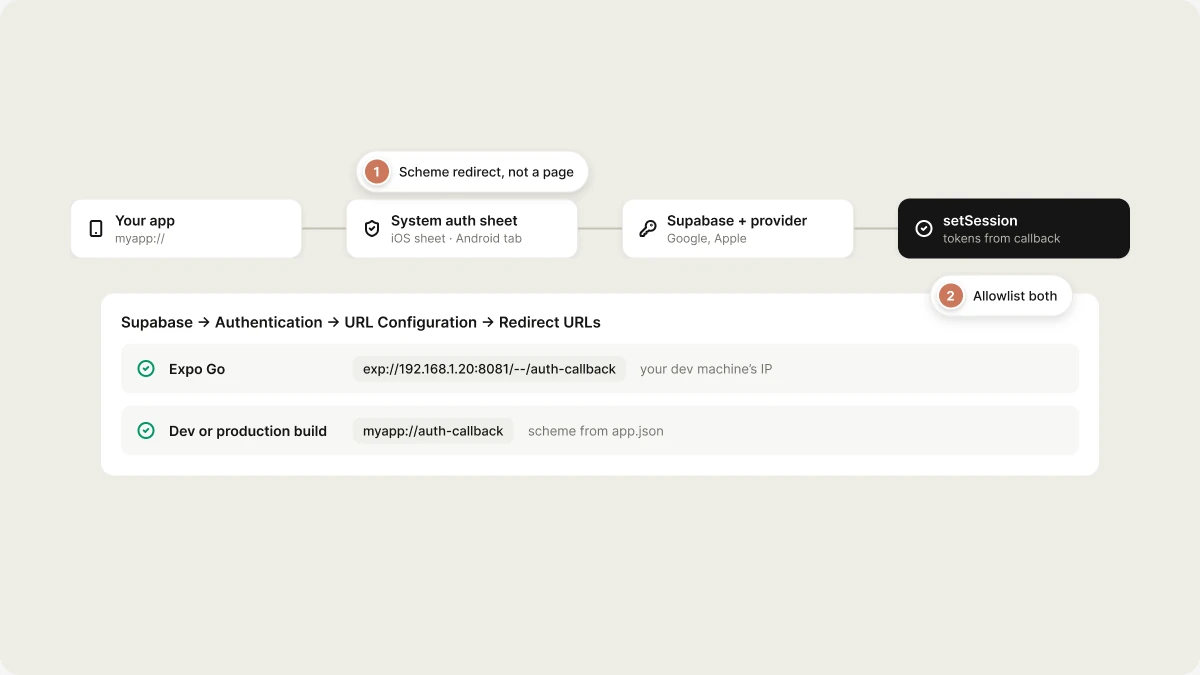
There is no page to redirect to. iOS opens `ASWebAuthenticationSession` and Android opens a Custom Tab, the user signs in, and the system hands control back to your app through a **custom URL scheme** — the same `myapp://` scheme used for [deep links](/features/mobile-apps/native#deep-links).
Neither `expo-auth-session` nor `expo-web-browser` ships in the starter — ask the agent for social sign-in and it installs both. The flow it writes:
```ts theme={"system"}
import * as WebBrowser from "expo-web-browser"
import { makeRedirectUri } from "expo-auth-session"
import { supabase } from "@/integrations/supabase/client"
// In a build: myapp://auth-callback
// In Expo Go: exp://192.168.1.20:8081/--/auth-callback
const redirectTo = makeRedirectUri({ scheme: "myapp", path: "auth-callback" })
export async function signInWithGoogle() {
const { data, error } = await supabase.auth.signInWithOAuth({
provider: "google",
options: { redirectTo, skipBrowserRedirect: true },
})
if (error) throw error
const result = await WebBrowser.openAuthSessionAsync(data.url, redirectTo)
if (result.type !== "success") return // user cancelled
// Tokens come back in the URL fragment
const params = new URLSearchParams(result.url.split("#")[1] ?? "")
const access_token = params.get("access_token")
const refresh_token = params.get("refresh_token")
if (!access_token || !refresh_token) throw new Error("No session in callback URL")
await supabase.auth.setSession({ access_token, refresh_token })
}
```
Three details do the work:
* **`skipBrowserRedirect: true`.** Without it `signInWithOAuth` tries to navigate a browser that doesn't exist here. You want the URL, not the navigation.
* **`openAuthSessionAsync(url, redirectTo)`.** The second argument is what tells the system sheet which URL means "done" — it must be the same string you sent to Supabase.
* **`setSession`.** Nothing detects the callback URL for you on native. Until you call `setSession`, the user is not signed in and nothing is persisted.
If your Supabase client is configured with `flowType: "pkce"`, the callback
carries `?code=` instead of a token fragment. Swap the last two steps for
`supabase.auth.exchangeCodeForSession(code)` — the rest is identical.
### Allowlist the exact value
In your Supabase dashboard → **Authentication → URL Configuration → Redirect URLs**, add the literal scheme URL:
```
myapp://auth-callback
```
Not a wildcard, not an `https://` URL. It has to match what `makeRedirectUri` produced, character for character.
## The dev-vs-prod trap
`makeRedirectUri` returns **a different value depending on how the app is running**, and this is what breaks in production after working all through development:
| Running as | `makeRedirectUri({ scheme: "myapp", path: "auth-callback" })` |
| - | - |
| Expo Go | `exp://192.168.1.20:8081/--/auth-callback` — your dev machine's IP, which changes with your network |
| Development or production build | `myapp://auth-callback` — the `scheme` from `app.json` |
Allowlist **both**. Only allowlisting the `exp://` URL you saw during development means every store build fails sign-in with a dismissed sheet and no error.
Two more consequences, both Vibely-specific:
* **Set your scheme before you build.** The `scheme` in `app.json` comes from **Settings → Mobile app → Deep link scheme**. Leave it at the template placeholder and the production build is refused with a message telling you to set it — but worse, changing it *after* you've allowlisted a redirect silently invalidates that allowlist entry. Pick the scheme first, allowlist it, then build.
* **The old auth proxy is gone.** Guides that tell you to pass `useProxy: true` or to allowlist `https://auth.expo.io/@you/your-app` are pre-SDK-48 and no longer work. Use the scheme.
Native OAuth does not work in the **web preview** either — the web preview has no URL scheme to return to. Test sign-in in Expo Go or on a build.
## Sign in with Apple
Use `expo-apple-authentication`, not the web flow above. It presents the native Apple sheet, which is what App Store reviewers expect to see, and it returns an identity token you hand straight to Supabase:
```ts theme={"system"}
import * as AppleAuthentication from "expo-apple-authentication"
import { supabase } from "@/integrations/supabase/client"
const credential = await AppleAuthentication.signInAsync({
requestedScopes: [
AppleAuthentication.AppleAuthenticationScope.FULL_NAME,
AppleAuthentication.AppleAuthenticationScope.EMAIL,
],
})
if (!credential.identityToken) throw new Error("No identity token")
await supabase.auth.signInWithIdToken({
provider: "apple",
token: credential.identityToken,
})
```
Notes that cost people a review cycle:
* **iOS only.** `AppleAuthentication.isAvailableAsync()` is false on Android and in the web preview. Render the button conditionally.
* **Name and email arrive once.** Apple returns `fullName` and `email` only on the user's *first* authorization. Persist them then; a second sign-in returns nulls.
* **Enable the Apple provider in Supabase** and add your bundle ID as an authorized client — see [auth-apple](https://supabase.com/docs/guides/auth/social-login/auth-apple).
### Guideline 4.8
If your app offers a third-party or social login — Google, Facebook, X — App Store Review Guideline **4.8** requires you to also offer an equivalent login option that:
* limits data collection to the user's **name and email address**;
* lets the user **keep their email address private** from your app; and
* does not collect **interactions with your app for advertising** without consent.
Sign in with Apple satisfies all three and is the shortest path. Plain email/password does **not** — it cannot mask the address, so it fails the second clause. The rule only bites if you offer a social login at all: an app with nothing but email/password has no 4.8 obligation. See [Ship](/features/mobile-apps/ship#submitting-to-the-app-store).
## Sessions
The starter's Supabase client already points `auth.storage` at a Keychain / Android Keystore–backed store (`src/integrations/supabase/secure-storage.ts`, chunked past the platform's 2048-byte item limit). Sessions survive a relaunch and refresh themselves. Leave that file alone, and never move identity into `AsyncStorage` — it is unencrypted. See [Native → Secure storage](/features/mobile-apps/native#secure-storage).
For "Unlock with Face ID", gate a session that is already on the device — don't use biometrics as the primary credential. [Native → Biometrics](/features/mobile-apps/native#biometrics) has the pattern.
## Checklist before you ship
1. Both redirect values allowlisted in Supabase — the `exp://` dev URL and `myapp://auth-callback`.
2. Deep link scheme set in **Settings → Mobile app**, and it matches the allowlisted URL.
3. Sign-in tested on a real **build**, not just Expo Go.
4. Sign in with Apple present if any other social login is.
5. A way to try the app, or at least see what it does, without an account — reviewers reject blank login walls.
## Related topics
- [Add users and authentication](/features/backend/auth.md)
- [FAQ](/faq.md)
- [Test and verify your app](/features/testing/overview.md)
- [Mobile App Mode](/features/mobile-apps/overview.md)
- [Mobile app templates](/features/mobile-apps/templates.md)
This documentation is built and hosted on [Mintlify](https://mintlify.com), a developer documentation platform.
## Native OAuth uses a scheme redirect
There is no page to redirect to. iOS opens `ASWebAuthenticationSession` and Android opens a Custom Tab, the user signs in, and the system hands control back to your app through a **custom URL scheme** — the same `myapp://` scheme used for [deep links](/features/mobile-apps/native#deep-links).
Neither `expo-auth-session` nor `expo-web-browser` ships in the starter — ask the agent for social sign-in and it installs both. The flow it writes:
```ts theme={"system"}
import * as WebBrowser from "expo-web-browser"
import { makeRedirectUri } from "expo-auth-session"
import { supabase } from "@/integrations/supabase/client"
// In a build: myapp://auth-callback
// In Expo Go: exp://192.168.1.20:8081/--/auth-callback
const redirectTo = makeRedirectUri({ scheme: "myapp", path: "auth-callback" })
export async function signInWithGoogle() {
const { data, error } = await supabase.auth.signInWithOAuth({
provider: "google",
options: { redirectTo, skipBrowserRedirect: true },
})
if (error) throw error
const result = await WebBrowser.openAuthSessionAsync(data.url, redirectTo)
if (result.type !== "success") return // user cancelled
// Tokens come back in the URL fragment
const params = new URLSearchParams(result.url.split("#")[1] ?? "")
const access_token = params.get("access_token")
const refresh_token = params.get("refresh_token")
if (!access_token || !refresh_token) throw new Error("No session in callback URL")
await supabase.auth.setSession({ access_token, refresh_token })
}
```
Three details do the work:
* **`skipBrowserRedirect: true`.** Without it `signInWithOAuth` tries to navigate a browser that doesn't exist here. You want the URL, not the navigation.
* **`openAuthSessionAsync(url, redirectTo)`.** The second argument is what tells the system sheet which URL means "done" — it must be the same string you sent to Supabase.
* **`setSession`.** Nothing detects the callback URL for you on native. Until you call `setSession`, the user is not signed in and nothing is persisted.
If your Supabase client is configured with `flowType: "pkce"`, the callback
carries `?code=` instead of a token fragment. Swap the last two steps for
`supabase.auth.exchangeCodeForSession(code)` — the rest is identical.
### Allowlist the exact value
In your Supabase dashboard → **Authentication → URL Configuration → Redirect URLs**, add the literal scheme URL:
```
myapp://auth-callback
```
Not a wildcard, not an `https://` URL. It has to match what `makeRedirectUri` produced, character for character.
## The dev-vs-prod trap
`makeRedirectUri` returns **a different value depending on how the app is running**, and this is what breaks in production after working all through development:
| Running as | `makeRedirectUri({ scheme: "myapp", path: "auth-callback" })` |
| - | - |
| Expo Go | `exp://192.168.1.20:8081/--/auth-callback` — your dev machine's IP, which changes with your network |
| Development or production build | `myapp://auth-callback` — the `scheme` from `app.json` |
Allowlist **both**. Only allowlisting the `exp://` URL you saw during development means every store build fails sign-in with a dismissed sheet and no error.
Two more consequences, both Vibely-specific:
* **Set your scheme before you build.** The `scheme` in `app.json` comes from **Settings → Mobile app → Deep link scheme**. Leave it at the template placeholder and the production build is refused with a message telling you to set it — but worse, changing it *after* you've allowlisted a redirect silently invalidates that allowlist entry. Pick the scheme first, allowlist it, then build.
* **The old auth proxy is gone.** Guides that tell you to pass `useProxy: true` or to allowlist `https://auth.expo.io/@you/your-app` are pre-SDK-48 and no longer work. Use the scheme.
Native OAuth does not work in the **web preview** either — the web preview has no URL scheme to return to. Test sign-in in Expo Go or on a build.
## Sign in with Apple
Use `expo-apple-authentication`, not the web flow above. It presents the native Apple sheet, which is what App Store reviewers expect to see, and it returns an identity token you hand straight to Supabase:
```ts theme={"system"}
import * as AppleAuthentication from "expo-apple-authentication"
import { supabase } from "@/integrations/supabase/client"
const credential = await AppleAuthentication.signInAsync({
requestedScopes: [
AppleAuthentication.AppleAuthenticationScope.FULL_NAME,
AppleAuthentication.AppleAuthenticationScope.EMAIL,
],
})
if (!credential.identityToken) throw new Error("No identity token")
await supabase.auth.signInWithIdToken({
provider: "apple",
token: credential.identityToken,
})
```
Notes that cost people a review cycle:
* **iOS only.** `AppleAuthentication.isAvailableAsync()` is false on Android and in the web preview. Render the button conditionally.
* **Name and email arrive once.** Apple returns `fullName` and `email` only on the user's *first* authorization. Persist them then; a second sign-in returns nulls.
* **Enable the Apple provider in Supabase** and add your bundle ID as an authorized client — see [auth-apple](https://supabase.com/docs/guides/auth/social-login/auth-apple).
### Guideline 4.8
If your app offers a third-party or social login — Google, Facebook, X — App Store Review Guideline **4.8** requires you to also offer an equivalent login option that:
* limits data collection to the user's **name and email address**;
* lets the user **keep their email address private** from your app; and
* does not collect **interactions with your app for advertising** without consent.
Sign in with Apple satisfies all three and is the shortest path. Plain email/password does **not** — it cannot mask the address, so it fails the second clause. The rule only bites if you offer a social login at all: an app with nothing but email/password has no 4.8 obligation. See [Ship](/features/mobile-apps/ship#submitting-to-the-app-store).
## Sessions
The starter's Supabase client already points `auth.storage` at a Keychain / Android Keystore–backed store (`src/integrations/supabase/secure-storage.ts`, chunked past the platform's 2048-byte item limit). Sessions survive a relaunch and refresh themselves. Leave that file alone, and never move identity into `AsyncStorage` — it is unencrypted. See [Native → Secure storage](/features/mobile-apps/native#secure-storage).
For "Unlock with Face ID", gate a session that is already on the device — don't use biometrics as the primary credential. [Native → Biometrics](/features/mobile-apps/native#biometrics) has the pattern.
## Checklist before you ship
1. Both redirect values allowlisted in Supabase — the `exp://` dev URL and `myapp://auth-callback`.
2. Deep link scheme set in **Settings → Mobile app**, and it matches the allowlisted URL.
3. Sign-in tested on a real **build**, not just Expo Go.
4. Sign in with Apple present if any other social login is.
5. A way to try the app, or at least see what it does, without an account — reviewers reject blank login walls.
## Related topics
- [Add users and authentication](/features/backend/auth.md)
- [FAQ](/faq.md)
- [Test and verify your app](/features/testing/overview.md)
- [Mobile App Mode](/features/mobile-apps/overview.md)
- [Mobile app templates](/features/mobile-apps/templates.md)
This documentation is built and hosted on [Mintlify](https://mintlify.com), a developer documentation platform.