> ## Documentation Index
> Fetch the complete documentation index at: https://docs.vibely.sh/llms.txt
> Use this file to discover all available pages before exploring further.
# App Store optimization
> The store listing fields that decide whether anyone finds your app
There is no SEO for a native app. Nothing crawls it, `robots.txt` means nothing,
and Open Graph tags never leave the web. What ranks an app is its store listing —
a fixed set of short text fields and a set of images, all typed into App Store
Connect and Play Console by hand.
Vibely builds and submits the app. The listing is yours to write, and it is the
half that decides whether anyone sees it.
These fields are not in Vibely. They live in App Store Connect and Play
Console, and the Play Developer API cannot create a store listing at all — see
[Ship → What still happens in Play Console](/features/mobile-apps/ship#what-still-happens-in-play-console).
Do them once, before your first production release.
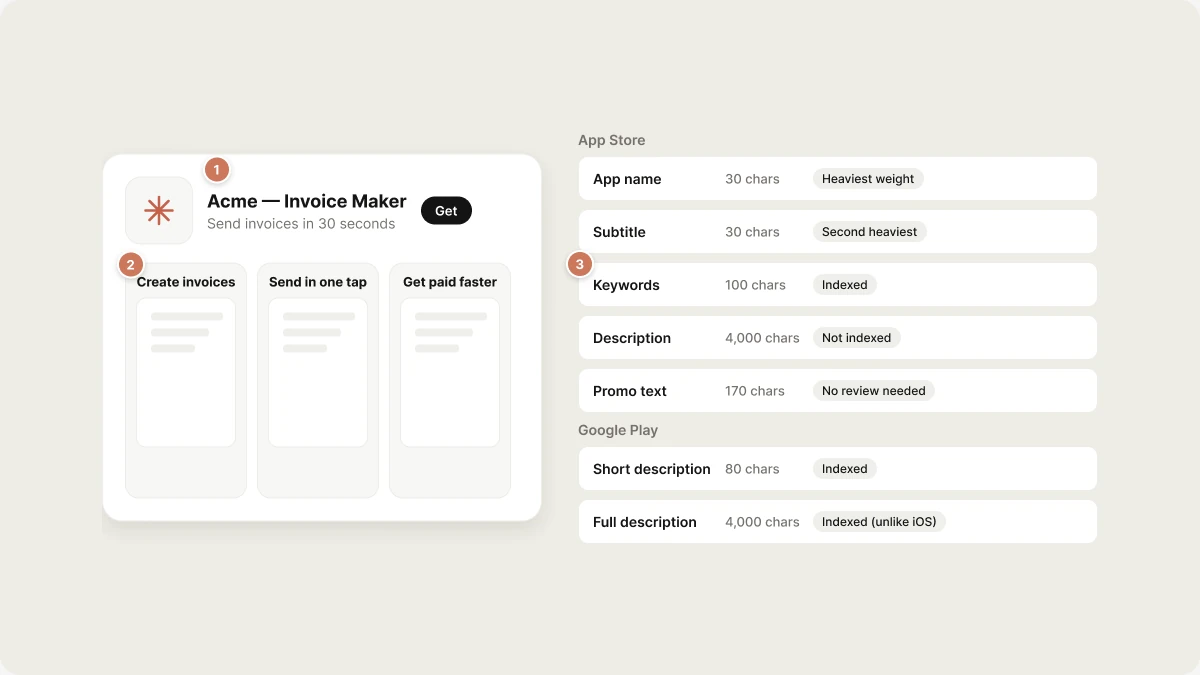 ## The fields, and what they weigh
### App Store (iOS)
| Field | Limit | Indexed for search? | What to put in it |
| - | - | - | - |
| App name | 30 chars | ✅ Heaviest weight | Brand + one keyword phrase. `Acme — Invoice Maker` |
| Subtitle | 30 chars | ✅ Second heaviest | The value, not a slogan. `Send invoices in 30 seconds` |
| Keywords | 100 chars | ✅ | Comma-separated, **no spaces after commas** — a space costs you a character |
| Description | 4,000 chars | ❌ Not indexed | Converts a visitor who already tapped through. First 2–3 lines are all most people read |
| Promotional text | 170 chars | ❌ | Changeable without a review — use it for launches and offers |
| Category | — | ✅ | Primary category drives the charts you can appear in |
Keyword field rules that cost real ranking:
* **Never repeat a word** that is already in the name or subtitle. Apple indexes
all three together; a repeat spends characters on nothing.
* **Skip plurals and your own brand name.** Apple stems, and your brand already
ranks.
* Do not use the words "app", "free", or your category name.
### Google Play (Android)
| Field | Limit | Indexed for search? | What to put in it |
| - | - | - | - |
| Title | 30 chars | ✅ Heaviest | Brand + primary keyword |
| Short description | 80 chars | ✅ | Shown above the fold; also the strongest conversion line |
| Full description | 4,000 chars | ✅ **Yes — unlike iOS** | Write for readers, place keywords naturally 3–5 times each |
This is the single biggest difference between the two stores. **Play indexes
the full description; Apple does not.** Do not paste the same text into both —
on iOS the description is pure conversion copy, on Play it is conversion copy
*and* your keyword surface.
## Screenshots
Screenshots are the highest-leverage asset on either store. Most installs are
decided in the gallery, before anyone reads a word.
| | App Store | Play |
| - | - | - |
| Minimum | 1 | 2 |
| Maximum | 10 per device size | 8 |
| Feature graphic | — | 1024×500, required |
| Video | App preview, up to 3 | Promo video (YouTube link) |
Apple requires one 6.7"-class iPhone set (1290×2796 portrait) and scales it down
for smaller devices; if the app ships on iPad, that is a separate required set.
Exact accepted pixel dimensions change with each device generation. The upload
screen in App Store Connect and Play Console is the authority — it rejects
anything it will not take and names the size it wants.
Ordering rules, in both stores:
1. **First screenshot carries the pitch.** Caption it. A bare UI screenshot wastes
the only one most people see.
2. **One idea per screenshot,** in the order a user would meet the features.
3. **Caption in the image,** not in the description — the gallery is scrolled, not
read.
4. Localized screenshots outperform translated text over an English UI.
You can build these from the app: ask the agent for a screenshot layout, or run
the app and capture the flows you want to sell.
## What moves the needle, in order
1. **Title and subtitle / short description.** Highest weight, 60 characters
total on iOS. Rewrite these before anything else.
2. **First two screenshots.** The conversion step everything else feeds.
3. **iOS keyword field.** 100 characters, all of them earning.
4. **Play full description.** Indexed, so it is doing two jobs.
5. **Ratings and reviews.** Both stores weight them heavily and neither lets you
shortcut them. Prompt for a review after a success moment, never on launch.
6. **Install-to-retention.** Play in particular demotes apps users uninstall
quickly, so a listing that oversells is a listing that decays.
## Changing a listing later
* **iOS:** the name, subtitle, keywords and screenshots are locked to a version
and change only through a review. **Promotional text** is the exception — it
updates instantly. Plan around that.
* **Play:** listing text can be edited at any time without a release, though
substantial changes may go through a short review.
That asymmetry is worth exploiting: iterate copy on Play, measure, then carry the
winner into the next iOS submission.
## What Vibely does not do
No keyword volume data, no competitor tracking, no rank monitoring, and no
automatic listing upload. Vibely builds the binary and drives the submission; the
listing is manual on both stores.
## Related
Builds, TestFlight, Play tracks and submission
The web equivalent, for a published web app
## Related topics
- [Optimize your app for SEO and AI search](/features/grow/seo.md)
- [Ship to stores](/features/mobile-apps/ship.md)
- [From idea to the App Store](/guides/from-idea-to-store.md)
- [Publish your Vibely project](/features/deploy/publish.md)
- [Add a third-party analytics tool](/integrations/connectors/analytics.md)
This documentation is built and hosted on [Mintlify](https://mintlify.com), a developer documentation platform.
## The fields, and what they weigh
### App Store (iOS)
| Field | Limit | Indexed for search? | What to put in it |
| - | - | - | - |
| App name | 30 chars | ✅ Heaviest weight | Brand + one keyword phrase. `Acme — Invoice Maker` |
| Subtitle | 30 chars | ✅ Second heaviest | The value, not a slogan. `Send invoices in 30 seconds` |
| Keywords | 100 chars | ✅ | Comma-separated, **no spaces after commas** — a space costs you a character |
| Description | 4,000 chars | ❌ Not indexed | Converts a visitor who already tapped through. First 2–3 lines are all most people read |
| Promotional text | 170 chars | ❌ | Changeable without a review — use it for launches and offers |
| Category | — | ✅ | Primary category drives the charts you can appear in |
Keyword field rules that cost real ranking:
* **Never repeat a word** that is already in the name or subtitle. Apple indexes
all three together; a repeat spends characters on nothing.
* **Skip plurals and your own brand name.** Apple stems, and your brand already
ranks.
* Do not use the words "app", "free", or your category name.
### Google Play (Android)
| Field | Limit | Indexed for search? | What to put in it |
| - | - | - | - |
| Title | 30 chars | ✅ Heaviest | Brand + primary keyword |
| Short description | 80 chars | ✅ | Shown above the fold; also the strongest conversion line |
| Full description | 4,000 chars | ✅ **Yes — unlike iOS** | Write for readers, place keywords naturally 3–5 times each |
This is the single biggest difference between the two stores. **Play indexes
the full description; Apple does not.** Do not paste the same text into both —
on iOS the description is pure conversion copy, on Play it is conversion copy
*and* your keyword surface.
## Screenshots
Screenshots are the highest-leverage asset on either store. Most installs are
decided in the gallery, before anyone reads a word.
| | App Store | Play |
| - | - | - |
| Minimum | 1 | 2 |
| Maximum | 10 per device size | 8 |
| Feature graphic | — | 1024×500, required |
| Video | App preview, up to 3 | Promo video (YouTube link) |
Apple requires one 6.7"-class iPhone set (1290×2796 portrait) and scales it down
for smaller devices; if the app ships on iPad, that is a separate required set.
Exact accepted pixel dimensions change with each device generation. The upload
screen in App Store Connect and Play Console is the authority — it rejects
anything it will not take and names the size it wants.
Ordering rules, in both stores:
1. **First screenshot carries the pitch.** Caption it. A bare UI screenshot wastes
the only one most people see.
2. **One idea per screenshot,** in the order a user would meet the features.
3. **Caption in the image,** not in the description — the gallery is scrolled, not
read.
4. Localized screenshots outperform translated text over an English UI.
You can build these from the app: ask the agent for a screenshot layout, or run
the app and capture the flows you want to sell.
## What moves the needle, in order
1. **Title and subtitle / short description.** Highest weight, 60 characters
total on iOS. Rewrite these before anything else.
2. **First two screenshots.** The conversion step everything else feeds.
3. **iOS keyword field.** 100 characters, all of them earning.
4. **Play full description.** Indexed, so it is doing two jobs.
5. **Ratings and reviews.** Both stores weight them heavily and neither lets you
shortcut them. Prompt for a review after a success moment, never on launch.
6. **Install-to-retention.** Play in particular demotes apps users uninstall
quickly, so a listing that oversells is a listing that decays.
## Changing a listing later
* **iOS:** the name, subtitle, keywords and screenshots are locked to a version
and change only through a review. **Promotional text** is the exception — it
updates instantly. Plan around that.
* **Play:** listing text can be edited at any time without a release, though
substantial changes may go through a short review.
That asymmetry is worth exploiting: iterate copy on Play, measure, then carry the
winner into the next iOS submission.
## What Vibely does not do
No keyword volume data, no competitor tracking, no rank monitoring, and no
automatic listing upload. Vibely builds the binary and drives the submission; the
listing is manual on both stores.
## Related
Builds, TestFlight, Play tracks and submission
The web equivalent, for a published web app
## Related topics
- [Optimize your app for SEO and AI search](/features/grow/seo.md)
- [Ship to stores](/features/mobile-apps/ship.md)
- [From idea to the App Store](/guides/from-idea-to-store.md)
- [Publish your Vibely project](/features/deploy/publish.md)
- [Add a third-party analytics tool](/integrations/connectors/analytics.md)
This documentation is built and hosted on [Mintlify](https://mintlify.com), a developer documentation platform.