> ## Documentation Index
> Fetch the complete documentation index at: https://docs.vibely.sh/llms.txt
> Use this file to discover all available pages before exploring further.
# Monitor your live app
> See the errors your visitors hit, get notified when something breaks, and hand it to Vibely to fix.
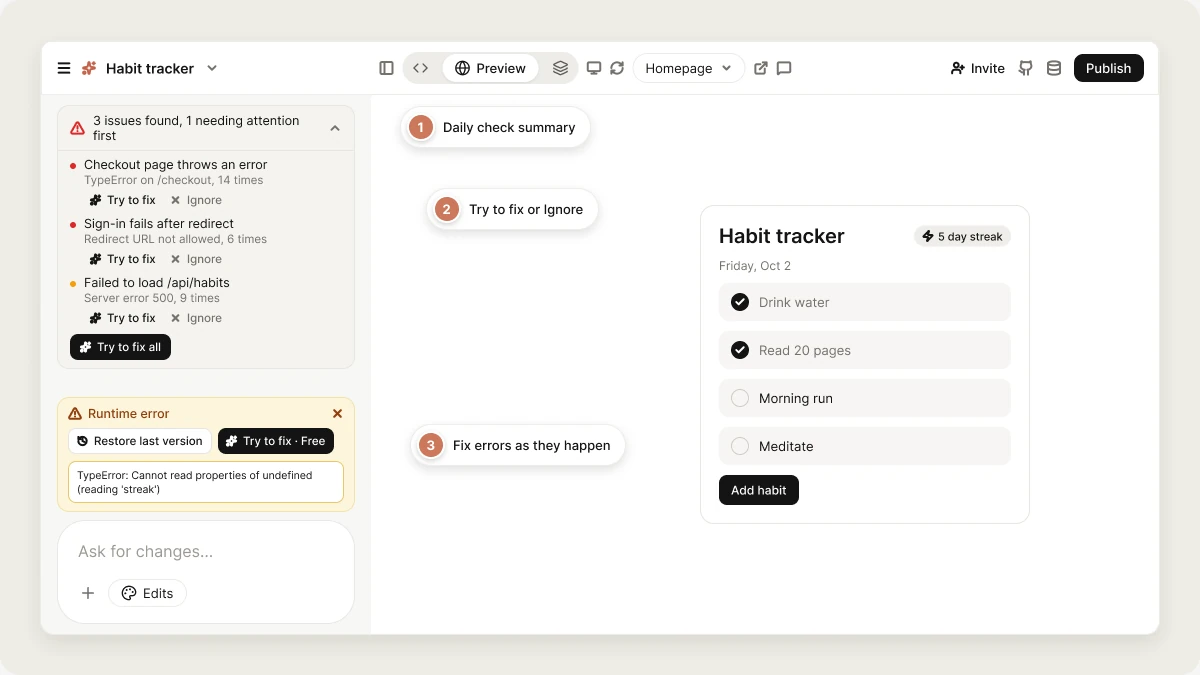
Once your app is live, Vibely watches for the errors your visitors actually run into. Your published app reports its errors back to your project, a daily check looks for new problems, and Vibely notifies you and shows the findings next to the chat so you can fix them.
 Monitoring is most useful for published apps with real visitors: it helps you catch problems before your users report them.
Monitoring is about errors in your app, not uptime. There are no synthetic probes or "is my site up" pings. Vibely reports what real visitors' browsers and devices send back.
## What gets reported
Every published web app includes a small error reporter. It catches uncaught errors, promise rejections nobody handled, and explicit `console.error` calls, and sends each one with its message, stack trace, the page it happened on, and the browser or device.
| Where the app runs | Reported to your project? |
| - | - |
| Preview in the editor | Yes, marked as preview |
| Published web app | Yes, marked as deployed |
| Mobile app in Expo Go or a development build | Yes, marked as preview |
| Mobile app store build | Yes, marked as deployed |
| Native iOS or Android crashes | No. See [Mobile](#mobile) |
Errors from browser extensions and third-party scripts (analytics tags, chat widgets) are filtered out, since they aren't your app breaking.
## How monitoring works
Monitoring turns on automatically the first time you publish a project. Once a day (around 06:00 UTC), Vibely looks at the errors your app reported over the last 7 days, groups repeats, filters out noise, and picks up to 8 findings, most serious first.
Findings are ranked by how much they affect visitors. Errors that break loading, hydration or sign-in are always treated as serious, and errors on the live site rank higher the more often they happen.
## How findings are shared
* **Notifications:** when a check finds new issues that matter, you get a notification in Vibely, and a push notification if you've allowed them, for example *"An error is affecting visitors of My App"*. You get at most one notification per check.
* **In the editor:** a summary appears above the project chat, such as *"3 issues found, 1 needing attention first"*.
## Review and fix findings
Expand the summary above the chat to see each finding. You can:
* **Try to fix**: sends the finding to Vibely as a build request. Vibely reproduces the problem first, then fixes it.
* **Try to fix all**: sends every open finding in one request.
* **Ignore**: removes a finding you don't need to act on (not relevant, already fixed, or not worth fixing). Click **Undo** to bring it back.
Fixes are ordinary build turns and use credits. Publish afterwards so the fix reaches your visitors.
To investigate before changing anything, ask first:
> Monitoring found that the checkout page throws an error. Before changing anything, explain what is causing it and how you'd fix it.
## Errors while you build
You don't have to wait for the daily check. When the preview or your live app throws, a **Runtime error** card appears in the project with two options:
* **Try to fix · Free**: sends the error to Vibely to fix. Using this button doesn't cost credits.
* **Restore last version**: rolls back to the last version before the breaking change.
The card shows exceptions only. React's development warnings and short-lived dev-server messages (like a lost connection that recovers on its own) are hidden so they don't look like real failures.
You can also just describe the problem in chat, for example *"The published app crashes when I click Save."* Vibely reads your app's recent errors, with stack traces, before it looks at a single file. You can steer it:
| Ask | What Vibely does |
| - | - |
| "Check the runtime errors" | Reads the latest errors at every level. |
| "Any errors on the /checkout route?" | Filters to that page. |
| "Is that error still happening?" | Reads again after a fix. |
The recent-errors log keeps the last 200 entries for one hour. An error logged before a fix stays in it for a while, so "it's still in the logs" isn't proof the fix failed: reload the app and check whether it happens again. An empty log isn't proof of a fix either, if the app hasn't been loaded since.
## Mobile
Mobile apps report JavaScript errors from inside the app: render errors, uncaught errors from buttons, timers and network callbacks, and unhandled promise rejections. Fatal errors are sent immediately, repeats are grouped, and each app launch sends at most 25 reports.
**Native crashes don't reach Vibely.** A crash in native code, such as a bad native module or a crash before JavaScript starts, produces no JavaScript error to report. Use **App Store Connect → Analytics → Crashes** and **Play Console → Android vitals** for those. If users report crashes and your project shows nothing, look there first.
## Sending errors somewhere else too
For long-term history, alerting rules or release tracking, ask Vibely to add Sentry (you supply the DSN). It works alongside Vibely's reporting rather than replacing it.
## Limitations
* Monitoring reports errors that visitors' browsers and devices send. It doesn't test your app, check uptime, or find bugs that don't throw an error.
* There are no email alerts, and the schedule isn't configurable yet.
* Vibely can rank a finding higher or lower than you would. Ignore the ones that don't matter.
## FAQ
No. Monitoring finds and explains issues. You decide whether to send a finding to Vibely.
No. It turns on the first time you publish a project.
Findings come from errors visitors hit over the last week. The problem may have been temporary, or already fixed by a change you made since. Ask Vibely to check whether it still happens before fixing it.
Yes, but errors that only happened in the preview are ranked low. Errors on your live site rank higher.
## Related
Put your app live and push fixes.
How to describe a bug so it gets fixed.
See who visits your app.
TestFlight, Play tracks and store submission.
## Related topics
- [Add AI features to your app](/features/backend/ai.md)
- [Workspace security center](/features/workspace/security-center.md)
- [Add payments to your app](/features/grow/payments.md)
- [Test and verify your app](/features/testing/overview.md)
- [Vibely for Enterprise](/introduction/enterprise.md)
This documentation is built and hosted on [Mintlify](https://mintlify.com), a developer documentation platform.
Monitoring is most useful for published apps with real visitors: it helps you catch problems before your users report them.
Monitoring is about errors in your app, not uptime. There are no synthetic probes or "is my site up" pings. Vibely reports what real visitors' browsers and devices send back.
## What gets reported
Every published web app includes a small error reporter. It catches uncaught errors, promise rejections nobody handled, and explicit `console.error` calls, and sends each one with its message, stack trace, the page it happened on, and the browser or device.
| Where the app runs | Reported to your project? |
| - | - |
| Preview in the editor | Yes, marked as preview |
| Published web app | Yes, marked as deployed |
| Mobile app in Expo Go or a development build | Yes, marked as preview |
| Mobile app store build | Yes, marked as deployed |
| Native iOS or Android crashes | No. See [Mobile](#mobile) |
Errors from browser extensions and third-party scripts (analytics tags, chat widgets) are filtered out, since they aren't your app breaking.
## How monitoring works
Monitoring turns on automatically the first time you publish a project. Once a day (around 06:00 UTC), Vibely looks at the errors your app reported over the last 7 days, groups repeats, filters out noise, and picks up to 8 findings, most serious first.
Findings are ranked by how much they affect visitors. Errors that break loading, hydration or sign-in are always treated as serious, and errors on the live site rank higher the more often they happen.
## How findings are shared
* **Notifications:** when a check finds new issues that matter, you get a notification in Vibely, and a push notification if you've allowed them, for example *"An error is affecting visitors of My App"*. You get at most one notification per check.
* **In the editor:** a summary appears above the project chat, such as *"3 issues found, 1 needing attention first"*.
## Review and fix findings
Expand the summary above the chat to see each finding. You can:
* **Try to fix**: sends the finding to Vibely as a build request. Vibely reproduces the problem first, then fixes it.
* **Try to fix all**: sends every open finding in one request.
* **Ignore**: removes a finding you don't need to act on (not relevant, already fixed, or not worth fixing). Click **Undo** to bring it back.
Fixes are ordinary build turns and use credits. Publish afterwards so the fix reaches your visitors.
To investigate before changing anything, ask first:
> Monitoring found that the checkout page throws an error. Before changing anything, explain what is causing it and how you'd fix it.
## Errors while you build
You don't have to wait for the daily check. When the preview or your live app throws, a **Runtime error** card appears in the project with two options:
* **Try to fix · Free**: sends the error to Vibely to fix. Using this button doesn't cost credits.
* **Restore last version**: rolls back to the last version before the breaking change.
The card shows exceptions only. React's development warnings and short-lived dev-server messages (like a lost connection that recovers on its own) are hidden so they don't look like real failures.
You can also just describe the problem in chat, for example *"The published app crashes when I click Save."* Vibely reads your app's recent errors, with stack traces, before it looks at a single file. You can steer it:
| Ask | What Vibely does |
| - | - |
| "Check the runtime errors" | Reads the latest errors at every level. |
| "Any errors on the /checkout route?" | Filters to that page. |
| "Is that error still happening?" | Reads again after a fix. |
The recent-errors log keeps the last 200 entries for one hour. An error logged before a fix stays in it for a while, so "it's still in the logs" isn't proof the fix failed: reload the app and check whether it happens again. An empty log isn't proof of a fix either, if the app hasn't been loaded since.
## Mobile
Mobile apps report JavaScript errors from inside the app: render errors, uncaught errors from buttons, timers and network callbacks, and unhandled promise rejections. Fatal errors are sent immediately, repeats are grouped, and each app launch sends at most 25 reports.
**Native crashes don't reach Vibely.** A crash in native code, such as a bad native module or a crash before JavaScript starts, produces no JavaScript error to report. Use **App Store Connect → Analytics → Crashes** and **Play Console → Android vitals** for those. If users report crashes and your project shows nothing, look there first.
## Sending errors somewhere else too
For long-term history, alerting rules or release tracking, ask Vibely to add Sentry (you supply the DSN). It works alongside Vibely's reporting rather than replacing it.
## Limitations
* Monitoring reports errors that visitors' browsers and devices send. It doesn't test your app, check uptime, or find bugs that don't throw an error.
* There are no email alerts, and the schedule isn't configurable yet.
* Vibely can rank a finding higher or lower than you would. Ignore the ones that don't matter.
## FAQ
No. Monitoring finds and explains issues. You decide whether to send a finding to Vibely.
No. It turns on the first time you publish a project.
Findings come from errors visitors hit over the last week. The problem may have been temporary, or already fixed by a change you made since. Ask Vibely to check whether it still happens before fixing it.
Yes, but errors that only happened in the preview are ranked low. Errors on your live site rank higher.
## Related
Put your app live and push fixes.
How to describe a bug so it gets fixed.
See who visits your app.
TestFlight, Play tracks and store submission.
## Related topics
- [Add AI features to your app](/features/backend/ai.md)
- [Workspace security center](/features/workspace/security-center.md)
- [Add payments to your app](/features/grow/payments.md)
- [Test and verify your app](/features/testing/overview.md)
- [Vibely for Enterprise](/introduction/enterprise.md)
This documentation is built and hosted on [Mintlify](https://mintlify.com), a developer documentation platform.