> ## Documentation Index
> Fetch the complete documentation index at: https://docs.vibely.sh/llms.txt
> Use this file to discover all available pages before exploring further.
# Build from an existing website
> Point Vibely at a site you have the rights to use, and it builds from that page's real assets, design tokens, and layout.
Describing a design in words loses most of it. If the thing you want already exists on the web — your old marketing site, a brand you own, a page you have rights to — hand Vibely the URL instead. It fetches the page and pulls it into your project as buildable material.
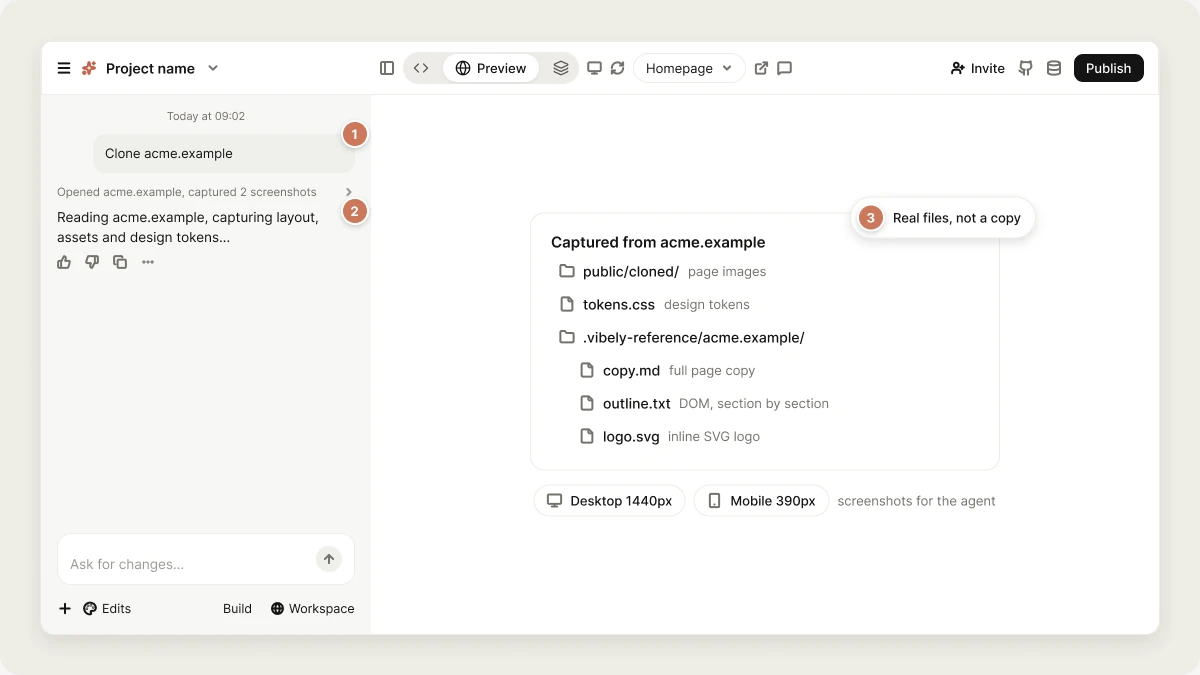 This is a **reference capture**, not a site copier. It is the difference between opening a design in front of the agent and asking the agent to remember one.
## What a capture actually pulls
| Captured | Where it lands |
| - | - |
| The page's own images — logo, hero, product shots | `public/cloned/` (web) or `assets/cloned/` (mobile), as real files |
| Design tokens read off the page's real CSS | inline in the agent's context, plus `tokens.css` |
| The full page copy | `.vibely-reference//copy.md` |
| The DOM structure, section by section | `.vibely-reference//outline.txt` |
| The inline SVG logo, if the page has one | `.vibely-reference//logo.svg` |
| Full-page desktop (1440px) and mobile (390px) screenshots | the agent's context for that turn |
The tokens come from the page's stylesheets, not from squinting at a screenshot — so the colours, fonts and spacing in your build are the real values, not approximations of them.
The `.vibely-reference/` directory is infrastructure. It never reaches your Git sync, your file tree, or an export.
## Asking for it
Just name the site in the prompt. A bare domain is fine — `https://` is added for you.
```text theme={"system"}
Build a landing page like acme.example — same section order, same palette,
but the copy is about my product, not theirs.
```
```text theme={"system"}
Clone acme.example
```
Vibely detects the reference on the first prompt of a turn and runs the capture before the build starts. You'll see `Reading acme.example — capturing layout, assets, and design tokens…` while it works.
Mid-build references work too — say it and the agent fetches it:
```text theme={"system"}
Now make the pricing page match acme.example/pricing
```
One page per capture. Sub-pages are separate fetches, so name each one you want.
If you only need what a page *says* — facts, pricing, docs — ask for that instead. Scraping a page for its text is a different, cheaper operation than capturing it as a design.
## What it does not do
* **It does not reproduce a site wholesale.** You get assets, tokens, an outline and copy. The agent then builds *your* app from them. There is no "make this site mine" button, and a capture of a complex app produces reference material, not a working clone of its backend.
* **It does not sign in.** Public URLs only. Anything behind a login, a paywall, or on a private network is out of reach — the fetcher is SSRF-guarded and refuses private addresses and `localhost`.
* **It does not take everything.** At most 24 images (8 MB each, 40 MB total) and 5 stylesheets. Largest and most identity-carrying assets come first.
* **Screenshots need a vision-capable model.** On a model without vision, the assets, tokens, outline and copy still land — only the rendered screenshots are skipped.
## Screenshots as a reference
You can also drop an image into chat instead of a URL — a mockup, a Figma export, a photo of a whiteboard. Vibely reads why the image is there before it acts on it, and it will not rebuild a failure as UI. Paste a 404 page or a stack trace and it diagnoses the problem instead of shipping an nginx error screen as your homepage.
If the intent is ambiguous, say it: "build this" or "fix this" removes all doubt.
## The legal line
Use this on **your own site, or a site you have the rights to use**. Brand assets, page copy and imagery belong to whoever made them, and a capture does not change that.
Vibely's [Acceptable Use Policy](https://vibely.sh/acceptable-use) governs the rest — in particular, content that infringes intellectual property or violates privacy law is not allowed, whichever tool produced it. Taking design *direction* from a competitor is ordinary practice. Republishing their logo, their photography and their copy under your own domain is not, and the capture will hand you all three if you point it there.
If someone has done that with your work, [report it](https://vibely.sh/dmca).
## FAQ
No. Vibely doesn't support prefilled prompt links. This page is about giving Vibely a website as a design reference inside your prompt.
Yes. A URL to build from already decides the look, so Vibely builds directly instead of showing [design directions](/features/design/design-guidance).
No. Only public pages can be captured. For a page you can't share publicly, attach screenshots of it instead.
## Related topics
Describe what to change once the reference is in.
How Vibely shapes the look of a new project.
Build from your Figma designs instead.
Take the result live.
## Related topics
- [Optimize your app for SEO and AI search](/features/grow/seo.md)
- [Publish your Vibely project](/features/deploy/publish.md)
- [Privacy & security settings](/features/workspace/privacy-security.md)
- [Build secrets](/features/build/build-secrets.md)
- [Design guidance](/features/design/design-guidance.md)
This documentation is built and hosted on [Mintlify](https://mintlify.com), a developer documentation platform.
This is a **reference capture**, not a site copier. It is the difference between opening a design in front of the agent and asking the agent to remember one.
## What a capture actually pulls
| Captured | Where it lands |
| - | - |
| The page's own images — logo, hero, product shots | `public/cloned/` (web) or `assets/cloned/` (mobile), as real files |
| Design tokens read off the page's real CSS | inline in the agent's context, plus `tokens.css` |
| The full page copy | `.vibely-reference//copy.md` |
| The DOM structure, section by section | `.vibely-reference//outline.txt` |
| The inline SVG logo, if the page has one | `.vibely-reference//logo.svg` |
| Full-page desktop (1440px) and mobile (390px) screenshots | the agent's context for that turn |
The tokens come from the page's stylesheets, not from squinting at a screenshot — so the colours, fonts and spacing in your build are the real values, not approximations of them.
The `.vibely-reference/` directory is infrastructure. It never reaches your Git sync, your file tree, or an export.
## Asking for it
Just name the site in the prompt. A bare domain is fine — `https://` is added for you.
```text theme={"system"}
Build a landing page like acme.example — same section order, same palette,
but the copy is about my product, not theirs.
```
```text theme={"system"}
Clone acme.example
```
Vibely detects the reference on the first prompt of a turn and runs the capture before the build starts. You'll see `Reading acme.example — capturing layout, assets, and design tokens…` while it works.
Mid-build references work too — say it and the agent fetches it:
```text theme={"system"}
Now make the pricing page match acme.example/pricing
```
One page per capture. Sub-pages are separate fetches, so name each one you want.
If you only need what a page *says* — facts, pricing, docs — ask for that instead. Scraping a page for its text is a different, cheaper operation than capturing it as a design.
## What it does not do
* **It does not reproduce a site wholesale.** You get assets, tokens, an outline and copy. The agent then builds *your* app from them. There is no "make this site mine" button, and a capture of a complex app produces reference material, not a working clone of its backend.
* **It does not sign in.** Public URLs only. Anything behind a login, a paywall, or on a private network is out of reach — the fetcher is SSRF-guarded and refuses private addresses and `localhost`.
* **It does not take everything.** At most 24 images (8 MB each, 40 MB total) and 5 stylesheets. Largest and most identity-carrying assets come first.
* **Screenshots need a vision-capable model.** On a model without vision, the assets, tokens, outline and copy still land — only the rendered screenshots are skipped.
## Screenshots as a reference
You can also drop an image into chat instead of a URL — a mockup, a Figma export, a photo of a whiteboard. Vibely reads why the image is there before it acts on it, and it will not rebuild a failure as UI. Paste a 404 page or a stack trace and it diagnoses the problem instead of shipping an nginx error screen as your homepage.
If the intent is ambiguous, say it: "build this" or "fix this" removes all doubt.
## The legal line
Use this on **your own site, or a site you have the rights to use**. Brand assets, page copy and imagery belong to whoever made them, and a capture does not change that.
Vibely's [Acceptable Use Policy](https://vibely.sh/acceptable-use) governs the rest — in particular, content that infringes intellectual property or violates privacy law is not allowed, whichever tool produced it. Taking design *direction* from a competitor is ordinary practice. Republishing their logo, their photography and their copy under your own domain is not, and the capture will hand you all three if you point it there.
If someone has done that with your work, [report it](https://vibely.sh/dmca).
## FAQ
No. Vibely doesn't support prefilled prompt links. This page is about giving Vibely a website as a design reference inside your prompt.
Yes. A URL to build from already decides the look, so Vibely builds directly instead of showing [design directions](/features/design/design-guidance).
No. Only public pages can be captured. For a page you can't share publicly, attach screenshots of it instead.
## Related topics
Describe what to change once the reference is in.
How Vibely shapes the look of a new project.
Build from your Figma designs instead.
Take the result live.
## Related topics
- [Optimize your app for SEO and AI search](/features/grow/seo.md)
- [Publish your Vibely project](/features/deploy/publish.md)
- [Privacy & security settings](/features/workspace/privacy-security.md)
- [Build secrets](/features/build/build-secrets.md)
- [Design guidance](/features/design/design-guidance.md)
This documentation is built and hosted on [Mintlify](https://mintlify.com), a developer documentation platform.