> ## Documentation Index
> Fetch the complete documentation index at: https://docs.vibely.sh/llms.txt
> Use this file to discover all available pages before exploring further.
# How Vibely hosts your app
> Vibely hosts your published app for you: no servers to set up, HTTPS included, and delivery from locations around the world.
Vibely hosts your app. When you [publish](/features/deploy/publish), your app goes live on its own URL, and Vibely takes care of everything behind it: there are no servers to set up, no hosting provider to choose, and nothing to configure. Hosting is part of Vibely, not a separate add-on.
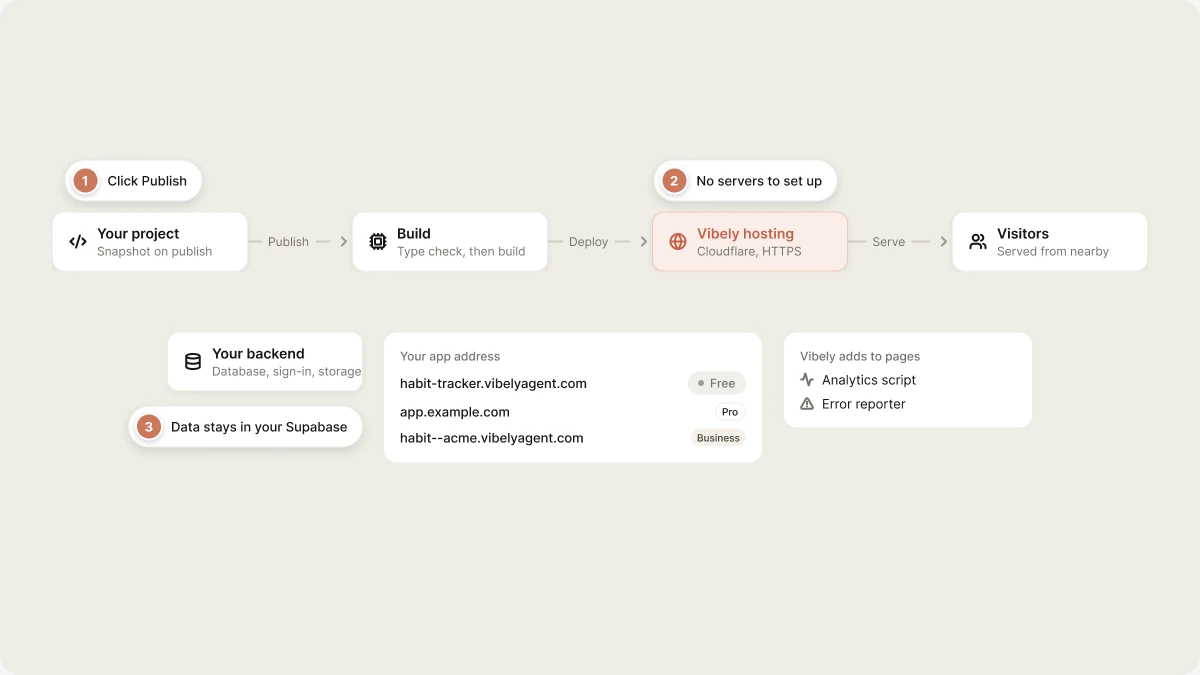 This page explains what that means in practice: what happens when you publish, how your live site reaches visitors, and how hosting relates to your app's backend.
## What happens when you publish
Publishing takes a snapshot of your project and puts it live. You publish with the **Publish** button in the top right of the editor. Then:
* Vibely checks your code for type errors and builds the app. If the build fails, nothing changes on your live site and Vibely tells you what went wrong.
* Your app gets a URL on `vibelyagent.com` with an address you choose, or your [custom domain](/features/deploy/custom-domain), or a [branded workspace URL](/features/deploy/branded-urls).
* HTTPS is included automatically. Vibely sets up the certificate for every published URL, including custom domains.
* The published site is a snapshot. Changes you make afterwards don't affect it until you click **Update** in the Publish popover.
Publishing to a `vibelyagent.com` address is free on every plan and doesn't use credits. [Custom domains](/features/deploy/custom-domain) require Pro, and [branded workspace URLs](/features/deploy/branded-urls) require Business.
## Who can visit your published app
By default, anyone with the link can visit your published app. On Business and Enterprise plans, you can instead limit it to your workspace, to specific groups, or to yourself, and visitors then have to sign in. See [Who can see your published app](/features/deploy/publish#who-can-see-your-published-app).
Who can *visit the live site* is separate from who can *open the project in the editor*: publishing never exposes your source code, chat history or unpublished work.
## Your site is delivered globally
Published apps run on Cloudflare's global network, so pages are served from locations close to your visitors wherever they are. You don't set any of this up.
Your app runs as a small server at the edge, not just as static files, so it can render pages on the server and run server-side code your app defines.
## How search engines and AI see your site
Crawlers only index what they can read. Because published apps can render on the server, search engines, social platforms and AI crawlers can receive readable pages. How well those pages rank depends on their content and metadata. See [SEO and AI search](/features/grow/seo).
## Traffic and scale
Your plan doesn't cap visitors, requests or bandwidth. Published apps scale with traffic automatically.
Each request your app's server code handles gets a time budget that grows with your plan. Ordinary pages stay well inside it. If your app does heavy work on every request, move that work to your backend.
Vibely also adds baseline security headers to every response where your app hasn't set its own.
## What Vibely adds to your pages
As your published pages are served, Vibely adds a few things to them. Your code isn't changed.
* **Website info.** The title and description from the Publish dialog fill in any page title, description or link-preview tag your app left as a placeholder or didn't set. Titles your code sets always win. See [Website info and your app's own tags](/features/grow/seo#website-info-and-your-apps-own-tags).
* **Analytics.** A small cookie-free script that counts visits for [Analytics](/features/grow/analytics). Turn on **Disable analytics** in Project settings to leave it out.
* **Error reporting.** A script that reports errors visitors hit to [Monitoring](/features/grow/monitoring).
* **The Edit with Vibely badge**, on Free workspaces' `vibelyagent.com` addresses only.
## Take your site offline
Open **Publish** and click **Unpublish**. The URL stops serving right away, custom domains are disconnected, and your project stays in the editor so you can publish again. See [Take your site offline](/features/deploy/publish#take-your-site-offline).
Expecting a big launch? Test your app with realistic data first, and check that your [Supabase](/integrations/supabase) plan fits the load. That is usually the first limit you hit.
## Hosting and your backend
Hosting serves your app's pages. Your backend is what those pages talk to: the database, sign-in, storage and functions. In Vibely, the backend is your own [Supabase](/integrations/supabase) project, connected with **Connect to Supabase**. The two work together, but they are separate:
* Every published app is hosted, whether or not it uses a backend.
* Your data lives in your Supabase project, in the region you chose there, and is billed by Supabase.
* When you publish, Vibely updates your Supabase project's sign-in settings so login and confirmation emails point at your live URL.
Running out of Vibely credits doesn't take your site down. Build credits are spent on building, not on serving visitors. If your app uses [Vibely AI](/features/backend/ai), its AI calls draw on a separate AI balance, and only those calls stop when that balance is empty.
## Preview vs published
The [preview](/features/projects/preview) is your live working view inside the editor. It updates instantly as you build and can differ from what visitors see. A [preview link](/features/collaboration/sharing#share-a-preview-link) shows that work in progress to someone without publishing, but it's view-only and expires after 7 days. Neither is hosting: only publishing puts your app on a permanent URL.
## Hosting somewhere else
You own your code and your data, and you can host part or all of your app outside Vibely. See [Ownership and portability](/features/deploy/ownership) for the trade-offs and [Deploy outside Vibely](/features/deploy/external-hosting) for the steps.
## FAQ
No. Publishing is all it takes: Vibely builds your app, puts it on a URL with HTTPS, and serves it to visitors.
No. Your published app runs on Vibely's hosting, not in your browser or your project's sandbox. You can close the editor and your site keeps serving visitors.
Open the **Publish** popover and check the project is still published (someone may have clicked **Unpublish**). If you use a custom domain, open **Manage → Settings → Domains** and check its status is **Live**; any other status comes with instructions. Check [Monitoring](/features/grow/monitoring) for errors your app is throwing. If everything looks right, contact support with your project URL.
Your site is served from Cloudflare's global network, close to each visitor. Your data lives in your Supabase project, in the region you picked in Supabase.
Publish again: open **Publish** and click **Update**.
Your plan doesn't limit visitors or bandwidth. Published apps scale with traffic automatically.
Yes. Every published URL is served over HTTPS, including custom domains. Vibely issues and renews the certificates for you.
## Related
Put your app live and push updates.
Serve your app on your own domain.
Your code and data are yours.
Host on Vercel, Netlify or your own servers.
## Related topics
- [Publish your Vibely project](/features/deploy/publish.md)
- [Deployment, hosting and ownership options](/features/deploy/ownership.md)
- [Connect a custom domain](/features/deploy/custom-domain.md)
- [Security best practices for Vibely apps](/features/security/best-practices.md)
- [Welcome to Vibely](/introduction/welcome.md)
This documentation is built and hosted on [Mintlify](https://mintlify.com), a developer documentation platform.
This page explains what that means in practice: what happens when you publish, how your live site reaches visitors, and how hosting relates to your app's backend.
## What happens when you publish
Publishing takes a snapshot of your project and puts it live. You publish with the **Publish** button in the top right of the editor. Then:
* Vibely checks your code for type errors and builds the app. If the build fails, nothing changes on your live site and Vibely tells you what went wrong.
* Your app gets a URL on `vibelyagent.com` with an address you choose, or your [custom domain](/features/deploy/custom-domain), or a [branded workspace URL](/features/deploy/branded-urls).
* HTTPS is included automatically. Vibely sets up the certificate for every published URL, including custom domains.
* The published site is a snapshot. Changes you make afterwards don't affect it until you click **Update** in the Publish popover.
Publishing to a `vibelyagent.com` address is free on every plan and doesn't use credits. [Custom domains](/features/deploy/custom-domain) require Pro, and [branded workspace URLs](/features/deploy/branded-urls) require Business.
## Who can visit your published app
By default, anyone with the link can visit your published app. On Business and Enterprise plans, you can instead limit it to your workspace, to specific groups, or to yourself, and visitors then have to sign in. See [Who can see your published app](/features/deploy/publish#who-can-see-your-published-app).
Who can *visit the live site* is separate from who can *open the project in the editor*: publishing never exposes your source code, chat history or unpublished work.
## Your site is delivered globally
Published apps run on Cloudflare's global network, so pages are served from locations close to your visitors wherever they are. You don't set any of this up.
Your app runs as a small server at the edge, not just as static files, so it can render pages on the server and run server-side code your app defines.
## How search engines and AI see your site
Crawlers only index what they can read. Because published apps can render on the server, search engines, social platforms and AI crawlers can receive readable pages. How well those pages rank depends on their content and metadata. See [SEO and AI search](/features/grow/seo).
## Traffic and scale
Your plan doesn't cap visitors, requests or bandwidth. Published apps scale with traffic automatically.
Each request your app's server code handles gets a time budget that grows with your plan. Ordinary pages stay well inside it. If your app does heavy work on every request, move that work to your backend.
Vibely also adds baseline security headers to every response where your app hasn't set its own.
## What Vibely adds to your pages
As your published pages are served, Vibely adds a few things to them. Your code isn't changed.
* **Website info.** The title and description from the Publish dialog fill in any page title, description or link-preview tag your app left as a placeholder or didn't set. Titles your code sets always win. See [Website info and your app's own tags](/features/grow/seo#website-info-and-your-apps-own-tags).
* **Analytics.** A small cookie-free script that counts visits for [Analytics](/features/grow/analytics). Turn on **Disable analytics** in Project settings to leave it out.
* **Error reporting.** A script that reports errors visitors hit to [Monitoring](/features/grow/monitoring).
* **The Edit with Vibely badge**, on Free workspaces' `vibelyagent.com` addresses only.
## Take your site offline
Open **Publish** and click **Unpublish**. The URL stops serving right away, custom domains are disconnected, and your project stays in the editor so you can publish again. See [Take your site offline](/features/deploy/publish#take-your-site-offline).
Expecting a big launch? Test your app with realistic data first, and check that your [Supabase](/integrations/supabase) plan fits the load. That is usually the first limit you hit.
## Hosting and your backend
Hosting serves your app's pages. Your backend is what those pages talk to: the database, sign-in, storage and functions. In Vibely, the backend is your own [Supabase](/integrations/supabase) project, connected with **Connect to Supabase**. The two work together, but they are separate:
* Every published app is hosted, whether or not it uses a backend.
* Your data lives in your Supabase project, in the region you chose there, and is billed by Supabase.
* When you publish, Vibely updates your Supabase project's sign-in settings so login and confirmation emails point at your live URL.
Running out of Vibely credits doesn't take your site down. Build credits are spent on building, not on serving visitors. If your app uses [Vibely AI](/features/backend/ai), its AI calls draw on a separate AI balance, and only those calls stop when that balance is empty.
## Preview vs published
The [preview](/features/projects/preview) is your live working view inside the editor. It updates instantly as you build and can differ from what visitors see. A [preview link](/features/collaboration/sharing#share-a-preview-link) shows that work in progress to someone without publishing, but it's view-only and expires after 7 days. Neither is hosting: only publishing puts your app on a permanent URL.
## Hosting somewhere else
You own your code and your data, and you can host part or all of your app outside Vibely. See [Ownership and portability](/features/deploy/ownership) for the trade-offs and [Deploy outside Vibely](/features/deploy/external-hosting) for the steps.
## FAQ
No. Publishing is all it takes: Vibely builds your app, puts it on a URL with HTTPS, and serves it to visitors.
No. Your published app runs on Vibely's hosting, not in your browser or your project's sandbox. You can close the editor and your site keeps serving visitors.
Open the **Publish** popover and check the project is still published (someone may have clicked **Unpublish**). If you use a custom domain, open **Manage → Settings → Domains** and check its status is **Live**; any other status comes with instructions. Check [Monitoring](/features/grow/monitoring) for errors your app is throwing. If everything looks right, contact support with your project URL.
Your site is served from Cloudflare's global network, close to each visitor. Your data lives in your Supabase project, in the region you picked in Supabase.
Publish again: open **Publish** and click **Update**.
Your plan doesn't limit visitors or bandwidth. Published apps scale with traffic automatically.
Yes. Every published URL is served over HTTPS, including custom domains. Vibely issues and renews the certificates for you.
## Related
Put your app live and push updates.
Serve your app on your own domain.
Your code and data are yours.
Host on Vercel, Netlify or your own servers.
## Related topics
- [Publish your Vibely project](/features/deploy/publish.md)
- [Deployment, hosting and ownership options](/features/deploy/ownership.md)
- [Connect a custom domain](/features/deploy/custom-domain.md)
- [Security best practices for Vibely apps](/features/security/best-practices.md)
- [Welcome to Vibely](/introduction/welcome.md)
This documentation is built and hosted on [Mintlify](https://mintlify.com), a developer documentation platform.