> ## Documentation Index
> Fetch the complete documentation index at: https://docs.vibely.sh/llms.txt
> Use this file to discover all available pages before exploring further.
# Reference other projects in your workspace
> Reuse code, components, and patterns from other projects in your workspace instead of rebuilding them.
Cross-project referencing lets Vibely read other projects in your workspace and reuse what's already been built there.
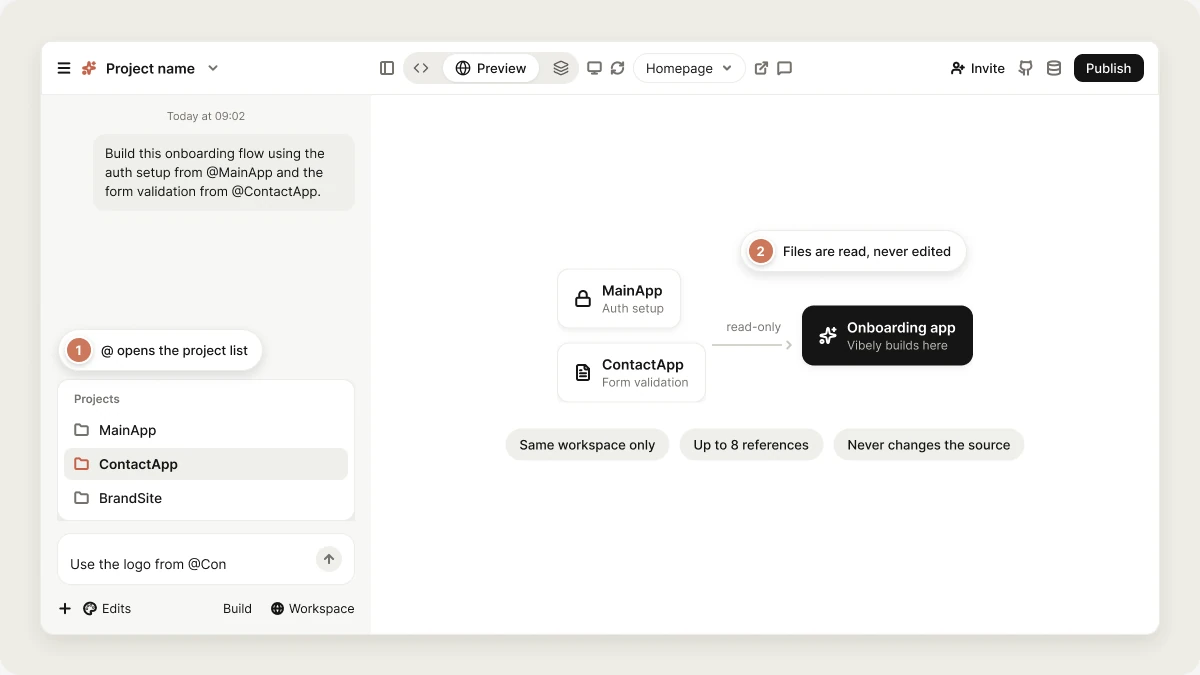 When you reference another project, Vibely can list its files, read its source code, and adapt what it finds, such as components, styling, authentication setup, or a data model, into the project you're working on. **The referenced project is never changed.**
You can reference a project explicitly with an `@` mention, or ask Vibely to use an existing project by name.
## How to reference other projects
Type `@` in the prompt box, start typing the project's name, and pick it from the list. The project is added to your message as a reference:
```text wrap theme={"system"}
Use the logo and color palette from @BrandSite.
```
Or ask Vibely to use an existing project, and it finds it in your workspace:
```text wrap theme={"system"}
Build this using the same authentication setup as our main customer app.
```
You can reference several projects in the same message:
```text wrap theme={"system"}
Build this onboarding flow using the auth setup from @MainApp and the form validation from @ContactApp.
```
You can attach up to eight project references to one message.
In web projects, the same `@` list also shows files from your current project, listed first. Pick a file to point Vibely at it, or keep typing to find the project you want.
## What you can reference
Vibely reads the referenced project's files, so you can reuse anything that lives in code:
* Components and layouts
* Styling, design tokens, and animations
* Authentication flows and API integrations
* Database schemas and data models
* Whole feature implementations
Each file Vibely reads from another project is read up to 20,000 characters. Very large files may be cut off.
### Reference across web and mobile
You can reference a web project from a mobile project, and the other way around. Vibely carries over what transfers directly, such as colors, typography, spacing, copy, the list of screens, navigation, and the data model, and rewrites platform code for the project you're building: web elements and CSS become React Native components, hover becomes press, and so on. It doesn't copy web code into a mobile app as is.
## When referencing works
Cross-project referencing works in [Build mode](/features/agent/build-mode). Vibely reads the referenced project while it builds.
[Subagents](/features/agent/subagents) can also read referenced projects when Vibely sends them to investigate part of a task.
## Permissions and access
Cross-project referencing follows your workspace and project access:
* Only projects in the **same workspace** can be referenced. Cross-workspace referencing isn't supported.
* You can reference only projects **you have access to**. A project set to **Restricted** can be referenced only by people who can open it.
* Access is **read-only**. Vibely never changes a referenced project.
## Turn off cross-project sharing
Workspace owners and admins can turn off cross-project referencing for the whole workspace in **Settings → Privacy & security → Cross-project sharing**. When it's off, no project in the workspace can read files from another project. It's on by default.
## FAQ
No. Cross-project referencing only works within the same workspace. To bring code from another workspace, [remix](/features/projects/remix) the project into your workspace first, or connect it through [GitHub](/integrations/github).
No. All cross-project access is read-only.
Only people who have access to the project can reference it. Other workspace members can't, even in the same workspace.
Check that:
* **Cross-project sharing** is on in **Settings → Privacy & security**.
* Both projects are in the same workspace.
* You have access to the project you're referencing.
If any of these block access, Vibely tells you in the chat and doesn't read the project.
## Related topics
Implement changes in your project.
Workspace-wide controls, including cross-project sharing.
Browse the projects in your workspace.
Ready-made prompts to adapt.
## Related topics
- [View and edit your project's code](/features/projects/code-editor.md)
- [FAQ](/faq.md)
- [Design guidance](/features/design/design-guidance.md)
- [Define workspace and project knowledge](/features/context/knowledge.md)
- [Workspace templates](/features/design/workspace-templates.md)
This documentation is built and hosted on [Mintlify](https://mintlify.com), a developer documentation platform.
When you reference another project, Vibely can list its files, read its source code, and adapt what it finds, such as components, styling, authentication setup, or a data model, into the project you're working on. **The referenced project is never changed.**
You can reference a project explicitly with an `@` mention, or ask Vibely to use an existing project by name.
## How to reference other projects
Type `@` in the prompt box, start typing the project's name, and pick it from the list. The project is added to your message as a reference:
```text wrap theme={"system"}
Use the logo and color palette from @BrandSite.
```
Or ask Vibely to use an existing project, and it finds it in your workspace:
```text wrap theme={"system"}
Build this using the same authentication setup as our main customer app.
```
You can reference several projects in the same message:
```text wrap theme={"system"}
Build this onboarding flow using the auth setup from @MainApp and the form validation from @ContactApp.
```
You can attach up to eight project references to one message.
In web projects, the same `@` list also shows files from your current project, listed first. Pick a file to point Vibely at it, or keep typing to find the project you want.
## What you can reference
Vibely reads the referenced project's files, so you can reuse anything that lives in code:
* Components and layouts
* Styling, design tokens, and animations
* Authentication flows and API integrations
* Database schemas and data models
* Whole feature implementations
Each file Vibely reads from another project is read up to 20,000 characters. Very large files may be cut off.
### Reference across web and mobile
You can reference a web project from a mobile project, and the other way around. Vibely carries over what transfers directly, such as colors, typography, spacing, copy, the list of screens, navigation, and the data model, and rewrites platform code for the project you're building: web elements and CSS become React Native components, hover becomes press, and so on. It doesn't copy web code into a mobile app as is.
## When referencing works
Cross-project referencing works in [Build mode](/features/agent/build-mode). Vibely reads the referenced project while it builds.
[Subagents](/features/agent/subagents) can also read referenced projects when Vibely sends them to investigate part of a task.
## Permissions and access
Cross-project referencing follows your workspace and project access:
* Only projects in the **same workspace** can be referenced. Cross-workspace referencing isn't supported.
* You can reference only projects **you have access to**. A project set to **Restricted** can be referenced only by people who can open it.
* Access is **read-only**. Vibely never changes a referenced project.
## Turn off cross-project sharing
Workspace owners and admins can turn off cross-project referencing for the whole workspace in **Settings → Privacy & security → Cross-project sharing**. When it's off, no project in the workspace can read files from another project. It's on by default.
## FAQ
No. Cross-project referencing only works within the same workspace. To bring code from another workspace, [remix](/features/projects/remix) the project into your workspace first, or connect it through [GitHub](/integrations/github).
No. All cross-project access is read-only.
Only people who have access to the project can reference it. Other workspace members can't, even in the same workspace.
Check that:
* **Cross-project sharing** is on in **Settings → Privacy & security**.
* Both projects are in the same workspace.
* You have access to the project you're referencing.
If any of these block access, Vibely tells you in the chat and doesn't read the project.
## Related topics
Implement changes in your project.
Workspace-wide controls, including cross-project sharing.
Browse the projects in your workspace.
Ready-made prompts to adapt.
## Related topics
- [View and edit your project's code](/features/projects/code-editor.md)
- [FAQ](/faq.md)
- [Design guidance](/features/design/design-guidance.md)
- [Define workspace and project knowledge](/features/context/knowledge.md)
- [Workspace templates](/features/design/workspace-templates.md)
This documentation is built and hosted on [Mintlify](https://mintlify.com), a developer documentation platform.